TL;DR:
- Migration to AWS yields significant performance improvements and cost reductions for mid-sized eCommerce and fintech companies.
- Phased, well-planned migration strategies drastically increase success rates, especially in regulated industries.
- Proper planning, discovery, and validation are critical to a successful legacy system migration, not just technology selection.
Most CIOs assume their legacy systems are too risky, too complex, or too deeply embedded to move anywhere without chaos. That assumption is costing them real money. Empirical benchmarks show mid-sized eCommerce companies achieving a 340% performance boost and a 58% cost reduction after migrating to AWS, while fintech firms report 30 to 45% lower infrastructure spend and 40 to 60% better system performance. Those are not marketing projections. They are measured outcomes. This guide breaks down why legacy systems stall modern businesses, what AWS cloud actually delivers, and how to choose a migration approach that works without gambling your operations.
Table of Contents
- Why legacy systems become bottlenecks for modern business
- How AWS cloud solves legacy limitations: Key benefits explained
- Migration strategies: AWS 7 Rs and choosing the right approach
- Managing risks: Edge cases and phased migration for fintech and eCommerce
- The overlooked truth: Planning trumps technology in legacy-to-cloud migration
- Next steps: Accelerate your legacy migration with AWS specialists
- Frequently asked questions
Key Takeaways
| Point | Details |
|---|---|
| Cost savings | Moving legacy systems to AWS can cut operational costs by 25–66% depending on strategy and sector. |
| Performance boost | ECommerce and fintech migrations typically deliver up to 340% improvements in speed and reliability. |
| Migration strategies | AWS 7 Rs methodology lets CIOs choose tailored migration paths like rehost, replatform, or refactor. |
| Phased migration wins | Incremental migration plans consistently outperform big-bang approaches for regulated workloads. |
| Security and compliance | AWS supports rigorous security and compliance demands, especially for fintech companies. |
Why legacy systems become bottlenecks for modern business
Having seen the real impact of cloud migration, let’s unpack why legacy systems often fail to meet modern demands.
Most legacy environments were built to handle the transaction volumes and user loads of a decade ago. Scaling them up means buying more physical hardware, which takes time, costs capital, and still hits a ceiling. When Black Friday traffic spikes 10x or a fintech product suddenly goes viral, a legacy system does not gracefully stretch. It buckles.
Here is what that actually looks like in practice across eCommerce and fintech environments:
- Vertical scaling limits: Legacy servers scale up, not out. You buy a bigger box, not more boxes. That hits a physical ceiling fast.
- Rigid software stacks: Older monolithic applications are often tightly coupled, meaning one component change can break five others. Deploying updates is slow and dangerous.
- Regulatory drift: Financial regulations like PCI DSS and SOC 2 evolve constantly. Legacy systems struggle to adapt without expensive custom engineering.
- Security exposure: Unpatched operating systems, end-of-life databases, and outdated encryption libraries create attack surfaces that modern compliance frameworks will not tolerate.
- Competitive lag: When your competitors deploy features in days using cloud-native pipelines and you need weeks for a legacy release cycle, you lose customers.
“Legacy infrastructure is not just a technical problem. It is a business velocity problem. Every week a bottleneck persists is a week your competitors gain ground.”
Understanding cloud in business strategies helps frame why this is not optional for growth-oriented companies. The urgency is especially sharp in fintech, where fintech migration case studies consistently show that companies delaying cloud adoption underperform peers on both speed-to-market and customer retention.
The cost of inaction is not zero. Maintaining legacy systems requires specialized engineers who understand outdated languages and architectures, often at a premium. Licensing for aging software grows more expensive over time. And the opportunity cost of building on a constrained foundation compounds every quarter.
How AWS cloud solves legacy limitations: Key benefits explained
Now that the legacy bottlenecks are clear, let’s break down AWS’s specific advantages with real-world numbers.
AWS is not a single product. It is an ecosystem of over 200 services designed to replace exactly the capabilities where legacy systems fall short. For CIOs evaluating migration, the gains fall into four clear categories.
Scalability on demand
AWS Auto Scaling and managed services like Amazon ECS and EKS (Elastic Kubernetes Service) let workloads expand and contract with real traffic, not projected worst-case estimates. A mid-sized eCommerce platform can configure Auto Scaling groups to handle a 10x load spike during a sale, then scale back to baseline within minutes. You pay for what you use, not what you feared you might need.

Cost efficiency with measurable benchmarks
| Cost lever | Legacy approach | AWS approach | Typical savings |
|---|---|---|---|
| Infrastructure spend | Fixed hardware capex | Pay-as-you-go | 25 to 66% |
| Compute optimization | Manual provisioning | Rightsizing and Savings Plans | 20 to 40% |
| Licensing | Perpetual per-server | Bring-your-own or SaaS | 15 to 30% |
| Operations overhead | In-house data center | Managed services | 30 to 50% |
Cost efficiency benchmarks consistently show 25 to 66% reductions when companies combine rightsizing, AWS Savings Plans, Reserved Instances, and retirement of redundant legacy systems. The biggest savings typically come not from compute discounts alone, but from eliminating entire layers of infrastructure that AWS managed services replace outright.
Performance gains backed by data
The 340% performance improvement reported by mid-sized eCommerce companies post-migration is not a fluke. It reflects what happens when slow on-premises storage gets replaced by Amazon Aurora or DynamoDB, when load balancers replace legacy reverse proxies, and when content delivery moves to CloudFront. For fintech, the gains are in transaction throughput, API response latency, and system uptime during peak trading windows.
Statistic: Fintech and banking companies report 40 to 60% better system performance after migrating core workloads to AWS, with concurrent 30 to 45% cost reductions.
Pro Tip: Before migration, benchmark your current system’s p95 response times and monthly infrastructure spend in detail. These baseline numbers become your proof of ROI post-migration. Without them, the performance gains are real but hard to quantify for your board.
Security and compliance built in
AWS provides services like AWS Shield, AWS WAF (Web Application Firewall), AWS Security Hub, and AWS Config to manage security posture continuously. For fintech companies operating under PCI DSS, SOX, or GDPR, AWS offers pre-built compliance frameworks and audit-ready logging that legacy systems cannot match without enormous custom engineering.
Unlocking cloud scalability on AWS also means you can scale security controls alongside your workloads automatically. And managing how you optimize AWS costs post-migration ensures you do not trade a legacy bill for a runaway cloud bill.
Migration strategies: AWS 7 Rs and choosing the right approach
After learning what you gain by moving to AWS, let’s examine the practical strategies for getting legacy workloads there efficiently and securely.
AWS formalizes the migration decision into seven options, commonly called the 7 Rs framework. Not every workload gets the same treatment. Matching the right strategy to each application is where migration planning earns its value.
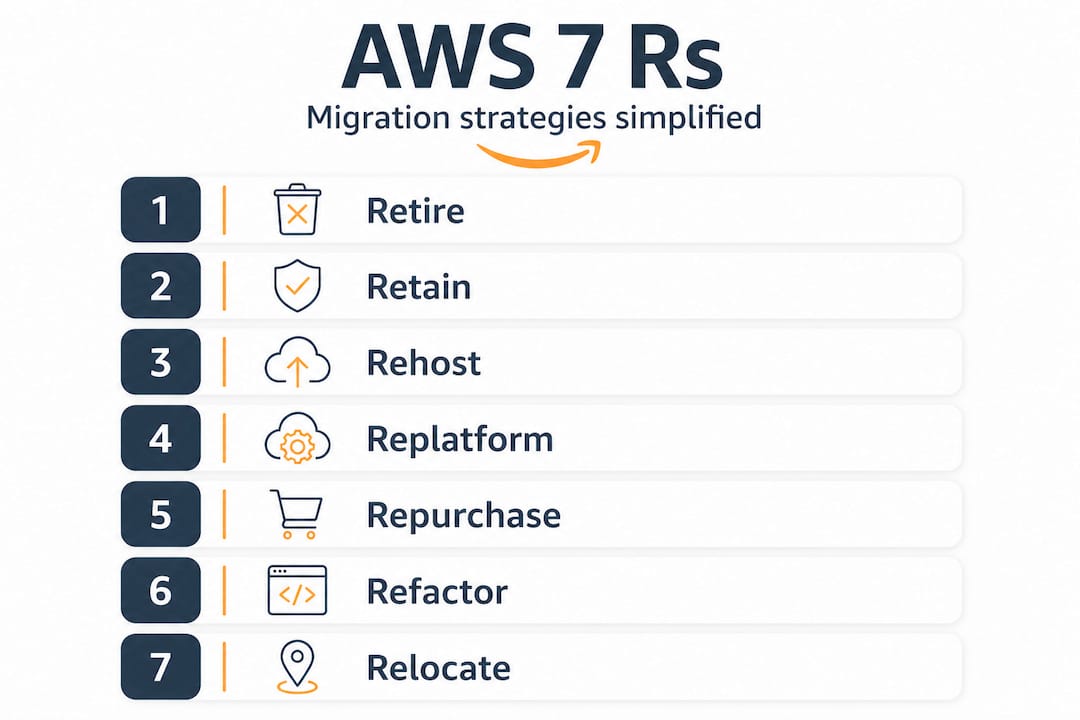
The AWS 7 Rs at a glance
| Strategy | What it means | Best for |
|---|---|---|
| Rehost (lift-and-shift) | Move as-is to AWS EC2 | Simple apps, speed priority |
| Replatform | Migrate with minor optimizations (e.g., move to RDS) | EOS databases, aging middleware |
| Refactor | Redesign for cloud-native architecture | Core revenue systems, microservices |
| Repurchase | Replace with SaaS equivalent | CRM, HR, non-core systems |
| Retire | Decommission unused applications | Redundant or obsolete apps |
| Retain | Keep on-premises for now | Highly specialized or compliant apps |
| Relocate | Move VMware workloads to AWS | VMware-heavy environments |
Here is how these strategies typically map to real scenarios:
- A retail eCommerce platform running on aging physical servers uses rehosting to reach AWS quickly. Once stable, teams replatform the database from MySQL on EC2 to Amazon Aurora for better performance and managed backups.
- A fintech company with a monolithic payment processing application takes a phased refactor approach, containerizing modules incrementally using Amazon ECS while keeping the core engine live until replacement modules are validated.
- An eCommerce business running an on-premises CRM repurchases, moving to a SaaS CRM and retiring the legacy application entirely.
Pro Tip: Do not commit every workload to refactoring. Refactoring is expensive and time-consuming. Reserve it for systems that directly drive revenue or competitive advantage. Rehosting is genuinely good enough for plenty of internal tools.
Migration best practices emphasize matching the strategy to the application’s business value and technical complexity, not defaulting to a single approach for the entire portfolio. Companies that treat digital transformation with AWS as a portfolio exercise rather than a single big-bang project consistently report smoother outcomes and lower risk.
The replatforming approach is particularly powerful for end-of-support components because it delivers immediate risk reduction without requiring a full application redesign. Move the database to RDS, swap the message queue to Amazon SQS, and you have eliminated two major end-of-life risks in days, not months.
Managing risks: Edge cases and phased migration for fintech and eCommerce
With strategic options clarified, let’s focus on how to mitigate risks and tackle specialized legacy cases for maximum migration success.
Legacy environments in fintech and eCommerce rarely consist of one clean system. They accumulate over years, with custom integrations, vendor dependencies, and pockets of business logic that nobody fully documents anymore. These edge cases are where migrations get into trouble.
The most common risk categories look like this:
- End-of-support (EOS) components: Databases or middleware that vendors no longer patch are security liabilities and compliance red flags. These need replatforming to managed services as a priority, before migration of the larger application.
- Tightly coupled monoliths: Large, interconnected applications where every change carries cascading risk. These require phased containerization, breaking off services one at a time rather than attempting a full redesign.
- Regulated data stores: Customer financial data, payment card data, and personal health information carry specific residency, encryption, and access control requirements that must be mapped and verified before, during, and after migration.
- Undocumented integrations: Legacy systems often connect to third-party APIs, internal tools, and batch jobs through connections that only one or two senior engineers know about. Discovery sprints before migration prevent nasty surprises mid-cutover.
Statistic: Phased migration in regulated sectors achieves a 92% success rate compared to 58% for big-bang migrations. That 34-point gap is the cost of skipping incremental planning.
The phased approach works because it limits the blast radius of any single change. You migrate one service or one data tier at a time. Each phase gets validated in production before the next phase begins. Rollback plans are simpler because less has changed. And your team builds confidence and operational knowledge with each completed phase.
Cloud scalability for legacy migration also means you can run legacy and cloud environments in parallel during transition, routing traffic gradually using weighted DNS or AWS Global Accelerator. This eliminates the all-or-nothing cutover risk that makes CIOs nervous about migration in the first place.
Pro Tip: Treat your first migration phase as a learning exercise, not just a technical task. Pick a workload that is important enough to generate real feedback but not so critical that a problem becomes a business incident. That first phase is where your team calibrates speed, discovers blind spots, and refines the playbook for everything that follows.
The overlooked truth: Planning trumps technology in legacy-to-cloud migration
Understanding edge cases leads us to the real secret behind high-success migrations.
After working through hundreds of migrations in eCommerce and fintech environments, the pattern is consistent. The migrations that fail rarely fail because AWS could not handle the workload. They fail because the planning was inadequate. The team rushed past discovery, underestimated integrations, or attempted to migrate everything at once under pressure from leadership.
Technology does not rescue poor planning. A well-architected cloud environment still produces chaos if the migration sequence is wrong, if rollback procedures were not tested, or if compliance requirements were treated as an afterthought.
The 92% success rate for phased migrations versus 58% for big-bang approaches tells you something important. The difference is not which cloud provider you chose or which instance type you provisioned. It is how methodically the team mapped dependencies, planned cutover windows, and validated each step before committing to the next.
In regulated industries like fintech, this is not optional discipline. It is the difference between a smooth migration and a compliance incident that generates regulatory scrutiny or customer notification requirements. Big-bang migrations in these environments carry risks that no technology can insulate against.
Our recommendation is always to start smaller than feels necessary. Move one application, learn from it, and apply those lessons to the next. The migration planning best practices that separate high-success teams from struggling ones are not exotic. They are disciplined discovery, realistic timelines, tested rollback procedures, and a willingness to iterate rather than sprint to a finish line.
The technology is genuinely good. AWS provides the tools, the managed services, and the security frameworks that legacy systems cannot match. But the business outcome depends on how you use those tools, and that is entirely a planning and execution problem.
Next steps: Accelerate your legacy migration with AWS specialists
Having explored why and how to move legacy systems, here is how to get expert help for your next migration.
Moving a legacy environment to AWS is one of the highest-leverage decisions a CIO makes. The performance gains are real, the cost reductions are documented, and the security posture improvements are measurable. But the execution complexity is also real, and getting it wrong is expensive.
At awsmigrationservices.com, we work with mid-sized eCommerce and fintech companies to plan and execute AWS migrations that do not create new problems while solving old ones. As an AWS Advanced Tier Partner with over 700 completed projects, we take full ownership of outcomes, not just deliverables. From infrastructure audit through post-migration optimization, we apply the right strategy for each workload, whether that is rehosting, replatforming, or refactoring. Explore our seamless migration best practices and our thinking on cloud strategies for business to see how we approach migrations that need to work the first time.
Frequently asked questions
How much can mid-sized companies save by moving legacy systems to AWS?
Mid-sized eCommerce firms have seen up to 58% cost reductions while fintech companies achieve 30 to 45% cost savings after migration, depending on workload type and optimization strategy applied.
Which AWS migration strategy should I use for end-of-support legacy components?
End-of-support components generally require a replatforming strategy, moving them to AWS managed services like RDS or SQS to eliminate security exposure without requiring a full application redesign.
Is phased migration safer than a “big bang” approach for regulated workloads?
Yes. Phased migration achieves a 92% success rate in regulated industries compared to 58% for big-bang methods, because each step is validated and reversible before the next phase begins.
How does AWS help with security and compliance for fintech migrations?
AWS provides customizable compliance frameworks including AWS Security Hub, AWS Config, and pre-built audit controls that meet strict regulatory requirements for PCI DSS, SOX, and GDPR-regulated fintech environments.