TL;DR:
- Cloud migration expenses often surpass expectations due to over-provisioned resources and overlooked fees. Implementing strategies like right-sizing, choosing appropriate instance types, and designing auto-scaling can significantly reduce costs without sacrificing performance or security. Successful cost management requires early planning, continuous optimization, and informed decision-making throughout the migration process.
Most CIOs and IT managers expect cloud migration to save money, but the gap between expectation and reality is often painful. Bills spike. Resources are over-provisioned. Egress fees appear out of nowhere. Yet 20-40% savings on compute are entirely achievable through right-sizing and processor selection alone, without compromising performance or security. The real challenge is not migrating to AWS. It is migrating smartly, with a clear cost strategy baked in from day one. This article lays out the evidence-backed methods that consistently deliver real savings.
Table of Contents
- Understanding true cost drivers in AWS migration
- Evidence-backed methods for cutting migration costs
- Comparing optimization vs repatriation and mitigations for high-utilization workloads
- Putting it all together: Practical workflow for cost-efficient AWS migration
- Our view: Why the ‘cost savings’ narrative needs nuance
- Ready for real AWS savings? Expert help for your migration
- Frequently asked questions
Key Takeaways
| Point | Details |
|---|---|
| Right-sizing matters | Properly adjusting resources is the biggest driver of savings and efficiency in cloud migration. |
| Graviton processor advantage | Migrating compatible workloads to Graviton chips delivers 20-40% lower compute costs. |
| Optimization beats repatriation | For most AWS users, optimizing your cloud setup is more cost-effective than returning to on-premise. |
| Assess high-utilization workloads | Only repatriate if egress fees make cloud hosting cost-prohibitive for steady, intensive operations. |
| Evidence-driven migration | Use proven strategies and real data to guide your AWS migration decisions for maximum ROI. |
Understanding true cost drivers in AWS migration
With a clearer understanding of the challenge, let’s break down what drives cloud migration expenses.
Most teams walk into an AWS migration focused on the technical lift: moving servers, reconfiguring networks, validating data. That is necessary work. But the financial surprises come from a different direction entirely.
EC2 instance sizing is the single largest lever. Most migrations start by mirroring existing on-premises hardware in the cloud, which is a costly habit. A physical server running at 15% average CPU utilization gets translated into an EC2 instance of the same nominal size. You end up paying for capacity you never use, month after month.
Beyond sizing, your migration pattern choice carries major cost implications. A simple rehost (lift-and-shift) is fast and predictable, but it locks in those over-provisioned sizes. Replatforming to managed services like RDS or ECS often reduces operating overhead and cost simultaneously. Refactoring to cloud-native architectures takes longer but delivers the deepest long-term savings.
Then there are the fees most teams underestimate: data egress charges. AWS charges for data leaving its network, and in high-throughput environments like eCommerce or financial services, these fees can represent a significant portion of your monthly bill. This is why cloud repatriation for high-utilization workloads enters the conversation, though AWS optimization tools often address these concerns before a full return to on-premises becomes necessary.
“Understanding your actual workload behavior, not just your hardware spec, is the foundation of every cost decision in AWS.”
Here is a quick breakdown of cost driver categories:
| Cost driver | Typical impact | Mitigation approach |
|---|---|---|
| Over-provisioned EC2 instances | 25-40% of wasted compute spend | Right-sizing before and after migration |
| Lift-and-shift migration pattern | Preserves on-premises inefficiencies | Evaluate replatform or refactor options |
| Data egress fees | Variable, high for data-heavy workloads | Use VPC endpoints, reduce cross-region transfers |
| Unused reserved capacity | 10-20% waste on underused commitments | Match Savings Plans to actual usage patterns |
| Storage misconfiguration | Often overlooked but cumulative | Lifecycle policies for S3, EBS volume audits |
Understanding cloud role strategies before you migrate helps you match the right pattern to each workload type, preventing the most common and expensive mistakes.
The key takeaway here: costs do not just happen. They result from specific decisions made early in the migration process. The sooner you identify your actual usage patterns, the more accurate your financial model will be.
Evidence-backed methods for cutting migration costs
Once you’ve pinpointed where costs originate, here’s how to decisively cut them.
There is no shortage of generic advice about cloud cost optimization. What separates effective teams from frustrated ones is applying specific techniques in the right sequence. Here are the methods that consistently produce measurable results.
1. Right-size before you migrate, not after
Most teams plan to optimize post-migration. That works, but it means paying inflated bills during the transition period, sometimes for months. The smarter move is to instrument your current environment for 30 to 60 days before migration. Tools like AWS Compute Optimizer and CloudWatch metrics reveal actual CPU, memory, and network utilization patterns. Use that data to select instance types from the start.
2. Move compatible workloads to Graviton processors
AWS Graviton3 instances (the ARM-based processor series) represent one of the clearest cost wins available today. Graviton processors deliver 20-40% savings on compute costs for workloads that run on ARM-compatible runtimes, including most Java, Python, Node.js, and Go applications. The catch is compatibility: workloads tied to x86-specific binaries or legacy Windows software cannot simply be moved over. But for modern application stacks, the savings are real and the performance tradeoff is negligible.

3. Choose Savings Plans and Reserved Instances strategically
On-demand pricing is the most expensive way to run sustained workloads. AWS Savings Plans offer up to 66% discount compared to on-demand rates, in exchange for a one or three year usage commitment. The trick is to commit only on your baseline load and let Spot or On-Demand handle burst capacity. This approach to cloud scalability and cost cutting prevents both overpayment and underprovisioning.
4. Implement auto-scaling from day one
Static instance fleets are expensive. Many workloads (especially in eCommerce) have predictable peaks and valleys. Auto Scaling Groups tied to CloudWatch alarms let your compute footprint match actual demand in near-real time. Teams that implement auto-scaling from migration day one typically see 15-25% additional savings compared to static fleets.
5. Use S3 storage tiers and EBS volume auditing
Storage costs are incremental but accumulate fast. S3 Intelligent-Tiering automatically moves objects to lower-cost storage classes based on access frequency. For EBS volumes, audit for detached or oversized volumes monthly. Unattached EBS volumes are a surprisingly common source of invisible spend.
Pro Tip: Run a cost simulation using the AWS Pricing Calculator before finalizing your migration architecture. Input your right-sized instance types, Savings Plan coverage ratio, and expected egress volume. The output will often reveal one or two changes that slash your projected bill by 15% or more before you write a single line of migration code.
Here is a side-by-side comparison of compute optimization options:
| Approach | Savings potential | Effort level | Best for |
|---|---|---|---|
| Right-sizing EC2 instances | 20-40% | Low to Medium | All workloads |
| Graviton processor migration | 20-40% | Medium | ARM-compatible stacks |
| Savings Plans vs on-demand | Up to 66% | Low | Predictable baseline loads |
| Auto Scaling Groups | 15-25% | Medium | Variable traffic workloads |
| Spot Instances | Up to 90% | High | Fault-tolerant batch workloads |
Following AWS migration best practices during implementation keeps these savings from evaporating due to architectural shortcuts taken under deadline pressure.
Comparing optimization vs repatriation and mitigations for high-utilization workloads
Since some workloads demand a nuanced approach, let’s examine optimization versus repatriation options.
Cloud repatriation (moving workloads back from cloud to on-premises or colocation) gets periodic attention in the trade press. The argument goes: for steady, high-utilization workloads, on-premises hardware can be cheaper than cloud compute over a three-to-five-year horizon, especially when egress fees are factored in.
There is real substance to this argument in specific scenarios. If you are running a database workload at 80% CPU utilization, 24 hours a day, seven days a week, with no burst requirement, the economics of dedicated hardware can be compelling. Some analyses show savings of 30-66% from repatriation in these cases, though AWS counterarguments emphasize that optimization tools eliminate most of the gap.
“Repatriation is not a cost strategy. It is a last resort after optimization options have been genuinely exhausted.”
Here is how the two approaches compare for high-utilization scenarios:
| Factor | AWS optimization | Cloud repatriation |
|---|---|---|
| Upfront cost | Low (Savings Plans commitment) | High (hardware purchase) |
| Egress fee exposure | Remains, but manageable | Eliminated |
| Operational burden | Low (managed services) | High (hardware management) |
| Scalability | On-demand | Constrained |
| Time to implement | Days to weeks | Months |
| Security and compliance | AWS-native tools | Depends on in-house capability |
The situations where repatriation genuinely makes financial sense are narrower than the headlines suggest:
- Workloads with flat, predictable utilization above 70% for 24 hours every day
- Environments with very high egress volumes and no viable architecture change to reduce them
- Organizations with existing datacenter contracts that have capacity headroom
- Specific regulatory environments requiring physical data sovereignty
For most eCommerce and fintech workloads, which are exactly the environments where optimizing AWS costs matters most, the burst nature of traffic makes repatriation unattractive. You lose elasticity, the ability to scale instantly for a sale event or a market spike, and that loss often exceeds the cost savings on paper.
AWS digital transformation insights consistently reinforce this point: the value of elasticity is frequently underpriced in repatriation cost models, because it is hard to quantify until you need it and do not have it.
Pro Tip: Before considering repatriation, run a 90-day cost analysis with AWS Cost Explorer, filtered by service and usage type. Focus on the top 5 cost contributors. In the vast majority of cases, targeted optimization of those five items delivers savings equal to or greater than repatriation, without the operational overhead or the loss of scalability.
Putting it all together: Practical workflow for cost-efficient AWS migration
Now, let’s synthesize these findings into an actionable migration workflow.
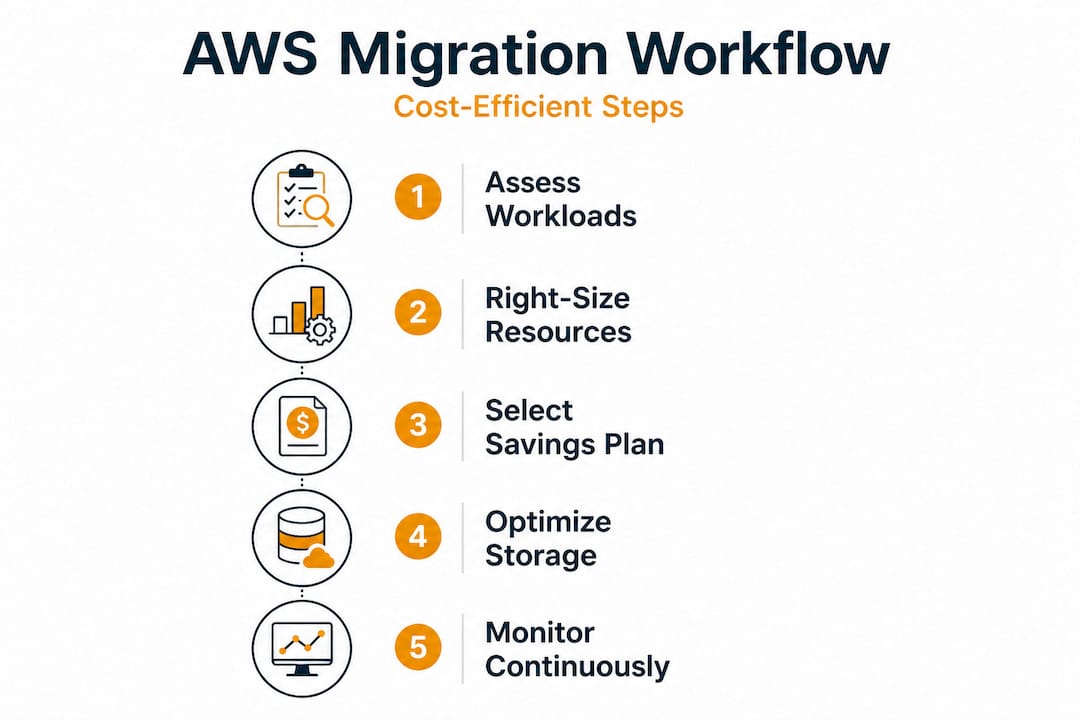
Having the right techniques is only half the equation. Applying them in the right order is what separates teams that achieve predictable savings from teams that end up revisiting their architecture six months post-launch. Here is a practical, phased workflow based on what actually works across hundreds of migration projects.
Phase 1: Infrastructure audit and workload classification (weeks 1 to 3)
- Instrument all production workloads with performance monitoring for at least 30 days to capture real utilization data, not estimates.
- Classify each workload by its traffic pattern: steady state, variable, bursty, or batch.
- Identify ARM-compatible applications that can run on Graviton instances.
- Flag high-egress workloads and model their egress cost under different AWS architectures.
- Document compliance and security requirements per workload to avoid post-migration rework.
Phase 2: Architecture design with cost modeling (weeks 3 to 6)
- Select instance families and sizes based on actual utilization data, targeting 60-70% average CPU as your provisioning baseline.
- Model three scenarios in the AWS Pricing Calculator: on-demand, Savings Plans, and Graviton-based sizing.
- Design auto-scaling policies for variable workloads before migration begins, not after.
- Plan storage lifecycle policies for S3 and identify EBS volumes that can be downsized or removed.
- Evaluate managed services (RDS, ECS, Lambda) for workloads where replatforming reduces operational cost.
Phase 3: Migration execution with cost guardrails (weeks 6 to 12)
- Set AWS Budgets alerts at 80% and 100% of your projected monthly spend from day one.
- Tag every resource with cost center, environment, and application identifiers before migration, not after.
- Apply migration best practices for security groups, IAM roles, and encryption to avoid costly rework.
- Run parallel environments for two to four weeks post-migration to validate performance and costs before decommissioning on-premises hardware.
- Purchase Savings Plans after two to four weeks of actual AWS usage data, not before. Your real baseline will differ from estimates.
Phase 4: Post-migration optimization (ongoing)
- Run AWS Compute Optimizer monthly for the first six months, acting on recommendations above a 15% savings threshold.
- Review Cost Explorer weekly during the first quarter.
- Schedule quarterly architecture reviews to identify new optimization opportunities as AWS releases new instance types and managed services.
Pro Tip: Right-sizing before and after migration is not a one-time event. AWS regularly releases new instance families. A quarterly review of Compute Optimizer recommendations can yield an additional 5-10% cost reduction per year, compounding over the life of your AWS environment.
Our view: Why the ‘cost savings’ narrative needs nuance
The cloud migration industry has a marketing problem. Case studies announce 40% cost savings. Blog posts promise six-figure reductions. CIOs walk into migrations with those numbers in their heads, and then reality lands differently.
The truth is that most organizations do capture real savings, but rarely as much as advertised, and almost never automatically. The savings happen when someone makes specific, informed decisions at each stage of the migration. They evaporate when teams rush the right-sizing phase, skip the architecture review, or purchase Reserved Instances on day one before they understand their actual consumption patterns.
We have worked through 700+ migration projects across eCommerce and fintech environments. The pattern is consistent: the teams that achieve the top-end savings are the ones that treat cost optimization as a first-class engineering concern, not an afterthought for the finance team to sort out after go-live.
The repatriation debate is a useful signal here. When a team starts asking whether they should move back to on-premises, it usually means the migration was under-optimized, not that the cloud is wrong for their workload. Optimization versus repatriation is rarely a genuine coin-flip. It is usually a sign that the right cost levers were not pulled at the right time.
Our recommendation: treat the cost model as a living document throughout the migration, not a one-time estimate. Build the habit of weekly Cost Explorer reviews into your migration project plan. Make right-sizing a gate, not a task. And resist the temptation to commit to Reserved Instances before you have at least 30 days of real production data. That discipline is what separates migrations that deliver on their financial promise from the ones that disappoint.
Ready for real AWS savings? Expert help for your migration
Getting from confusion to clarity on AWS migration costs is exactly what we do at awsmigrationservices.com. As an AWS Advanced Tier Partner with 700+ completed projects, we have handled the full spectrum of migration complexity, from straightforward rehosting to high-load eCommerce platforms where every dollar of compute spend matters.
Whether you are at the planning stage or already mid-migration and looking to course-correct, our team can audit your current setup and deliver a clear cost optimization roadmap. From AWS migration best practices to hands-on implementation, we take ownership of outcomes, not just deliverables. Explore our cost optimization guide to see the specific techniques we apply across eCommerce and fintech environments to reduce AWS spend without trading away performance or reliability.
Frequently asked questions
What is “right-sizing” in cloud migration?
Right-sizing means adjusting virtual server resources so they are neither over-provisioned nor under-provisioned, which maximizes efficiency and lowers costs. Proper right-sizing of EC2 instances can deliver 20-40% savings on compute spend alone.
Does migrating to Graviton processors always lower AWS costs?
Not always. Graviton processors yield 20-40% savings on compatible workloads, but only applications built for ARM architecture benefit, meaning x86-specific or legacy Windows workloads cannot be moved without code changes.
When is cloud repatriation a better option than AWS optimization?
Repatriation makes sense for steady, high-utilization workloads where egress fees are very high and the traffic pattern has no burst requirement, making the elasticity of the cloud less valuable.
Can cost reduction strategies impact performance or security?
Evidence shows that right-sizing and moving to Graviton maintain performance for compatible workloads without security trade-offs, provided the architecture is designed with AWS-native security controls from the start.
What are the most common mistakes CIOs make during AWS migration?
The most frequent mistake is skipping right-sizing and committing to Reserved Instances too early. The second is failing to model egress fees for high-utilization workloads, which can silently erode projected savings over time.