
TL;DR:
- Assuming data center migration is simple leads to costly failures like downtime, compliance issues, and budget overruns.
- A successful migration requires thorough planning, workload readiness assessment, phased execution, and proactive security controls to mitigate risks.
Most IT leaders assume moving to AWS is roughly like copying files from one drive to another, just at a larger scale. That assumption is where budget overruns, surprise downtime, and compliance failures are born. Data center migration is time-consuming, costly, and complex, and the organizations that treat it casually almost always pay for it later. This guide breaks down exactly what data center migration means, where it goes wrong, how to plan for it properly on AWS, and what strategic mistakes to avoid before you sign off on any migration project.
Table of Contents
- What is data center migration?
- Common risks and challenges of data center migration
- Essential steps for a successful AWS migration
- Pitfalls to avoid: Why lift-and-shift isn’t always safer
- A seasoned perspective: Why phased migration and workload readiness matter more than speed
- Plan your AWS migration with proven experts
- Frequently asked questions
Key Takeaways
| Point | Details |
|---|---|
| Define migration scope | Migration involves moving infrastructure, data, and applications to a new environment, not just copying files. |
| Plan for risk | Prepare for core risks like data loss, downtime, and scope creep with strong backup and testing plans. |
| Phased approach wins | Breaking migration into deliberate phases controls cost, risk, and operational disruption. |
| Strategy selection matters | Choosing the right migration strategy for each workload avoids costly performance or compliance issues. |
| Expert guidance is critical | External migration experts can help structure, optimize, and de-risk large AWS projects. |
What is data center migration?
Data center migration is not just an IT task. It’s a business transformation event that touches every layer of your technology stack.
Data center migration is the process of moving IT infrastructure, applications, and data from one environment (such as an on-premises data center) to another (such as a new data center, colocation facility, or cloud) as part of an infrastructure transformation. That means every server, every database, every middleware service, and every application dependency needs to be accounted for, mapped, and moved safely.
Organizations pursue migration for several concrete reasons:
- Cost efficiency: On-premises hardware is expensive to purchase, maintain, and power. AWS lets you pay for what you actually use.
- Scalability: Physical infrastructure scales slowly. Cloud environments scale within minutes in response to real demand.
- Modernization: Legacy systems accumulate technical debt. Migration is often the trigger to refactor outdated architectures.
- Business continuity: Cloud environments provide geographic redundancy that most on-premises setups simply cannot match.
When it comes to AWS specifically, the three most common migration scenarios are: moving from on-premises to AWS (the most common), moving from another cloud provider to AWS (cloud-to-cloud migration), and building a hybrid model where some workloads stay on-premises while others move to AWS. Each of these scenarios has different complexity levels, different tooling requirements, and very different risk profiles. The cloud migration drivers that push companies toward AWS are well documented, but understanding the full scope of what you’re committing to is what separates successful migrations from expensive ones.
“Underestimating the scope of a migration is the most common reason projects run over time and budget. Every application has dependencies that aren’t visible in a spreadsheet.”
This is worth pausing on. When teams inventory their environment, they often catalog the obvious assets: servers, databases, and storage volumes. What they miss are the hidden dependencies, custom scripts that run at 2 a.m., undocumented integrations between legacy systems, and vendor APIs that only work from specific IP ranges. Discovering those mid-migration is painful and expensive.
Common risks and challenges of data center migration
Knowing what you’re moving is only half the problem. The other half is understanding what can go wrong during the move itself.
The major risk categories in any data center migration include:
- Data loss: A failed transfer, a corrupted snapshot, or a missed cutover window can destroy production data permanently.
- Unplanned downtime: If the migration window runs longer than expected, your customers notice. For eCommerce companies, every hour of downtime has a direct revenue impact.
- Regulatory compliance gaps: HIPAA, PCI-DSS, GDPR, and other frameworks have specific requirements about where data lives and how it’s handled during transit. Moving it incorrectly creates legal exposure.
- Scope creep: Migrations often expand mid-project as teams discover new systems, integrations, or requirements that weren’t in the original plan.
- Operational complexity: Running two environments simultaneously during a migration (one on-premises, one in AWS) creates confusion about which systems are authoritative, especially for databases.
Backup and recovery planning is non-negotiable. Every migration should have a tested rollback plan, not just a theoretical one. If you cannot restore your environment to its pre-migration state within a defined timeframe, you are not ready to migrate.
Two metrics that every migration team needs to define before they move a single workload are RPO and RTO. RPO (Recovery Point Objective) and RTO (Recovery Time Objective) measure the maximum tolerable data loss and the maximum tolerable downtime respectively, and they’re especially critical for stateful systems like databases. In plain English: RPO tells you how much data you can afford to lose (measured in time), and RTO tells you how long the business can function without the system being back online. A financial platform might have an RPO of zero and an RTO of five minutes. A batch reporting system might tolerate much longer windows. These numbers drive every decision about migration sequencing, tooling, and testing requirements.

Pro Tip: Define your RPO and RTO targets for each application before you build the migration plan, not after. These numbers should come from the business, not from the IT team. The business owns the risk tolerance; IT just needs to execute against it.
Compliance risks deserve special attention. Many teams treat security as something to configure after the migration is done. That’s backwards. A secure AWS migration requires security controls to be defined and validated at the architecture design stage, not as an afterthought. The cloud security essentials that matter most during migration include identity and access management, encryption in transit and at rest, network segmentation, and logging. Skipping these steps to accelerate the project is a trade-off that almost always costs more to fix later than it would have cost to implement correctly from the start. You can also reference AWS migration best practices for a structured look at how to approach these controls during each phase.
Essential steps for a successful AWS migration
Understanding the risks leads directly to the question of how to mitigate them. A structured, phased approach is the most reliable way to move workloads safely to AWS.
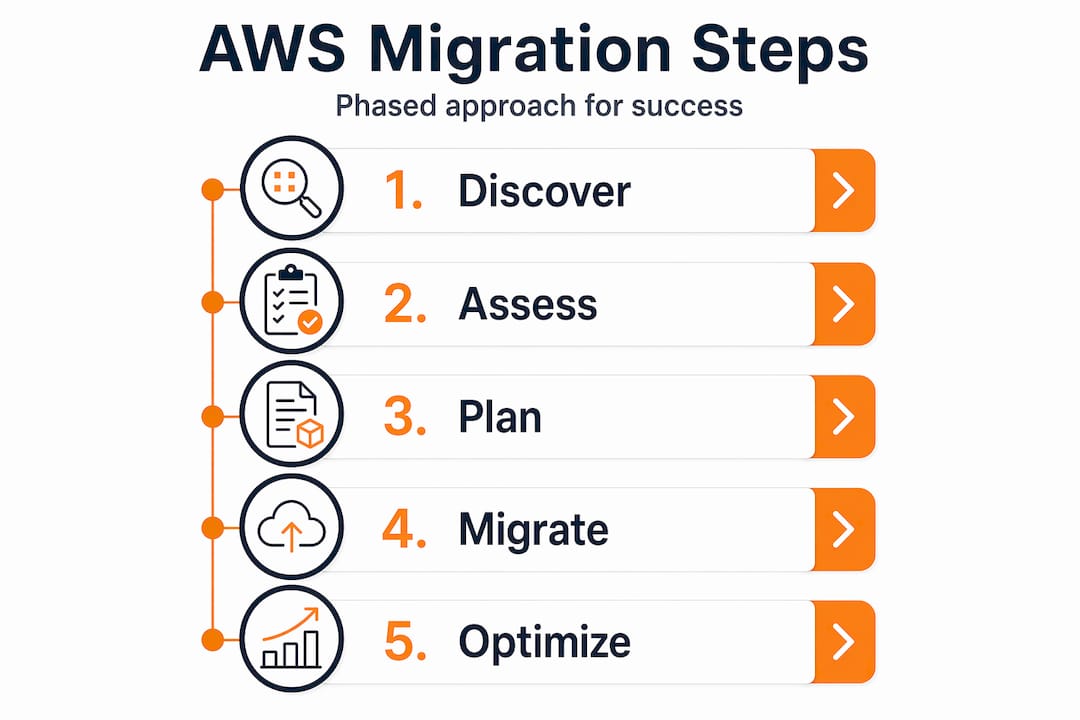
Here are the core steps in sequence:
- Discovery and assessment: Catalog every asset in your current environment, including servers, databases, applications, network configurations, licenses, and dependencies. Automated discovery tools help, but manual validation is still required for accurate dependency mapping.
- Migration strategy: Decide how each workload will be moved. The options are rehost (lift-and-shift), replatform (migrate with targeted optimizations), or refactor (rebuild for cloud-native architecture). The right answer is different for every workload.
- Stakeholder alignment: Get written agreement from business owners, security teams, compliance officers, and application owners before work begins. Lack of alignment is one of the top reasons migrations stall or go over budget.
- Backup and pre-migration testing: Run a full backup of everything before touching production. Test your recovery procedures in a non-production environment to confirm they actually work.
- Phased execution: Move workloads in logical groups, not all at once. Start with lower-risk, lower-dependency systems so the team can build confidence and catch issues before they affect business-critical applications.
- Validation and cutover: After each migration wave, validate that applications are functioning correctly in AWS before decommissioning on-premises resources. Automated testing is faster and more reliable than manual checks.
- Post-migration optimization: Once workloads are running in AWS, review performance and cost. Right-sizing instances and eliminating unused resources after migration often reduces spend significantly. Optimizing cloud infrastructure post-migration is where a lot of the long-term financial value is captured.
Large-scale migrations require phased planning and scope control to avoid scope creep and to manage the timeline and risk impact of additional transformation work. AWS prescriptive guidance emphasizes this clearly because the failure mode is predictable: teams that skip structured phasing end up with sprawling projects that lose momentum and overrun budgets.
| Phase | Activities | Key outputs |
|---|---|---|
| Discover | Inventory assets, map dependencies, assess readiness | Asset catalog, dependency map |
| Plan | Define strategy per workload, set RPO/RTO, assign resources | Migration runbook, risk register |
| Migrate | Execute in waves, monitor, document issues | Migrated workloads, incident log |
| Validate | Test functionality, performance, security, compliance | Test results, sign-off documentation |
| Optimize | Right-size resources, reduce costs, tune performance | Cost baseline, performance benchmarks |
Pro Tip: Treat scope control as a formal project management discipline. Any request to add workloads or change requirements mid-migration should go through a documented change control process. Informal scope additions are the single fastest way to double your timeline and budget. Thinking about cloud scalability with AWS early in the planning phase also helps you design the target architecture to grow without requiring another major overhaul later.
Pitfalls to avoid: Why lift-and-shift isn’t always safer
A structured process gets you most of the way there. But the strategy you choose for each workload matters just as much as the process.
Lift-and-shift (rehosting) is popular because it feels simple and fast. You take your existing server image, move it to an EC2 instance, and call it done. For some workloads, that’s genuinely the right call. For others, it creates more problems than it solves.
Not all workloads are cloud-ready without changes. Legacy and regulated workloads can run into serious performance and compliance problems if moved using the wrong approach. A legacy application that was designed around a specific hardware configuration may perform poorly on virtualized infrastructure. A workload subject to strict compliance rules may inadvertently fail those requirements when moved as-is to a shared cloud environment without the right access controls.
Here’s a comparison that puts the trade-offs in plain terms:
| Factor | Lift-and-shift (rehost) | Replatform / Refactor |
|---|---|---|
| Initial cost | Lower | Higher |
| Migration timeline | Faster | Slower |
| Long-term cost | Often higher (cloud isn’t optimized) | Usually lower (cloud-native efficiency) |
| Compliance risk | Higher for regulated workloads | Lower when designed correctly |
| Performance | May not improve | Typically improves |
| Future scalability | Limited | Designed for scale |
When evaluating which strategy to apply to a given workload, consider these factors:
- Workload readiness: Is the application containerizable? Does it have hardcoded dependencies on physical hardware? Can it tolerate shared infrastructure?
- Compliance requirements: Does the workload handle regulated data? If yes, architecture choices during migration directly affect your audit posture.
- Total cost of ownership: A faster lift-and-shift migration might cost less to execute but more to run over the following two years.
- Operational fit: Will your team be able to support the workload in its new form? A refactored application is more efficient but requires different skills to operate.
For legacy to cloud migration scenarios specifically, a blanket lift-and-shift approach almost always creates technical debt that surfaces six to twelve months post-migration in the form of performance issues, unexpected costs, or compliance findings during an audit.
A seasoned perspective: Why phased migration and workload readiness matter more than speed
Here’s something the mainstream migration advice rarely says plainly: the pressure to move fast is usually the biggest risk factor in any migration project, not the technical complexity itself.
We’ve worked through more than 700 completed migrations, many of them in high-load eCommerce and fintech environments where downtime translates directly into lost revenue. The pattern in failed or expensive migrations is almost always the same. Someone in leadership decided the migration needed to be done faster than the readiness work could support, corners were cut, and the team spent the next several months cleaning up issues that proper upfront assessment would have caught in days.
The insight that most teams miss is this: even a partial migration creates a hybrid environment, and hybrid environments are operationally complex. When you have some workloads in AWS and some still on-premises, you have cross-environment dependencies that can fail in unpredictable ways. AWS explicitly emphasizes governance, controls, and phased approaches for large migrations precisely because the in-between state is where most incidents happen. This isn’t theory. It’s a documented failure mode that shows up repeatedly in large-scale programs.
Workload readiness checks are not bureaucratic overhead. They are the mechanism that tells you which applications are safe to move and which ones need architectural changes first. Skipping them to save a few weeks upfront routinely costs months of remediation on the back end. Aligning your cloud strategies for business goals with a realistic readiness timeline is how you get a migration that delivers actual ROI instead of just moving your problems to a different data center.
The bottom line is simple. Speed is not a migration strategy. Readiness is.
Plan your AWS migration with proven experts
Moving to AWS without the right structure in place is one of the most avoidable risks in enterprise IT. Every challenge described in this guide, from scope creep to compliance gaps to lift-and-shift failures, is manageable when you approach migration with proper planning, phased execution, and workload-level strategy.

At AWS Migration Services, we take full ownership of the migration lifecycle from discovery and assessment through execution and post-migration optimization. As an AWS Advanced Tier Partner with 700+ completed projects, we bring real-world experience in complex, high-load environments where getting it wrong isn’t an option. Whether you need to rehost, replatform, or refactor, we apply the right approach for each workload so you get performance, compliance, and cost outcomes that last. Review our migration best practices guide to see how we structure execution, or explore how we optimize AWS costs after the move to make sure your cloud investment delivers what it promised.
Frequently asked questions
How long does a typical data center migration take?
Large-scale migrations require phased planning and scope control, and can take anywhere from several months to over a year depending on the number of workloads and their complexity.
What is the difference between lift-and-shift and refactor migration?
Lift-and-shift moves applications as-is with minimal changes, while refactoring rebuilds them to use cloud-native features; choosing the wrong approach for legacy or regulated workloads often creates performance and compliance problems.
How can we minimize data loss during migration?
Back up all critical data before migration begins and test your recovery procedures in a non-production environment to confirm that restoration works reliably before you touch production.
What are RPO and RTO, and why do they matter?
RPO is the maximum acceptable data loss measured in time, and RTO is the maximum acceptable downtime; both metrics directly drive decisions about migration tooling, sequencing, and testing requirements for each application.
Why do some migrations fail or cost more than expected?
Migrations fail most often due to skipped workload readiness checks, informal scope additions, and lack of phased planning; structured controls and phasing are the most effective safeguards against budget overruns and timeline failures.