
TL;DR:
- High availability in AWS aims to ensure near 100% application uptime by eliminating single points of failure through Multi-AZ deployments, load balancing, auto-scaling, and automated recovery. It spreads workloads across isolated Availability Zones to minimize downtime, with SLAs up to 99.999%, but does not guarantee zero downtime, which requires more complex multi-Region architectures. Proper configuration, deep health checks, regular failover testing, and stateless design are essential for effective resilience, while most failures stem from misconfiguration rather than infrastructure faults.
High availability in AWS is defined as a system design approach that keeps applications accessible and operational close to 100% uptime by eliminating single points of failure through Multi-AZ deployments, load balancing, auto-scaling, and automated recovery. For IT professionals and decision-makers, understanding this concept is the foundation of every resilient AWS architecture. The difference between a system that recovers in 90 seconds and one that stays down for hours often comes down to whether high availability principles were built in from day one, not bolted on after an incident.
What is high availability in AWS and how does it work?
High availability in AWS means spreading workloads across isolated Availability Zones so that a single component or zone failure cannot take the entire application offline. AWS defines this formally through Service Level Agreements with targets of 99.9%, 99.99%, and 99.999% uptime. To put those numbers in concrete terms: 99.9% availability allows roughly 8.76 hours of downtime per year, 99.99% allows about 52.6 minutes, and 99.999% allows only 5.26 minutes. Each step up in the SLA tier requires meaningfully more redundancy and automation to achieve.
The core building blocks are AWS Regions and Availability Zones. A Region is a geographic area containing multiple AZs, each of which is a physically separate data center with independent power, cooling, and networking. This physical isolation is what makes fault containment possible. A failure in one AZ does not propagate to another.
Key AWS infrastructure components that enable HA include:
- AWS Availability Zones (AZs): Physically isolated data centers within a Region that prevent single points of failure
- Elastic Load Balancing (ALB and NLB): Distributes incoming traffic across healthy instances in multiple AZs
- EC2 Auto Scaling groups: Automatically replace failed instances and span multiple AZs for compute redundancy
- Amazon RDS Multi-AZ: Maintains a synchronous standby replica in a separate AZ with automatic failover
- Amazon S3 and DynamoDB: Built-in multi-AZ redundancy with no additional configuration required
Pro Tip: When you configure an Auto Scaling group, always specify at least two AZs. A single-AZ Auto Scaling group defeats the purpose of the service entirely.
How does AWS infrastructure enable high availability?
AWS is designed against failure domains by distributing workloads across isolated Availability Zones. The Elastic Load Balancer sits in front of your compute layer and routes requests only to instances that pass health checks. When an EC2 instance fails, the load balancer stops sending traffic to it within seconds, and the Auto Scaling group launches a replacement in a healthy AZ.

Amazon RDS Multi-AZ takes a similar approach for databases. Writes are synchronously replicated to a standby instance in a separate AZ. If the primary fails, RDS automatic failover completes in 60 to 120 seconds with no data loss. That is fast enough for most production workloads, though applications must handle the brief reconnection window gracefully.
Managed services like Amazon S3 and DynamoDB handle HA transparently. S3 stores objects redundantly across multiple AZs within a Region. DynamoDB replicates data across three AZs by default. For teams migrating workloads to AWS, these managed services reduce the operational burden of building redundancy from scratch. You can read more about how these services fit into a broader AWS services guide for resilient architectures.
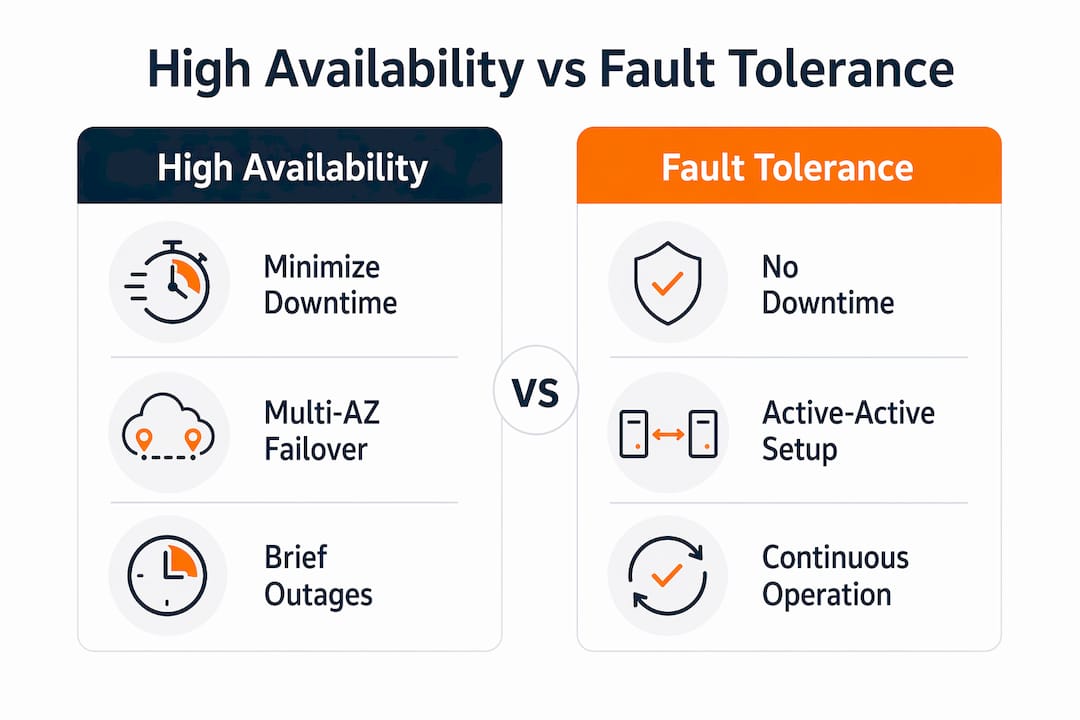
What is the difference between high availability, fault tolerance, and disaster recovery?
These three terms are often used interchangeably, but they describe distinct design goals with very different cost and complexity profiles.
| Concept | Goal | Typical AWS Pattern | Recovery Time |
|---|---|---|---|
| High availability | Minimize downtime within a Region | Multi-AZ Auto Scaling, RDS Multi-AZ, ALB | Seconds to 2 minutes |
| Fault tolerance | Zero downtime, active-active redundancy | Multi-AZ with stateless design, no single active instance | Near-zero, sub-second |
| Disaster recovery | Survive Region-wide failure | Multi-Region with Route 53 failover, Aurora Global Database | Minutes to hours (RTO-dependent) |
Multi-AZ HA protects against Availability Zone failures within a Region but is not a substitute for disaster recovery, which handles Region-level failures through multi-Region designs. This distinction matters enormously for business continuity planning. A company that assumes Multi-AZ equals disaster recovery will be unprepared when an entire AWS Region experiences a service disruption.
Fault tolerance goes further than high availability by requiring active-active redundancy with no single active primary. This means every component runs in parallel across multiple AZs simultaneously, with no failover delay at all. The trade-off is cost: fault-tolerant architectures typically require double or triple the compute resources of a standard HA setup. Most production applications target high availability rather than full fault tolerance because the cost difference is significant and the brief failover window is acceptable.
What are common design patterns to achieve high availability on AWS?
Building for high availability on AWS follows a set of well-established architectural patterns. Here are the most effective ones in order of implementation priority:
-
Multi-AZ Auto Scaling with load balancers. Place EC2 instances in an Auto Scaling group spanning at least two AZs. Attach an Application Load Balancer with health checks. ELB health checks detect unhealthy instances and stop routing traffic to them while Auto Scaling replaces them automatically.
-
RDS Multi-AZ deployment. Enable Multi-AZ on every production RDS instance. The standby replica in a separate AZ receives synchronous writes, so failover completes with zero data loss. Test this regularly by running a “reboot with failover” to confirm your application reconnects cleanly.
-
Stateless application design. Store session state in Amazon ElastiCache or DynamoDB rather than in memory on EC2 instances. Stateless instances can be terminated and replaced without affecting active user sessions, which makes Auto Scaling far more effective.
-
Decoupled components via SQS and SNS. Use Amazon SQS to buffer requests between application tiers. If a downstream service fails, messages queue rather than causing cascading failures. Amazon SNS and EventBridge handle event-driven communication between services without tight coupling.
-
Route 53 health checks and DNS failover. Configure Route 53 health checks to monitor your primary endpoints and automatically route traffic to failover targets. With TTL settings of 30 to 60 seconds, DNS-level failover is fast enough to complement application-level recovery.
Pro Tip: Stateless design is the single most impactful architectural decision for high availability. If your instances carry state, every failure becomes a data recovery problem, not just a compute replacement.
How to improve and ensure high availability in AWS: best practices
Configuring the right AWS services is necessary but not sufficient. Operational discipline determines whether your HA architecture actually performs as designed when a real failure occurs.
-
Configure deep health checks. A health check that only verifies an HTTP 200 response tells you the web server is running, not that the application is functional. Misconfigured health checks cause Auto Scaling to route traffic to instances that cannot serve users. Your health check endpoint should verify database connectivity, cache availability, and any critical dependencies.
-
Set appropriate Auto Scaling grace periods. The health check grace period tells Auto Scaling how long to wait before evaluating a new instance. Set it too short and Auto Scaling terminates instances that are still initializing. Set it too long and genuinely failed instances stay in rotation. Match the grace period to your actual application startup time.
-
Test failover regularly. Real-world HA testing with Multi-AZ RDS requires running actual failover tests to confirm application reconnection and acceptable recovery times. Schedule quarterly failover drills. An untested HA architecture is an assumption, not a guarantee.
-
Enable cross-zone load balancing. Cross-zone load balancing on ALBs distributes traffic evenly across instances in all AZs. Without it, traffic distribution becomes uneven during AZ failovers, which can overload instances in the surviving zones.
-
Tune DNS TTL for Route 53. Low TTL values (30 to 60 seconds) allow faster DNS-based failover. Higher TTLs reduce DNS query load but slow down recovery. For critical endpoints, 60 seconds is a reasonable balance between performance and failover speed.
-
Build retry logic into your application. During the 60 to 120 second RDS failover window, database connections will fail. Applications without retry logic will surface errors to users. Implement exponential backoff with jitter for all database and external service calls.
What multi-Region architectures offer beyond high availability
Multi-Region architectures address a different threat model than Multi-AZ HA. They protect against Region-wide failures, which are rare but not theoretical. The design patterns and trade-offs are worth understanding before you decide whether Multi-AZ is sufficient for your workload.
| Pattern | Services Used | RTO | Cost Impact | Best For |
|---|---|---|---|---|
| Active-passive failover | Route 53, RDS read replica, S3 replication | Minutes | Moderate | Most production workloads |
| Active-active multi-Region | Route 53 latency routing, DynamoDB Global Tables, Aurora Global Database | Seconds | High | Global applications, fintech |
| Event-driven multi-Region | EventBridge, API Gateway, DynamoDB Global Tables | Seconds to minutes | Moderate to high | Microservices, event-driven systems |
Multi-Region event-driven architectures use Amazon Route 53 health checks combined with Amazon EventBridge and DynamoDB Global Tables for automatic failover and data replication across Regions. Regional independence reduces latency for global users while health checks enable routing away from unhealthy Regions within seconds.
DynamoDB Global Tables and Aurora Global Database handle data replication across Regions automatically. Aurora Global Database replicates with typical lag under one second, which makes it viable for active-active read workloads. The challenge is write consistency: multi-Region active-active architectures require careful conflict resolution strategies for write operations.
The honest trade-off is cost and complexity. A multi-Region active-active architecture can cost two to three times more than a single-Region Multi-AZ deployment. For most eCommerce and SaaS workloads, Multi-AZ HA within a single Region is sufficient. Multi-Region becomes necessary when your Recovery Time Objective is under five minutes and your business cannot tolerate a full Region outage. Understanding AWS scalability strategies helps you calibrate which tier of resilience your workload actually requires.
Key takeaways
An effective AWS high availability strategy requires Multi-AZ redundancy, correctly scoped health checks, stateless application design, and regular failover testing to deliver on its uptime promises.
| Point | Details |
|---|---|
| HA is not zero downtime | Brief failover windows of 60 to 120 seconds are normal and acceptable for most workloads. |
| Multi-AZ is the baseline | Spreading workloads across at least two AZs is the minimum viable HA configuration on AWS. |
| Health checks must go deep | Verify database and dependency health, not just HTTP 200, to avoid routing traffic to broken instances. |
| Multi-Region is for DR, not HA | Region-wide failures require multi-Region architectures; Multi-AZ alone does not cover that scenario. |
| Test failover before you need it | Quarterly failover drills on RDS and Auto Scaling groups confirm your architecture performs as designed. |
Why most AWS HA failures are self-inflicted
After working through hundreds of AWS architecture reviews at IT-Magic, the pattern I see most often is not infrastructure failure. It is misconfiguration. Teams deploy Multi-AZ RDS and Multi-AZ Auto Scaling groups, check the boxes, and assume they are covered. Then a real incident happens and the application stays down for 20 minutes because nobody tested whether the app reconnects to the database after failover.
The second most common issue is health check overconfidence. A health check that returns 200 because the web server is running, while the database connection pool is exhausted, is worse than no health check at all. It keeps the instance in rotation while users get errors. I have seen this exact scenario cause more user-facing downtime than the underlying infrastructure failure it was supposed to catch.
My recommendation for any team planning an AWS deployment: treat failover testing as a first-class operational practice, not a one-time setup task. Build it into your runbooks. Run it quarterly. The AWS migration best practices that actually hold up under pressure are the ones that include testing, not just configuration.
High availability does not mean zero downtime. It means your system recovers fast enough that most users never notice. That is a realistic and achievable goal. Zero downtime is a much harder and more expensive target, and most applications do not actually need it.
— Oleksandr
Build your AWS architecture for real-world resilience
Understanding high availability concepts is the starting point. Implementing them correctly across a production environment, especially during a migration, is where most teams hit friction.
IT-Magic is an AWS Advanced Tier Partner with 700+ completed migration projects, specializing in high-load eCommerce and fintech environments where downtime directly translates to lost revenue. The team takes full ownership of architecture design, implementation, and post-migration optimization, including HA configuration, failover testing, and cost calibration. If you are planning an AWS migration or need an architecture review of your current setup, explore IT-Magic’s AWS migration services to see how production-grade resilience gets built in from day one.
FAQ
What is high availability in AWS?
High availability in AWS is a system design approach that minimizes unplanned downtime by eliminating single points of failure through Multi-AZ deployments, load balancing, and auto-scaling. AWS SLA targets range from 99.9% to 99.999% uptime depending on the architecture tier.
How does Multi-AZ differ from multi-Region in AWS?
Multi-AZ protects against Availability Zone failures within a single Region and is the standard HA pattern. Multi-Region architectures protect against full Region outages and are used for disaster recovery with lower Recovery Time Objectives.
How long does RDS Multi-AZ failover take?
RDS Multi-AZ failover typically completes within 60 to 120 seconds with synchronous replication and no data loss. Applications must implement retry logic to handle the brief reconnection window during failover.
What is the most common mistake in AWS high availability design?
The most common mistake is configuring health checks that only verify server responsiveness rather than full application readiness. This routes traffic to instances that are running but cannot serve users, causing visible downtime despite a technically healthy infrastructure.
When should you use multi-Region instead of Multi-AZ?
Use multi-Region architecture when your Recovery Time Objective is under five minutes and your business cannot tolerate a full AWS Region outage. For most production workloads, Multi-AZ within a single Region provides sufficient availability at significantly lower cost and complexity.