
TL;DR:
- The AWS Schema Conversion Tool automates database schema conversion for heterogeneous migrations to AWS. Manual effort is required for procedural code, and pairing SCT with DMS ensures complete data migration. Skipping assessment or rushing the process can lead to costly errors and delays.
The AWS Schema Conversion Tool (SCT) is a desktop application that automatically converts database schemas from one engine to another, making heterogeneous migrations to AWS possible without rewriting your entire data model from scratch. SCT handles the translation layer between proprietary engines like Oracle or SQL Server and AWS-compatible open-source targets like Aurora PostgreSQL or Aurora MySQL. It works as the first half of a two-tool migration strategy, with AWS Database Migration Service (DMS) handling the actual data movement. For database administrators managing complex migrations, understanding how SCT and DMS divide responsibilities is the difference between a clean cutover and months of debugging.
What are the key steps in the AWS Schema Conversion Tool workflow?
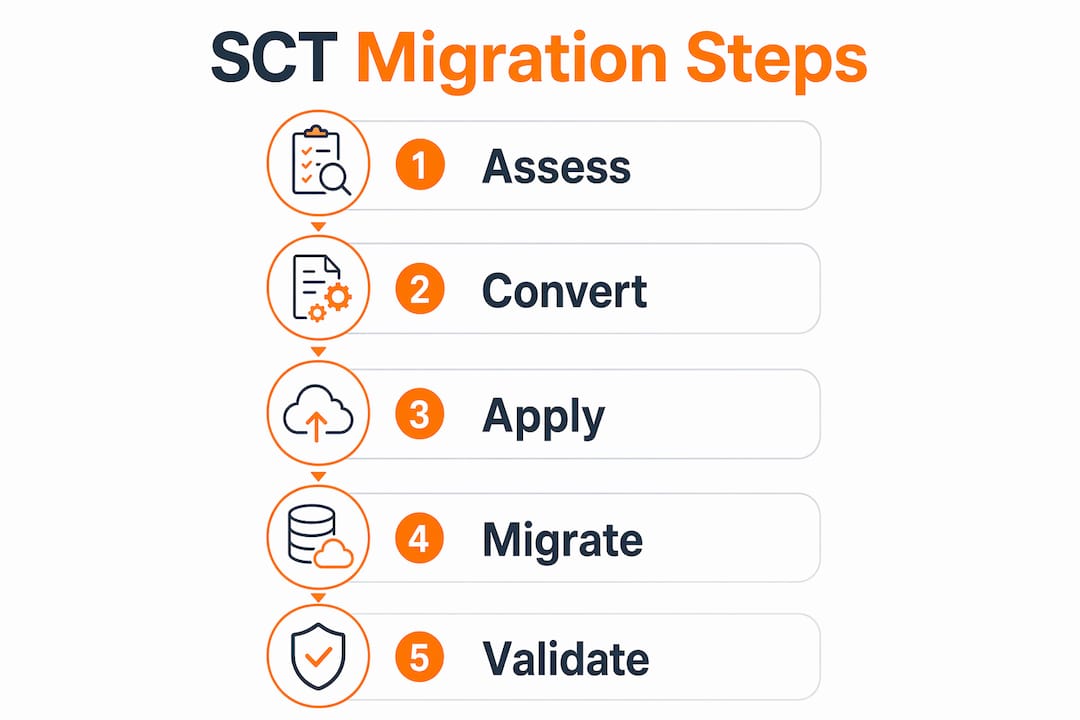
The schema conversion process follows six sequential phases, and skipping any one of them creates problems downstream. Each phase builds on the previous one, so the order matters.
-
Connect to source and target databases. SCT requires live connections to both your source database (Oracle, SQL Server, etc.) and your target AWS database. You configure these connections inside the SCT project using the correct JDBC driver for each engine.
-
Run the assessment report. This is the most underused step. The assessment report categorizes every schema object into two groups: objects SCT can convert automatically and objects that need manual work. Treat this report as your migration roadmap.
-
Convert the schema. SCT translates tables, views, indexes, and data types automatically. Procedural code like stored procedures gets flagged for manual review. The tool generates converted SQL code and marks problem areas inline.
-
Fix manual action items. Any object SCT cannot convert gets labeled with an action item. You review each one, rewrite the problematic code in the target engine’s syntax, and update the converted schema accordingly.
-
Apply the schema to the target database. Once you are satisfied with the converted schema, you apply it directly through the SCT GUI or export the SQL scripts for manual execution. Exported scripts let you review and edit the code before it touches the target database.
-
Migrate data with DMS. After the schema is in place, AWS DMS takes over to move the actual data rows. SCT does not move data. DMS does.
Pro Tip: Run the assessment report before writing a single line of migration code. The report tells you exactly how much manual work your migration requires, which directly affects your project timeline and budget.
Which schema components require manual intervention after automated conversion?

SCT automates table and data type conversions effectively, but it is primarily a translation aid. The tool identifies areas requiring human expertise, and that expertise is concentrated in procedural code.
The most common objects requiring manual work include:
-
Stored procedures and functions. Oracle PL/SQL and SQL Server T-SQL stored procedures need converting to PL/pgSQL in PostgreSQL. This is the bulk of manual effort in most migrations. Business logic embedded in packages, especially Oracle PL/SQL packages with complex dependencies, requires careful refactoring rather than simple syntax substitution.
-
Triggers. Triggers written in proprietary syntax often use engine-specific features that have no direct equivalent in the target database. Each trigger needs individual review.
-
Sequences and identity columns. Oracle sequences behave differently from PostgreSQL sequences or MySQL auto-increment columns. The mapping is not always one-to-one, and you may need to adjust sequence start values and increment logic.
-
Hierarchical queries. Oracle’s CONNECT BY syntax for tree-structured queries has no native equivalent in PostgreSQL. You rewrite these using recursive Common Table Expressions (CTEs) instead.
-
Proprietary data types. Types like Oracle’s NUMBER with specific precision settings or SQL Server’s DATETIME2 require deliberate mapping decisions. The wrong mapping silently corrupts data.
Pro Tip: Budget at least 40% of your total migration time for manual code refactoring. Teams that assume SCT will handle everything end up discovering the real work only after the automated conversion runs.
The assessment report guides which elements need attention by assigning a complexity rating to each object. High-complexity objects are the ones that need a senior DBA, not a junior engineer copying syntax from documentation.
How do AWS Schema Conversion Tool and AWS DMS work together?
SCT and DMS are inseparable in successful heterogeneous migrations. SCT delivers the schema structure, and DMS manages the data migration. Attempting to use one without the other in a heterogeneous migration produces an incomplete result.
The division of responsibilities is clear:
| Responsibility | AWS SCT | AWS DMS |
|---|---|---|
| Schema translation | Yes | No |
| Table and index creation | Yes (applied to target) | No |
| Row-level data migration | No | Yes |
| Continuous replication (CDC) | No | Yes |
| Assessment and reporting | Yes | No |
| Ongoing synchronization | No | Yes |
The SCT and DMS integration follows a strict sequence. You must apply the converted schema to the target database before DMS starts moving data. If the target schema does not exist, DMS has nowhere to write the incoming rows.
DMS uses Change Data Capture (CDC) to handle ongoing synchronization during the migration window. CDC captures every insert, update, and delete on the source database and replays those changes on the target in near real time. This lets you keep the source system running while the migration completes, which is critical for minimizing downtime.
AWS also offers DMS Schema Conversion, a fully managed, web-based feature built on the SCT conversion engine. It supports AI-assisted conversions and is useful for teams that prefer a managed service over the desktop application. The underlying conversion logic is the same, but the interface and management model differ.
For teams migrating to Amazon Aurora, the SCT and DMS combination is the standard approach for moving from Oracle or SQL Server to Aurora PostgreSQL or Aurora MySQL.
What are the installation requirements and best practices for AWS SCT?
SCT runs as a desktop application on three operating systems: Microsoft Windows, Fedora Linux, and Ubuntu Linux, all in 64-bit versions. The installation itself is straightforward, but the JDBC driver setup trips up most first-time users.
Key setup requirements and best practices:
-
Download JDBC drivers separately. SCT does not bundle JDBC drivers due to licensing restrictions. You download the correct driver for your source database (Oracle JDBC, Microsoft JDBC for SQL Server, etc.) and your target database, then point SCT to the driver files in the application settings.
-
Create a dedicated SCT project. Each migration gets its own project file. The project stores your connection settings, conversion history, and action items. Keeping projects organized by environment (dev, staging, production) prevents configuration errors.
-
Connect with read-only credentials on the source. SCT only reads the source schema. You do not need write access to the source database, and granting it creates unnecessary risk.
-
Run assessment reports iteratively. Do not run the assessment once and move on. Run it again after each round of manual fixes to confirm that your changes resolved the flagged items and did not introduce new ones.
-
Export scripts before applying. The option to save converted schema as SQL scripts gives you a review checkpoint. Apply scripts to a test environment first, validate behavior, then apply to production.
The AWS migration guide for enterprise environments recommends treating the SCT project as a living document throughout the migration, not a one-time artifact. Schema changes on the source database during a long migration window require re-running conversions to keep the target schema current.
Key Takeaways
The AWS Schema Conversion Tool automates schema translation but requires deliberate manual effort for procedural code, and it only succeeds when paired with AWS DMS for complete data migration.
| Point | Details |
|---|---|
| SCT handles schema, DMS handles data | Apply the converted schema before starting any DMS data migration task. |
| Assessment report is non-negotiable | Run it first to identify manual action items and avoid runtime failures after schema application. |
| Procedural code needs manual rewriting | Stored procedures, triggers, and hierarchical queries require human refactoring, not just automated conversion. |
| JDBC drivers require separate setup | Download and configure drivers for both source and target databases before connecting in SCT. |
| Iterative validation prevents errors | Re-run assessments and test on non-production environments before applying schema to production. |
What I’ve learned from watching teams misuse AWS SCT
The biggest mistake I see consistently is treating SCT as a one-click solution. Teams run the automated conversion, see a high percentage of objects converted, and assume the migration is nearly done. Then they hit the stored procedures.
The automated conversion percentage is misleading. SCT might convert 85% of your objects automatically, but that remaining 15% often contains the most complex business logic in your entire database. Oracle PL/SQL packages with thousands of lines of procedural code, custom aggregate functions, and deeply nested cursor logic do not translate cleanly. Rewriting that code correctly takes time, and underestimating it is the single most common reason migrations run over schedule.
The other pattern I see is teams skipping the assessment report because they are in a hurry. The report feels like overhead when you just want to start converting. Skipping it means you discover the hard problems at runtime, after the schema is already applied to the target. Fixing errors at that stage costs far more time than reading the report at the start.
My recommendation: treat the assessment report as a project scoping tool, not a technical formality. Share it with your project manager before committing to a timeline. The report tells you exactly what you are dealing with, and that information belongs in your planning documents, not just your terminal window.
Testing before cutover is also non-negotiable. Run your application against the converted schema in a staging environment for at least two weeks before you touch production. AWS cloud security and data integrity issues surface during this period, not during the conversion itself.
— Oleksandr
AWS migration expertise for your SCT and DMS projects
Database migrations involving SCT and DMS are technically demanding. The schema conversion is only the starting point. Getting the data migration right, validating application behavior, and cutting over without downtime requires experience across the full migration lifecycle.

IT-Magic is an AWS Advanced Tier Partner with 700+ completed migration projects, including complex heterogeneous database migrations from Oracle and SQL Server to Aurora PostgreSQL and Aurora MySQL. The team takes full ownership of execution, from the initial assessment report through post-migration validation. If your organization needs a secure AWS migration that covers SCT, DMS, and everything in between, IT-Magic handles the technical depth so your team does not have to. Review the migration best practices to understand what a well-executed migration looks like before you start.
FAQ
What is the AWS Schema Conversion Tool used for?
The AWS Schema Conversion Tool converts database schemas from one engine to another, enabling heterogeneous migrations such as Oracle to Aurora PostgreSQL or SQL Server to Aurora MySQL. It automates table and data type conversion and flags procedural code for manual review.
Is AWS SCT free to use?
AWS SCT is available at no additional charge as a desktop application. You download it directly from AWS and pay only for the AWS services you use during the migration, such as DMS replication instances.
What operating systems does AWS SCT support?
SCT runs on Microsoft Windows, Fedora Linux, and Ubuntu Linux, all in 64-bit versions. It also requires separate JDBC driver downloads for both the source and target databases.
What is the difference between AWS SCT and AWS DMS?
SCT converts the database schema structure and applies it to the target database. DMS migrates the actual data rows and handles ongoing replication through Change Data Capture. Both tools are required for a complete heterogeneous migration.
Can AWS SCT convert stored procedures automatically?
SCT converts many stored procedures partially, but Oracle PL/SQL and SQL Server T-SQL procedures typically require manual rewriting into the target engine’s procedural language, such as PL/pgSQL for PostgreSQL. The assessment report identifies which procedures need manual work.