
Match your AWS disaster recovery plan to workload criticality: tier-1 revenue systems typically require warm standby or multi-site active/active, tier-2 workloads usually fit pilot light, and tier-3 systems often run on backup and restore alone. The right tier depends entirely on how much downtime and data loss the business can actually absorb, not on what looks impressive in an architecture diagram. Warm standby and multi-site cost more every month because you’re paying for live or near-live infrastructure in a second AWS Region. Backup and restore has low ongoing cost but recovery may take many hours when needed.
Before picking a strategy, do three things:
- Run a Business Impact Analysis (BIA) to rank workloads by revenue and compliance exposure.
- Assign explicit RTO and RPO numbers to each workload tier, not vague targets like “as fast as possible.”
- Capture your infrastructure as code and schedule a first recovery drill within 90 days.
Key Takeaways
An effective AWS disaster recovery plan matches workload tiers from a Business Impact Analysis to one of four AWS strategies, backed by tested runbooks and quarterly drills for critical systems.
| Point | Details |
|---|---|
| Start with a BIA | Assign RTO/RPO per workload before choosing a technical DR strategy. |
| Match tier to strategy | Use warm standby or multi-site for tier-1 workloads, pilot light or backup/restore for lower tiers. |
| Build the runbook first | Document owners, triggers, and validation checks for both failover and failback. |
| Test on a real cadence | Run quarterly drills for critical workloads, annual drills for the rest. |
| Automate replication and IaC | Use Elastic Disaster Recovery, Aurora Global Database, or DynamoDB global tables with CloudFormation or CDK. |
Table of Contents
- What Is an AWS Disaster Recovery Plan?
- How Do You Map Workloads to Recovery Objectives?
- The Four AWS Disaster Recovery Strategies and When to Use Each
- Which AWS Services Power Each Recovery Strategy?
- How Do You Build a Failover and Failback Runbook?
- How Often Should You Test Your DR Plan?
- What Are the Cost and Compliance Trade-Offs?
- How Does IT-Magic Implement AWS Disaster Recovery in Practice?
- What Do Real DR Drills Actually Teach You?
- Sources
- FAQ
What Is an AWS Disaster Recovery Plan?
An AWS disaster recovery plan is a documented, tested procedure for restoring critical systems and data after an outage, using AWS-native services like AWS Elastic Disaster Recovery, AWS Backup, and cross-Region replication to meet defined recovery time and recovery point objectives. It’s different from a generic backup routine because it specifies who declares a disaster, which region takes over, how traffic reroutes, and how you verify the recovered environment actually works before customers touch it.
AWS groups disaster recovery strategies into four tiers: Backup and Restore, Pilot Light, Warm Standby, and Multi-Site Active/Active, each trading cost for recovery speed. Most enterprises don’t pick one tier for the whole company. They map different tiers to different workloads based on what a BIA reveals about actual business impact.
How Do You Map Workloads to Recovery Objectives?
Skipping the Business Impact Analysis is the single most common reason DR plans fail during a real event. Teams build an impressive warm standby architecture for a system that turns out to tolerate 12 hours of downtime just fine, while the payment gateway that needed near-zero RTO sits on nightly snapshots.
A proper BIA has to deliver four things: named owners for each workload, an explicit RTO/RPO pair, any legal or compliance constraints (data residency, retention mandates), and a real dollar figure for an hour of downtime. Without the cost-of-downtime number, every DR conversation becomes a debate about feelings instead of budget. Finance teams tend to underestimate this figure until you show them a checkout outage during a peak sales hour.
Once you have those inputs, sort workloads into tiers. A common structure looks like this:
| Tier | Example workload | Target RTO | Target RPO | Business impact if down |
|---|---|---|---|---|
| Tier 1 | Checkout, payment processing | Short RTO | Very low RPO | Direct revenue loss, SLA breach |
| Tier 2 | Order management, CRM | Moderate RTO | Low RPO | Operational disruption, customer complaints |
| Tier 3 | Internal reporting, archives | Longer RTO | Higher RPO | Inconvenience, no direct revenue hit |
A simple scoring matrix helps when dozens of workloads compete for attention. Score each on revenue impact (1 to 5), compliance exposure (1 to 5), and customer-facing visibility (1 to 5). Anything scoring 12 or higher becomes tier 1 by default, regardless of what the application owner claims. That scoring discipline is what the AWS whitepaper on disaster recovery of on-premises applications recommends before any technical strategy gets chosen, and it’s the step most teams rush past.
The Four AWS Disaster Recovery Strategies and When to Use Each
AWS’s own reliability guidance defines four canonical strategies, and each one answers a different question: how fast do you need to be back, and how much are you willing to pay every month to guarantee it?
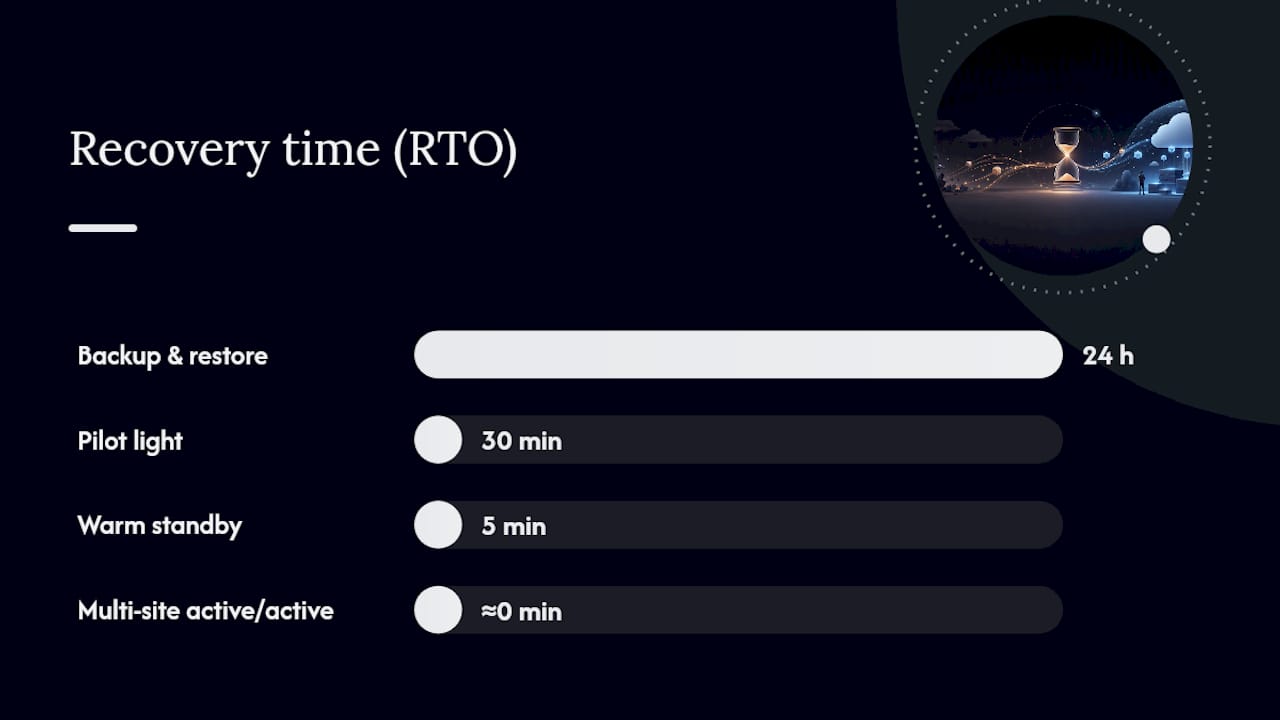
Backup and restore. You back up data and infrastructure configuration, then rebuild from scratch in a recovery Region when disaster strikes. RTO typically spans a full day or more; RPO is measured in hours depending on backup frequency. This is the cheapest option by far, since you’re not running any standby compute. It fits tier-3 workloads: internal tools, batch reporting, archival systems where a day of downtime is annoying but not existential.
Pilot light. A minimal version of your environment runs constantly in the DR Region, usually just the database layer replicating data, with application servers stopped and ready to scale up on demand. RTO is usually within tens of minutes and RPO within minutes. Costs more than backup and restore because you’re paying for standby database instances, but far less than running full duplicate infrastructure. This suits tier-2 workloads with real but not immediate urgency, and it’s a common fit for mid-size SaaS platforms with regulatory pressure to prove a recovery capability without paying for full redundancy.
Warm standby. A scaled-down but fully functional copy of your production environment runs in the DR Region at all times, ready to take full production traffic once scaled up. RTO is reduced to minutes and RPO to seconds. This costs meaningfully more since you’re running live infrastructure around the clock, just at lower capacity. Financial services and healthcare platforms with strict uptime SLAs tend to land here.
Multi-site active/active. Full production workloads run simultaneously across two or more Regions, actively serving traffic with automated routing between them. RTO and RPO both approach zero. This is the most expensive and operationally complex option, requiring careful handling of data consistency across Regions, but it’s the only strategy that survives a full regional outage without a noticeable customer-facing gap. Global platforms with continuous uptime requirements, think large marketplaces or trading platforms, justify this cost.
| Strategy | RTO / RPO | Cost & complexity | Data-consistency risk | Testing complexity |
|---|---|---|---|---|
| Backup & restore | full day / hours | Low cost, low complexity | Low risk, but stale data | Simple, infrequent tests |
| Pilot light | Minutes / minutes | Moderate cost and complexity | Moderate, depends on replication lag | Moderate, needs scale-up validation |
| Warm standby | Minutes / seconds | High cost, high complexity | Low, near-continuous sync | High, needs regular failover tests |
| Multi-site active/active | Near-zero / near-zero | Highest cost, highest complexity | Requires conflict resolution design | Highest, continuous validation |
Which AWS Services Power Each Recovery Strategy?
Picking a strategy is the easy part. Wiring together the AWS services that deliver it is where most plans stall out.
AWS Elastic Disaster Recovery (DRS) is the backbone for pilot light and warm standby architectures. It continuously replicates source servers at the block level into a low-cost staging area in your target Region, then launches full EC2 recovery instances only when you initiate a drill or a real failover. That staging-area design is what keeps pilot light affordable: you pay for storage and a thin replication layer, not full-size running instances, until the moment you actually need them.

AWS Backup centralizes backup policies across EC2, RDS, DynamoDB, and EFS, and it supports continuous backups with point-in-time recovery down to one-second precision for supported resources. This is your backup-and-restore workhorse and your compliance safety net for tier-3 workloads.
Amazon S3 Replication handles cross-Region object durability for static assets, logs, and backups feeding into DR. Amazon RDS read replicas and Aurora Global Databases extend that to relational data, letting you promote a replica in the DR Region during failover with typical Aurora Global Database RPO under a second. DynamoDB global tables do the equivalent for NoSQL, replicating writes across Regions automatically for active/active designs.
Route 53 and Application Recovery Controller manage the actual traffic cutover. Route 53 ARC lets you define readiness checks and routing controls that redirect users to a healthy Region, and your runbook needs to name exactly who owns that switch and under what conditions it fires, per AWS’s cross-Region DR deployment guidance.
CloudFormation or the AWS CDK should hold every piece of your DR infrastructure as versioned code, so you’re never hand-clicking through the console during an actual incident. AWS Resilience Hub then assesses that architecture against your defined RTO/RPO targets and flags gaps before an outage finds them for you.
One operational rule matters more than any service choice: prefer data-plane operations over control-plane operations during failover. Control planes can be impaired during region-wide events, so promoting a read replica (data plane) is more reliable mid-incident than trying to launch new resources through an API that might itself be degraded.
How Do You Build a Failover and Failback Runbook?
A DR plan without a runbook is just a diagram. The runbook is what a tired on-call engineer follows at 3 a.m. when the primary Region is degraded and the room is full of opinions.
- Detect. Automated monitoring (CloudWatch alarms, health checks) flags the anomaly. Owner: on-call SRE.
- Assess. Confirm scope and severity against declared thresholds. Owner: incident commander.
- Declare. A named authority formally declares a disaster, based on pre-agreed criteria, not a gut call under pressure. Owner: incident commander or VP Engineering.
- Notify. Alert stakeholders, customer support, and leadership through a predefined channel. Owner: incident commander.
- Initiate. Trigger DRS instance launch or promote read replicas. Owner: cloud infrastructure lead.
- Validate. Run automated smoke tests against the recovered environment before routing live traffic. Owner: QA/platform lead.
- Cutover. Update Route 53 ARC routing controls to send traffic to the DR Region. Owner: network lead.
- Close. Document timeline, confirm SLA impact, and open a post-incident review. Owner: incident commander.
Failback follows a mirror process, but slower and more deliberate. Confirm the primary Region’s underlying issue is fully resolved, resynchronize data from the DR Region back to primary, and validate consistency before flipping traffic back. A documented, scheduled failback procedure matters as much as the failover plan itself — teams that nail failover and improvise failback tend to introduce a second incident during the “victory lap.”
Store runbooks in Git or a versioned wiki, exactly like production code, and keep an offline copy accessible somewhere that doesn’t depend on the systems you’re trying to recover, since Elastic Disaster Recovery’s best practices specifically warn against runbooks trapped inside the outage itself.
Pro Tip: Define your failover declaration threshold in writing before an incident happens. Vague criteria like “when it feels bad enough” lead to premature failovers that cause data inconsistency, or delayed ones that blow your RTO waiting for certainty that never arrives.
| Runbook phase | Primary owner | Validation check |
|---|---|---|
| Detect & declare | On-call SRE / incident commander | Alarm threshold breached and confirmed |
| Initiate failover | Cloud infrastructure lead | DRS/replica promotion completes |
| Cutover | Network lead | Route 53 ARC health check passes |
| Failback | Cloud infrastructure lead | Primary Region resync verified |
How Often Should You Test Your DR Plan?
A DR plan you haven’t drilled is a theory, not a plan. Testing frequency should scale with criticality: mission-critical tier-1 workloads warrant quarterly drills, while tier-2 and tier-3 systems can run on an annual cadence.
- Run partial drills (validating replication and instance launch) more frequently than full drills.
- Automate smoke tests that check application health, database connectivity, and DNS resolution immediately after any test launch.
- Only run a full production-traffic drill once your infrastructure-as-code pipeline is validated end to end; debugging IaC issues during a live drill under time pressure creates more risk than it resolves.
- Track time-to-detect, time-to-declare, time-to-restore, and post-recovery data-consistency checks as your core KPIs.
Testing frequency reality check: AWS recommends at least one full drill per year, with quarterly testing for business-critical applications. Most organizations that skip this find out their RTO assumptions were wrong exactly once, during the outage that mattered.
What Are the Cost and Compliance Trade-Offs?
Every DR tier upgrade costs money somewhere. Standby compute capacity, cross-Region data transfer fees, launched instances during drills, and replication storage all stack up as you move from backup and restore toward multi-site active/active.
- Cross-Region data transfer is often the hidden line item teams forget to budget for, especially with high-write-volume databases replicating continuously.
- For compliance-sensitive workloads, enable point-in-time recovery, use AWS Backup Vault Lock for immutable backups, and tightly scope IAM permissions used during recovery so a disaster doesn’t become an access-control incident too.
- Watch for region-wide service limits (EC2 instance quotas in your DR Region can silently block a launch), control-plane dependency during failover, and configuration drift between primary and DR environments if you’re not managing both through the same IaC templates.
How Does IT-Magic Implement AWS Disaster Recovery in Practice?
A DR engagement should never start with infrastructure. It starts with an audit and a BIA report that produces prioritized workload tiers, followed by IaC templates, replication configuration, documented runbooks, and a scheduled first drill before anyone calls the project done.
IT-Magic runs implementations in small early waves, typically 10 to 20 servers at a time, on a sprint cadence that surfaces integration problems while they’re still cheap to fix rather than after the whole estate is wired together. That phased approach mirrors how our migration acceleration program structures larger AWS rollouts generally, and it applies just as directly to DR builds. Each wave ends with a validation checkpoint before the next one starts, and the engagement closes with a full end-to-end drill, not a sign-off on paper.
- Infrastructure audit and BIA report with tiered workload prioritization.
- CloudFormation or Terraform templates covering network, compute, and data-layer recovery.
- Replication configuration (DRS, RDS/Aurora, DynamoDB global tables as appropriate).
- Versioned runbooks with named owners and a scheduled drill calendar.
Pro Tip: Treat your runbooks like production code. Store them in version control, review changes the same way you’d review a pull request, and keep an offline, non-cloud-dependent copy for the day your primary documentation platform is part of the outage.
What Do Real DR Drills Actually Teach You?
Run enough drills and the surprises start repeating. Missing IAM permissions block instance launches at the worst moment. DNS TTLs set too high delay failover by minutes you don’t have. Stateful applications come up in the wrong order because nobody documented the dependency chain, and someone always forgets where the offline credentials live.
The fixes are unglamorous: automated smoke tests after every launch, a recorded and versioned application launch order, and pre-approved failback windows so nobody’s improvising authorization mid-incident. Pair every technical drill with a stakeholder tabletop exercise. The infrastructure can fail over perfectly and the plan can still fall apart if leadership doesn’t know who’s allowed to declare a disaster.
Sources
- Disaster recovery planning | AWS Well-Architected Reliability Pillar
Ready to put this into practice without pulling your team off other priorities? IT-Magic’s AWS migration services build the audit, IaC templates, and tested runbooks a real DR plan needs, and our migration best practices guide covers the broader project methodology behind it.
FAQ
What Is the Difference Between RTO and RPO?
RTO (Recovery Time Objective) is how long you can be down; RPO (Recovery Point Objective) is how much data you can afford to lose, measured in time since the last good backup or replication point.
Which AWS DR Strategy Is Cheapest?
Backup and restore is the least expensive strategy since it requires no standby compute but has the longest recovery time, often a full day or more.
How Often Should You Test an AWS Disaster Recovery Plan?
Industry best practice is to conduct at least one full DR drill annually, and more frequent drills for critical applications, to confirm RTO and RPO targets actually hold.
Can AWS Elastic Disaster Recovery Replace a Full DR Plan?
No. Elastic Disaster Recovery handles continuous replication and fast recovery instance launches, but a complete plan still needs a BIA, documented runbooks, defined failover authority, and a failback procedure.
What Should a DR Runbook Include?
A runbook needs numbered failover and failback steps, named owners for each decision point, validation checks, and version control, ideally stored both in Git and in an offline, accessible copy.