TL;DR:
- Cloud infrastructure includes physical data centers, virtualization, network fabric, security, and platform services.
- Proper design across compute, storage, networking, and services is critical for scalable, compliant, and cost-efficient migrations.
- Ongoing governance, metrics, and updates ensure long-term cloud benefits in agility, security, and business outcomes.
Most IT leaders walking into a migration project assume cloud infrastructure means renting someone else’s servers. That assumption costs companies millions. Cloud infrastructure is actually the full technical and operational foundation that determines whether your workloads run reliably, scale without cracks, and stay compliant under regulatory scrutiny. For eCommerce and fintech teams planning an AWS migration, getting this foundation right is not optional. It is the difference between a migration that drives revenue and one that creates six months of firefighting.
Table of Contents
- What is cloud infrastructure? The real foundation of cloud success
- Core components of cloud infrastructure: Compute, storage, networking, and services
- Cloud infrastructure and the AWS migration lifecycle
- Real-world impact: Key business benefits of cloud infrastructure for eCommerce and fintech
- What most executives miss about cloud infrastructure migrations
- Accelerate your AWS migration with expert support
- Frequently asked questions
Key Takeaways
| Point | Details |
|---|---|
| Cloud infrastructure defined | It’s the combination of computing, storage, networking, and services delivered on-demand, not physical assets you own. |
| Migration needs strategy | Using AWS migration frameworks reduces risk and aligns technology decisions with business priorities. |
| Real business benefits | Cloud infrastructure supports scalability, agility, and compliance, especially for eCommerce and fintech. |
| Success requires leadership | Continuous benchmarking and executive focus turn infrastructure investments into real value. |
What is cloud infrastructure? The real foundation of cloud success
With the misconception addressed, let’s clarify exactly what cloud infrastructure encompasses and why the difference matters for your business.
Cloud infrastructure is not a single product or a switch you flip. According to the AWS overview whitepaper, “cloud infrastructure is the underlying set of computing, storage, networking, and related services provided by a cloud provider that enables delivery of cloud computing services on demand.” That definition covers far more ground than most people realize. It includes the physical data centers, the virtualization layers, the networking fabric, the security controls baked in at every level, and the platform services sitting on top.
Think of it this way. Traditional IT infrastructure is like owning a fleet of delivery trucks. You buy them, maintain them, and if demand spikes, you are stuck waiting months for new vehicles. Cloud infrastructure is like having access to a logistics network that scales your fleet in minutes, automatically routes around broken roads, and bills you only for the miles driven. That shift is not just operational. It is strategic.
Understanding cloud’s role in business strategy helps clarify why the foundation matters so much. eCommerce platforms dealing with Black Friday traffic spikes and fintech companies processing thousands of transactions per second cannot afford infrastructure that is undersized, misconfigured, or poorly secured. The four pillars of cloud infrastructure set the terms for success.
| Infrastructure pillar | What it covers | Business impact |
|---|---|---|
| Compute | Virtual machines, containers, serverless functions | Speed, scalability, workload isolation |
| Storage | Object, block, and file storage | Data durability, retrieval speed, cost efficiency |
| Networking | VPCs, load balancers, CDN, connectivity | Latency, reliability, segmentation |
| Platform services | Databases, analytics, messaging, ML | Developer velocity, operational simplicity |
“The difference between a successful migration and a costly one almost always comes down to how seriously the team treated infrastructure design before writing a single migration script.”
Each pillar feeds the others. Weak networking design undermines the best compute choices. Poorly structured storage inflates costs and slows queries. Getting the full picture right from day one is what separates production-grade migrations from experiments that go sideways.
Core components of cloud infrastructure: Compute, storage, networking, and services
Now that we’ve clarified the big picture, let’s break down the components that form your actual cloud infrastructure and see how they factor into secure, strategic migration decisions.
As the AWS overview whitepaper puts it, cloud computing gives you access to a shared pool of configurable resources delivered as on-demand services, rather than purchasing and operating your own fixed infrastructure. That on-demand model changes how you design, price, and secure every layer of your environment.
Compute is your processing power. In AWS terms, this means Amazon EC2 instances for traditional virtual machines, Amazon ECS or EKS for containerized workloads, and AWS Lambda for serverless functions. For fintech applications handling real-time fraud detection or eCommerce platforms running recommendation engines, choosing the right compute model directly affects both performance and operating cost. A workload that runs 24/7 at high load fits reserved EC2 pricing. A workload that fires occasionally in bursts fits Lambda. Mixing these models correctly can cut compute costs by 40% or more compared to lifting and shifting everything into standard virtual machines.

Storage comes in three main forms. Object storage, like Amazon S3, is ideal for media files, backups, and data lakes. Block storage, like Amazon EBS, attaches directly to compute instances and handles databases and transactional workloads. File storage, like Amazon EFS, provides shared access across multiple instances. Getting this wrong is expensive. An eCommerce company storing transactional records in the wrong storage class can end up paying 10x more than necessary while also introducing retrieval latency.
Networking is where many migrations stumble. AWS Virtual Private Cloud (VPC) lets you isolate workloads, control traffic flow, and enforce strict access policies. For fintech companies under PCI-DSS or SOC 2 requirements, network segmentation is not a nice-to-have. It is a compliance mandate. AWS Direct Connect and VPN options handle hybrid connectivity during migration phases when some systems still run on-premises.
Platform services include managed databases like Amazon RDS and Aurora, analytics tools like Amazon Redshift, messaging services like Amazon SQS and SNS, and much more. These services remove the operational overhead of managing the underlying software stack. Instead of patching your own PostgreSQL clusters, you let AWS handle the engine-level maintenance and focus your team on application logic.
Here is a practical comparison of how component choices shift between rehost and replatform migration strategies:
| Component | Rehost (lift and shift) | Replatform (optimize) |
|---|---|---|
| Compute | EC2 instances matching on-prem specs | Right-sized EC2 with auto scaling groups |
| Storage | EBS volumes mirroring local disks | S3 for objects, RDS for databases |
| Networking | Basic VPC setup | Multi-AZ, WAF, security groups tuned |
| Platform services | Minimal changes | Managed databases, caching layers added |
Understanding scalability with AWS and optimizing AWS costs both depend on making these component-level decisions deliberately, not by default.
A practical approach to aligning your infrastructure choices with compliance requirements looks like this:
- Map every workload to its regulatory scope (PCI-DSS, SOC 2, GDPR, HIPAA as relevant).
- Identify which components touch in-scope data and require tighter controls.
- Choose AWS services with built-in compliance certifications for in-scope components.
- Document the control implementation at each infrastructure layer for auditors.
- Automate compliance checks using AWS Config rules and AWS Security Hub.
Pro Tip: In fintech and eCommerce environments, using AWS services that already hold PCI-DSS Level 1 certification dramatically reduces your own certification scope. The compliance work is partially inherited from the infrastructure layer itself.
Cloud infrastructure and the AWS migration lifecycle
With the key building blocks in mind, let’s explore how these infrastructure choices play out across the full cloud migration journey using AWS’s proven frameworks.
AWS migrations follow a structured lifecycle: assess, mobilize, and migrate/modernize. Each phase has distinct infrastructure decisions that either set up long-term success or create technical debt you’ll spend years paying down. The AWS Well-Architected Migration Lens frames how to validate cloud infrastructure decisions across these lifecycle phases using six core pillars: Security, Reliability, Performance Efficiency, Cost Optimization, Operational Excellence, and Sustainability.
Understanding AWS migration best practices at each lifecycle phase prevents the most common failure modes. Here is how infrastructure decisions map to each stage:
Assess phase: This is where you audit your existing estate. You catalog every workload, its dependencies, its compliance requirements, and its performance characteristics. Infrastructure decisions made here set the trajectory. Skipping a thorough assessment leads to surprise costs and security gaps discovered post-migration.
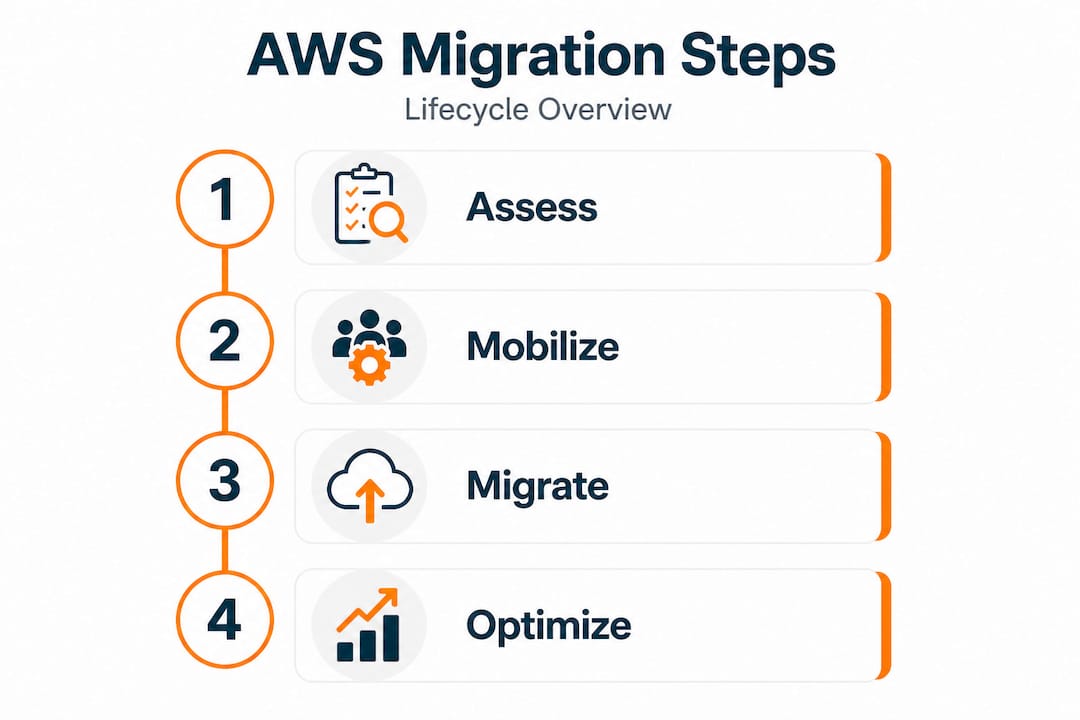
Mobilize phase: This is where you build your landing zone, establish your network architecture, set up identity and access management, and validate your security baseline. The landing zone is the foundation. If it is poorly designed, every workload you migrate into it inherits those weaknesses.
Migrate/modernize phase: This is execution. Workloads move in waves, typically starting with less critical systems. Infrastructure configuration gets validated against the Well-Architected pillars before each workload goes live.
Key focus areas for reducing risk across all phases:
- Security: Use AWS IAM with least-privilege policies, enable AWS CloudTrail for all API activity, encrypt data at rest and in transit from day one.
- Reliability: Deploy across multiple Availability Zones, implement automated health checks, and test failover scenarios before go-live.
- Cost optimization: Set up AWS Cost Explorer and budgets during the mobilize phase, not after spending surprises appear.
- Performance efficiency: Benchmark application performance against baseline metrics before and after each migration wave.
- Operational excellence: Automate infrastructure provisioning using AWS CloudFormation or Terraform to eliminate manual configuration errors.
- Sustainability: Choose instance types and regions that align with your organization’s carbon and energy efficiency goals.
Pro Tip: Use the AWS Well-Architected Tool, which is free in the AWS console, to run a structured review of your infrastructure against the Migration Lens at each phase boundary. It surfaces specific risks with actionable remediation steps before they become production incidents.
Real-world impact: Key business benefits of cloud infrastructure for eCommerce and fintech
Having covered how infrastructure shapes migration, let’s make the connection to the business wins you can expect from making the right choices.
Technical choices at the infrastructure layer translate directly into executive-level outcomes. The AWS overview whitepaper confirms that cloud providers deliver shared, on-demand resources that boost business agility and security. In practice, that means faster product releases, lower capital expenditure, and stronger security posture, all at the same time.
For eCommerce and fintech specifically, the stakes are higher than in most industries. A 100-millisecond increase in page load time can reduce conversion rates by 7%. A payment processing outage during peak hours can cost a fintech company millions in failed transactions and regulatory scrutiny. The infrastructure decisions made during migration directly determine whether these outcomes improve or get worse.
Key business benefits that well-designed cloud infrastructure delivers:
- Elastic scalability: Traffic spikes, seasonal peaks, and rapid growth get absorbed automatically without emergency hardware orders or planned downtime.
- Compliance infrastructure: AWS provides native tools and service certifications for PCI-DSS, SOC 2, ISO 27001, and GDPR alignment, reducing the audit burden on your internal team.
- Speed to market: Teams provision new environments in minutes instead of weeks, accelerating feature development and competitive response.
- Cost agility: You shift from fixed CapEx to variable OpEx, paying only for what you use, and use reserved or savings plans pricing to lock in discounts for predictable workloads.
- Security upgrades: AWS global infrastructure includes DDoS protection, managed threat detection, and encryption services that would cost far more to replicate on-premises.
- Always-on reliability: Multi-AZ and multi-region architectures provide uptime levels that on-premises hardware simply cannot match at equivalent cost.
Understanding digital transformation on AWS puts these benefits in the context of long-term strategic positioning, not just short-term infrastructure savings. The most successful companies treat their AWS environment as a platform for innovation, not just a cheaper version of their old data center.
What most executives miss about cloud infrastructure migrations
Here is the pattern we see repeatedly across complex migrations in eCommerce and fintech: the technology works, and the project still fails to deliver its expected return. The reason almost always traces back to two things: treating the migration as a one-time project rather than an ongoing capability, and measuring success by completion date rather than business outcomes.
Cloud infrastructure is not static. AWS releases over 200 new features and services every year. The right architecture in 2024 may not be the optimal architecture in 2026. Companies that treat go-live as the finish line stop optimizing the moment they are through the door. Costs creep up. Technical debt accumulates. The infrastructure that was right-sized on day one becomes bloated 18 months later as teams provision resources without governance.
Executive leadership plays a larger role in infrastructure ROI than most technology leaders admit. When business stakeholders define clear outcome metrics, such as cost per transaction, uptime percentages, deployment frequency, and time to market, the infrastructure team has clear targets to build and optimize toward. When executives stay uninvolved after approving the budget, the infrastructure team optimizes for technical elegance instead of business value.
The teams that sustain the highest cloud strategies for long-term success share a common trait. They built ongoing cloud governance into their operating model from the start. Regular Well-Architected reviews, monthly cost optimization cycles, and continuous security posture assessments are not additional projects. They are standard operations.
Infrastructure maturity also determines how quickly companies can capitalize on new AWS capabilities. A team running a well-structured, modular AWS environment can adopt a new managed AI service in days. A team running a tangled lift-and-shift environment needs weeks of preparation work before they can safely introduce anything new. The migration is where you pay for that maturity, or fail to invest in it.
Accelerate your AWS migration with expert support
If you are planning an AWS migration and want a foundation that supports growth rather than constraining it, the difference comes down to execution depth. We have completed AWS migration services across 700+ projects as an AWS Advanced Tier Partner, working specifically in high-load eCommerce and fintech environments where getting infrastructure decisions right is non-negotiable.
Our process covers every phase from infrastructure audit through post-migration optimization, applying the right strategy, whether rehost, replatform, or refactor, based on your actual workload requirements and compliance obligations. We apply migration best practices validated across hundreds of real-world environments. If you want to understand how to unlock AWS scalability for your specific architecture, our team can walk you through a structured evaluation. Contact us to start with an infrastructure assessment tailored to your migration context.
Frequently asked questions
How is cloud infrastructure different from traditional IT infrastructure?
Cloud infrastructure delivers on-demand, shared resources at scale without the capital cost or operational burden of maintaining fixed physical hardware onsite. Traditional IT requires you to own, provision, and manage every layer yourself, which limits speed and flexibility.
What are the main risks when migrating cloud infrastructure?
Main risks include misconfigurations, weak security controls, and poor alignment with business goals. The AWS Migration Lens provides a structured framework to identify and remediate these risks at each migration phase before they affect production systems.
Which industries benefit most from advanced cloud infrastructure?
Industries with demanding security and compliance requirements, particularly eCommerce and fintech, gain the most. Cloud providers deliver shared, on-demand resources that combine agility with built-in security certifications that directly support PCI-DSS and SOC 2 compliance needs.
How do you ensure security during an AWS migration?
The AWS Migration Lens validates security architecture decisions at each phase of the migration lifecycle, covering all six Well-Architected pillars including Security and Reliability. Combining this with IAM least-privilege policies, encryption, and automated compliance checks builds a defensible security posture from the start.