
TL;DR:
- SQL Server RDS pricing mainly depends on edition choice, which significantly impacts licensing costs.
- Additional factors like instance size, storage, Multi-AZ deployment, and data transfer also influence the total bill.
SQL Server RDS pricing is driven by five factors: compute (instance class and edition), licensing model (License Included vs Bring Your Own License/BYOM), storage and I/O, Multi-AZ configuration, and data transfer. Of those five, edition choice is usually the largest single lever. Moving from Enterprise to Standard or Web can cut the license portion of your hourly rate dramatically, often more than any rightsizing or commitment discount you could stack on top. The billing clock runs in one-second increments with a 10-minute minimum charge after any billable status change, so even short-lived test instances cost real money.
Before you read further, here are the five immediate steps that matter most:
- Pick the right edition first. Validate whether Enterprise features are genuinely required.
- Right-size the instance family. Match memory and vCPU to your actual workload profile.
- Choose storage type. Decide between General Purpose SSD (gp3) and Provisioned IOPS before pricing.
- Evaluate Reserved Instances and Database Savings Plans. Commitments cut On-Demand rates significantly.
- Run the AWS Pricing Calculator. Build a full estimate including storage, backups, and data transfer before committing.
Table of Contents
- How SQL Server RDS pricing models and licensing work
- How compute pricing works for SQL Server instances
- How storage, backups, and data transfer affect your bill
- What Multi-AZ does to your monthly cost
- How to estimate your monthly SQL Server RDS cost
- Practical steps to cut your SQL Server RDS spend
- Key Takeaways
- When to optimize yourself vs when to bring in a partner
- Cut SQL Server RDS costs with IT-Magic’s free audit
- Useful sources
- FAQ
How SQL Server RDS pricing models and licensing work
Amazon RDS for SQL Server offers four billing approaches: On-Demand bundled, On-Demand unbundled, Reserved Instances (RIs), and Database Savings Plans.
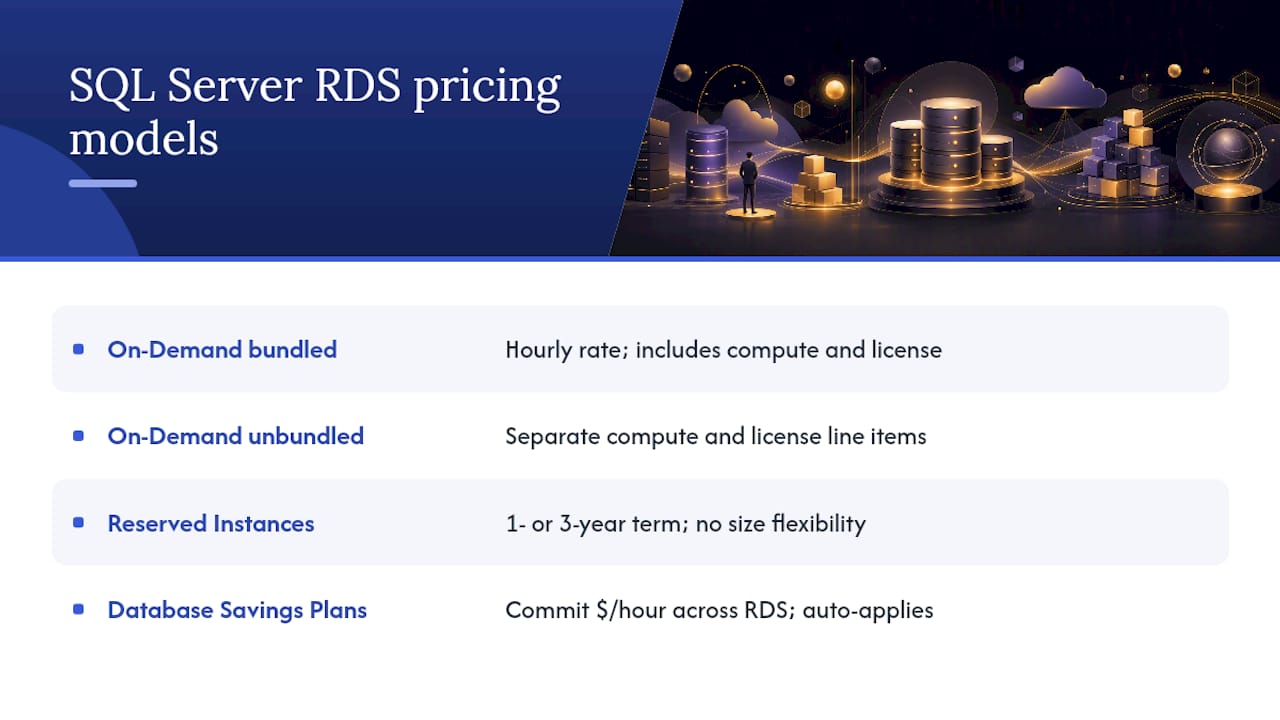
On-Demand bundled is the default. You pay an hourly rate that includes both the EC2 compute and the SQL Server license. No upfront commitment, no minimum term. It is the right choice for unpredictable workloads or new deployments you have not yet sized.
On-Demand unbundled separates the compute and license charges into visible line items. The total cost is similar, but the billing transparency helps teams that need to allocate licensing spend separately.
Reserved Instances require a 1-year or 3-year commitment in exchange for a meaningful discount over On-Demand rates. Payment choices are No Upfront, Partial Upfront, and All Upfront, with All Upfront delivering the deepest discount. One critical constraint: SQL Server RIs do not support size flexibility. The RI must match the exact running configuration, including instance class, edition, licensing model, Multi-AZ setting, and region. Change any of those and the RI no longer applies.
Database Savings Plans offer a more flexible commitment. You commit to a consistent dollar-per-hour spend across RDS, and the discount applies automatically to eligible usage. They work well when your instance mix or sizing may shift during the commitment term.
License Included vs BYOM
License Included (LI) means AWS handles the SQL Server license. It covers Express, Web, Standard, and Enterprise editions. You pay a higher hourly rate, but there is no separate Microsoft agreement to manage. AWS does cap LI instances at 10 per account by default, so large deployments may need a limit increase.
Bring Your Own License (BYOM) lets you apply existing SQL Server licenses with active Software Assurance to RDS. You pay a lower hourly rate because the license cost is removed. The tradeoff is compliance responsibility: you must confirm your licenses are eligible, maintain Software Assurance, and follow the BYOM process AWS requires. Not every edition or scenario qualifies for BYOM on RDS. Some BYOL situations, particularly those involving license mobility for large Enterprise pools, require EC2 rather than RDS.
| Pricing model | Supported editions | Typical use case | Key constraint |
|---|---|---|---|
| On-Demand LI | Express, Web, Standard, Enterprise | New or variable workloads | Highest per-hour rate |
| Reserved Instance LI | Web, Standard, Enterprise | Stable, predictable workloads | No size flexibility; exact config match required |
| Database Savings Plans | Web, Standard, Enterprise | Mixed or evolving instance fleets | Commitment in $/hr, not instance type |
| BYOM | Standard, Enterprise (eligible) | Customers with active SA licenses | Software Assurance required; some scenarios need EC2 |
Pro Tip: For workloads with uncertain timelines, 1-year No Upfront RIs give you a discount without locking cash. Database Savings Plans are better when you expect to resize or change editions mid-term. On-Demand is only the right default when you genuinely cannot forecast usage beyond 30 days.
AWS also offers promotional credits that can offset initial migration costs. The AWS Migration Acceleration Program is one route to access those credits for qualifying projects.
How compute pricing works for SQL Server instances
Compute is billed per second, with the hourly rate varying by instance family, size, and whether licensing is bundled. Memory-optimized families (db.r7g, db.r8g) are the standard choice for SQL Server workloads because SQL Server licenses under the LI model are priced per vCPU, and memory-optimized instances give you more RAM per vCPU than general-purpose families. That ratio matters: you get more usable capacity per licensed vCPU.
For unbundled instances, the license charge appears as a separate per-vCPU-hour line. This makes it easier to see exactly what the SQL Server license is costing you versus the underlying compute.
T3 instances and CPU credit surprises
T3 instances run in Unlimited mode on RDS by default. In Unlimited mode, the instance can burst above its baseline CPU for as long as needed, but CPU credits consumed beyond the accrued balance are charged separately at a per-vCPU-hour rate. AWS documents a CPU credit charge of $0.144 per vCPU-hour for T3 instances. That charge is not covered by Reserved Instances. A workload that runs consistently above baseline on a T3 can end up costing more than a comparably sized fixed-performance instance, and the credit charges only appear after the fact on your bill.
Instance selection rules worth following:
- Match instance family to workload type: memory-optimized for OLTP, general purpose for dev/test.
- Size vCPUs to your SQL Server license tier, not just to CPU utilization.
- Avoid T3 for any workload with sustained or unpredictable CPU demand.
- Check NUMA boundaries when sizing large instances: SQL Server licensing is sensitive to socket and NUMA topology.
- For RI purchases, confirm the exact instance class before buying because size flexibility does not apply.
Pro Tip: Pick an instance family that maps cleanly to your licensing model. If you buy an RI for a db.r8g.xlarge Standard LI and later need to scale to a db.r8g.2xlarge, the RI does not follow. You will pay On-Demand rates on the new size until the RI term expires.
How storage, backups, and data transfer affect your bill
Compute and licensing get most of the attention, but storage, backup snapshots, and data transfer can materially change the total bill. Leaving them out of your estimate is one of the most common planning mistakes.
Storage types
General Purpose SSD gp2 allocates IOPS based on storage size (3 IOPS per GB, up to 16,000 IOPS). You pay per GB-month. If you need more IOPS, you provision more storage, which can lead to overprovisioning.

General Purpose SSD gp3 decouples IOPS and throughput from storage size. You provision storage, IOPS, and throughput independently, which means you can right-size each dimension separately. For most SQL Server workloads, gp3 is the better default.
Provisioned IOPS (io1/io2) charges separately for storage (per GB-month) and IOPS (per IOPS-month). It delivers consistent, low-latency performance for I/O-intensive workloads. The per-IOPS charge adds up quickly at high IOPS levels, so it is only cost-effective when your workload genuinely requires guaranteed IOPS rather than just higher throughput.
| Storage type | IOPS model | Best use case | Cost behavior |
|---|---|---|---|
| gp2 | Tied to storage size | Dev/test, moderate workloads | Predictable; overprovisioning risk |
| gp3 | Independent provisioning | Most production workloads | Lower baseline cost; tune IOPS separately |
| io1/io2 | Dedicated, provisioned | High-throughput OLTP, latency-sensitive | Higher cost; justified only at sustained high IOPS |
Backups and data transfer
Automated backup storage up to the size of your provisioned database storage is included at no extra charge. Storage beyond that, and all manual snapshots, are billed at standard S3 rates. Long retention windows with large databases can generate meaningful snapshot costs.
Inbound data transfer to RDS is free. Outbound data transfer has a free allowance, and charges apply beyond that threshold. Cross-region data transfer for replicas or snapshots is billed at standard inter-region rates and should be included in any multi-region architecture estimate.
Pro Tip: If you are on gp2 and your IOPS utilization is consistently below the provisioned ceiling, migrate to gp3. You can often reduce storage costs while independently setting the IOPS you actually need, rather than paying for the storage-to-IOPS ratio gp2 forces on you. Recent SSD storage advances have made gp3 pricing even more favorable relative to provisioned alternatives.
What Multi-AZ does to your monthly cost
Multi-AZ deploys a synchronous standby replica in a second Availability Zone. The standby handles automatic failover but does not serve read traffic. From a billing perspective, you are running two instances: the primary and the standby both consume compute and storage.
In practice, Multi-AZ roughly doubles the compute portion of your bill. Storage charges are also duplicated because the standby maintains its own copy of the data. I/O charges, however, are not doubled in the same way since writes go to both but reads only hit the primary.
High-availability decision rules:
- Use Multi-AZ for any production workload where downtime directly costs revenue or violates SLA commitments.
- For dev/test environments, Single-AZ is almost always the right call. The cost savings are immediate and the risk is acceptable.
- If your RPO/RTO requirements are looser than Multi-AZ provides, consider automated snapshots with a defined restore procedure as a lower-cost alternative.
- Read replicas for SQL Server on RDS have limited support compared to open-source engines. Verify availability for your edition before planning a replica-based HA architecture.
- Cross-region replicas add inter-region data transfer costs on top of the replica instance cost. Model both before committing.
How to estimate your monthly SQL Server RDS cost
The AWS Pricing Calculator is the right tool for this. Here is the workflow:
- Select your AWS Region — Rates vary by region. US East (N. Virginia) is typically the lowest.
- Choose the engine and edition — RDS for SQL Server, then pick Express, Web, Standard, or Enterprise.
- Enable Multi-AZ if required — The calculator shows the cost impact immediately.
Worked example
The table below uses a db.r8g.xlarge running SQL Server Standard License Included in US East (N. Virginia). Rates are illustrative, sourced from third-party published estimates. Verify current rates on the official AWS pricing page before making purchasing decisions.
| Configuration | Hourly rate (approx.) | Monthly cost |
|---|---|---|
| Single-AZ, On-Demand, Standard LI | ~$1.22/hr | ~$890 |
| Multi-AZ, On-Demand, Standard LI | ~$2.44/hr | ~$1,780 |
| Single-AZ, 1-yr RI (All Upfront), Standard LI | Lower effective rate | Materially less than On-Demand |
| + 100 GB gp3 storage | Per GB-month rate | Add to above |
| + Automated backups (within provisioned size) | $0 | $0 |
Before finalizing any estimate, validate these inputs:
- Workload profile: peak vs baseline CPU and memory utilization.
- Backup retention policy and average database size.
- Acceptable RPO/RTO, which determines whether Multi-AZ is required.
- Licensing footprint: do you have active Software Assurance licenses eligible for BYOM?
- Data transfer volumes, especially for applications with high read traffic or cross-region requirements.
The 10-minute billing minimum means a test instance you spin up and tear down in two minutes still charges for 10 minutes. Across a team running frequent short-lived tests, that adds up.
Practical steps to cut your SQL Server RDS spend
These are ordered by expected impact, not alphabetically.
- Validate edition requirements. AWS Prescriptive Guidance is direct: edition selection is the single most effective cost optimization. Run a feature audit. If your application does not use Enterprise-only features (Advanced Analytics, In-Memory OLTP at scale, certain HA features), move to Standard or Web.
- Rightsize before committing. Use CloudWatch metrics to identify CPU and memory utilization over a 2-4 week period. Oversized instances are common after lift-and-shift migrations.
- Evaluate RIs vs Database Savings Plans. For stable, well-understood workloads, 1-year or 3-year RIs on the exact configuration deliver the deepest discount. For evolving environments, Database Savings Plans give flexibility without locking you to a specific instance type.
- Consider BYOM only when you have compliant licenses and long-term stability. BYOM reduces the hourly rate but adds compliance overhead. It is not worth pursuing if your license situation is unclear or your deployment is likely to change.
- Switch from gp2 to gp3 and tune IOPS independently. For most workloads, gp3 costs less than gp2 at equivalent IOPS levels once you right-size the IOPS provisioning.
- Monitor T3 CPU credit consumption. Set CloudWatch alarms on CPUCreditBalance. If credits are consistently depleted, move to a fixed-performance instance family before the credit charges accumulate.
Pro Tip: When migration timelines are uncertain, combine short-term 1-year No Upfront RIs with a Database Savings Plan commitment. The RI covers your known stable instances; the Savings Plan absorbs the variable portion. You get a discount on both without overcommitting to a configuration that may change. For a structured approach to AWS cost optimization, this layered commitment strategy is one of the highest-ROI moves available.
Key Takeaways
SQL Server RDS pricing is controlled primarily by edition choice, and every other optimization (rightsizing, commitments, storage tuning) compounds on top of that foundation.
| Point | Details |
|---|---|
| Edition is the biggest lever | Moving from Enterprise to Standard or Web can cut the license portion of your hourly rate dramatically — for example, a db.r8g.xlarge running SQL Server Standard License Included in Single‑AZ is about $1.22/hr, while the Enterprise edition is significantly higher. |
| Four cost components add up | Compute, licensing, storage/I/O, and Multi-AZ all contribute; model all four before finalizing an estimate. |
| RIs require exact config match | SQL Server RIs have no size flexibility; buy only after confirming the instance class, edition, and AZ setting are stable. |
| Use the Pricing Calculator | The AWS Pricing Calculator lets you compare On-Demand, RI, and Savings Plans side by side for your specific configuration. |
| IT-Magic for complex deployments | IT-Magic’s AWS migration audits cover edition validation, RI/Savings Plan design, and rightsizing for SQL Server workloads. |
When to optimize yourself vs when to bring in a partner
Most teams can handle the basics: running the Pricing Calculator, switching from gp2 to gp3, and moving a dev/test instance off Enterprise. Those are table-stakes moves that do not require outside help.
The picture changes when the environment gets complicated. Large license pools with mixed Software Assurance coverage, regulated workloads where compliance documentation is required, cross-region deployments with complex data transfer patterns, or migrations where downtime is genuinely not an option — these are the situations where an internal team’s time cost starts to exceed the savings they are generating.
Signals that point toward bringing in a partner:
A structured partner engagement typically delivers: a full license and instance audit, a committed savings plan design with RI purchase guidance, a rightsizing report with specific instance recommendations, migration automation to reduce cutover risk, and post-migration cost governance to prevent spend from drifting back up.
Cut SQL Server RDS costs with IT-Magic’s free audit
IT-Magic is an AWS Advanced Tier Partner with 700+ completed migration projects, including complex SQL Server environments in eCommerce and fintech where licensing costs and performance SLAs are both non-negotiable. The difference from a generic cost review: IT-Magic takes full ownership of execution, not just recommendations.

For teams spending meaningfully on SQL Server RDS, the free introductory audit covers:
- License review: LI vs BYOM eligibility and compliance check.
- RI and Savings Plan recommendation: which commitment model fits your workload profile.
- Rightsizing report: instance family and size recommendations backed by actual utilization data.
The audit converts into a fixed-price engagement with defined deliverables and measurable outcomes. No open-ended retainer, no ambiguous scope. See what past projects delivered in the IT-Magic case studies, then request your free AWS cost audit to get a clear picture of what your SQL Server deployment should actually cost.
Useful sources
Before purchasing Reserved Instances or committing to a licensing model, verify current rates directly on the official AWS pages. Rates change, and third-party guides (including this one) may not reflect the latest pricing.
- Amazon RDS for SQL Server pricing
- Amazon RDS for SQL Server FAQs — Amazon Web Services (AWS)
- Managed Relational Database — Amazon RDS Pricing
- Optimize costs for Microsoft workloads — SQL Server editions (AWS Prescriptive Guidance)
- RDS Pricing Calculator: MySQL, PostgreSQL, and SQL Server Cost Breakdown for 2026 | Usage.ai
- RDS SQL Server Reserved Instances | Licensing, Editions, and What AWS Does Not Tell You About No Size Flexibility | Usage.ai
- AWS Pricing Calculator
Always verify region-specific and instance-specific rates on the official AWS pricing pages before making any purchase or commitment decision.
FAQ
What drives SQL Server RDS pricing the most?
Edition choice is the largest single driver. Enterprise licensing costs significantly more per vCPU-hour than Standard or Web, so validating whether Enterprise features are actually required is the first step in any cost review.
Does SQL Server RDS support size flexibility on Reserved Instances?
No. SQL Server License Included RIs require an exact configuration match, including instance class, edition, Multi-AZ setting, and region. Size flexibility does not apply, unlike open-source engine RIs.
What is the minimum billing period for an RDS SQL Server instance?
RDS bills in one-second increments with a 10-minute minimum charge after any billable status change such as creating, starting, or modifying an instance.
When should I use BYOM instead of License Included?
BYOM makes sense when you have existing SQL Server licenses with active Software Assurance and a stable, long-term deployment. It reduces the hourly rate but adds compliance responsibility. If your licensing situation is unclear or your deployment is likely to change, License Included is the lower-risk choice.
How do I estimate my full monthly SQL Server RDS cost?
Use the AWS Pricing Calculator and include all five cost components: compute (instance class and edition), licensing model, storage type and IOPS, Multi-AZ configuration, and data transfer. Compute-only estimates routinely understate the real bill by a meaningful margin.