
RDS Blue/Green Deployments create a synchronized staging copy of your production database, called green, alongside the live environment, called blue, so you can test engine upgrades, parameter changes, or schema updates before flipping traffic over. Switchover typically finishes in under one minute, and if something looks wrong, blue is still sitting right there as your rollback point.
Here is when it earns its place in your maintenance plan:
- You need to upgrade a MySQL, PostgreSQL, or MariaDB major version without booking a maintenance window your customers will notice.
- You want a tested, reversible path for parameter group or storage changes on a production instance that cannot tolerate a botched upgrade.
- Your workload is regulated or high-traffic enough (fintech, eCommerce) that a snapshot-and-pray upgrade strategy is not an acceptable risk.
If your database is small, low-traffic, or the change is trivial, a standard snapshot or a read replica promotion is often simpler and cheaper.
Key Takeaways
RDS Blue/Green Deployments reduce database upgrade risk by giving engineers a live, synchronized test environment and a fast, reversible switchover path.
| Point | Details |
|---|---|
| Switchover is fast | Typically finishes in under one minute using endpoint renaming, not a data migration. |
| Rollback stays available | Blue is retained and renamed with an “-old” suffix after switchover, giving you a fallback. |
| Engine support is specific | Covers RDS for MySQL, PostgreSQL, and MariaDB; Aurora uses separate documentation. |
| Replication lag is the real risk | Confirm lag has reached zero and validate schema changes are replication-compatible before switching. |
| Cleanup prevents cost creep | Delete the retained blue environment once confident, or it keeps billing under its “-old” name. |
| Complex cutovers benefit from a partner | IT-Magic runs fixed-price, zero-downtime cutover projects for regulated and high-load environments. |
Table of Contents
- What Is RDS Blue/Green and How Does the Workflow Run?
- Which RDS Engines Support Blue/Green Deployments?
- How Do You Create and Manage a Blue/Green Deployment?
- What Happens During Switchover and How Do You Roll Back?
- What Are the Biggest Risks and Best Practices?
- What Should Be on Your Pre-Flight and Cleanup Checklist?
- When Does a Migration Partner Make More Sense Than DIY?
- How IT-Magic Handles Your Blue/Green Cutover
- Sources
- FAQ
What Is RDS Blue/Green and How Does the Workflow Run?
RDS blue/green deployment works by cloning your production topology, including read replicas, Multi-AZ configuration, and Performance Insights settings, into a new green environment kept continuously in sync with blue through native replication. This is the core of any blue green migration strategy built on managed RDS: you get a live, production-accurate sandbox instead of a static copy that goes stale the moment you create it.
The workflow runs in five stages:
- Create green. RDS restores the new primary from a snapshot of blue.
- Background sync. Data continues to lazy-load and storage initializes while replication keeps green current.
- Bake and test. You run integration tests, query changed behavior, and validate performance against green, which stays read-only.
- Switchover. RDS renames endpoints so your application connects to green without any connection-string changes.
- Cleanup. Blue is retained under a new name for rollback, then deleted once you’re confident.
The benefits map directly to engineering outcomes:
- Downtime measured in seconds, not hours, because the switchover process is a metadata operation, not a data migration.
- A genuine rollback point that a snapshot restore can’t match, since blue keeps running until you decide otherwise.
- Lower-risk major version upgrades, the kind of change (MySQL 5.7 to 8.0, for instance) that historically meant a weekend on-call rotation.
Which RDS Engines Support Blue/Green Deployments?
Amazon RDS Blue/Green Deployments currently cover RDS for MySQL, RDS for PostgreSQL, and RDS for MariaDB. Amazon Aurora has its own separate implementation and documentation set, so if you’re running Aurora MySQL or Aurora PostgreSQL, check the Aurora-specific guide rather than assuming the standard RDS behavior applies identically.
A few caveats change how you plan the bake period:
- PostgreSQL relies on logical replication, which does not support every DDL statement, so schema changes need to be replication-compatible before you attempt them in green.
- MySQL benefits from GTID-based replication, which tends to be more forgiving with schema drift and easier to monitor for consistency.
- Green environments stay read-only by default, and storage keeps lazy-loading data in the background after creation, meaning fresh queries against cold blocks can be slower until initialization finishes.
How Do You Create and Manage a Blue/Green Deployment?
In the RDS console, the path is Actions → Create blue/green deployment, where you’ll pick a source instance, then review target engine version, parameter group, storage type, and instance class before confirming. Most mistakes happen here, not later, because these settings determine whether green actually represents the environment you intend to run in production.

For automation, the AWS CLI command create-blue-green-deployment is the one to memorize for any RDS blue green deployment you’re scripting into a pipeline:
aws rds create-blue-green-deployment
  --blue-green-deployment-name my-deployment
  --source arn:aws:rds:us-east-1:123456789012:db:my-db
  --target-engine-version 8.0.35
  --target-db-parameter-group-name my-new-pg
  --target-storage-type gp3
  --target-allocated-storage 500
The RDS API exposes the same operation for teams building custom orchestration on top of Boto3 or Terraform.
Settings worth double-checking before you hit create:
| Setting | Why It Matters |
|---|---|
| Target engine version | Determines which major/minor upgrade you’re testing; mismatches cause replication errors |
| Parameter group | Green needs a group compatible with the target version, not a copy of blue’s group |
| Storage type and IOPS | Switching to gp3 or io2 mid-upgrade changes baseline performance; test under load |
| Instance class | Undersizing green versus blue skews your bake-period performance data |
| Optimized Writes | Improves write throughput on Graviton-based instances; confirm engine version support first |
Green stays read-only by default, and RDS discourages writing to it directly during validation. If you must simulate write traffic for a specific test, do it deliberately and briefly, and monitor the background data load in CloudWatch so you don’t confuse lazy-load lag with a real replication problem.
Pro Tip: Run your heaviest, ugliest production query against green before you trust the bake period. Cold storage from lazy loading can mask performance regressions that only show up once real cache patterns settle in.
What Happens During Switchover and How Do You Roll Back?
Switchover isn’t a manual cutover. RDS runs guardrail checks, confirms replication lag is effectively zero, then renames endpoints so your application keeps its existing connection strings pointed at what is now the new primary. No DNS propagation wait, no code deploy.
You’ll see the deployment move through a defined set of lifecycle states:
PROVISIONINGAVAILABLESWITCHOVER_IN_PROGRESSSWITCHOVER_COMPLETEDSWITCHOVER_FAILEDINVALID_CONFIGURATION
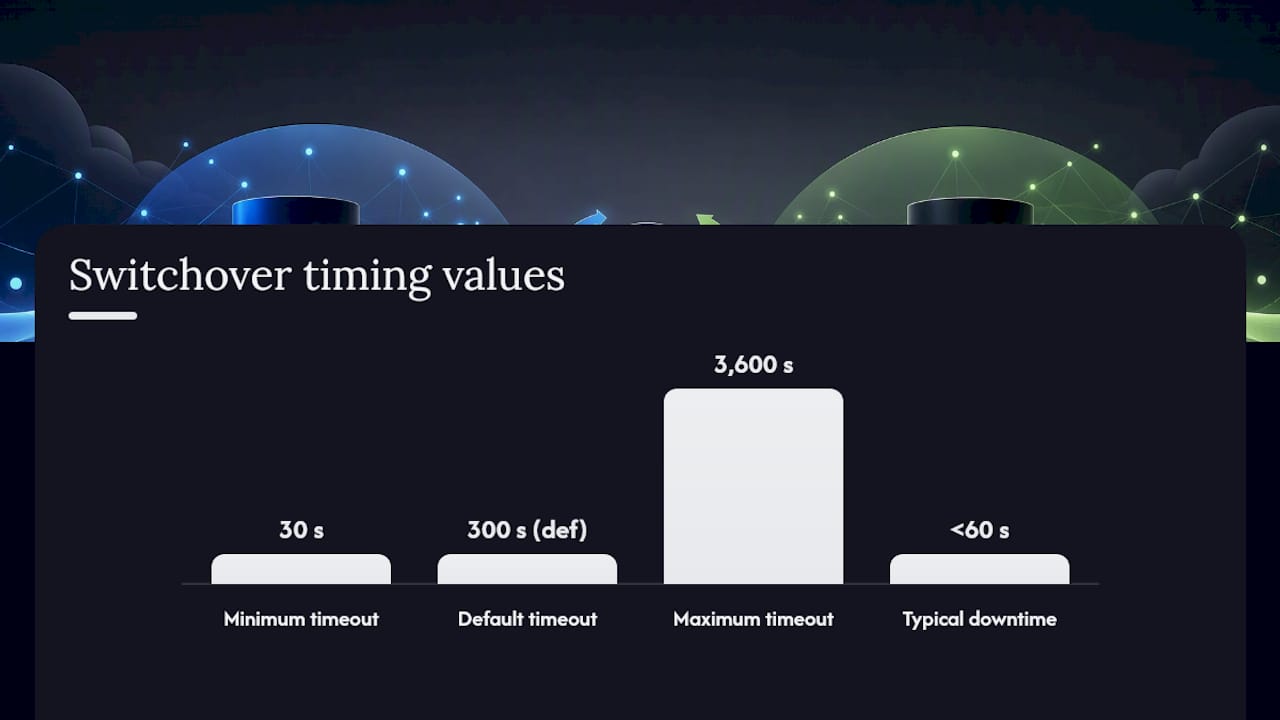
Downtime is typically under a minute, but it’s workload-dependent, and you control the ceiling with a switchover timeout you can set between 30 and 3,600 seconds, with 300 seconds as the default. If switchover doesn’t complete inside that window, RDS automatically rolls back, leaving blue as your active production database.
To roll back manually before switchover completes:
- Cancel the switchover if it’s still in progress.
- Investigate the
SWITCHOVER_FAILEDorINVALID_CONFIGURATIONstate through CloudWatch and the RDS event log. - Fix the underlying issue (usually replication lag or a parameter mismatch) and retry.
Pro Tip: Never promote the green instance manually through Actions → Promote as a shortcut. That breaks the replication link RDS depends on and can strand your deployment in an Invalid configuration state that’s harder to fix than the problem you were trying to avoid.
What Are the Biggest Risks and Best Practices?
The main risks are quieter than a failed switchover. Replication lag creeping up during a long bake period, unsupported DDL breaking PostgreSQL’s logical replication mid-test, lazy loading that hasn’t finished before you assume green is fully warmed, and parameter groups that drifted from what you actually intended to test. None of these throw a loud alarm on their own.
Metrics worth watching through the bake window:
| Metric | What It Tells You |
|---|---|
| Replica lag | Whether green is actually caught up before you consider switchover |
| DatabaseConnections | Unexpected connection spikes that hint at misrouted test traffic |
| ActiveTransactions | Long-running transactions that could stall replication |
| ReplicationSlotDiskUsage | Growing disk usage that signals a replication slot isn’t draining |
| FreeableMemory | Memory pressure that skews your performance comparison against blue |
Best practices that consistently reduce risk: enable GTID-based, crash-safe replication for MySQL where the engine allows it, keep green strictly read-only until you’re ready to test writes deliberately, and confirm replication lag has hit zero before you initiate switchover, not just “close enough.” Schedule the actual cutover during a genuine low-traffic window even though the operation itself is fast. CloudWatch alarms tied to lag thresholds, combined with CI/CD gates borrowed from patterns like ECS lifecycle hooks, give you an automated stop button instead of relying on someone watching a dashboard at 2 a.m.
Pro Tip: If your application uses RDS Proxy or a topology-aware smart driver, switchover downtime often drops further because connections redirect on topology change instead of waiting on DNS.
What Should Be on Your Pre-Flight and Cleanup Checklist?
Before creating a deployment: confirm your replication mode (logical for PostgreSQL, GTID for MySQL), run your application’s real integration suite against green, and check that lazy loading has actually finished rather than assuming it has.
After switchover: update any external replicas or binary-log consumers pointing at the old primary, verify IAM and S3 permissions still work for any extensions you rely on, and delete the retained blue environment once you’re confident, since it keeps incurring standard costs under an “-old” suffix until you do.
The gotchas that trip up otherwise careful teams: manually promoting green instead of running the official switchover, forgetting to re-enable write parameters on old-blue if you need it later for regression testing, and simply losing track of that renamed blue resource for a billing cycle or two.
Pro Tip: Put the blue decommission step directly into your migration runbook with a date, not a “when convenient” note. That’s the step teams forget most.
When Does a Migration Partner Make More Sense Than DIY?
Complex topologies change the math. Multi-region Multi-AZ setups, a heavy read-replica fan-out, or compliance requirements around cutover audit trails push a blue/green project past what most internal teams handle comfortably on top of their regular workload. A partner typically brings tested runbooks, cutover automation, and rollback playbooks already built rather than assembled under deadline pressure. When you’re scoping that kind of engagement, ask for case studies and confirm AWS Partner tier status before committing.
How IT-Magic Handles Your Blue/Green Cutover
Running a blue/green deployment correctly on a live production database, especially one tied to revenue, is a different job than reading the AWS documentation once. IT-Magic runs fixed-price migration and cutover projects specifically for teams that can’t afford a switchover to go sideways, backed by zero-downtime cutover playbooks and 24/7 support once you’re live.

That includes GDPR-aware, compliance-ready architecture work for regulated fintech and healthcare workloads where a botched parameter group change isn’t just downtime, it’s an audit finding. As an AWS Advanced Tier Partner with 700+ completed projects, IT-Magic takes ownership of the runbook, the guardrail checks, and the post-switchover cleanup instead of leaving your team to script it solo. If you’re planning an engine upgrade or a full zero-downtime migration to AWS, request an introductory infrastructure audit and get a scoped plan for your specific topology before you touch production.
Sources
- Overview of Amazon RDS Blue/Green Deployments
FAQ
Is Blue/Green Deployment Risky?
The switchover itself is low-risk because RDS runs guardrail checks and automatically rolls back if it exceeds the timeout you set. The real risk sits earlier, in unmonitored replication lag or schema changes that aren’t replication-compatible.
What Is an RDS Blue/Green Deployment?
It’s a feature that creates a synchronized copy of your production database, called green, that mirrors your live environment (blue) so you can test upgrades and changes before a fast, near-zero-downtime switchover.
What Is a Blue/Green Deployment Pattern in General?
Outside of RDS, blue/green refers to running two identical environments and routing traffic from the old one to the new one once it’s validated. RDS Blue/Green Deployments apply this same pattern specifically to managed database engines, handling the replication and endpoint renaming for you.
What Is a Blue/Green Deployment for Databases Specifically?
For databases, it means keeping a live, continuously synced replica of production available for testing engine and schema changes, then switching application traffic to it through an endpoint rename rather than a data migration.
How Long Does an RDS Blue/Green Switchover Actually Take?
Typically under one minute, though the exact figure depends on your workload and how close replication lag is to zero at the moment you switch. You can set a switchover timeout between 30 and 3,600 seconds to control how long RDS will wait before rolling back automatically.