TL;DR:
- Effective cost management requires deliberate planning, tools, and ongoing governance from the start.
- Rightsizing compute and storage resources delivers significant immediate savings after migration.
- Automation and a strong cost-conscious culture are vital for sustained AWS savings over time.
Surprise AWS bills are one of the most common frustrations for enterprise IT teams mid-migration. You plan for a budget, provision resources to match your on-premises footprint, and then the first invoice arrives looking nothing like the estimate. The good news: runaway cloud spend is almost always avoidable. What it takes is deliberate planning, the right tooling, and a structured approach that ties every cost decision to performance and compliance requirements. This guide walks through proven actions that CIOs and IT managers can apply right now, covering everything from foundational governance to automation, so you get real savings without putting your operations at risk.
Table of Contents
- Prepare for cost optimization: Foundational practices
- Rightsize and modernize resources for immediate impact
- Leverage storage and data transfer optimizations
- Automate and govern for sustained results
- Why AWS cost optimization is as much culture as tools
- Accelerate your AWS cost savings with expert support
- Frequently asked questions
Key Takeaways
| Point | Details |
|---|---|
| Establish cost visibility | Use tagging, AWS Cost Explorer, and cost alerts to track spending as you migrate. |
| Rightsize and modernize | Target optimal utilization and migrate to ARM-based resources to quickly lower expenses. |
| Optimize storage and transfers | Apply lifecycle policies, delete unused volumes, and avoid unnecessary data transfer fees. |
| Automate and govern | Use automation for idle resources and enforce regular audits to prevent cost drift. |
| Make it a cultural shift | True AWS savings only last when your whole team embraces cost optimization as an ongoing practice. |
Prepare for cost optimization: Foundational practices
Before you touch a single instance size or storage tier, you need financial visibility. Optimization without measurement is guesswork, and guesswork in a complex enterprise migration leads to either wasted spend or broken services. The foundational work here is less glamorous than rightsizing EC2 instances, but it pays dividends throughout the entire migration lifecycle.
The AWS Well-Architected Cost Optimization Pillar recommends implementing Cloud Financial Management (CFM) practices that include cost visibility through AWS Cost Explorer, the Cost and Usage Report (CUR), and resource tagging for proper attribution during migration. These are not optional add-ons. They are the control panel for every decision that follows.
Key tools to activate from day one:
- AWS Cost Explorer: Visualizes spending patterns over time, filters by service, region, and tag, and surfaces anomalies before they become big problems.
- Cost and Usage Report (CUR): Delivers granular, hourly billing data that integrates with tools like Amazon Athena or QuickSight for deeper analysis.
- Resource tagging: Assigns cost ownership to teams, projects, or business units so you know exactly who is spending what.
- AWS Budgets: Sets threshold alerts that notify your team before spend exceeds agreed limits, rather than discovering the overrun after the billing cycle closes.
The single most costly mistake teams make is launching resources during migration without consistent tagging. Once you have hundreds of EC2 instances, RDS clusters, and S3 buckets running, retroactively tagging them is painful and error-prone. Tag from the start, enforce it through tag policies in AWS Organizations, and map every resource to a cost center.
| Governance tool | Primary function | When to activate |
|---|---|---|
| AWS Cost Explorer | Spend visualization and anomaly detection | Before migration begins |
| Cost and Usage Report | Granular billing data for analysis | Before migration begins |
| Resource tagging with tag policies | Cost attribution by team/project | At first resource creation |
| AWS Budgets | Proactive spend alerts | Before major migration waves |
Following solid migration best practices from the beginning makes financial governance much easier to layer in. When your architecture decisions are intentional rather than reactive, you create fewer orphaned resources and cost anomalies.
Pro Tip: Schedule a monthly tag audit with your finops or cloud operations team. Tags drift over time as teams spin up resources informally. A 30-minute review catching misaligned tags can save thousands of dollars in misattributed spend and missed optimization opportunities. Pair this with a look at cloud strategies that align financial governance with broader business goals.
Rightsize and modernize resources for immediate impact
With financial controls and tagging in place, address the largest savings opportunities in compute and storage. Overprovisioning is the most widespread cost problem in enterprise cloud migrations. Teams lift and shift their on-premises footprint directly into AWS without adjusting instance sizes, often replicating the buffer capacity that existed to cover unpredictable hardware failures. In AWS, that buffer is unnecessary and expensive.

The data from rightsizing studies shows that rightsizing EC2 instances, EBS volumes, and RDS databases using AWS Compute Optimizer while targeting 40 to 70 percent CPU utilization consistently delivers significant savings. Migrating to Graviton (ARM-based) instances can reduce compute costs by 20 to 40 percent for compatible workloads.
Here is a structured approach to rightsizing that protects performance while cutting waste:
- Identify your top spenders. Pull a CUR report filtered by service and sort by cost. EC2, EBS, and RDS almost always dominate. Focus optimization effort where it delivers the biggest return.
- Run AWS Compute Optimizer. This tool analyzes CloudWatch utilization metrics over a 14-day window and recommends instance type changes based on actual workload behavior rather than provisioned capacity.
- Target the right utilization band. Most production workloads run efficiently between 40 and 70 percent CPU utilization. Below 20 percent is a clear signal of overprovisioning. Above 80 percent sustained is a performance risk.
- Evaluate Graviton migration. AWS Graviton3 instances offer better price-performance for compute-intensive workloads including web servers, containerized applications, and batch processing. Validate compatibility before switching.
- Load test before committing. Any rightsizing change should be validated under realistic traffic conditions. Use tools like AWS Load Testing or Apache JMeter to simulate peak load on a resized instance before migrating production traffic.
Our migration services team routinely finds that enterprises running legacy Java or .NET workloads on r5.4xlarge instances can comfortably move to r7g.2xlarge Graviton instances at roughly 35 percent lower cost with no observable performance degradation after load testing.
| Instance family | Use case | Graviton equivalent | Estimated savings |
|---|---|---|---|
| m5.xlarge (general purpose) | Web servers, app servers | m7g.xlarge | 20 to 30 percent |
| r5.2xlarge (memory-optimized) | In-memory databases, caches | r7g.2xlarge | 25 to 40 percent |
| c5.4xlarge (compute-optimized) | Batch processing, analytics | c7g.4xlarge | 20 to 35 percent |
Pro Tip: Avoid Spot Instances for critical databases or stateful services. Spot is excellent for batch workloads, CI/CD pipelines, and stateless microservices, but Spot interruptions can corrupt stateful data or cause availability gaps that far outweigh the cost savings.
Leverage storage and data transfer optimizations
After optimizing compute, ensure storage and transfer costs don’t undermine your savings. These costs grow quietly. Storage bills accumulate because nobody is deleting old snapshots. Data transfer fees compound because teams are routing traffic through NAT Gateways unnecessarily. These are fixable problems, and the fixes are straightforward once you know where to look.
Optimizing storage with S3 Intelligent-Tiering, lifecycle policies to move data to S3 Infrequent Access or Glacier, and deleting unattached EBS volumes and outdated snapshots can deliver savings of 40 to 95 percent on your storage line items depending on data access patterns.
Storage optimization actions, in priority order:
- Enable S3 Intelligent-Tiering for buckets where access patterns are unpredictable. AWS automatically moves objects between frequent and infrequent tiers based on access frequency, with no retrieval fees for objects in the infrequent access tier.
- Create lifecycle policies for S3 buckets holding logs, backups, and archives. Move data to S3 Standard-IA after 30 days of no access, then to Glacier Flexible Retrieval after 90 days.
- Delete unattached EBS volumes. Every EBS volume that was detached from a terminated instance but not deleted continues generating monthly charges. Run an audit using AWS Config rules or a simple CLI command to surface all unattached volumes.
- Purge outdated snapshots. RDS and EBS snapshots are often retained far beyond any reasonable recovery window. Set a retention policy and automate deletion of snapshots older than your defined threshold.
- Establish VPC endpoints for high-traffic services like S3, DynamoDB, and ECR. Without endpoints, traffic routes through NAT Gateways and generates transfer charges that add up fast in high-volume environments.
On the networking side, eliminating data transfer waste by using VPC endpoints for S3, DynamoDB, and ECR to avoid NAT Gateway fees and minimizing inter-region transfers is one of the most impactful and underutilized optimizations in enterprise AWS environments.
| Storage tier | Monthly cost (per GB) | Best for | Access latency |
|---|---|---|---|
| S3 Standard | ~$0.023 | Frequently accessed data | Milliseconds |
| S3 Standard-IA | ~$0.0125 | Infrequent access, minimum 30 days | Milliseconds |
| S3 Glacier Instant Retrieval | ~$0.004 | Archives, quarterly access | Milliseconds |
| S3 Glacier Flexible Retrieval | ~$0.0036 | Long-term archives | Minutes to hours |
Cross-region data transfer is another hidden cost driver. Audit your architecture for any workflows that pull data across regions unnecessarily. Often, replicating a critical dataset closer to the consumer service eliminates recurring transfer fees that dwarf the one-time replication cost.
Automate and govern for sustained results
Sustained optimization requires ongoing enforcement, not just one-off actions. The single biggest threat to long-term AWS cost control is drift. Teams make smart decisions at migration time, and then six months later someone spins up a large instance for a proof of concept, forgets about it, and it runs for three months untouched. Automation prevents drift from becoming a budget problem.
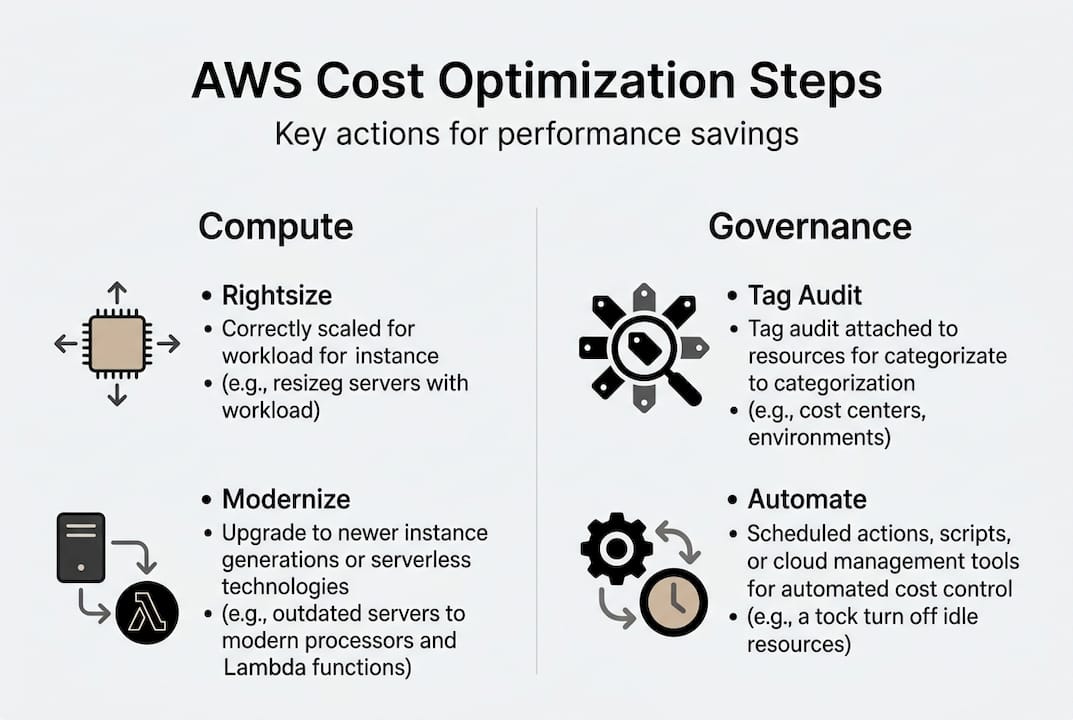
Automating dev/test environment shutdowns using instance schedulers or Lambda functions can deliver up to 65 percent savings on non-production compute costs. Serverless architectures are equally impactful for variable or event-driven workloads where you pay only for actual execution time.
Follow this sequence for building durable automation and governance:
- Automate environment schedules. Use AWS Instance Scheduler or EventBridge with Lambda to stop dev and test instances outside business hours. A t3.large running 24/7 instead of 10 hours a day wastes more than 58 percent of its cost.
- Adopt serverless for the right workloads. AWS Lambda, API Gateway, and Fargate are ideal for workloads with unpredictable or spiky traffic. You eliminate idle compute cost entirely and pay only for what you use.
- Enforce tagging and security policies with AWS Config. Create Config rules that flag untagged resources or instances missing compliance controls. Integrate with Security Hub for a unified view of policy violations.
- Load test after every major optimization. Any time you rightsize, migrate to Graviton, or change architectural patterns, run a load test to confirm performance baselines are maintained. Compliance and performance validation using AWS Config and Security Hub combined with load testing ensures that optimization changes don’t introduce security gaps or latency regressions.
- Schedule regular Well-Architected Reviews. The AWS Well-Architected Framework Cost Pillar focuses on resource efficiency, expenditure awareness, and spend management as ongoing disciplines, not one-time checkboxes. Conduct formal reviews quarterly and after every major workload change.
Refer to the best practice migration checklist to align automation and governance steps with your broader migration milestones.
“Cost optimization is not a project. It is an operational discipline. The teams that sustain the lowest AWS spend treat cost as a first-class engineering metric, not a finance team concern.”
Pro Tip: Assign clear ownership for cost reviews. Without a named owner, cost anomalies go unaddressed. Whether you designate a FinOps engineer, a platform team lead, or rotate the responsibility across teams, accountability must be explicit. Weekly 15-minute cost reviews catch problems before they compound.
Why AWS cost optimization is as much culture as tools
Here is the uncomfortable reality that most technical guides skip: the tools are easy. AWS Cost Explorer, Compute Optimizer, and Config rules take hours to set up. The hard part is sustaining the behavior that keeps costs low after migration completes and the initial optimization push winds down.
The contrast between quick wins and strategic FinOps culture reveals that rightsizing and cleanup deliver fast results, but only a FinOps culture with proper governance and commitment strategies sustains them. Automation prevents drift, but it requires governance to avoid generating its own form of technical debt.
We have seen this pattern repeatedly across enterprise migrations: a team executes a rigorous optimization during migration, cuts the AWS bill by 40 percent, gets celebrated, and then 12 months later costs have crept back to near the original level. The resources that caused the drift were not the ones touched during optimization. They were new services spun up without any cost culture in place.
The fix is treating cost decisions the way you treat security decisions. No team would deploy an unreviewed IAM policy to production. Cost controls deserve the same rigor. Build cost review gates into your sprint ceremonies, tie infrastructure requests to budget approvals, and make spend dashboards visible to engineering leads, not just finance. The technology does the tracking. Your team culture determines whether anyone actually responds.
Accelerate your AWS cost savings with expert support
Managing the full lifecycle of AWS cost optimization, from tagging governance and rightsizing to storage cleanup and automation, is a significant operational undertaking, especially when your team is already managing an active migration.
At awsmigrationservices.com, we take full ownership of execution so your team does not have to choose between keeping the lights on and optimizing spend. As an AWS Advanced Tier Partner with 700+ completed migrations, we implement the financial governance, rightsizing, and automation frameworks described in this guide as part of every engagement. Our work is grounded in the migration best practices that consistently deliver measurable cost reduction without compromising performance or compliance. Contact us to discuss what a structured optimization engagement looks like for your environment.
Frequently asked questions
What is the fastest way to reduce AWS costs for a large enterprise?
Rightsizing compute resources and removing unused storage volumes usually delivers the fastest savings, followed by automated shutdown for non-production workloads using AWS Compute Optimizer targeting 40 to 70 percent CPU utilization.
How can I automate AWS cost optimization securely?
Use AWS Config and Security Hub with automation scripts to enforce tagging and compliance policies simultaneously, so cost controls never introduce security gaps or regulatory compliance risks.
Why avoid Spot Instances for stateful databases?
Spot Instances can be reclaimed with very short notice, making them unsuitable for stateful or database workloads that require persistence and consistent availability to avoid data corruption.
What tools provide AWS cost visibility during migration?
AWS Cost Explorer, the Cost and Usage Report (CUR), and resource tagging deliver the spend visibility needed to attribute costs accurately and identify optimization opportunities throughout the migration lifecycle.