TL;DR:
- Cloud computing offers on-demand resources that enable instant scalability, lower costs, and faster deployment compared to on-premises infrastructure. It enhances operational efficiency by reducing maintenance, automating security, and supporting global expansion, while security depends on proper configuration and governance. For most organizations, hybrid models balancing control and flexibility are the practical choice, with careful workload evaluation being essential for optimal infrastructure decisions.
Cloud computing is defined as on-demand delivery of computing resources, including servers, storage, databases, and software, over the internet without owning physical hardware. The decision to choose cloud over on-premises infrastructure has shifted from a cost conversation to a strategic one. With the global cloud market projected to reach $905 billion in 2026 and a 94% adoption rate across industries, the question for most IT decision-makers is no longer whether to move to cloud, but how to do it well. Cloud migration delivers a $3.86 return for every $1 spent, with SMBs reporting 21% higher profits and 26% faster growth than peers still running on-premises infrastructure.
Why choose cloud over on-premises: the core advantages
The primary reason organizations choose cloud over on-premises infrastructure is the combination of instant scalability, lower upfront cost, and faster time to production. Traditional on-premises setups require capital expenditure on servers, networking equipment, and data center space before a single workload runs. Cloud flips that model entirely.
Here are the advantages that matter most to IT decision-makers:
- Scalability on demand. Cloud providers like AWS, Microsoft Azure, and Google Cloud Platform let you add or remove compute capacity in minutes. Ordering, racking, and configuring physical servers takes weeks.
- Pay-as-you-go pricing. You pay only for what you consume. There is no budget locked into hardware that sits underutilized at 15% capacity for three years.
- Faster deployment cycles. Development teams can spin up new environments in minutes rather than waiting for procurement. This directly accelerates product releases and reduces time to market.
- Automatic maintenance. Cloud providers handle firmware updates, hardware replacements, and security patching automatically, eliminating the vulnerability windows that plague on-premises teams managing patch cycles manually.
- Global reach. AWS alone operates availability zones across more than 30 geographic regions. Replicating that footprint with owned hardware is financially out of reach for most organizations.
The greatest cloud advantage in 2026 is not cost reduction. It is operational friction removal, which frees engineering teams to build products instead of managing infrastructure. That shift is what separates fast-moving organizations from those perpetually stuck in maintenance mode.
Pro Tip: Before your next budget cycle, calculate how many engineering hours per month your team spends on infrastructure maintenance tasks. That number, multiplied by fully loaded labor cost, is your true on-premises operational tax.

How do cloud and on-premises compare in security, control, and compliance?
Security is the most common objection IT leaders raise when evaluating on-premises vs cloud. The assumption is that local hardware means better security. That assumption is wrong in most cases, though the nuance matters.
| Factor | Cloud | On-Premises |
|---|---|---|
| Security investment | Billions spent annually by providers on certifications, tooling, and threat intelligence | Dependent entirely on internal IT budget and expertise |
| Certifications | ISO 27001, SOC 2, FedRAMP, PCI DSS maintained by provider | Organization must obtain and maintain independently |
| Patch management | Automatic, continuous | Manual, often delayed |
| Physical access control | Provider-managed, enterprise-grade | Organization-managed, variable quality |
| Misconfiguration risk | High if governance is absent | High if team lacks cloud expertise |
| Compliance flexibility | Hybrid and private cloud options available | Full control but full responsibility |
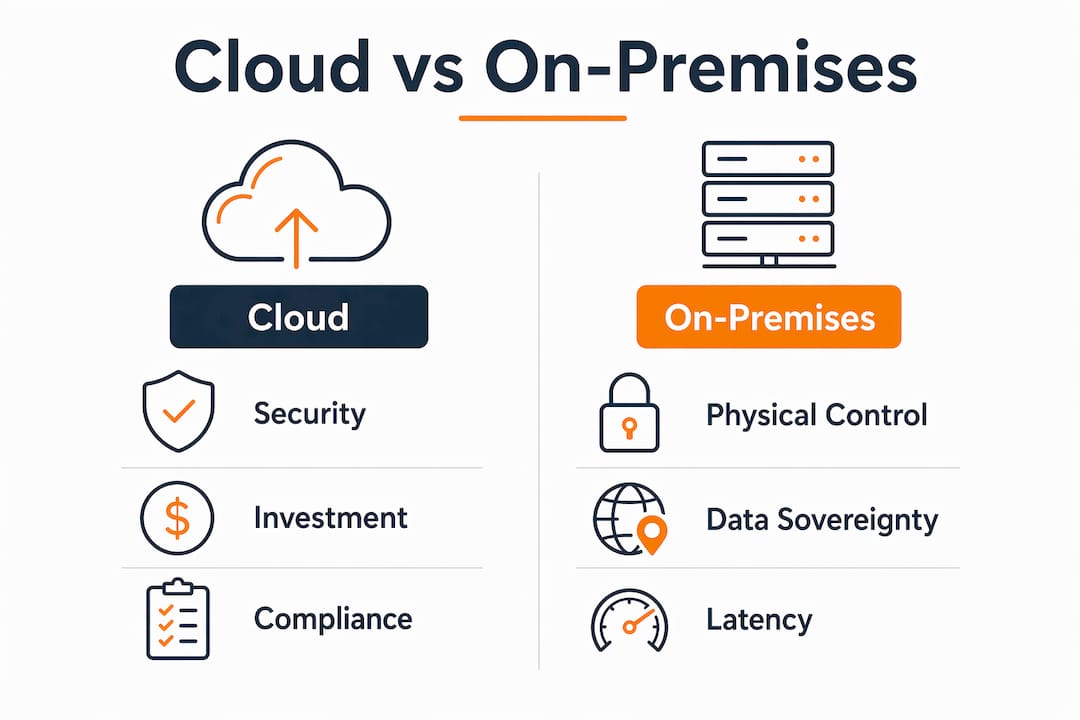
Cloud security depends entirely on correct configuration and governance, not on the provider’s certifications alone. A misconfigured S3 bucket exposes data just as surely as an unlocked server room. The shared responsibility model means AWS secures the infrastructure layer. You secure everything you deploy on top of it.
On-premises infrastructure gives you complete physical control, which matters in specific scenarios: classified government workloads, certain financial regulations, or environments where data cannot legally leave a specific jurisdiction. But physical control does not equal security. An on-premises team without dedicated security expertise often produces a less secure environment than a well-governed AWS deployment.
Pro Tip: When evaluating cloud security for compliance purposes, request your provider’s SOC 2 Type II report and map their controls directly to your regulatory framework before making architecture decisions.
What are the operational and scalability differences?
Scalability is where cloud infrastructure creates the most measurable separation from on-premises setups. The operational differences compound over time in ways that are not always visible in a simple cost comparison.
-
Elastic scaling. Cloud resources scale instantly, responding to real-time demand. An eCommerce platform handling a Black Friday traffic spike can scale compute capacity automatically and scale back down within hours. On-premises infrastructure requires you to provision for peak load permanently, meaning you pay for that capacity 365 days a year.
-
Infrastructure as Code. IaC tools like AWS CloudFormation and Terraform allow teams to define, version, and deploy entire infrastructure stacks through code. This eliminates manual configuration errors and makes environment replication trivial. Treating cloud as a remote data center without automation eliminates most of its operational advantages.
-
Disaster recovery and availability. Cloud providers offer multi-region replication, automated failover, and managed backup services that would require significant capital investment to replicate on-premises. AWS offers a Recovery Time Objective measured in minutes for properly architected workloads. On-premises disaster recovery typically involves a secondary physical site, which doubles hardware and facilities costs.
-
Global availability. Deploying to a new geographic market on-premises means procuring hardware, securing a facility, and hiring local IT staff. On AWS, it means selecting a new region in a configuration file and deploying.
-
Operational team focus. On-premises infrastructure demands ongoing attention from skilled engineers for tasks that generate zero business value: replacing failed drives, managing network switches, and coordinating hardware vendor support. Cloud shifts that effort toward application performance and product development.
For organizations running cloud scalability for growth, the compounding effect of these five factors is what makes cloud the default choice for dynamic workloads.
What are the cost considerations for cloud vs on-premises?
Cost comparisons between cloud and on-premises infrastructure are frequently oversimplified. The honest answer is that cloud is cheaper for most organizations, but not all workloads, and not without proper financial governance.
| Cost Category | Cloud | On-Premises |
|---|---|---|
| Upfront capital | Near zero | High (servers, networking, facilities) |
| Ongoing compute cost | Variable, usage-based | Fixed, regardless of utilization |
| Hardware refresh cycle | Not applicable | Every 3 to 5 years |
| IT staffing | Reduced infrastructure ops headcount | Full infrastructure team required |
| Disaster recovery | Included in architecture | Separate facility and hardware |
| Cost overrun risk | High without FinOps controls | Predictable but inflexible |
The pay-as-you-go model converts capital expenses to operational expenses, which improves cash flow and reduces financial risk for growing organizations. That shift also means cloud costs can spiral without discipline. Organizations that migrate without implementing FinOps practices, using tools like AWS Cost Explorer, AWS Budgets, or third-party platforms like CloudHealth, often see bills that exceed their on-premises baseline.
On-premises can be more economical in one specific scenario: stable, predictable workloads running on recently refreshed hardware with a strong in-house IT team. A manufacturing company running the same ERP workload at consistent capacity for the next five years may find that owned hardware delivers a lower total cost of ownership over that period. The calculation changes the moment that workload needs to grow, change, or integrate with modern services.
For a detailed breakdown of migration cost planning, the choice of rehost, replatform, or refactor strategy significantly affects both migration cost and long-term cloud spend.
When might on-premises infrastructure be the better choice?
Cloud is the right answer for most organizations, but not every workload. On-premises infrastructure offers complete control and predictable performance in scenarios where those properties are non-negotiable.
- Data sovereignty requirements. Certain government contracts, healthcare regulations, and financial compliance frameworks require data to remain within specific physical boundaries that cloud regions cannot satisfy.
- Latency-sensitive applications. Industrial control systems, high-frequency trading platforms, and real-time manufacturing automation often require sub-millisecond response times that cloud networking cannot guarantee.
- Stable workloads with fresh hardware. If your organization recently invested in a hardware refresh and runs predictable, non-variable workloads, the depreciation math may favor staying on-premises for the remaining hardware lifecycle.
- Strong in-house IT teams with compliance expertise. Organizations with mature internal security and compliance operations sometimes find that cloud governance adds complexity without proportional benefit.
- Hybrid cloud as the practical middle ground. Most enterprises do not make a binary choice. Hybrid cloud models blend on-premises control for sensitive or latency-critical workloads with cloud scalability for everything else. This is the most common enterprise architecture in 2026 and often the most pragmatic starting point for organizations with legacy dependencies.
The SMB cloud migration guide from Internet Port covers how smaller organizations can evaluate this tradeoff without the complexity that enterprise-scale decisions involve.
Key takeaways
Cloud is the superior infrastructure choice for most organizations because it removes operational friction, scales with demand, and converts capital risk into manageable operational expense.
| Point | Details |
|---|---|
| ROI favors cloud strongly | Cloud migration returns $3.86 per $1 spent, with SMBs seeing 21% higher profits. |
| Security requires governance | Cloud providers hold ISO 27001 and SOC 2 certifications, but misconfiguration is your responsibility. |
| Scalability is the real differentiator | Cloud scales in minutes; on-premises procurement takes weeks and locks in fixed capacity. |
| On-premises still fits specific cases | Data sovereignty, sub-millisecond latency needs, and stable workloads on fresh hardware favor on-premises. |
| Hybrid is the common enterprise reality | Most organizations run hybrid architectures, keeping sensitive workloads on-premises while scaling dynamic ones in cloud. |
The infrastructure decision most teams get wrong
After working through hundreds of cloud migration projects, the pattern I see most often is not organizations choosing the wrong infrastructure. It is organizations treating the cloud vs on-premises decision as a one-time, all-or-nothing choice.
The teams that get the most value from cloud are the ones that evaluate workload by workload. They ask: what does this specific application need in terms of latency, compliance, scaling behavior, and development velocity? A monolithic ERP system with stable load and strict audit requirements may legitimately belong on-premises or in a private cloud. The same organization’s customer-facing API layer, data analytics pipeline, and development environments almost certainly belong in AWS or a comparable public cloud.
What I find consistently underestimated is the operational maturity required to run cloud well. Moving to AWS without implementing IaC, cost governance, and proper IAM policies does not give you cloud benefits. It gives you a more expensive, harder-to-manage version of your on-premises problems. The organizations that thrive are the ones that treat cloud as a discipline, not a destination.
The enterprise scalability and security advantages of cloud are real, but they require deliberate architecture decisions to materialize. My honest recommendation: start with a thorough infrastructure audit, identify your three to five highest-value migration candidates, and build cloud operational maturity before migrating everything. The competitive advantage comes from doing it right, not doing it fast.
— Oleksandr
Ready to move from on-premises to AWS?
IT-Magic has completed 700+ AWS migrations for eCommerce and fintech organizations where downtime and cost overruns are not acceptable outcomes. As an AWS Advanced Tier Partner, IT-Magic takes full ownership of the migration lifecycle: infrastructure audit, strategy selection, hands-on implementation, and post-migration cost optimization. Whether your workloads need a straight rehost or a full refactor, the approach is always matched to your business context. Explore AWS migration services from IT-Magic to see how a structured, proven migration process eliminates the risk of moving from on-premises to cloud. You can also review AWS migration best practices to understand what a production-grade migration actually looks like.
FAQ
Why is cloud generally better than on-premises for most businesses?
Cloud delivers faster deployment, automatic scaling, and lower upfront cost compared to on-premises infrastructure. SMBs using cloud report 21% higher profits and 26% faster growth than those running on-premises setups.
Is cloud infrastructure more secure than on-premises?
Neither is inherently more secure. Cloud providers invest billions in certifications like ISO 27001 and SOC 2, but security outcomes depend on how well your team configures and governs the environment.
What is the main cost difference between cloud and on-premises?
Cloud converts capital expenditure into operational expenditure, eliminating hardware refresh cycles and reducing infrastructure staffing needs. On-premises can be cheaper for stable, predictable workloads on recently refreshed hardware.
When does on-premises infrastructure make more sense than cloud?
On-premises is preferable for workloads with strict data sovereignty requirements, sub-millisecond latency needs, or stable compute demand on hardware that has not yet reached end of life.
What is a hybrid cloud model and when should you use it?
A hybrid cloud model combines on-premises infrastructure for sensitive or latency-critical workloads with public cloud for scalable, dynamic applications. Most enterprises in 2026 use hybrid architectures as a practical balance between control and agility.