
TL;DR:
- Skipping structured planning leads to costly cloud migration failures. Proper dependency mapping, testing, and stakeholder involvement ensure a successful, value-driven migration.
Cloud migration failure is defined by one consistent pattern: teams that skip structured planning pay for it in downtime, data loss, and cost overruns. Knowing how to avoid migration pitfalls is the difference between a migration that delivers business value and one that stalls operations for months. The good news is that the most common migration errors follow predictable patterns, and every one of them has a documented fix. This guide covers the prerequisites, execution steps, and validation practices that IT decision-makers and business leaders need to move workloads to AWS without surprises.
What prerequisites are vital to preventing migration pitfalls?
Successful migration starts long before a single workload moves. The foundation is stakeholder alignment between business and technology teams. When finance, operations, and IT agree on scope, timelines, and acceptable risk before the project starts, migration creep becomes far less likely.

Data profiling and cleansing come next. Migrating dirty data into a new environment does not clean it. It multiplies the problem. Audit source data for duplicates, null values, and format inconsistencies before any transfer begins. This step alone eliminates a large category of post-migration errors.
Undocumented application dependencies remain a top cause of migration failure. Comprehensive dependency mapping before migration avoids unexpected system breakages after cutover. Document every integration, API call, and data feed that touches the systems you plan to move.
Defining success with specific, quantifiable metrics prevents disputes and migration creep. A concrete example: 100% of records migrated with zero integrity errors within 48 hours post-cutover. Without a target like that, teams argue about whether the migration succeeded rather than fixing what went wrong.
The table below compares the core preparatory activities and what each one protects against.
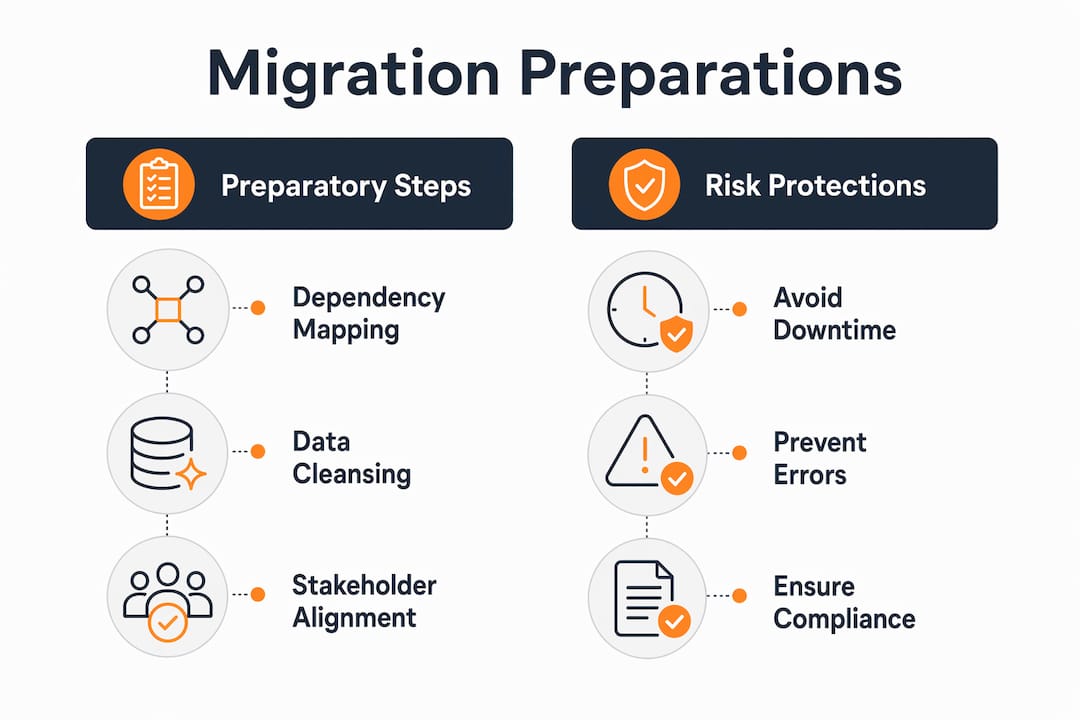
| Preparation activity | What it prevents |
|---|---|
| Stakeholder alignment | Scope creep and conflicting priorities mid-project |
| Data profiling and cleansing | Corrupted or incomplete records in the target system |
| Dependency mapping | Unexpected application breakages after cutover |
| Success criteria definition | Post-migration disputes and undetected failures |
| Compliance and governance review | Regulatory violations and audit failures |
Key preparatory steps to complete before migration begins:
- Map all application and data dependencies to a shared documentation system
- Profile source data and log all anomalies before transfer
- Define rollback triggers in writing with sign-off from both IT and business leads
- Confirm compliance requirements for data residency, retention, and access controls
- Assign data ownership to specific teams so accountability is clear from day one
How can pilot migrations and phased execution reduce migration risks?
Pilot migrations are the single most effective tool for catching problems before they affect production. Running a dry run with actual production-volume data is the highest ROI migration test available. Synthetic data testing fails to reveal bottlenecks and incompatibilities that only surface with real data.
Pilot migrations should run on 5–10% of actual production data to uncover edge case issues. Testing real, unsanitized subsets improves the accuracy of migration timelines and success prediction. A pilot that uses clean, representative sample data tells you almost nothing about what will break at scale.
Phased migration reduces the blast radius of any single failure. A big bang cutover moves everything at once. If something breaks, everything breaks. A phased approach moves workloads in batches, validates each batch, and only proceeds when the previous phase passes its success criteria.
Continuous data replication and parallel runs add another layer of protection. Running the source and target systems simultaneously for a defined period lets teams compare outputs in real time and catch discrepancies before the source is decommissioned.
How to execute a pilot migration that actually predicts production outcomes:
- Select 5–10% of production data, prioritizing the most complex and highest-volume records
- Run the migration against the target environment and log every error and warning
- Measure transfer speed, error rates, and data integrity against your pre-defined success criteria
- Identify any schema mismatches, truncation errors, or performance bottlenecks
- Adjust the migration plan based on pilot findings before scaling to full production
Pro Tip: Select edge-case data for your pilot: the largest files, the oldest records, and the most complex schemas. These are the records most likely to break, and finding that out during a pilot costs far less than finding it during a full cutover.
What are the best practices for managing rollbacks and post-migration validation?
Rollback plans that exist only on paper provide false confidence. Failure to test rollback plans practically renders them ineffective. Rollback plans must include pre-defined triggers and be tested in sandbox environments prior to migration. A trigger might be: error rate exceeds 2% within the first four hours post-cutover, or a critical integration fails validation.
Testing rollback procedures in a non-production environment before migration day is non-negotiable. Teams that skip this step discover their rollback process is broken at the worst possible moment. The sandbox test should mirror production conditions as closely as possible.
Source systems should remain in read-only mode for at least 30 days after cutover. This acts as a last-resort archive to mitigate risks from data corruption or missing records post-migration. Decommissioning the source system on day one removes your safety net before you know you need it.
Post-migration audits lasting 2–4 weeks are industry standard in 2026. During this audit period, teams must actively monitor error rates and compare performance to legacy systems, keeping rollback options open throughout.
Post-migration validation checklist:
- Compare record counts between source and target systems at the table level
- Validate data types, formats, and precision for all critical fields
- Run integration tests for every API and downstream system that connects to migrated data
- Monitor application performance against pre-migration baselines for at least two weeks
- Use automated cross-database diffing to catch schema drift, precision mismatches, or truncations that manual checks miss
Pro Tip: Do not rely on manual spot checks for data reconciliation. Automated diffing tools catch the category of errors that humans consistently miss: precision truncations, silent null conversions, and schema drift that looks correct until a downstream system fails.
How does cross-team collaboration prevent migration mistakes?
Ignoring business logic and stakeholder input causes costly migration errors. Engaging non-technical stakeholders ensures business rules and data ownership are preserved in migration plans. The technical team knows how data is stored. The business team knows what the data means and how it gets used.
Hidden business logic is one of the most underestimated migration risks. A field labeled “status” in a database might drive pricing rules, customer notifications, and compliance reporting. If the migration team does not know that, they may map it incorrectly or drop it entirely. The result shows up weeks later as a billing error or a compliance gap.
Successful cloud migrations require strategic modernization rather than a simple lift and shift. This means business units need to participate in defining what the migrated system should do, not just what it currently does. That conversation surfaces requirements that no technical audit would find on its own.
Common mistakes that cross-team collaboration directly prevents:
- Migrating deprecated data fields that business teams have already replaced with new processes
- Applying incorrect retention policies because IT did not consult legal or compliance teams
- Breaking customer-facing workflows because product teams were not included in dependency mapping
- Losing calculated fields or derived metrics that exist in application logic rather than the database schema
- Missing data ownership gaps that create accountability problems post-migration
Governance and compliance must be embedded in the migration plan from the start, not added as a review step at the end. For teams operating in regulated industries, this means involving legal, compliance, and security stakeholders in the planning phase. The migration strategy selection process should reflect these requirements before any technical work begins.
Key Takeaways
Avoiding migration pitfalls requires structured preparation, tested rollback plans, phased execution, and active cross-team collaboration before and after cutover.
| Point | Details |
|---|---|
| Map dependencies before moving anything | Undocumented dependencies are the top cause of post-cutover breakages. |
| Use real production data in pilots | Synthetic data misses the edge cases that break migrations at scale. |
| Test rollback plans in a sandbox | Untested rollback procedures fail when you need them most. |
| Keep source systems read-only for 30 days | This preserves a recovery option while the target system stabilizes. |
| Include business stakeholders from day one | Business logic and data ownership gaps cause errors that technical audits cannot catch. |
What I have learned from watching migrations succeed and fail
Most migration failures I have seen share one trait: the team treated the project as a technical move rather than a business change. They focused on getting data from point A to point B and assumed the business side would sort itself out. It never does.
The lift-and-shift instinct is understandable. It feels faster and lower risk. But lift-and-shift migrations fail primarily because of lack of modernization. Moving a legacy architecture to the cloud without refactoring it means you inherit every performance problem and scaling constraint the old system had, plus new cloud costs on top. That is not a migration win.
The projects that go well share a different mindset. The team treats migration as a chance to fix what was already broken. They do the honest assessment of legacy debt, they involve the business early, and they define what “done” looks like before writing a single line of migration code. The AWS cloud migration guide for IT teams lays out this full lifecycle approach clearly.
Post-migration monitoring is where discipline tends to slip. Teams declare victory at cutover and move on. The 2–4 week audit period exists precisely because the real problems surface after the adrenaline of go-live fades. Build that monitoring period into the project plan as a hard deliverable, not an optional follow-up.
— Oleksandr
IT-Magic’s approach to migration risk management
IT-Magic has completed 700+ AWS migration projects across eCommerce and fintech environments where downtime translates directly into lost revenue. The team takes full ownership of execution, from infrastructure audit through post-migration optimization, so your internal team does not carry the operational burden of the project.

Every engagement covers the full migration lifecycle: dependency mapping, pilot testing, phased cutover, rollback planning, and a structured post-migration validation period. IT-Magic applies the right strategy for each workload, whether that is rehost, replatform, or refactor, based on your business context and long-term goals. For IT leaders who need a predictable, secure path to AWS, the AWS migration services page covers the full scope of what IT-Magic delivers. You can also review real migration outcomes across industries to see the measurable impact of a structured approach.
FAQ
What is the most common cause of cloud migration failure?
Undocumented application dependencies and the absence of tested rollback plans are the leading causes of migration failure. Both are preventable with structured pre-migration planning.
How long should post-migration audits last?
Industry standard in 2026 calls for 2–4 weeks of active monitoring after cutover, with rollback options kept open throughout the audit period.
Why should source systems stay online after cutover?
Keeping source systems in read-only mode for at least 30 days post-cutover provides a recovery archive if data corruption or missing records are discovered in the target system.
What percentage of production data should a pilot migration use?
Pilot migrations should use 5–10% of actual production data, specifically targeting the most complex records, largest files, and oldest data to surface edge case failures before full cutover.
How do you define success criteria for a migration?
Success criteria must be specific and measurable. A strong example: 100% of records migrated with zero integrity errors within 48 hours post-cutover. Vague criteria lead to disputes about whether the migration succeeded.