
TL;DR:
- Minimizing AWS downtime involves designing architectures without single points of failure and testing recovery plans regularly. Deployment strategies like Blue/Green, Canary, and Strangler pattern help reduce update risks and achieve near-zero or instant rollout times. Using multiple Availability Zones, implementing health checks, and automating incident response significantly improve availability and reduce recovery time during outages.
Minimizing downtime on AWS is the practice of designing, deploying, and operating cloud workloads so that service interruptions stay within defined recovery objectives. For workloads targeting 99.99% availability, the total tolerated outage is roughly 53 minutes per year. A single unplanned incident that takes 30–45 minutes to resolve can consume most of that budget in one event. The strategies covered here, including Blue/Green deployments, Multi-AZ architecture, and AWS Incident Manager, give IT teams the tools to protect that budget and keep operations running.
What are the best deployment strategies to reduce AWS downtime?
Deployment method is the first place downtime gets introduced or prevented. Every application update, schema change, or infrastructure swap carries risk. Choosing the right deployment pattern eliminates most of that risk before it reaches production.

Blue/Green deployments
Blue/Green deployment runs two identical environments in parallel. Traffic shifts from the live “blue” environment to the updated “green” environment only after validation passes. The result is near-zero downtime for application updates, with instant rollback if the new version fails.
For databases, Amazon RDS Blue/Green Deployments reduce primary database switchover time to 5 seconds or less for standard connections, and about 2 seconds for teams using the AWS Advanced JDBC Driver. That is a meaningful reduction compared to traditional maintenance windows that can last 15–30 minutes.
Canary and Rolling deployments
Canary deployments route a small percentage of live traffic to the new version first. This limits the blast radius of a bad release. If error rates stay normal, the rollout continues incrementally. Rolling deployments replace instances one at a time, keeping the majority of capacity live throughout the update.
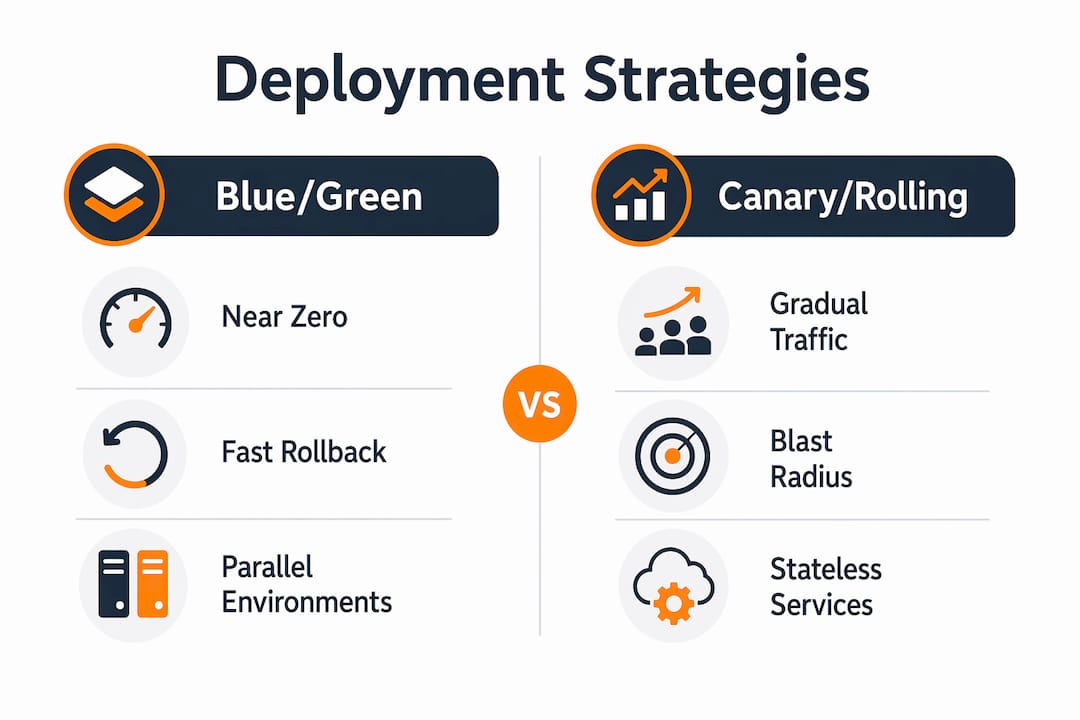
Both approaches suit stateless services well. They work poorly for workloads with strict session affinity or database schema changes that cannot run in parallel with the old version.
Zero-downtime API migrations with the Strangler fig pattern
The Strangler fig pattern combined with Amazon CloudFront Functions enables zero-downtime API migrations by routing traffic progressively to new endpoints. Teams can migrate individual API routes without touching the legacy system, and roll back instantly if a route fails. This approach is particularly effective during large-scale AWS migrations where a full cutover is too risky.
Pro Tip: Before any Blue/Green switchover, run synthetic transaction tests against the green environment for at least 10 minutes. Catching a failed health check before traffic shifts costs nothing. Catching it after costs you your RTO.
| Deployment type | Downtime risk | Rollback speed | Best use case |
|---|---|---|---|
| Blue/Green | Near zero | Instant | Full application and database updates |
| Canary | Very low | Fast | Stateless services, gradual rollouts |
| Rolling | Low | Moderate | Containerized workloads, auto-scaling groups |
| Strangler fig | Near zero | Instant | API migrations and legacy decomposition |
How can AWS architecture design improve availability and reduce downtime?
Architecture is where availability is built in, not bolted on. The difference between 99.5% and 99.95% uptime is not configuration tuning. Moving to 99.95% availability requires removing single points of failure (SPOFs) entirely, including NAT gateways and standalone RDS instances. That is a structural change, not a settings adjustment.
-
Deploy across multiple Availability Zones. Multi-AZ placement means a hardware failure, power event, or network issue in one AZ does not take down your service. AWS managed services like Amazon RDS Multi-AZ handle synchronous replication automatically. Converting an existing RDS instance to Multi-AZ takes an hour or more as a background task and increases write latency slightly due to synchronous replication, but it does not cause downtime during the modification itself.
-
Add RDS Proxy for database failover. Without RDS Proxy, an RDS Multi-AZ failover takes 60–120 seconds plus reconnection time. RDS Proxy absorbs that gap by managing the connection pool, so application threads do not see the failover at all.
-
Eliminate NAT gateway as a SPOF. A single NAT gateway in one AZ creates a correlated failure point. Deploy one NAT gateway per AZ and update route tables accordingly.
-
Design applications to be stateless. Stateless services can be replaced, restarted, or scaled without session loss. Store session data in ElastiCache or DynamoDB rather than in application memory.
-
Implement health checks and load balancing. Application Load Balancer health checks remove unhealthy targets from rotation within seconds. Pair this with graceful degradation logic so partial failures return reduced functionality rather than errors. For a deeper look at these principles, the high availability design guide covers the full set of managed service features that maintain uptime.
What disaster recovery strategies help minimize downtime on AWS?
Disaster recovery (DR) planning defines how fast you recover when architecture alone cannot prevent an outage. AWS supports four DR models, each with a different cost and recovery time trade-off.
- Backup and restore. The lowest-cost option. Data is backed up to Amazon S3 or AWS Backup. Recovery time is measured in hours. This model suits non-critical workloads where a long RTO is acceptable.
- Pilot light. A minimal version of the production environment runs continuously in a secondary region. Core services like databases replicate in real time. Compute is provisioned only at failover. Recovery time drops to minutes rather than hours.
- Warm standby. A scaled-down but fully functional copy of production runs in the DR region. Failover requires only scaling up, not provisioning from scratch. RTO is measured in minutes.
- Active-active. Traffic runs across two or more regions simultaneously. Failover is automatic and nearly instantaneous. This model carries the highest cost but delivers the lowest RTO and RPO.
The pilot light model carries a specific risk that teams often overlook. Capacity constraints in a failover region can prevent compute from provisioning when you need it most. On-Demand Capacity Reservations solve this by guaranteeing instance availability in the target region without requiring a long-term commitment. This is a low-cost insurance policy for any team running pilot light DR.
Pro Tip: Test your DR failover on a schedule, not just before an audit. Regular DR drills confirm that failover completes within your RTO and expose configuration drift before a real incident does.
Which AWS tools and automation improve incident response and reduce downtime?
Fast detection and fast response are the two variables that control mean time to resolution (MTTR). AWS provides native tooling that addresses both.
AWS Incident Manager
AWS Incident Manager establishes a call bridge within 5 minutes of a critical alarm. The previous standard response time was 15 minutes. That 3x improvement in response speed directly compresses MTTR for high-severity incidents. Incident Manager also automates runbook execution, so the first responder does not have to locate documentation under pressure.
Monitoring and alerting
Amazon CloudWatch with composite alarms reduces alert noise by grouping related signals into a single actionable notification. Pairing CloudWatch with AI-driven alert triage filters low-priority events so on-call engineers focus on real incidents. Detection time is the hidden variable in most outage post-mortems. Cutting detection from 10 minutes to 2 minutes saves more RTO than almost any architectural change.
Infrastructure as code and CI/CD pipelines
Infrastructure as code (IaC) tools like AWS CloudFormation and Terraform enforce consistent, tested configurations across environments. A configuration drift that causes an outage in production is almost always absent in teams that deploy exclusively through IaC. CI/CD pipelines with automated rollback gates catch bad deployments before they reach full traffic. For teams planning a migration, AWS migration best practices detail how to integrate IaC and CI/CD from day one.
| Tool | Primary function | Downtime impact |
|---|---|---|
| AWS Incident Manager | Automated incident response | Reduces MTTR by 3x |
| Amazon CloudWatch | Monitoring and alerting | Cuts detection time |
| AWS CloudFormation | Infrastructure as code | Prevents configuration drift |
| RDS Proxy | Database connection management | Absorbs failover gaps |
| CloudFront Functions | Traffic routing and rollback | Enables zero-downtime API migration |
What common mistakes cause AWS downtime and how do you fix them?
Most AWS outages are preventable. The root cause is almost always one of a small set of repeatable mistakes.
-
Relying on a single region or AZ. A single-region architecture creates correlated failure risk. One AWS event can take down your entire stack. Deploy across at least two AZs for standard workloads and two regions for critical ones.
-
Ignoring DNS caching during failover. DNS TTL values that are too high delay traffic rerouting during a failover event. Set TTL to 60 seconds or less for records that point to load balancers or failover endpoints.
-
Skipping failover tests. A DR plan that has never been tested is a guess, not a plan. Untested failover procedures routinely fail on the first real attempt due to IAM permission gaps, missing AMIs, or stale DNS records.
-
Neglecting post-migration monitoring. The 30 days after a migration carry the highest risk of unexpected downtime. Application behavior in production differs from staging. Set up CloudWatch dashboards and anomaly detection before cutover, not after.
-
Treating availability as a default. AWS provides the building blocks for high availability. It does not configure them for you. Teams that assume Multi-AZ is enabled by default on new RDS instances, or that Auto Scaling handles all failure scenarios, will discover the gaps during an incident.
Pro Tip: Build a zero-downtime migration checklist before cutover. Include DNS TTL reduction, health check validation, rollback triggers, and a 30-minute post-cutover monitoring window as mandatory steps.
Key takeaways
Minimizing downtime on AWS requires removing single points of failure, choosing the right deployment method, and testing recovery procedures before an incident forces you to rely on them.
| Point | Details |
|---|---|
| Blue/Green cuts database downtime | Amazon RDS Blue/Green Deployments reduce switchover time to 5 seconds or less. |
| SPOFs define your availability ceiling | Moving from 99.5% to 99.95% uptime requires eliminating NAT gateways and standalone RDS instances. |
| Pilot light needs reserved capacity | On-Demand Capacity Reservations prevent compute shortfalls during DR failover in constrained regions. |
| Incident Manager compresses MTTR | AWS Incident Manager establishes a response call bridge within 5 minutes, 3x faster than manual escalation. |
| Untested DR plans fail | Regular failover drills confirm RTO compliance and expose configuration drift before a real outage. |
What I’ve learned from real-world AWS outage responses
The most expensive outages I have seen were not caused by AWS failures. They were caused by teams that designed for the happy path and never stress-tested the failure path. A Multi-AZ RDS instance with no RDS Proxy still produces 60–120 seconds of connection errors during failover. That is enough to trigger cascading timeouts in a high-throughput eCommerce checkout flow.
The second pattern I see repeatedly is over-reliance on monitoring without acting on it. Teams build CloudWatch dashboards, set alarms, and then tune them so aggressively to reduce noise that the alarms stop firing on real events. Alert fatigue is a real operational risk, and it is worth treating it as a reliability problem, not just an annoyance.
The third lesson is about DR testing cadence. Most teams test DR once a year, usually before an audit. That cadence is not enough. Infrastructure changes constantly. An IAM role that existed during last year’s DR test may have been deleted by a cleanup script three months ago. Monthly or quarterly failover drills are the only way to know your DR plan actually works.
My practical recommendation: align your downtime minimization plan with a business impact analysis. Not every service needs active-active architecture. But every service needs a documented RTO, a tested failover procedure, and an owner who runs that test on a schedule. The teams I have seen maintain the best uptime records are not the ones with the most complex architectures. They are the ones with the most disciplined testing practices.
— Oleksandr
IT-Magic’s approach to AWS migrations with minimal downtime
Planning an AWS migration and concerned about service continuity? IT-Magic has completed 700+ AWS migrations as an AWS Advanced Tier Partner, with a track record in high-load eCommerce and fintech environments where every minute of downtime has a direct revenue cost.

IT-Magic applies Blue/Green deployments, Multi-AZ architecture design, and DR planning from the first day of engagement, not as afterthoughts. The team handles infrastructure audits, migration execution, and post-migration monitoring so your internal team does not carry the operational burden. See what that looks like in practice on the AWS migration services page, or review the client case studies for documented results from complex migrations.
FAQ
What is the minimum AWS availability target for production workloads?
Production workloads commonly target 99.99% availability, which allows roughly 53 minutes of downtime per year. Achieving that target requires Multi-AZ deployment and elimination of single points of failure.
How fast does Amazon RDS Blue/Green deployment switch over?
Amazon RDS Blue/Green Deployments complete the primary database switchover in 5 seconds or less for standard connections, and approximately 2 seconds for teams using the AWS Advanced JDBC Driver.
What is the difference between pilot light and warm standby DR?
Pilot light keeps only core services like databases running in the DR region and provisions compute at failover. Warm standby runs a scaled-down but fully functional copy of production, so failover requires only scaling up rather than provisioning from scratch.
How does AWS Incident Manager reduce downtime?
AWS Incident Manager automatically establishes a response call bridge within 5 minutes of a critical alarm, compared to the previous 15-minute standard. That 3x improvement in response speed directly reduces mean time to resolution.
Why do failover tests matter if Multi-AZ is already enabled?
Multi-AZ handles hardware and AZ-level failures automatically, but failover procedures for region-level events, application-layer failures, and DR scenarios require separate testing. Configuration drift, missing IAM permissions, and stale DNS records only surface during an actual test.