
TL;DR:
- Migrating from on-premises to AWS involves careful planning, including discovery, assessment, and building a target environment.
- Post-migration success depends on continuous optimization through cost control, security, and operational adjustments.
On-premise to AWS migration is the process of moving your organization’s infrastructure, applications, and data from physical servers or local data centers to Amazon Web Services. The industry term for this broader process is cloud migration, and it covers everything from simple server lifts to full application modernization. Done right, it delivers lower infrastructure costs, elastic capacity, and production-grade reliability. Done wrong, it moves technical debt to a new address and costs more than the hardware it replaced. This guide gives IT professionals and business leaders a structured, phased path from discovery through post-migration optimization.
What are the prerequisites for on-premise to AWS migration?
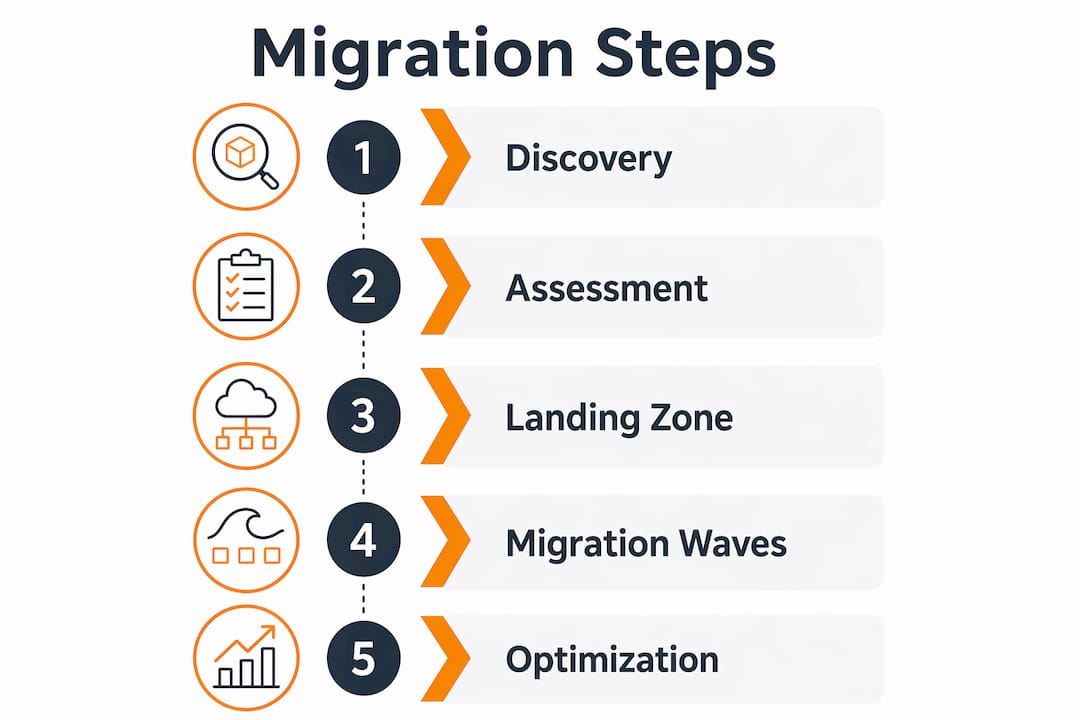
A successful on-premise to AWS migration starts long before any server moves. Discovery and planning account for roughly 80% of the work; the actual technical move is the remaining 20%. That ratio surprises most teams, but it explains why migrations fail. Undocumented dependencies are the primary cause of project failures, not execution errors.
Discovery and inventory
Start with a full inventory of every application, server, database, and network dependency in your environment. AWS Application Discovery Service automates much of this by collecting configuration and performance data from on-premises servers. Pair it with dependency mapping to identify which applications communicate with each other. Teams that skip this step routinely discover hidden connections mid-migration, which forces rollbacks and delays.

Readiness assessment
A readiness assessment covers three areas: compliance and licensing, network configuration, and team skills. Check software licenses for cloud portability. Confirm that regulatory requirements such as HIPAA, PCI DSS, or SOC 2 are addressed in your target AWS architecture. Evaluate your team’s AWS knowledge gaps and plan training before execution begins.
Building the target environment
Before migrating a single workload, build your AWS Landing Zone. AWS Control Tower automates the setup of a multi-account environment with guardrails, logging, and identity management already in place. This foundation prevents governance gaps from appearing later when dozens of workloads are running.
| Prerequisite | Tool or Standard | Purpose |
|---|---|---|
| Application discovery | AWS Application Discovery Service | Inventory servers and map dependencies |
| Compliance check | HIPAA, PCI DSS, SOC 2 | Confirm regulatory readiness |
| Target environment setup | AWS Control Tower | Multi-account governance and guardrails |
| Data transfer planning | AWS Snowball (datasets over 10TB) | Reduce transfer time for large datasets |
| Network configuration | AWS Direct Connect or VPN | Secure, low-latency connectivity |
Key prerequisites to complete before migration begins:
- Document all application dependencies and communication paths
- Validate software license portability for cloud environments
- Confirm your team holds or will obtain relevant AWS certifications
- Define rollback procedures for every workload before it moves
- Establish cost baselines to measure savings after migration
How to plan and execute migration in waves?
Wave-based migration is the most reliable method for moving a large on-premises environment to AWS without disrupting operations. Industry best practices call for grouping 5–10 applications per wave, starting with non-critical workloads and progressing to business-critical systems as your team builds confidence and process.
Applying the 6 R’s per workload
The 6 R’s framework assigns a migration strategy to each workload based on its technical and business requirements. Applying the 6 R’s must be workload-specific, not a blanket approach. Treating every application the same is one of the most common reasons migrations produce disappointing results.
- Rehost (lift and shift): Move the application to AWS with no code changes. Best for legacy systems where speed matters more than modernization.
- Replatform: Make targeted adjustments, such as moving to a managed database service, without rewriting the application. Delivers quick wins on cost and maintenance.
- Refactor: Redesign the application to use cloud-native services such as AWS Lambda or Amazon ECS. Highest effort, highest long-term return.
- Repurchase: Replace the application with a SaaS product. Common for CRM or HR systems.
- Retire: Decommission applications that are no longer needed. Up to 10–20% of infrastructure can be decommissioned immediately after discovery, which reduces migration scope and cost.
- Retain: Keep certain workloads on-premises temporarily, typically due to compliance or latency requirements.
Migration Factory model
A Migration Factory treats migration as a repeatable production process rather than a one-off project. Each wave uses the same documented runbooks, testing checklists, and cutover procedures. Teams get faster with each wave. By wave three or four, execution time per application drops significantly because the process is already proven.
Pro Tip: Never attempt a big-bang migration where all workloads move simultaneously. A single undiscovered dependency can take down multiple systems at once. Wave-based execution contains the blast radius of any issue to a small group of applications.
What are the main migration methods and how do you execute them?
AWS provides a full suite of migration tools covering every phase, from server replication to database conversion. Knowing which tool fits which method saves weeks of rework.
Lift and shift with AWS Application Migration Service
AWS Application Migration Service (MGN) replicates on-premises servers to AWS in real time. It runs a continuous block-level replication in the background, so the actual cutover window is measured in minutes rather than hours. This method works best for applications where refactoring is not justified by the business case.
Database migration with AWS Database Migration Service
AWS Database Migration Service (DMS) handles both homogeneous migrations (Oracle to Oracle) and heterogeneous migrations (Oracle to Amazon Aurora). It keeps the source database fully operational during migration, which is critical for production systems. Schema conversion is handled by the AWS Schema Conversion Tool when moving between database engines.
A common technical failure point
Hardcoded network settings cause failures in a significant share of cloud migrations. On-premises applications often reference static IP addresses or hostnames that do not exist in AWS. Replace these with environment variables or AWS Systems Manager Parameter Store before cutover. This single step prevents a category of failures that teams typically diagnose under pressure during the cutover window.
| Method | Best for | Key AWS service | Typical timeline |
|---|---|---|---|
| Lift and shift | Legacy apps, speed priority | AWS MGN | Days to weeks |
| Replatform | Apps needing managed services | Amazon RDS, Elastic Beanstalk | Weeks |
| Refactor | Cloud-native redesign | Lambda, ECS, EKS | Months |
| Database migration | Any database workload | AWS DMS | Days to weeks |
| Large data transfer | Datasets over 10TB | AWS Snowball | Days (physical shipment) |
Pro Tip: Always run a full cutover rehearsal in a non-production environment before the real cutover date. Teams that rehearse catch configuration errors that testing alone misses.
For choosing the right migration strategy per workload, the decision depends on application age, code quality, and business priority, not just technical feasibility.
How do you optimize costs and operations after migration?
Post-migration optimization is where the financial case for cloud migration is won or lost. Continuous tuning, cost monitoring, and security governance prevent cloud overspending and performance degradation. Teams that skip this phase often find their AWS bill exceeds their old data center costs within six months.
Right-sizing and cost control
Right-sizing means matching instance types and sizes to actual workload demand. Most teams over-provision during the initial migration because they replicate on-premises sizing, which was itself over-provisioned for peak capacity. AWS Cost Explorer and AWS Compute Optimizer identify idle resources and recommend smaller instance types. Switching to Reserved Instances or Savings Plans for stable workloads typically reduces compute costs by 30–40% compared to On-Demand pricing.
Security and governance
Post-migration security requires a different model than on-premises. The AWS shared responsibility model means AWS secures the infrastructure, but your team secures everything running on it. AWS Security Hub aggregates findings from GuardDuty, Inspector, and Macie into a single dashboard. Establish a Cloud Center of Excellence (CCoE) to own governance standards, enforce tagging policies, and review architecture decisions across teams.
Common post-migration pitfalls to avoid:
- Leaving development and test environments running 24/7 when they only need 8-hour windows
- Ignoring data transfer costs between Availability Zones and regions
- Failing to set AWS Budgets alerts before costs exceed thresholds
- Running workloads on instance types optimized for a different use case
- Skipping regular cloud performance reviews after the initial stabilization period
Operational model adjustments
Cloud operations require new skills and new processes. Monitoring shifts from hardware-centric tools to CloudWatch, AWS X-Ray, and third-party observability platforms. Incident response runbooks need updating to reflect cloud-specific failure modes such as Availability Zone outages or API throttling. Teams that treat cloud operations as identical to on-premises operations consistently underperform on reliability and cost.
Key Takeaways
A successful on-premise to AWS migration requires thorough discovery, workload-specific strategies, wave-based execution, and disciplined post-migration optimization to deliver lasting cost and performance gains.
| Point | Details |
|---|---|
| Discovery drives success | Undocumented dependencies are the primary cause of migration failures; plan for 80% discovery, 20% execution. |
| Use the 6 R’s per workload | Assign rehost, replatform, refactor, repurchase, retire, or retain based on each application’s specific needs. |
| Migrate in waves of 5–10 apps | Start with non-critical workloads to build team confidence before moving business-critical systems. |
| Fix hardcoded configs before cutover | Replace static IPs and hostnames with environment variables or AWS Systems Manager Parameter Store. |
| Optimize after migration | Right-size instances, set budget alerts, and establish a Cloud Center of Excellence to control ongoing costs. |
What I’ve learned after 700+ AWS migrations
The biggest misconception I see repeatedly is that migration is purely a technical task. It is a business transformation that affects people, processes, and culture. The teams that struggle most are the ones that hand the project entirely to infrastructure engineers without involving application owners, finance, and compliance from day one.
Discovery is where I have seen the most expensive mistakes. Teams rush it because it feels like overhead. Then they hit an undocumented Oracle database that feeds six other applications, and the entire wave stops. Spending three extra weeks on discovery saves three months of firefighting.
The other lesson I keep coming back to is the danger of migrating technical debt directly to the cloud. Lift and shift is a legitimate strategy for the right workloads, but using it as a default because it is faster creates a cloud environment that costs more and performs worse than the data center it replaced. The 6 R’s framework exists precisely to force that workload-by-workload conversation.
Pilot migrations matter more than most teams realize. Running one wave with a small group of non-critical applications teaches your team more than any training course. The process gaps, the missing runbooks, the configuration surprises: they all surface in a controlled environment where the stakes are low. Iterate on that pilot before scaling to critical systems.
— Oleksandr
IT-Magic’s end-to-end AWS migration support
Moving from on-premises infrastructure to AWS is a significant undertaking, and execution quality determines whether you cut costs or create new problems.

IT-Magic is an AWS Advanced Tier Partner with 700+ completed migrations across eCommerce, fintech, and enterprise environments. The team covers the full lifecycle: infrastructure audit, wave planning, hands-on execution, and post-migration optimization. Whether your workloads need a fast rehost or a full refactor, IT-Magic takes ownership of outcomes, not just deliverables. Explore IT-Magic’s AWS migration services or review the AWS migration best practices guide to see how the process works in practice.
FAQ
What is on-premise to AWS migration?
On-premise to AWS migration is the process of moving applications, data, and infrastructure from physical servers or local data centers to Amazon Web Services. It covers strategies ranging from lift-and-shift rehosting to full application refactoring.
How long does an AWS migration take?
Timeline depends on environment size and complexity. A single application rehost can complete in days, while a full enterprise migration with hundreds of workloads typically takes 6–18 months using a phased wave approach.
What are the 6 R’s of cloud migration?
The 6 R’s are Rehost, Replatform, Refactor, Repurchase, Retire, and Retain. Each strategy applies to a specific workload type based on technical requirements, compliance needs, and business priority.
What causes most AWS migration failures?
Undocumented dependencies and insufficient discovery cause most migration failures. Teams that spend less than 80% of project time on planning and discovery consistently encounter preventable outages during cutover.
How do you control AWS costs after migration?
Use AWS Cost Explorer and AWS Compute Optimizer to right-size instances, switch stable workloads to Reserved Instances or Savings Plans, and set AWS Budgets alerts to catch overspending before it compounds.