
TL;DR:
- Migrating from GCP to AWS involves structured phases like assessment, execution, and optimization to reduce disruptions and costs. Proper preparation, including workload mapping and pilot testing, is essential for success and avoiding common configuration issues. Post-migration governance and cost management are critical to maintaining savings and security.
GCP to AWS migration is the process of moving cloud workloads, applications, and data from Google Cloud Platform to Amazon Web Services with minimal disruption and controlled costs. The industry term for this broader process is cloud workload migration, and it follows three structured phases: assessment, execution, and optimization. A standard lift-and-shift for 10–20 servers takes 2–4 weeks, while 50–100 servers require 6–10 weeks from assessment to completion. Organizations that follow a proper migration strategy have cut infrastructure costs by 25–40%. IT-Magic has completed 700+ such migrations as an AWS Advanced Tier Partner, and the patterns that determine success are consistent across every engagement.
What prerequisites and tools are essential before starting a GCP to AWS migration?
Preparation determines whether your migration runs on schedule or stalls in week three. Before you write a single line of migration config, you need a complete inventory of what you are moving.

Environment discovery and workload mapping
AWS Migration Hub and AWS Application Discovery Service give you a data-driven picture of your GCP workloads and recommend matched AWS migration strategies. Run the Discovery Service agent on your GCP instances to collect CPU, memory, network, and dependency data. Export that data into Migration Hub to generate a workload map. This step surfaces hidden dependencies that will otherwise break your migration waves.
Mapping GCP services to AWS equivalents is the next critical task. The table below covers the most common service pairs:
| GCP Service | AWS Equivalent |
|---|---|
| Compute Engine | Amazon EC2 |
| Cloud SQL | Amazon RDS |
| Cloud Storage | Amazon S3 |
| Cloud Load Balancing | AWS Elastic Load Balancing |
| Cloud Pub/Sub | Amazon SQS / SNS |
| BigQuery | Amazon Redshift |
Core migration tools
Three AWS tools do the heavy lifting for most migrations:
- AWS Application Migration Service (MGN): Replicates source servers at the block level for lift-and-shift workloads.
- AWS Database Migration Service (DMS): Handles continuous data replication for relational and NoSQL databases during cutover.
- AWS Schema Conversion Tool (SCT): Converts database schemas when you are moving between engine types, such as Cloud SQL for PostgreSQL to Amazon Aurora.
Cost is a real planning variable. Professional cloud migration services start around $10,000 for small database migrations and reach $60,000–$120,000+ for enterprise engagements. The AWS Migration Acceleration Program (MAP) provides co-funding and credits that can offset a meaningful portion of those costs for qualifying organizations.
Pro Tip: Apply for MAP funding before you start the assessment phase, not after. The program requires documented discovery outputs, so starting early means you qualify faster.
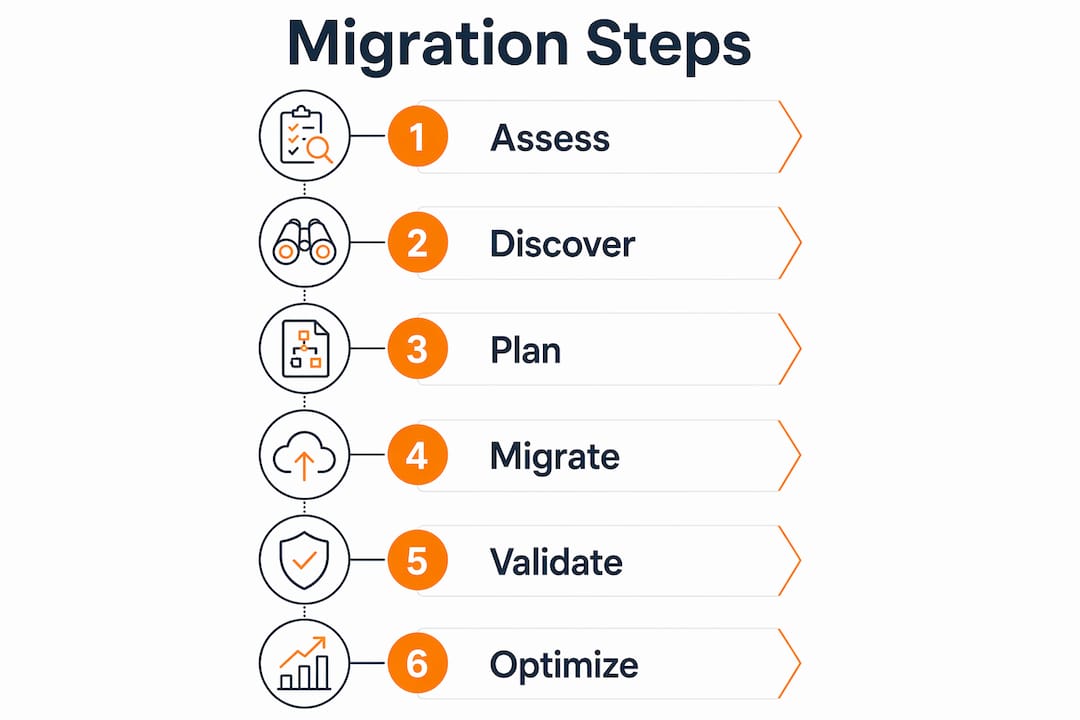
How to execute the migration: step-by-step from pilot to production waves
Execution without a pilot is the single most common cause of avoidable outages. A thin-slice pilot migration reveals hidden dependencies and operational gaps that no checklist catches. Pick one low-risk, representative workload and run it through the full migration cycle before touching production systems.
Step-by-step migration process
- Install the AWS MGN agent on your GCP source servers. The agent begins continuous block-level replication to a staging area in your target AWS region.
- Monitor replication lag in the MGN console until the lag drops below one minute. This confirms the staging environment is current.
- Run a test launch from MGN. This spins up a test instance without affecting the source. Validate application behavior, networking, and IAM permissions at this stage.
- Plan your migration waves. Wave planning batches 5–10 applications grouped by dependency and risk. Start with stateless services, then move stateful workloads, and finish with databases.
- Migrate databases with AWS DMS. Configure a replication instance, create source and target endpoints, and start a full-load-plus-CDC task. CDC (Change Data Capture) keeps the target database current during the transition window.
- Validate data integrity before cutover. Row counts, checksums, and application-level smoke tests all belong in your acceptance gate.
- Execute cutover. Cutover checklists must include dual-run confirmation, data integrity validation, and a documented rollback plan. These are your go/no-go gates.
- Decommission GCP resources only after the AWS environment has run stably for an agreed observation period, typically 2–4 weeks.
Pro Tip: Never cut DNS until your AWS environment has passed all acceptance gates. A 5-minute DNS TTL set 24 hours before cutover gives you fast rollback without a full redeployment.
The comparison below shows the key differences between a rehost and a replatform approach, which are the two most common strategies for moving from GCP:
| Criteria | Rehost (lift-and-shift) | Replatform (lift-and-reshape) |
|---|---|---|
| Speed | Fastest, weeks | Moderate, months |
| Cost to migrate | Lower upfront | Higher upfront |
| Long-term AWS cost | Higher (over-provisioned) | Lower (right-sized) |
| Risk | Lower | Moderate |
| Best for | Time-sensitive moves | Cost-sensitive workloads |
What are the common challenges and troubleshooting tips during migration?
The most disruptive migration problems are not network failures or capacity limits. They are configuration artifacts that AWS MGN carries over from GCP without warning.
SSH key and cloud-init failures
AWS MGN replicates an exact disk image, including GCP-specific SSH keys and cloud-init configurations that point to GCP metadata servers. When the instance boots on AWS, cloud-init tries to reach metadata.google.internal, fails, and the SSH daemon loads keys that AWS EC2 Instance Connect does not recognize. The result is a locked instance with no console access.
The most reliable fix is manual volume mounting and SSH key injection. Stop the affected instance, detach the root EBS volume, attach it to a working “rescue” instance, mount the volume, replace the SSH authorized_keys file with an AWS-compatible key pair, and edit or disable the cloud-init configuration. Reattach the volume to the original instance and start it. This process takes under 30 minutes once you have done it once.
The broader lesson is that block-level replication requires manual post-launch cleanup for any GCP-specific configuration. Build this step into your wave checklist, not your incident response.
Additional challenges to anticipate
- Network CIDR conflicts: GCP VPC default ranges often overlap with AWS VPC defaults. Define your AWS VPC CIDR blocks before replication starts.
- IAM permission gaps: GCP service accounts do not map directly to AWS IAM roles. Audit every application’s permission requirements and create equivalent IAM policies before launch.
- Licensing differences: Some software licenses are tied to GCP VM IDs. Contact vendors before migration to avoid compliance gaps on AWS.
- Clock skew: GCP and AWS use different NTP sources. Verify that your applications tolerate minor time differences, especially in distributed systems.
Pro Tip: Create a pre-launch runbook for every wave that includes the cloud-init fix, key injection steps, and a 10-minute post-launch health check. Teams that skip this step spend hours in incident calls.
How to optimize and secure your AWS environment after migrating from GCP?
Post-migration is where most teams lose the cost savings they expected. The work does not end at cutover.
Governance and security baseline
Set up AWS Organizations with Service Control Policies before your first production wave lands. Retrofitting guardrails after workloads are running is significantly harder and more expensive. SCPs at the organization level prevent teams from spinning up unapproved instance types, disabling CloudTrail, or deploying into unauthorized regions.
The security baseline for a post-migration AWS environment should cover:
- Enable AWS CloudTrail across all regions and accounts. Every API call is logged.
- Activate AWS Config to track resource configuration changes and flag drift from your baseline.
- Deploy AWS Security Hub to aggregate findings from GuardDuty, Inspector, and Macie into a single compliance dashboard.
- Apply resource tagging standards from day one. Tags drive cost allocation, and untagged resources are invisible in billing reports.
- Right-size instances using AWS Compute Optimizer recommendations after 2–4 weeks of production data. GCP and AWS instance families do not map 1:1, so initial sizing is always an estimate.
Pro Tip: Use the AWS cloud security guide for enterprise migrations to build your SCP library before the first wave. Starting with a policy template is faster than writing from scratch under deadline pressure.
The table below summarizes the post-migration optimization priorities by time horizon:
| Time horizon | Priority | Tool |
|---|---|---|
| Week 1–2 | Security baseline, tagging | AWS Security Hub, Config |
| Week 3–4 | Right-sizing analysis | AWS Compute Optimizer |
| Month 2 | Reserved Instance planning | AWS Cost Explorer |
| Month 3+ | Continuous compliance | AWS Config Rules, SCPs |
Decommission GCP resources only after the observation period confirms AWS stability. Running both environments in parallel costs money, but it is the only safe rollback option. A disciplined approach to AWS costs during this window prevents the parallel-run period from erasing your migration savings.
Key Takeaways
A successful GCP to AWS migration requires structured phases, tool-specific preparation, and post-migration governance to deliver lasting cost and performance gains.
| Point | Details |
|---|---|
| Plan before you replicate | Run AWS Discovery Service and map GCP services to AWS equivalents before touching MGN. |
| Pilot first, always | A thin-slice pilot exposes dependency and access issues that checklists miss. |
| Fix cloud-init post-launch | Manually inject AWS-compatible SSH keys and disable GCP cloud-init on every migrated instance. |
| Set guardrails early | Deploy AWS Organizations and SCPs before production waves land, not after. |
| Right-size after 2–4 weeks | Use Compute Optimizer on real production data, not pre-migration estimates. |
What I’ve learned from 700+ migrations: the patterns that actually matter
After working through hundreds of GCP to AWS migrations across eCommerce and fintech environments, the technical steps are rarely where projects fail. The failures happen in the gaps between teams and the assumptions baked into checklists.
The cloud-init and SSH key issue is a perfect example. Every team that hits it for the first time loses half a day. Every team that knows about it in advance fixes it in 20 minutes. The difference is not skill. It is preparation. A migration runbook that includes the volume-detach procedure as a standard post-launch step turns a potential incident into a routine task.
The second pattern I see consistently is teams that skip the pilot because they are under schedule pressure. The pilot migration feels like overhead when you are already behind. It is actually the step that prevents you from falling further behind. Every hidden dependency the pilot surfaces is a dependency that would have caused an outage during a production wave.
Organizational guardrails are the third area where I see consistent underinvestment. Teams focus on the migration and defer the governance work. Then they spend the next six months cleaning up untagged resources, oversized instances, and accounts with no SCP coverage. Setting up AWS Organizations and SCPs takes one day. Retrofitting them across a live environment takes weeks.
My honest recommendation: treat the migration best practices as non-negotiable constraints, not optional enhancements. The teams that follow the full process, including pilot, wave gates, and post-migration optimization, consistently deliver on time and under budget.
— Oleksandr
IT-Magic’s AWS migration services for GCP workloads
IT-Magic works with IT teams and decision-makers who need to move from GCP to AWS without taking on the execution risk themselves. As an AWS Advanced Tier Partner with 700+ completed projects, IT-Magic takes full ownership of every phase: infrastructure audit, migration strategy, hands-on execution, and post-migration optimization.

The team specializes in complex, high-load environments where downtime translates directly into lost revenue. Whether your workload needs a rehost, replatform, or refactor approach, IT-Magic applies the right strategy for your timeline and budget. You can review AWS migration services and case studies showing measurable cost reductions and performance improvements. For teams that want to understand the full scope before committing, IT-Magic offers a migration readiness assessment as a starting point.
FAQ
What is GCP to AWS migration?
GCP to AWS migration is the process of transferring workloads, applications, and data from Google Cloud Platform to Amazon Web Services. It follows structured phases: discovery, replication, testing, cutover, and optimization.
How long does a GCP to AWS migration take?
A lift-and-shift migration for 10–20 servers typically takes 2–4 weeks. Larger environments of 50–100 servers require 6–10 weeks from assessment to completion.
What tools does AWS provide for migrating from GCP?
AWS provides three primary tools: AWS Application Migration Service (MGN) for server replication, AWS Database Migration Service (DMS) for continuous database transfer, and AWS Migration Hub for workload inventory and tracking.
Why do migrated GCP instances lose SSH access on AWS?
AWS MGN copies the exact disk image including GCP-specific SSH keys and cloud-init configurations. These configurations are incompatible with AWS, blocking access. The fix requires detaching the root volume and manually injecting AWS-compatible keys.
How much does a GCP to AWS migration cost?
Professional migration services start around $10,000 for small database migrations and reach $60,000–$120,000+ for enterprise-scale projects. The AWS Migration Acceleration Program (MAP) offers co-funding that can offset a significant portion of those costs.