
TL;DR:
- Migrating VMware to AWS uses automation tools and structured planning to reduce manual effort and risk.
- Cost increases following Broadcom’s acquisition motivate many organizations to shift to cloud-native architectures.
VMware to AWS migration is the process of moving on-premises VMware virtual machines and workloads to AWS using AI-powered automation, structured wave planning, and proven cloud architecture patterns. The Broadcom acquisition changed the economics of staying on VMware. Licensing costs reported to double or triple for many on-premises customers after renewal, making the business case for cloud migration far stronger than it was two years ago. AWS now offers tools like AWS Transform and AWS Application Migration Service that reduce what once took months of manual work into a structured, largely automated process. This guide walks IT professionals and decision-makers through every phase: prerequisites, step-by-step execution, common pitfalls, and the strategic choices that determine long-term outcomes.
What does a VMware to AWS migration require before you start?
The most expensive mistakes in cloud migration happen before a single VM moves. Skipping the discovery and planning phase leads to oversized instances, broken dependencies, and surprise licensing bills on the other side.

Core prerequisites
You need an active AWS account with appropriate IAM permissions, access to your VMware vCenter environment, and a clear inventory of all VMs, their dependencies, and their performance profiles. VMware versions supported by AWS migration tooling include vSphere 6.0 and later. Check your specific version against the AWS Application Migration Service compatibility matrix before committing to a timeline.
The most underrated prerequisite is historical performance data. P95 performance data collected over 365 days gives AWS Transform the inputs it needs to recommend correctly sized instances. Point-in-time snapshots miss peak load behavior entirely, which leads to either overspending on oversized instances or performance failures under real traffic.
Pro Tip: Use PowerShell-based PowerCLI collectors to gather vCenter data without deploying intrusive agents. Agentless data collection eliminates the approval delays and security reviews that come with agent-based discovery, cutting weeks off your planning phase.
| Prerequisite | Details |
|---|---|
| AWS account and IAM roles | Set up migration-specific IAM roles with least-privilege access before discovery begins. |
| VMware vCenter access | Required for PowerCLI-based data collection and dependency mapping. |
| Historical performance data | Collect P95 metrics over 365 days for accurate AWS instance sizing. |
| Licensing audit | Identify all third-party licenses that do not transfer to cloud and evaluate cloud-native alternatives. |
| Network topology documentation | Map all VLANs, firewall rules, and routing configurations before conversion begins. |
Licensing is a separate category of preparation. Third-party software licenses tied to physical hardware or specific hypervisors often do not transfer to AWS. Audit every application in scope and identify which ones require new licensing agreements or replacement with cloud-native services. This step directly affects your VMware to AWS cost analysis and should be completed before you finalize your migration scope.
How does the VMware to AWS migration process work step by step?
The migration workflow combines automated discovery with structured execution. AWS Transform handles the intelligence layer. AWS Application Migration Service handles the replication and cutover layer. Together, they cover the full lifecycle from inventory to production.
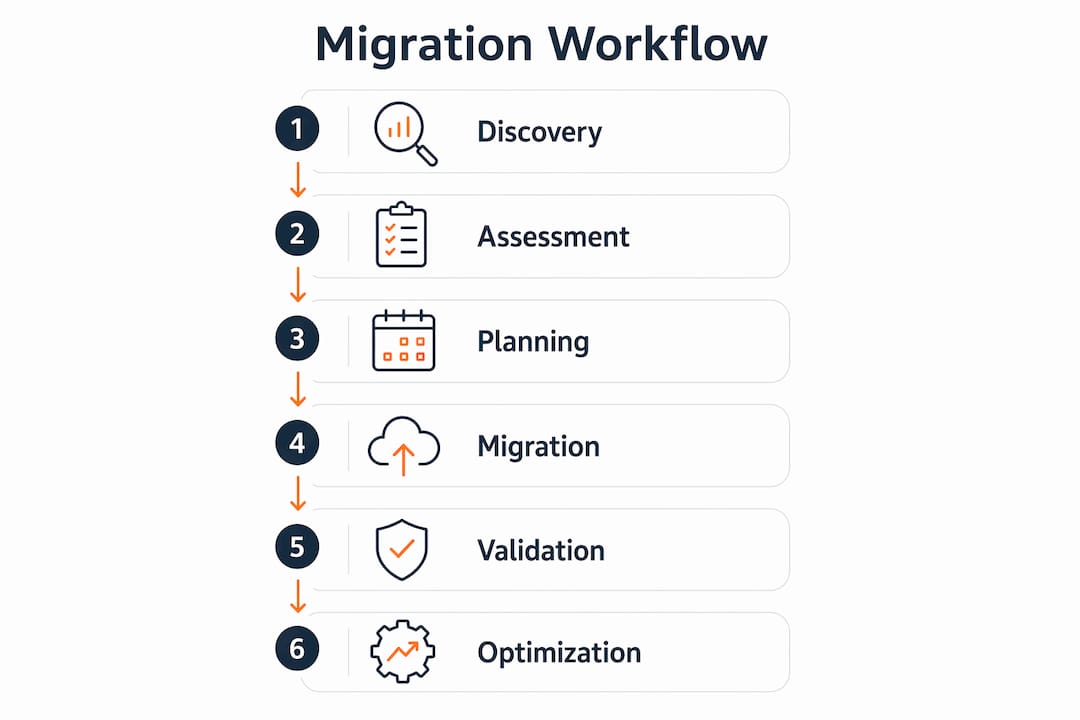
The six-phase migration workflow
- Infrastructure discovery. AWS Transform connects to your vCenter environment and automatically catalogs all VMs, their configurations, and their interdependencies. This replaces weeks of manual spreadsheet work.
- Dependency mapping. AWS Transform uses agentic AI to identify which applications communicate with each other and which VMs must move together. Moving a database before its application server causes outages. Dependency mapping prevents that.
- Wave planning. AWS Transform groups VMs into migration waves based on dependencies and business criticality. Low-risk, standalone workloads move first. Business-critical, tightly coupled systems move last, after the process is proven.
- Network configuration conversion. This is historically the longest phase. AWS Transform accelerates network conversion up to 80 times compared to manual methods. VLANs, security groups, routing tables, and firewall rules are converted automatically, reducing both time and human error.
- Replication and testing. AWS Application Migration Service continuously replicates VMware servers to AWS in the background. You can launch test instances at any point without interrupting production. This lets your team validate application behavior in AWS before any cutover decision is made.
- Cutover. Once testing passes, you execute a final sync and cut over to AWS. Downtime is measured in minutes, not hours, because replication keeps the target environment current up to the moment of switch.
Pro Tip: Run at least two full test cutovers per wave before scheduling the production cutover. Each test reveals configuration gaps that are far cheaper to fix in a test environment than during a live migration window.
| Phase | Key action | Primary tool |
|---|---|---|
| Discovery | Catalog all VMs and configurations | AWS Transform |
| Dependency mapping | Identify application communication patterns | AWS Transform |
| Wave planning | Group VMs by dependency and risk | AWS Transform |
| Network conversion | Convert VLANs and firewall rules automatically | AWS Transform |
| Replication | Continuous background sync to AWS | AWS Application Migration Service |
| Cutover | Final sync and production switch | AWS Application Migration Service |
What are the most common VMware migration challenges?
Most VMware to AWS migrations that go wrong fail for predictable reasons. Knowing them in advance lets you build mitigation into the plan rather than scrambling during execution.
- Licensing cost surprises. Broadcom’s acquisition of VMware changed renewal economics significantly. Budget for the possibility that staying on VMware-based licensing is no longer viable and evaluate cloud-native alternatives during the planning phase.
- Incorrect instance sizing. Sizing based on current CPU and memory snapshots ignores seasonal peaks. An e-commerce platform sized in january will be undersized for a november traffic spike. Use P95 data over a full year.
- Network conversion bottlenecks. Manual network conversion is error-prone and slow. Teams that skip AI-assisted conversion tools spend disproportionate time on this phase and introduce configuration drift between source and target environments.
- Agent deployment friction. Traditional discovery tools require agents on every VM. In large environments, getting security approval for agent deployment can take weeks. PowerCLI-based collectors bypass this entirely.
- Dependency blind spots. Undocumented application dependencies cause cascading failures when VMs are migrated in the wrong order. Automated dependency mapping is not optional for environments with more than 50 VMs.
“The teams that struggle most with VMware migrations are the ones that treat network conversion as an afterthought. It is the longest phase by default, and without AI-assisted tooling, it becomes the phase that breaks timelines and budgets.”
Pro Tip: Consider an Experience-Based Acceleration workshop with AWS specialists. A structured 3-day EBA engagement can compress months of planning into days and builds internal team capability at the same time.
If you want a structured checklist covering these risks, the AWS migration checklist from IT-Magic covers the full planning and execution sequence for VMware workloads.
Which migration strategies should IT leaders consider in 2026?
The right migration strategy depends on your application portfolio, your tolerance for change, and your long-term cost targets. Three approaches dominate the decision space.
Rehost, replatform, and refactor compared
Rehost (lift-and-shift) moves VMs to AWS with minimal changes. It is the fastest path and the lowest risk for stable, well-understood workloads. The trade-off is that you carry your existing architecture, including its inefficiencies, into the cloud. For a detailed breakdown of when rehosting makes sense, the rehost migration guide covers the decision criteria thoroughly.
Replatform makes targeted changes to take advantage of managed AWS services without rewriting application code. Swapping a self-managed MySQL instance for Amazon RDS is a replatform move. You get operational benefits without a full redevelopment cycle.
Refactor rebuilds applications to run as cloud-native services. It delivers the highest long-term efficiency but requires the most time and skill. The refactoring guide for AWS covers the technical approach in detail.
Direct sales of VMware Cloud on AWS stopped on April 30, 2024. That change forces IT leaders to make a genuine architectural decision rather than defaulting to a managed VMware environment. The hybrid approach, using AWS Transform for planning and AWS Application Migration Service for execution, works across all three strategies and gives you the flexibility to rehost now and replatform later.
| Strategy | Speed | Cost impact | Best for |
|---|---|---|---|
| Rehost | Fast | Neutral short-term | Stable workloads, tight timelines |
| Replatform | Moderate | Reduced operational cost | Workloads with manageable service swaps |
| Refactor | Slow | Lowest long-term cost | Applications requiring cloud-native performance |
- Rehost works best when your primary goal is exiting VMware licensing costs quickly.
- Replatform suits workloads where managed services replace significant operational overhead.
- Refactor is the right call for applications where performance, compliance, or cost at scale justifies the investment.
If you need an AWS cloud engineer to support the execution phase, hiring a specialist with VMware migration experience shortens ramp-up time considerably.
Key Takeaways
Successful VMware to AWS migration requires accurate discovery data, AI-assisted network conversion, and a migration strategy matched to your application portfolio and cost targets.
| Point | Details |
|---|---|
| Use P95 historical data | Collect 365 days of performance data to avoid costly instance sizing errors. |
| Automate network conversion | AWS Transform reduces network conversion time by up to 80x compared to manual methods. |
| Map dependencies before moving | AI-driven dependency mapping prevents cascading failures from incorrect migration sequencing. |
| Choose the right strategy | Rehost exits VMware fast; replatform and refactor deliver better long-term economics. |
| Plan for licensing changes | Broadcom’s acquisition has doubled or tripled renewal costs for many customers, making cloud migration the cost-effective path. |
What I’ve learned from watching teams migrate VMware at scale
The biggest shift I have seen in VMware migrations over the past two years is not the tooling. It is the mindset. Teams that used to treat migration as a one-time infrastructure project now approach it as a portfolio decision. Which workloads get rehosted, which get replatformed, and which get refactored. That distinction matters more than which tool you use.
AI-driven services like AWS Transform have genuinely changed the speed equation. The network conversion phase used to be where migrations went to die. Weeks of manual work, constant configuration errors, and rollback cycles. Automating that phase does not just save time. It removes the single most common source of migration failure.
What I still see teams get wrong is the data collection phase. They grab a snapshot of current CPU and memory utilization, run it through a sizing tool, and wonder why their AWS instances are either idle or overwhelmed six months later. P95 data over a full year is not a nice-to-have. It is the difference between an accurate migration and an expensive one.
My honest recommendation for 2026: do not let licensing cost pressure rush you into a rehost-only strategy if your applications have real modernization potential. The exit from VMware is the right moment to evaluate the full portfolio. Rehost what needs to move fast. Replatform what benefits from managed services. Refactor what will run at scale for the next five years. A phased approach built on accurate data and automated tooling is the path that holds up under real-world conditions.
— Oleksandr
IT-Magic’s approach to VMware cloud migration
IT-Magic has completed 700+ AWS migration projects as an AWS Advanced Tier Partner, with deep specialization in high-load eCommerce and fintech environments where downtime translates directly into lost revenue.

For teams moving off VMware, IT-Magic covers the full lifecycle: infrastructure audit, dependency mapping, wave planning, hands-on execution, and post-migration cost optimization. The approach applies rehost, replatform, or refactor based on what each workload actually needs, not a one-size-fits-all template. If your organization needs a predictable, secure migration to AWS without adding operational burden to your internal team, IT-Magic takes full ownership of execution and outcomes. Review the migration pitfalls guide to see the most common failure points IT-Magic helps clients avoid.
FAQ
What is VMware to AWS migration?
VMware to AWS migration is the process of moving on-premises VMware virtual machines and workloads to AWS cloud infrastructure using tools like AWS Transform and AWS Application Migration Service. The goal is to replace VMware licensing costs with cloud-native scalability and managed services.
How long does a VMware to AWS migration take?
Timeline depends on environment size, dependency complexity, and the migration strategy chosen. Structured approaches using AI-driven wave planning and automated network conversion significantly compress timelines compared to fully manual methods.
Why are organizations accelerating VMware migrations in 2026?
VMware licensing costs doubled or tripled for many customers following the Broadcom acquisition, and direct sales of VMware Cloud on AWS ended April 30, 2024. Both changes make staying on VMware significantly more expensive than migrating to cloud-native AWS architectures.
What is the difference between AWS Transform and AWS Application Migration Service?
AWS Transform handles discovery, dependency mapping, wave planning, and network configuration conversion. AWS Application Migration Service handles continuous replication and the actual cutover. Combining both tools gives teams a complete migration workflow from planning through production.
How do I avoid oversizing or undersizing AWS instances?
Use P95 historical performance data collected over at least 365 days rather than point-in-time snapshots. This captures seasonal peaks and real workload behavior, which produces accurate AWS instance recommendations.