
TL;DR:
- Moving from a self-managed Kubernetes cluster to Amazon EKS involves a structured, multi-phase process with dependency mapping, careful planning, and validation. Preparation includes setting up the target cluster with necessary components like storage drivers, load balancer controllers, and security roles, while storage and networking require deliberate adjustments. Thorough testing using functional, performance, chaos, and security tests ensures workloads behave as expected before production cutover.
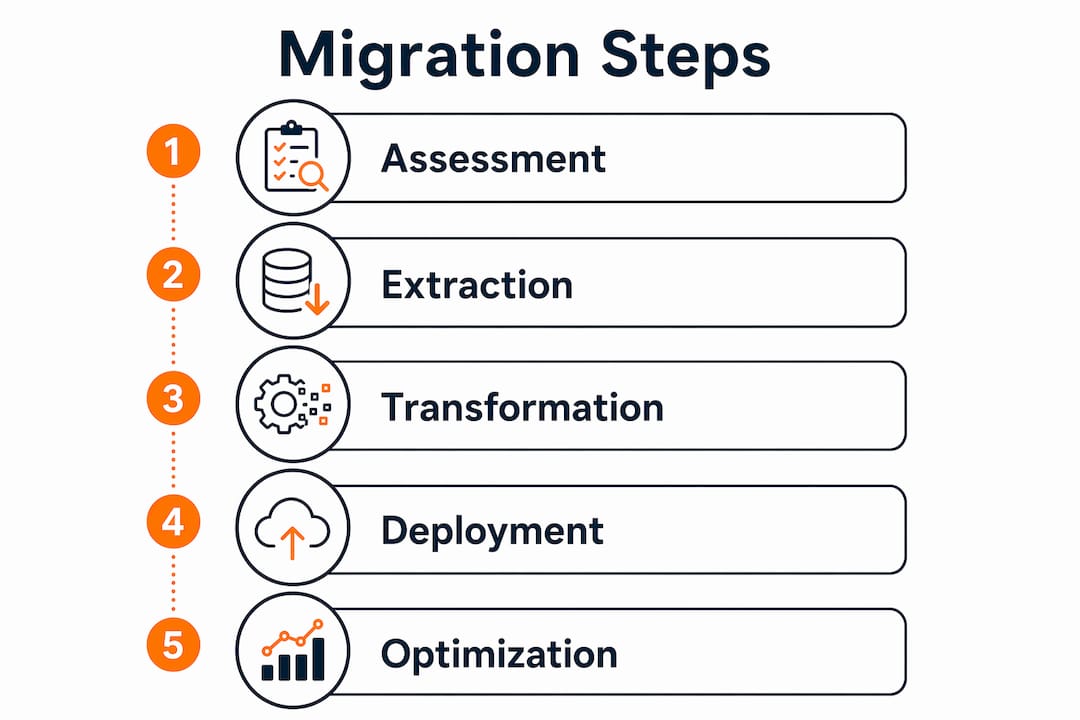
Moving from a self-managed Kubernetes cluster to Amazon EKS is a structured transformation, not a lift-and-paste operation. The process runs through five core stages: assessment, extraction, transformation, migration, and validation. Each stage has real dependencies on the one before it. Skip the assessment, and you will hit storage blockers at phase six. Rush the networking changes, and your LoadBalancer services will fail silently on the target cluster.
The payoff is real. Amazon EKS offloads control plane management, integrates natively with IAM, VPC, and AWS Load Balancer Controller, and gives your team back the hours currently spent patching etcd and managing Kubernetes API server upgrades. The Kubernetes Migration Factory toolkit from AWS samples is the most practical open-source starting point for the extraction and migration phases.
Key things to keep in mind before you start:
- Persistent volumes do not move automatically. You need AWS DataSync or Velero for storage migration, handled separately from resource manifests.
- Networking requires deliberate changes. Legacy cluster IPs must be stripped, and AWS Load Balancer Controller annotations must be added for any LoadBalancer-type services.
- The target EKS cluster must exist before migration begins. The migration scripts do not provision it.
- Secret values are created as opaque placeholders. You populate real values post-migration via AWS Secrets Manager or Parameter Store.
How to migrate Kubernetes to EKS: assessment and planning
The assessment phase is where migrations succeed or fail. Teams that skip it discover critical blockers mid-migration, when fixing them is expensive and disruptive. Thorough dependency mapping is the single most reliable predictor of a clean cutover.

Start by inventorying every Kubernetes resource in your source cluster: Deployments, StatefulSets, DaemonSets, CronJobs, Services, Ingresses, ConfigMaps, Secrets, StorageClasses, CRDs, and Helm releases. Then map the dependencies between services to determine migration order. Leaf services with no downstream internal dependencies go first. Shared databases and services with circular dependencies require a temporary bridge or must migrate together.
Classify each workload by risk:
- Low risk: Stateless HTTP APIs, already containerized, no local storage, standard health checks
- Medium risk: Services with persistent storage, specific networking requirements, or complex configuration
- High risk: Stateful services (databases, message queues), services with host-level dependencies, legacy apps that resist containerization
Choose your migration strategy based on risk tolerance and downtime budget. Blue-green migration builds a complete parallel EKS cluster and switches traffic at once, offering instant rollback. Phased migration moves workloads in waves, starting with non-critical services. Lift-and-shift recreates your current configuration in EKS first, then migrates workloads.
Before running a single migration script, prepare the target EKS cluster with these components:
- Amazon EBS CSI driver for StorageClass provisioner remapping (
ebs.csi.aws.com) - AWS Load Balancer Controller for LoadBalancer services and ALB Ingress
- CRD operators (cert-manager, Prometheus Operator, etc.) installed before any custom resource instances migrate
- IAM roles for service accounts (IRSA) configured for workloads that need AWS API access
- Network connectivity from your local machine to both the source and target API servers
Pro Tip: Map your dependencies before writing a single manifest change. The teams that hit mid-migration blockers almost always skipped this step and discovered a shared NFS mount or a circular service dependency at the worst possible moment.
Migration timelines vary considerably: a small team with a handful of microservices might complete the process in a couple of months, while an enterprise with dozens of services and compliance requirements can take several months.
Testing and validating workloads on Amazon EKS
Testing a Kubernetes migration goes well beyond running your existing test suite against the new cluster. You need to confirm that the application behaves identically under realistic conditions, handles failures gracefully, and meets your security baseline.
Run these four categories of tests before any production traffic touches the new cluster:
- Functional tests: Execute your existing test suite against the EKS-hosted version. Confirm correct HTTP responses, database reads/writes, and inter-service calls.
- Performance tests: Use load tools like k6 or Locust to generate realistic traffic. Compare latency percentiles (p50, p95, p99) against your baseline from the source cluster. Any regression at p99 is worth investigating before cutover.
- Chaos tests: Simulate pod failures, node failures, and network partitions. Verify that readiness probes, PodDisruptionBudgets, and replica counts handle disruptions without cascading failures.
- Security assessments: Run kube-bench for CIS Kubernetes benchmark compliance and kubeaudit for security misconfigurations. Validate network policies enforce the isolation you expect.
For high-traffic or revenue-critical services, shadow traffic is the safest pre-cutover validation. Istio’s traffic mirroring duplicates production requests to the EKS-hosted version without affecting live users. You compare response codes, latencies, and payloads between environments before committing to the switch. Canary deployments serve the same purpose with real traffic: route 1–5% to the new cluster, monitor for 30–60 minutes, then increment.
Executing the migration: tools, phases, and deployment strategies
The extraction-transformation-migration pattern is the most reliable execution approach. The Kubernetes Migration Factory toolkit implements this in two scripts: extract_cluster_info.py pulls all resources from the source cluster into structured JSON, and migrate_to_eks.py transforms and deploys them to EKS in eight sequential phases.
The eight migration phases run in this order, and the order matters:
| Phase | What it does |
|---|---|
| 1. Namespaces | Creates all non-system namespaces on the target |
| 2. RBAC | Migrates ServiceAccounts, ClusterRoles, RoleBindings; skips system/EKS built-ins |
| 3. Storage Classes | Applies StorageClasses with automatic provisioner remapping |
| 4. ConfigMaps & Secrets | Migrates ConfigMaps; creates Secrets as opaque placeholders |
| 5. CRDs | Applies custom resource instances; warns if operator not installed |
| 6. Workloads | Rebuilds Deployments, StatefulSets, DaemonSets, Jobs, CronJobs |
| — | Migrates Services (strips clusterIP, adds LB annotations), Ingresses, NetworkPolicies |
| — | Detects releases and generates reinstall commands |
The script automatically remaps legacy in-tree provisioners to CSI drivers and strips clusterIP fields so EKS assigns new IPs. For LoadBalancer services, it adds the AWS Load Balancer Controller annotations required for ALB support.
Persistent volume data requires separate handling. Neither the extraction script nor the migration script moves your actual data. Plan your storage migration with AWS DataSync for large-scale data transfer or Velero for Kubernetes-native backup and restore of persistent volumes.
Run the migration in dry-run mode first:
python3 migrate_to_eks.py --dry-run
This previews every phase without applying anything. If phase three fails, fix the issue and resume from phase four:
python migrate_to_eks.py --start-phase 4 --extraction-dir ../extraction/cluster-extraction-output
For deployment strategy, blue-green and canary approaches with Argo Rollouts give you the most control. Blue-green maintains two live environments and switches traffic instantly, with rollback under two seconds. Canary shifts traffic progressively (10% → 25% → 50% → 100%), validating at each step. Here is a minimal blue-green Rollout manifest:
apiVersion: argoproj.io/v1alpha1
kind: Rollout
metadata:
  name: myapp-blue-green
spec:
  replicas: 3
  strategy:
    blueGreen:
      activeService: myapp-active
      previewService: myapp-preview
      autoPromotionEnabled: false
      scaleDownDelaySeconds: 30
Use blue-green for critical systems and database migrations where instant rollback is non-negotiable. Use canary for high-risk changes or A/B testing scenarios where gradual validation matters more than speed.
Pro Tip: Execute your rollback procedure at least once in a staging environment before go-live. A rollback plan you have never tested is not a rollback plan.
For additional guidance on infrastructure automation patterns that complement this workflow, the scalable infrastructure migration guide covers Terraform and AWS CDK approaches that work well alongside the Migration Factory toolkit.
Post-migration optimization and ongoing EKS maintenance
Getting workloads running on EKS is the midpoint, not the finish line. The cluster needs ongoing attention across security, cost, observability, and reliability to deliver on the promise of a managed Kubernetes environment.
Start with secrets. The migration script creates all Secrets as opaque placeholders. Populate real values through AWS Secrets Manager, AWS Systems Manager Parameter Store, or the External Secrets Operator. Leaving placeholder secrets in place is a security gap that will surface in your next compliance review.
For monitoring, pair AWS-native tooling (CloudWatch Container Insights) with Prometheus and Grafana for application-level metrics. CloudWatch handles node and control plane visibility; Prometheus gives you the workload-level detail your dashboards need. Post-migration is also the right time to set up cloud-native monitoring that can surface anomalies before they become incidents.
Cost management on EKS comes down to three practices:
- Right-size your pods. Use Vertical Pod Autoscaler recommendations to identify over-provisioned CPU and memory requests. Most teams discover they have been running with 2–3x more reserved capacity than their workloads actually use.
- Configure Cluster Autoscaler or Karpenter. Karpenter provisions nodes faster and with more flexibility than the standard Cluster Autoscaler, especially for mixed instance-type workloads.
- Use Spot instances for fault-tolerant workloads. Batch jobs, stateless services, and dev environments are good candidates. Keep stateful workloads on On-Demand nodes.
Backup and disaster recovery on EKS centers on Velero for cluster state and application data, combined with AWS DataSync for persistent volume contents. Schedule regular Velero backups to an S3 bucket in a separate AWS region. Test restores on a schedule, not just before an incident.
Security hardening post-migration includes enforcing Pod Security Standards, auditing RBAC bindings for over-privileged service accounts, and enabling AWS GuardDuty for EKS runtime threat detection. Run kube-bench periodically to catch configuration drift against the CIS benchmark.
Finally, plan your Kubernetes version upgrade cadence. Amazon EKS supports each minor version for roughly 14 months after release. Staying within one or two minor versions of the current release keeps your upgrade path manageable and your cluster eligible for AWS support.
How IT-Magic supports complex Kubernetes migrations to EKS
IT-Magic is an AWS Advanced Tier Partner with over 700 completed migration projects. The work covers the full lifecycle: infrastructure audit, strategy selection, hands-on implementation, and post-migration optimization. For Kubernetes migrations specifically, the team applies the phased extraction-transformation-migration methodology, combined with AWS-native tooling like IRSA, the AWS Load Balancer Controller, and EBS CSI drivers, to reduce cutover risk on production workloads.
Migrating to EKS is as much an operational transformation as a technical one. Teams that succeed don’t just move workloads — they adopt cloud-native monitoring, automated CI/CD, and infrastructure as code alongside the migration itself. The technical lift is manageable; the operational shift is where most teams need support.
IT-Magic specializes in high-load environments in eCommerce and fintech, where downtime and performance gaps translate directly into lost revenue. The case studies on record show measurable outcomes: reduced AWS spend, improved application performance, and architectures built for scale rather than just survival.
The migration approach at IT-Magic covers every phase the AWS Prescriptive Guidance recommends, from dependency mapping and risk classification through blue-green or phased cutover, post-migration secret population, and ongoing cluster hardening. Clients get full ownership of execution and outcomes, not a handoff to a runbook.
For teams evaluating their readiness, the AWS migration best practices guide covers the strategy decisions that matter most before the first script runs.
What to do after reading this guide
The path to a production-grade EKS environment follows a clear sequence: assess your current cluster and map dependencies, prepare the target EKS cluster with the right components, test thoroughly before any traffic switches, execute migration in phased increments, and harden the cluster post-migration.
A few things that separate successful migrations from the ones that get rolled back:
- Start with low-risk, stateless workloads. Early wins surface infrastructure issues (DNS, storage, networking) before you tackle stateful services.
- Never skip the dry run. The Migration Factory’s
--dry-runflag exists for a reason. Use it on every phase before applying changes. - Keep the old environment running for at least 48 hours after cutover. Don’t decommission anything until you have confirmed stability through at least one full business cycle, including peak hours.
- Treat secrets as a post-migration task, not an afterthought. Placeholder secrets are a gap in your security posture from day one.
- Evolve your operational model alongside the technical migration. Cloud-native CI/CD, infrastructure as code, and automated monitoring are not optional extras; they are what makes EKS worth running.
For teams ready to move forward, IT-Magic’s AWS migration services provide the execution depth and AWS expertise to handle complex, high-load migrations without adding operational burden to your team. The secure software deployment guide is also worth reviewing for teams building or refining their CI/CD pipelines on EKS post-migration.
Key Takeaways
Migrating Kubernetes to EKS requires phased execution across assessment, extraction, transformation, deployment, and post-migration hardening, with persistent storage and networking handled as separate workstreams.
| Point | Details |
|---|---|
| Assessment determines success | Dependency mapping before migration prevents costly mid-process blockers and determines correct migration order. |
| Eight-phase migration order matters | Namespaces, RBAC, storage, config, CRDs, workloads, networking, and Helm releases must apply in sequence to avoid dependency errors. |
| Storage migrates separately | Persistent volume data requires AWS DataSync or Velero; it does not move with resource manifests. |
| Blue-green vs. canary by risk | Blue-green gives instant rollback under two seconds; canary validates progressively at 10%–100% traffic increments. |
| Post-migration hardening is required | Populate placeholder secrets, configure Prometheus and CloudWatch, right-size pods, and run kube-bench after cutover. |
FAQ
What is the Kubernetes Migration Factory?
The Kubernetes Migration Factory is an open-source AWS sample toolkit that automates the extraction of Kubernetes resources from a source cluster into structured JSON, then transforms and deploys them to a target Amazon EKS cluster in eight sequential, validated phases.
How long does it take to migrate Kubernetes to EKS?
Migration timelines range from a couple of months for small teams with a few services to several months for large enterprises with many services and compliance requirements.
Do persistent volumes migrate automatically to EKS?
No. Persistent volume data does not migrate with Kubernetes resource definitions. You need AWS DataSync or Velero to handle the actual data movement separately from manifest migration.
What networking changes are required when moving to EKS?
You must remove legacy cluster IPs from Service definitions and add AWS Load Balancer Controller annotations for LoadBalancer-type services. Ingresses also need to be configured for Application Load Balancers.
Should I use blue-green or canary deployment for EKS migration cutover?
Use blue-green for critical systems and database migrations where instant rollback (under two seconds with Argo Rollouts) is the priority. Use canary for high-risk application changes where gradual traffic validation from 10% to 100% reduces blast radius.