
TL;DR:
- Cloud disaster recovery restores critical IT systems and data using cloud infrastructure to meet specific RTO and RPO targets. It involves workload tiering, architecture selection, automation, and ongoing testing to ensure operational readiness and cost efficiency. Regular drills and plan maintenance are essential to avoid the gap between a plan and an effective disaster response.
Cloud disaster recovery (cloud DR) is the combination of architectures, processes, and automation that restores critical IT systems and data using cloud infrastructure to meet two governing metrics: Recovery Time Objective (RTO) and Recovery Point Objective (RPO). RTO is how fast you must be back online after a failure. RPO is how much data loss you can absorb, measured backward in time from the moment of the incident.
A quick example makes both concrete. Different databases have widely varying requirements for RTO and RPO; some require recovery times measured in minutes and seconds, while others may tolerate recovery times measured in hours. The same organization has very different spend requirements. According to AWS, cloud DR leverages cloud infrastructure and services to restore access and functionality to critical IT systems after a catastrophic event, with RTO and RPO as the primary success metrics.
TL;DR for executives:
- Prioritize workloads. Run a business impact analysis (BIA) to classify systems by revenue and operational impact before touching architecture.
- Set explicit RTO/RPO targets per workload tier. One-size-fits-all targets waste budget on low-criticality systems and under-protect high-criticality ones.
- Schedule automated failover tests. A DR plan that has never been tested is a hypothesis, not a plan.
Table of Contents
- Why does cloud disaster recovery matter for business continuity?
- How does cloud DR differ from traditional on-premises DR?
- What are the core DR architectures and how do they compare?
- How do you build a cloud disaster recovery plan step by step?
- How do AWS, Azure, and Google Cloud support disaster recovery?
- What testing schedule actually keeps a DR plan reliable?
- What are the common pitfalls and hidden costs of cloud DR?
- AWS-focused DR checklist for teams running a pilot
- Key Takeaways
- The gap between DR plans and DR programs
- IT-Magic runs AWS DR pilots from audit to validated failover
- Useful sources
- FAQ
Why does cloud disaster recovery matter for business continuity?
The business case for cloud DR is straightforward once you price a real outage. Downtime costs vary sharply by industry and company size, but the direction is always the same: every minute offline costs money, and the costs compound quickly across lost revenue, SLA penalties, and recovery labor.

Cloud DR changes the cost structure in a meaningful way. Traditional DR required a fully provisioned secondary data center sitting idle most of the year. Microsoft Azure notes that cloud-based DR reduces the need for duplicate physical recovery sites and lets organizations pay for recovery capacity only when triggered. That shift from capital expenditure to consumption-based spending is the CFO argument in one sentence.
For CIOs and SRE leads, the appeal is speed and geographic redundancy. Cloud providers operate multiple regions and availability zones, so a regional outage in one location does not automatically take down a replicated workload in another. For CISOs, the compliance angle matters: many regulatory frameworks, including HIPAA, PCI DSS, and SOC 2, require documented and tested recovery procedures. Cloud DR, when implemented correctly, generates the audit evidence those frameworks demand.
Key business benefits:
- Reduced RTO through automated failover and pre-provisioned recovery environments
- Lower capital expense by eliminating idle secondary hardware
- Geographically redundant data copies without managing physical facilities
- Faster test cycles because cloud environments can be spun up and torn down on demand
- SLA-backed infrastructure from providers with published durability and availability commitments
- Compliance-ready audit trails from automated replication and test logs
Cloud DR is not always the right posture. Workloads with strict data sovereignty requirements, sub-millisecond latency needs, or regulatory mandates that prohibit data leaving a specific jurisdiction may still require on-premises or hybrid approaches. The role of cloud in business continuity is strongest when geographic redundancy and elastic capacity outweigh those constraints.
How does cloud DR differ from traditional on-premises DR?
The operational gap between cloud and traditional DR is larger than most teams expect until they have lived through a failover drill on each.

Traditional DR means maintaining a secondary site with hardware that mirrors production, keeping it patched and configured, and hoping the runbooks are current when you actually need them. The capital cost is high, the test frequency is low (because tests are disruptive and expensive), and configuration drift between primary and secondary environments is nearly inevitable over a 12-month cycle.
Cloud DR flips those constraints. Elasticity means you can provision a warm standby environment in minutes rather than weeks. Infrastructure as code (IaC) means your secondary environment is defined in version-controlled templates, not in a technician’s memory. Pay-for-use pricing means you can run a full failover test, measure actual RTO, and tear the environment down without paying for idle hardware the rest of the year.
Advantages of cloud DR:
- Elastic capacity on demand, no hardware procurement lead times
- IaC-driven consistency between primary and recovery environments
- Automated replication and orchestration reduce human error during failover
- Lower ongoing cost for backup-and-restore and pilot light tiers
Disadvantages and caveats:
- Cross-region data egress fees add up, especially for high-volume replication
- Provider-managed services have scope limits; customer-side dependencies (on-prem license servers, third-party APIs) are still your responsibility
- Cloud costs for warm standby and active-active architectures can exceed on-prem costs if not governed carefully
High availability vs. disaster recovery. These are architecturally distinct concepts that get conflated constantly. High availability (HA) addresses component-level failures using redundancy and self-healing within a single region. DR addresses catastrophic, region-level failures requiring discrete replica systems and explicit failover and failback procedures. An AWS high availability guide covers HA design patterns in depth. The short version: HA keeps you running through a server failure; DR keeps you running through a regional outage.
When to choose cloud DR over hybrid or on-prem:
- RTO/RPO targets are under four hours and you cannot justify a second physical site
- Workloads are already cloud-hosted or in active migration
- Budget favors operational expense over capital expense
- Compliance permits multi-region cloud storage for your data classification
Pro Tip: If your organization has data sovereignty requirements, check whether your cloud provider offers in-country regions before assuming cloud DR is off the table. AWS, Azure, and Google Cloud all operate U.S.-only region pairs that satisfy most federal and state data residency requirements.
What are the core DR architectures and how do they compare?
Cloud DR architectures commonly include four patterns: backup and restore, pilot light, warm standby, and multi-site active-active. Each maps to a different RTO/RPO profile, cost level, and operational complexity. Choosing the wrong one for a workload tier is the most common way teams either overspend or under-protect.
Core components every architecture relies on
Before picking a pattern, make sure these building blocks are in place:
- Data replication: continuous or scheduled copying of data to a recovery region
- Configuration backups and IaC templates: CloudFormation, CDK, or Terraform definitions that can rebuild infrastructure without manual steps
- DNS and traffic routing: health-check-driven routing (Route 53, Azure Traffic Manager, Cloud DNS) that redirects traffic automatically at failover
- IAM roles for failover: pre-provisioned permissions so recovery automation can act without human approval during an incident
- Runbooks: documented, step-by-step procedures for failover, failback, and communication
Infrastructure as code is specifically recommended to reduce recovery time and human error during the backup-and-restore pattern, where infrastructure must be redeployed from scratch.
Architecture comparison
| Architecture | RTO | RPO | Cost / ongoing spend | Complexity | Recovery speed | Scope | Operational burden |
|---|---|---|---|---|---|---|---|
| Backup & restore | Hours (4–24 hrs) | Hours | Lowest (storage only) | Low | Slow; manual redeploy | Full site | Low; periodic backup validation |
| Pilot light | Minutes to hours (1–4 hrs) | Minutes | Low-moderate | Moderate | Moderate; scale-up required | Core data tier only | Moderate; IaC drift checks |
| Warm standby | Minutes | Minutes | Moderate | Moderate-high | Fast; scale-up minimal | Partial site | Higher; ongoing sync and testing |
| Active-active (multi-region) | Seconds to minutes | Near-zero | Highest | High | Near-instant | Full site | Highest; continuous validation |
Google Cloud’s DR guidance notes that most applications have RTOs between an hour and a day, and only a small fraction require near-zero RTO due to the cost and complexity of automated multi-region failover. That framing should anchor your architecture selection conversation with stakeholders.
Pro Tip: Pilot light combined with scheduled warm-ups is a practical, low-cost approach for many systems. Keep critical data replicated and IaC templates ready, then scale application tiers at failover time. You get meaningful RTO improvement without paying for a continuously running standby environment.
When to use each pattern
Backup and restore fits non-critical workloads where hours of downtime are acceptable and budget is the primary constraint. Development environments, archival systems, and internal reporting tools are typical candidates.
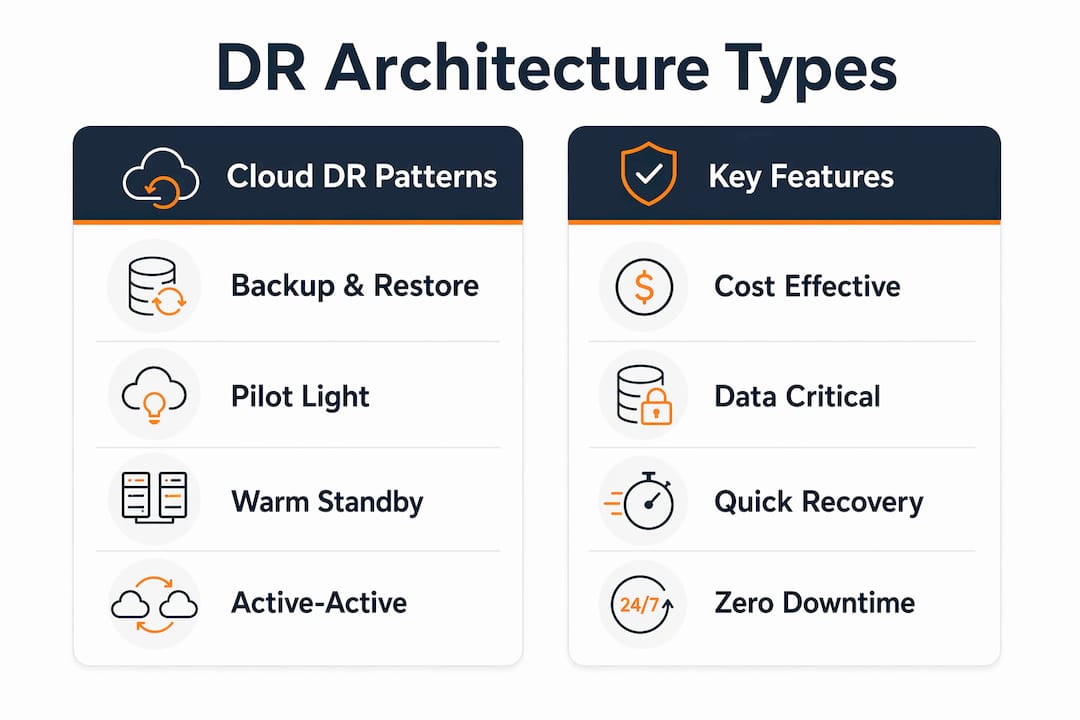
Pilot light suits workloads where the data tier is critical but the application tier can tolerate a brief scale-up delay. A database that must be current, paired with an application that can restart in under an hour, is the classic fit.
Warm standby is the right choice for business-critical customer-facing applications where RTO must stay under an hour but active-active costs are hard to justify. E-commerce checkout flows and customer portals often land here.
Active-active is reserved for mission-critical systems where even minutes of downtime translate directly to revenue loss or regulatory exposure. Financial trading platforms, payment processors, and healthcare systems with real-time data requirements are the primary use cases.
How do you build a cloud disaster recovery plan step by step?
A DR plan built without a business impact analysis is just a technical exercise. The BIA is what connects recovery objectives to business outcomes and gets executive buy-in for the budget.
Step 1: Conduct a business impact analysis
Identify every IT system and map it to the business function it supports. For each system, estimate the financial and operational impact of one hour, four hours, and 24 hours of downtime. The BIA output is a prioritized workload list with draft RTO/RPO targets attached to each tier.
Workload classification is the foundation. Without it, you cannot make defensible architecture decisions.
Step 2: Define RTO/RPO per workload tier
Map each workload to one of three or four criticality tiers. Tier 0 (mission-critical) gets active-active or warm standby with RTO in minutes. Tier 1 (business-critical) gets warm standby or pilot light. Tier 2 (standard) gets backup and restore. Tier 3 (non-critical) may get no DR beyond standard backups.
The AWS DR whitepaper is explicit: not all workloads require hot-site recovery, and one-size-fits-all RTO/RPO targets are a common and expensive mistake.
Step 3: Select architecture and implement
Choose the architecture pattern that matches each tier’s RTO/RPO and budget. Then implement:
- Configure replication (AWS Database Migration Service, S3 Cross-Region Replication, Azure Site Recovery, or Google Cloud Storage Transfer Service depending on workload type)
- Write IaC templates for the recovery environment (CloudFormation, CDK, or Terraform)
- Set up DNS health checks and automated traffic routing
- Create and test IAM roles scoped to failover operations
- Store secrets in AWS Secrets Manager or Azure Key Vault with cross-region replication
- Document the runbook: who declares a disaster, who executes failover, who communicates to customers
Step 4: Test and validate
Run a tabletop exercise before any technical test. Walk the team through the runbook verbally, identify gaps, and update documentation. Then run a partial failover on a non-production workload. Measure actual RTO and RPO against targets. Fix gaps. Only then run a full failover on production during a low-traffic window.
Step 5: Operate and maintain
DR plans decay. Schedule quarterly runbook reviews, rotate credentials, validate IAM roles, and check IaC templates for drift. Set up monitoring and alerting (CloudWatch, Azure Monitor, or Google Cloud Monitoring) to detect replication lag and trigger automated alerts before a disaster forces the issue.
Pro Tip: The most common implementation gap is IAM permissions. Failover automation often needs cross-account or cross-region permissions that were never provisioned. Test IAM roles in isolation before the first failover drill, not during it. Missing permissions for failover roles, stale IaC templates, and forgotten external dependencies are the leading causes of DR plan failures.
A 6–12 week pilot timeline is realistic for most organizations: two weeks for BIA and architecture selection, two weeks for implementation, two weeks for testing and gap remediation, and two weeks for documentation and stakeholder sign-off.
How do AWS, Azure, and Google Cloud support disaster recovery?
Each major cloud provider offers a distinct set of DR-relevant services. The right choice depends on where your workloads already live and which managed services fit your architecture pattern.
AWS offers the broadest set of DR-specific tooling. AWS Elastic Disaster Recovery can reduce RPO to seconds and RTO to minutes for supported workloads by orchestrating continuous replication and automated failover. Supporting services include AWS Backup for centralized backup management, S3 Cross-Region Replication for object storage durability, Route 53 health checks for DNS-based failover, and CloudFormation or CDK for IaC-driven environment rebuilds. AWS also publishes a dedicated DR workloads whitepaper that maps services to each architecture pattern.
Microsoft Azure provides Azure Site Recovery as its primary DR orchestration service, handling replication, failover, and failback for both Azure-native and on-premises workloads. Azure Backup covers VM and database snapshots. Azure Traffic Manager and Azure Front Door handle traffic routing during failover. The Azure Well-Architected Framework includes detailed DR planning guidance tied to criticality tiers and SLO targets.
Google Cloud focuses on architecting DR for infrastructure outages with guidance on zonal, regional, and multi-region scope. Cloud Storage multi-region buckets, Cloud SQL cross-region replicas, and Cloud DNS with health checks form the core DR toolkit. Google Cloud also emphasizes defining RTO/RPO against outage scope (zonal vs. regional vs. multi-region) rather than individual component failures.
Managed DR (DRaaS). All three providers support third-party Disaster Recovery as a Service offerings through their marketplaces. DRaaS makes sense when your team lacks the operational depth to manage replication, failover orchestration, and testing cadence internally. The trade-off is cost and reduced control over the recovery environment.
Pro Tip: Cloud providers are responsible for the durability and availability of their infrastructure. You are responsible for configuring replication, setting retention policies, and testing failover. The shared responsibility model does not cover gaps in your DR configuration.
What testing schedule actually keeps a DR plan reliable?
A DR plan that has not been tested recently is not a plan. It is a document. The gap between the two becomes visible at the worst possible moment.
Test types and what each validates
Tabletop exercise: The team walks through the DR runbook verbally, simulating a declared disaster. No systems are touched. This validates process, communication chains, role assignments, and escalation paths. It takes two to four hours and should happen at least quarterly.
Partial failover: A subset of workloads, typically a non-production environment or a single application tier, is failed over to the recovery region. This validates replication integrity, IaC template accuracy, IAM role permissions, and DNS routing for the tested scope. Run this semiannually.
Full failover: The entire production environment is failed over to the recovery region. This is the only test that measures actual end-to-end RTO and RPO under real conditions. Run this at least annually for critical systems, during a planned maintenance window.
Microsoft Azure’s DR guidance recommends tabletop drills regularly (quarterly or semiannual), partial failovers semiannually, and full failovers at least annually for critical systems, with objective metrics captured during each test.
Maintenance activities between tests
- Review and update runbooks after every infrastructure change
- Rotate credentials and verify secrets replication to the recovery region
- Validate IAM roles have not been modified or restricted since the last test
- Run IaC drift checks to confirm recovery templates match production configuration
- Verify backup restore integrity by actually restoring a sample dataset, not just checking that backups completed
Automation and IaC reduce recovery time but are not substitutes for documented processes and regular testing. Common DR plan failures are human and process issues, not technology failures.
What are the common pitfalls and hidden costs of cloud DR?
The most expensive DR mistake is treating it as a backup problem. Backups protect data. DR protects operations. A full backup of your database does nothing for your RTO if you have no tested procedure to rebuild the application tier around it.
Common pitfalls:
- Applying a single RTO/RPO to all workloads, which either overspends on low-criticality systems or under-protects high-criticality ones
- Ignoring failback complexity; getting to the recovery region is step one, but returning to the primary region after the incident is resolved requires its own tested procedure
- Missing IAM permission gaps that only surface during an actual failover attempt
- Configuration drift between primary and recovery IaC templates that accumulates silently between tests
- Undocumented external dependencies (on-premises license servers, third-party payment APIs, SaaS integrations) that break the recovery environment even when your own infrastructure is healthy
What drives ongoing DR spend:
- Replication data transfer, especially cross-region egress fees for high-volume databases
- Reserved or on-demand capacity for warm standby and active-active environments
- Snapshot storage costs, which grow without lifecycle policies
- Testing labor and any temporary capacity provisioned during full failover tests
Pro Tip: Three cost-control tactics that work in practice: use tiered replication (replicate only Tier 0 and Tier 1 workloads continuously; use daily snapshots for Tier 2), implement snapshot lifecycle policies to expire old recovery points automatically, and schedule warm standby environments to scale down during off-hours when RTO targets allow it. These three changes alone can cut ongoing DR spend significantly without changing your recovery architecture.
For teams managing AWS cost optimization alongside DR, the same principles apply: right-size reserved capacity, use Savings Plans where baseline capacity is predictable, and audit cross-region data transfer regularly.
AWS-focused DR checklist for teams running a pilot
This checklist is structured for teams preparing an executable DR pilot on AWS. Work through it in order.
Preflight checks
- Complete the BIA and produce a tiered workload inventory with draft RTO/RPO targets
- Confirm network connectivity between primary and recovery regions (VPC peering, AWS Transit Gateway, or Direct Connect extension)
- Verify that all workloads have documented dependencies, including third-party APIs and on-premises services
- Confirm IAM permissions allow cross-region replication and failover automation for each workload tier
Implementation checklist
- Configure data replication: AWS Elastic Disaster Recovery for server replication, S3 Cross-Region Replication for object storage, and RDS cross-region read replicas or Aurora Global Database for relational workloads
- Write or validate CloudFormation or CDK templates for the recovery environment; store them in a version-controlled repository
- Create failover IAM roles with least-privilege permissions scoped to recovery operations
- Replicate secrets to the recovery region using AWS Secrets Manager cross-region replication
- Configure Route 53 health checks and failover routing policies for each application endpoint
- Document the runbook: declare-disaster trigger, failover execution steps, communication template, and failback procedure
Pro Tip: Use AWS migration best practices as a preflight reference. Many of the same preflight steps for a migration (dependency mapping, IAM scoping, network validation) apply directly to a DR pilot.
Operational checklist
- Run a tabletop exercise against the completed runbook before any technical test
- Execute a partial failover on a non-production workload; measure actual RTO and RPO
- Verify data integrity in the recovery region after failover (row counts, checksums, application smoke tests)
- Automate rollback and failback steps in the runbook; do not rely on memory during a real incident
- Schedule quarterly runbook reviews and semiannual partial failover tests in the team calendar
IT-Magic has completed 700+ AWS migration and resilience projects as an AWS Advanced Tier Partner. For teams that need an executable DR pilot without pulling internal engineering capacity off production work, a fixed-price engagement covering audit, architecture, implementation, and the first validated failover test is the fastest path from plan to proof. See IT-Magic’s case studies for examples of measurable outcomes from similar engagements.
Key Takeaways
Cloud DR requires explicit RTO/RPO targets per workload tier, an architecture matched to those targets, and a tested runbook before any of it counts as operational.
| Point | Details |
|---|---|
| RTO and RPO govern everything | Set explicit RTO/RPO targets per workload tier before selecting any architecture or tooling. |
| Workload tiering controls cost | Apply active-active only to mission-critical systems; use backup and restore for non-critical workloads to avoid overspending. |
| IaC prevents configuration drift | Version-controlled CloudFormation or Terraform templates keep recovery environments consistent with production. |
| Testing cadence: quarterly, semiannual, annual | Run tabletop exercises quarterly, partial failovers semiannually, and full failovers at least annually for critical systems. |
| IT-Magic for AWS DR pilots | IT-Magic delivers fixed-price AWS DR pilots covering audit, architecture, implementation, and validated failover testing. |
The gap between DR plans and DR programs
Most organizations have a DR plan. Far fewer have a DR program. The difference is not documentation quality or architecture sophistication. It is whether the plan has been tested under conditions that approximate a real incident, and whether someone owns the maintenance cadence that keeps it current.
The architectural shift toward IaC and automated failover is genuinely significant. Embedding DR into the deployment pipeline, rather than maintaining it as a separate manual process, is the right direction. But the teams that get the most out of that shift are the ones that treat the human layer with the same rigor as the technical layer. Runbooks that no one has read in six months, IAM roles that were correct at implementation and have since drifted, failback procedures that exist in a slide deck but have never been executed: these are where real incidents become disasters.
The other thing worth saying plainly: most workloads do not need active-active. The instinct to protect everything at the highest tier is understandable, but it produces DR programs that are expensive, complex, and paradoxically harder to maintain and test. A well-tiered program with three architecture patterns, each tested on its own cadence, is more reliable than a uniformly over-engineered one. Spend the active-active budget on the two or three systems where downtime directly costs revenue. Let the rest run on pilot light or backup and restore with a tested runbook.
The organizations that handle real incidents well are almost never the ones with the most sophisticated architecture. They are the ones that practiced.
IT-Magic runs AWS DR pilots from audit to validated failover
Most teams know they need a DR plan. The hard part is getting from that knowledge to a tested, operational program without pulling senior engineers off production work for three months.
IT-Magic delivers fixed-price AWS DR engagements that cover the full lifecycle: infrastructure audit, BIA-aligned workload tiering, architecture selection, hands-on implementation, and a validated failover test with measured RTO and RPO. As an AWS Advanced Tier Partner with 700+ completed projects, the team brings execution depth in high-load eCommerce and fintech environments where DR is not optional.

The starting point is a free introductory audit that maps your current recovery posture, identifies the highest-risk gaps, and produces a prioritized recommendation for a DR pilot. No long-term commitment required to start. Request your free AWS DR audit and get a clear picture of where you stand before committing to a full engagement.
Useful sources
The following official documentation and whitepapers are the primary references for U.S.-based teams building or evaluating cloud DR programs:
- AWS: What Is Disaster Recovery? — AWS overview of cloud DR concepts, RTO/RPO, and service options including Elastic Disaster Recovery
- AWS: Disaster Recovery of Workloads on AWS (whitepaper) — the definitive AWS reference for architecture patterns, BIA guidance, and implementation checklists
- Google Cloud: Architecting Disaster Recovery for Cloud Infrastructure Outages — Google Cloud’s architecture guidance covering outage scopes, RTO/RPO mapping, and pattern selection
- Microsoft Azure: What Is Disaster Recovery? — Azure’s DR overview covering cost structure, testing cadence, and Azure Site Recovery
- Microsoft Azure Well-Architected Framework: Disaster Recovery — detailed DR planning guidance including criticality tiers, SLO targets, and escalation plan structure
- Ready.gov: IT Disaster Recovery Plan — U.S. government guidance on IT DR planning, BIA integration, and data backup strategy for businesses
- Business continuity network solutions — practical reference for network connectivity options that support multi-site cloud DR
FAQ
What is disaster recovery in simple terms?
Cloud disaster recovery is the process of restoring your IT systems and data after a major failure, using cloud infrastructure to meet defined recovery time and data-loss targets. The two metrics that define success are RTO (how fast you recover) and RPO (how much data you can afford to lose).
What is AWS disaster recovery?
AWS disaster recovery refers to the architectures, services, and automation AWS provides to restore workloads after a failure, including AWS Elastic Disaster Recovery, AWS Backup, S3 Cross-Region Replication, and Route 53 health-check-based failover. AWS Elastic Disaster Recovery can reduce RPO to seconds and RTO to minutes for supported workloads.
What is Azure disaster recovery?
Azure disaster recovery uses Azure Site Recovery as its primary orchestration service to replicate, fail over, and fail back both Azure-native and on-premises workloads. Azure’s Well-Architected Framework ties DR planning to criticality tiers, with RTO and RPO targets ranging from seconds for mission-critical Tier 0 systems to hours for standard workloads.
What are the four stages of disaster recovery?
The four stages are: (1) assess and plan (BIA, workload tiering, RTO/RPO definition), (2) implement (replication, IaC, failover routing, IAM roles), (3) test and validate (tabletop, partial failover, full failover), and (4) maintain and improve (runbook updates, credential rotation, drift checks, scheduled retests). Ready.gov’s IT DR guidance frames the plan as a living document that must be tested periodically to remain valid.