
TL;DR:
- For enterprise EC2 management, avoid static keys and prefer identity-based access methods like EC2 Instance Connect Endpoints or Systems Manager Session Manager. Proper configuration of security groups, permissions, and user names is essential for successful SSH connections. Transitioning to managed access reduces key sprawl, improves auditability, and ensures compliance for large or regulated deployments.
To SSH into an EC2 instance, run this command:
ssh -i /path/key-pair-name.pem instance-user-name@instance-public-dns-name
That gets you in. For enterprise fleets, though, raw SSH with static key pairs is increasingly the wrong default. AWS recommends moving toward identity-based managed access — EC2 Instance Connect Endpoints (EICE) or Systems Manager Session Manager — to centralize control, eliminate key sprawl, and satisfy audit requirements without maintaining open port 22 across your security groups.
The practical rule for enterprise teams: use raw SSH for isolated dev instances where speed matters and risk is low. For production workloads, regulated environments, or any fleet larger than a handful of instances, identity-based access is the right call — not a nice-to-have.
Table of Contents
- What do you need before you can SSH into EC2?
- What are the enterprise alternatives to raw SSH on EC2?
- How do you diagnose and fix common SSH connection failures?
- What are the enterprise best practices for SSH access management?
- When should you keep SSH and when should you switch to managed access?
- Key Takeaways
- The access model most teams get wrong
- IT-Magic handles the access modernization you keep deferring
- Useful sources
- FAQ
What do you need before you can SSH into EC2?
Before you run the command, five things must be true. Miss any one of them and you get a timeout or a refused connection.
- Instance is running and status checks have passed. Confirm in the EC2 console — both system and instance checks should show green.
- Security group allows inbound TCP on port 22. The rule must permit your source IP. Opening
0.0.0.0/0works but exposes the instance to the entire internet — restrict it to your office CIDR or a bastion IP. - You have the correct
.pemprivate key file. This is the key pair you selected at launch. There is no recovery if you lose it. - Key file permissions are locked down. On Linux or macOS, run
chmod 400 key-pair-name.pembefore connecting. On Windows, disable inheritance on the.pemfile properties and remove access for all users except your own account. - You are using the correct OS username. This varies by AMI:
| AMI | Default username |
|---|---|
| Amazon Linux 2 / AL2 | ec2-user |
| Ubuntu | ubuntu |
| CentOS | centos |
| Debian | admin |
| RHEL | ec2-user or root |
The full SSH command looks like this:
ssh -i /path/key-pair-name.pem [email protected]
Pro Tip: Run ssh -vvv -i /path/key.pem user@host when a connection fails silently. The verbose output shows exactly which key the client is offering and where the handshake breaks — it distinguishes a network block from an authentication failure in seconds.
What are the enterprise alternatives to raw SSH on EC2?
Static key pairs work fine for a single developer. At scale, they become a liability: keys get copied to laptops, shared across teams, and forgotten in CI pipelines. Decoupling access from static keys via IAM and EICE materially reduces key leakage risk in large deployments.
AWS Systems Manager Session Manager
Session Manager gives you a browser-based or CLI shell to any instance that has the SSM Agent installed and the right IAM role attached — no open port 22, no key file, no public IP required. Every session is logged to CloudWatch Logs or S3 automatically. Access is controlled entirely through IAM policies, so you can enforce MFA at the identity provider level and revoke access by changing a policy rather than hunting down key files.

The tradeoff: Session Manager adds a small latency overhead compared to a direct TCP connection, and it requires the SSM Agent to be running and reachable. For high-throughput admin tasks like large file transfers, raw SSH or EICE tunnels are faster.
EC2 Instance Connect and EC2 Instance Connect Endpoint (EICE)
EC2 Instance Connect pushes a one-time SSH public key to the instance metadata for 60 seconds, then connects. No long-lived keys stored anywhere. EICE extends this to private-subnet instances — no public IP needed at all.
The EICE CLI command is straightforward:
aws ec2-instance-connect ssh --instance-id i-1234567890example --connection-type eice
You can also use a ProxyCommand pattern for standard OpenSSH clients:
ssh -i my-key.pem ec2-user@i-1234567890example
  -o ProxyCommand='aws ec2-instance-connect open-tunnel --instance-id i-1234567890example'
Note: the ssh parameter under ec2-instance-connect is only available in AWS CLI v2. If your team is still on v1, upgrade before deploying this pattern.
| Method | Public IP required | Key management | Audit logging | MFA support | Best for |
|---|---|---|---|---|---|
| Raw SSH | Yes (or bastion) | Manual | None native | No | Dev/test, isolated instances |
| EC2 Instance Connect | Yes (or EICE) | Ephemeral (60s) | Basic | Via IdP | Small teams, quick access |
| EICE | No | Ephemeral | CloudTrail | Via IdP | Private subnets, no public IP |
| Session Manager | No | None | CloudWatch/S3 | Via IAM/IdP | Production, regulated workloads |
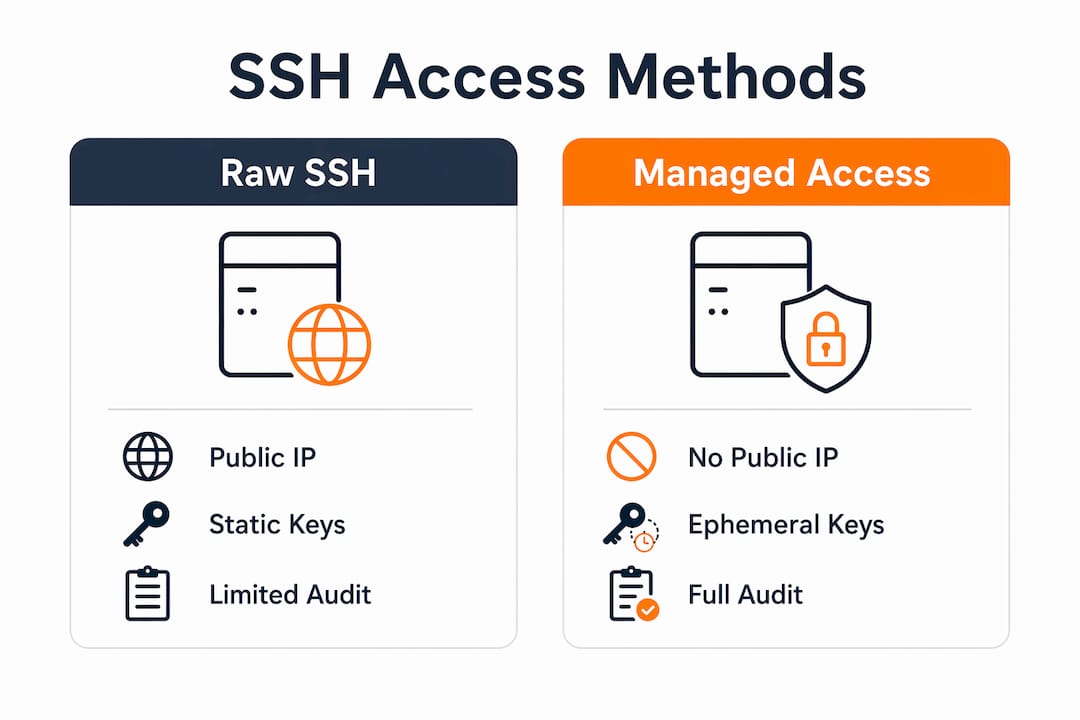
Pro Tip: EICE is the fastest path to eliminating public IPs from your EC2 fleet without a full Session Manager rollout. Deploy one EICE endpoint per VPC and point all private-subnet access through it — cloud security best practices recommend this as a first step in access modernization.
How do you diagnose and fix common SSH connection failures?
SSH failures in enterprise environments are overwhelmingly caused by network and security configuration, not the instance OS. Start with the network layer.
| Error message | Likely cause | First check |
|---|---|---|
Connection timed out |
Security group blocks port 22, NACL drop, no route | Check inbound SG rule, NACL, route table, public IP |
Connection refused |
sshd not running, wrong port |
Check instance status, verify sshd via Session Manager |
Permission denied (publickey) |
Wrong key, wrong username, bad permissions | Verify key file, username, run chmod 400 |
Host key verification failed |
Instance replaced, IP reused | Remove stale entry from ~/.ssh/known_hosts |
When the error is ambiguous, work through this sequence:
- Confirm instance status checks pass in the EC2 console.
- Verify the security group has an inbound rule for TCP port 22 from your IP — not
0.0.0.0/0unless you intend it. - Check NACLs and route tables. A subnet with no internet gateway route will time out even with a correct security group.
- Confirm the instance has a public IP or that you are routing through EICE or a bastion.
- Check key file permissions (
chmod 400) and that you are using the right username for the AMI. - Run
ssh -vvvto see the exact handshake failure.
When manual triage stalls, use the AWSSupport-TroubleshootSSH automation. It runs a Systems Manager automation document against the target instance, checks common SSH configuration issues, and can fix them automatically. If the instance is unreachable by SSH entirely, EC2 Serial Console or Session Manager are your recovery paths — use them to inspect
sshdstatus and logs without needing a working SSH connection.
What are the enterprise best practices for SSH access management?
The biggest risk in most enterprise AWS environments is not a sophisticated attack. It is an old .pem file sitting in a developer’s home directory, still valid, attached to a production instance.
Key lifecycle management starts with a simple rule: one key pair per environment, not one per operator. Store private keys in a secrets manager such as AWS Secrets Manager rather than on local workstations. Rotate key pairs on a defined schedule and retire old pairs immediately when team members leave. An automated maintenance approach to key inventory and rotation reduces the manual overhead that causes sprawl.
The access principle that actually holds at scale: treat SSH keys the same way you treat passwords — never share them, rotate them on a schedule, and audit who has access to what at least quarterly.
Access controls should follow least privilege. Restrict security group rules to known CIDR ranges or, better, remove port 22 from production security groups entirely and route through EICE or Session Manager. Bastion hosts are a reasonable middle ground for teams not yet ready for full managed access, but they add operational overhead and become a single point of failure if not maintained.
Network considerations go beyond security groups. A private-subnet instance with no NAT gateway and no EICE endpoint is unreachable by SSH regardless of what the security group says. VPN and Transit Gateway configurations can also intercept or block SSH traffic in ways that are not obvious from the EC2 console. Map your VPC route tables before assuming connectivity.
Auditing and compliance require centralized logging. CloudTrail captures API calls; Session Manager logs capture the actual session content. For regulated workloads — fintech, healthcare, anything under SOC 2 or HIPAA — session-level logging is often a compliance requirement, not optional. Pair logging with periodic access reviews: who has SSH access, to which instances, and when did they last use it.
Pro Tip: Implement ephemeral access patterns from day one. With EICE or EC2 Instance Connect, no long-lived key ever touches a workstation. When an engineer leaves, there is nothing to revoke — the access was never persistent to begin with. This is the AWS cloud security guidance for enterprise-scale deployments.
When should you keep SSH and when should you switch to managed access?
Not every workload needs the same access model. The decision comes down to four factors: fleet size, compliance requirements, exposure risk, and operational overhead.
| Workload type | Recommended access model | Rationale |
|---|---|---|
| Small dev/test fleet, isolated VPC | Raw SSH acceptable | Low risk, speed matters, overhead not justified |
| Production cluster, multiple operators | EICE or Session Manager | Key sprawl risk, auditability needed |
| Regulated workload (fintech, healthcare) | Session Manager with logging | Compliance requires session-level audit trail |
| Legacy migration in progress | Bastion + SSH short-term, EICE target | Transition state; plan EICE rollout in migration scope |
The decision flow is straightforward:
- Low user count, isolated workload, no compliance requirement: SSH is fine. Lock down the security group and rotate keys on schedule.
- Production workload, multiple engineers, or any regulatory scope: move to Session Manager or EICE. The operational overhead of managed access is lower than the risk and audit cost of key management at scale.
- High-throughput admin tasks (large file transfers, frequent tunneling): EICE tunnels perform closer to raw SSH than Session Manager does. Session Manager adds latency that matters for bulk operations.
The managed cloud services model for CIOs treats access modernization as part of the migration scope, not an afterthought. Teams that defer it end up retrofitting controls under audit pressure.
Key Takeaways
Securing EC2 access at enterprise scale requires replacing static SSH key pairs with identity-based managed access — EICE and Session Manager — while enforcing centralized logging and least-privilege network controls from day one.
| Point | Details |
|---|---|
| SSH command basics | Use ssh -i /path/key.pem user@public-dns; set chmod 400 on the key file before connecting. |
| Security group discipline | Restrict port 22 to trusted IPs or remove it entirely and route through EICE for private instances. |
| Managed access for production | Prefer Session Manager or EICE over raw SSH for any fleet with compliance, audit, or multi-operator requirements. |
| Troubleshoot systematically | Most failures are network/config issues; use ssh -vvv first, then AWSSupport-TroubleshootSSH automation. |
| IT-Magic migration scope | IT-Magic integrates access modernization into every migration engagement, covering EICE setup, Session Manager rollout, and ongoing DevOps-as-a-Service. |
The access model most teams get wrong
Most enterprise teams treat SSH access as a solved problem — set up a key pair, open port 22, move on. The real risk surfaces six months later when you have 40 engineers, 12 .pem files of unknown provenance, and a compliance audit asking for session logs that do not exist.
The shift to identity-based access is not technically difficult. EICE takes an afternoon to configure. Session Manager requires an IAM role and the SSM Agent. What makes it hard is organizational: getting teams to stop using the old keys, updating runbooks, and building the habit of ephemeral access. That is where most migrations stall.
The teams that get it right treat access modernization as a first-class deliverable in the migration project, not a cleanup task for later. They define the target access model before the first instance launches, configure EICE or Session Manager as the default, and retire SSH keys as part of cutover — not as a follow-up ticket that never gets prioritized.
One more thing worth saying plainly: Session Manager’s latency overhead is real but small for interactive sessions. It only becomes a genuine constraint for bulk file transfers or high-frequency tunneling. For everything else — shell access, log inspection, configuration changes — the audit trail and the elimination of key management overhead are worth it.
IT-Magic handles the access modernization you keep deferring
Migrating to AWS without locking down EC2 access is half a migration. IT-Magic delivers the full picture: infrastructure audit, zero-downtime migration execution, and identity-based access configuration built into the project scope from day one — not bolted on after the fact.

As an AWS Advanced Tier Partner with 700+ completed projects, IT-Magic has implemented EICE and Session Manager rollouts across eCommerce, fintech, and SaaS environments where a misconfigured security group or a leaked key pair translates directly into revenue loss. Fixed-price engagements, 24/7 post-migration support, and a DevOps-as-a-Service model mean your team keeps operating while IT-Magic handles the access controls, compliance logging, and ongoing optimization.
Ready to modernize your EC2 access as part of a production-grade migration? Request a free infrastructure audit and get a clear picture of your current SSH exposure and the fastest path to managed access.
Useful sources
The references below are the primary AWS documentation pages cited throughout this guide. Save them to your team’s runbooks and compliance artifacts.
| Resource | Purpose |
|---|---|
| Connect to Linux EC2 via SSH client | Canonical SSH command, prerequisites, and username reference |
| Private key permissions | chmod 400 and Windows key permission steps |
| EC2 Instance Connect Endpoint (EICE) | EICE setup, CLI usage, and ProxyCommand patterns |
| SSH troubleshooting — AWS re:Post | Error-to-cause mapping and AWSSupport-TroubleshootSSH automation |
| Connect to Linux instance — overview | Session Manager, EC2 Instance Connect, and managed access overview |
| AWS CLI v2 — ec2-instance-connect ssh | Full CLI reference for EICE and direct connection types |
For EC2 Instance Connect CLI features — including --connection-type eice and --local-forwarding — AWS CLI v2 is required. Confirm your version with aws --version before deploying EICE-based access patterns.
FAQ
What is the exact command to SSH into an EC2 instance?
Run ssh -i /path/key-pair-name.pem instance-user-name@instance-public-dns-name from your terminal. Set chmod 400 on the key file first or the connection will be refused.
What causes “Connection timed out” when connecting to EC2?
The most common cause is a security group that does not allow inbound TCP on port 22 from your IP, or a missing internet gateway route in the subnet’s route table.
How does EC2 Instance Connect Endpoint differ from raw SSH?
EICE routes your connection through an AWS-managed endpoint, so the instance needs no public IP and port 22 does not need to be open to the internet. Access is controlled by IAM rather than static key files.
When should I use Systems Manager Session Manager instead of SSH?
Use Session Manager for production or regulated workloads where you need a full session audit trail, MFA enforcement, and no open port 22. It logs every session to CloudWatch or S3 automatically.
How do I troubleshoot SSH access automatically on EC2?
Run the AWSSupport-TroubleshootSSH automation in AWS Systems Manager. It diagnoses common SSH configuration issues and can resolve them automatically without requiring a working SSH connection to the instance.