
Adopt a least-privilege, temporary-credential-first IAM strategy enforced by org-level guardrails and continuous review. That single sentence covers the entire discipline, but making it real requires a specific set of controls working together rather than a pile of one-off policies.
The controls that make this practical:
- Federate human access through IAM Identity Center instead of standing IAM users
- Force workloads onto roles and short-lived STS tokens
- Require phishing-resistant MFA and vault the root user
- Generate least-privilege policies from IAM Access Analyzer findings and CloudTrail activity
- Enforce account-level invariants with AWS Organizations and SCPs
- Delegate role creation safely using permissions boundaries
- Run scheduled audits to catch permission creep before it compounds
None of this runs on autopilot. AWS’s own Well‑Architected security pillar treats permissions management as a continual process, not a project with an end date. Skip the automation and the review cadence, and even a well-designed policy set decays within a quarter.
Key Takeaways
A durable IAM strategy AWS teams can maintain long-term combines federated temporary credentials, role-based workload access, org-level guardrails, and a scheduled review cadence backed by automation.
| Point | Details |
|---|---|
| Kill standing IAM users | Federate human access through IAM Identity Center so credentials expire automatically instead of sitting valid indefinitely. |
| Roles over embedded keys | Give EC2, ECS, and Lambda workloads roles and STS tokens rather than static access keys in code. |
| Guardrails, not just policies | Pair AWS Organizations and SCPs with permissions boundaries so no single misconfigured policy grants too much. |
| Generate, don’t guess, policies | Use IAM Access Analyzer against CloudTrail data to build least-privilege policies from real usage. |
| Build it into the migration | IT-Magic bakes IAM architecture and review automation into every AWS migration, run by an AWS Advanced Tier Partner with 700+ completed projects. |
Table of Contents
- Why an IAM Strategy AWS Environments Need Starts With Temporary Credentials
- Give Workloads Roles, Not Credentials Baked Into Code
- Locking Down MFA and the Root User
- When Long-Term Access Keys Are Still Justified
- Turning Least Privilege From a Slogan Into a Workflow
- Multi-Account Guardrails With AWS Organizations and SCPs
- Permissions Boundaries: Delegating Without Losing Control
- Making Reviews and Cleanup a Routine, Not an Event
- Scoping Access Further With Condition Keys and ABAC
- The Operational Checklist for Rolling This Out During a Migration
- What Actually Breaks IAM Rollouts (and How to Avoid It)
- Get Your AWS Identity Strategy Built Alongside Your Migration
- Sources
- FAQ
Why an IAM Strategy AWS Environments Need Starts With Temporary Credentials
Long-lived IAM users are the single biggest source of avoidable risk in most AWS accounts. A leaked access key has no expiration built in. It works until someone notices and revokes it, which in a lot of breach postmortems is weeks or months later. Temporary credentials solve this by design: they expire, typically in an hour, so a compromised token has a short shelf life even when nobody catches it immediately.

AWS recommends federating human users through an identity provider and using IAM Identity Center to centrally manage access across every account in your organization. Identity Center issues permission sets tied to your existing identity provider through SAML or OIDC and supports SCIM provisioning so a person removed from your HR system or Entra ID tenant loses AWS access automatically, not three weeks later when someone remembers to revoke it manually.
Migrating off standing IAM users follows a fairly predictable sequence:
- Inventory every existing IAM user, including forgotten service accounts nobody owns anymore
- Map each user’s actual permissions to a role and permission set, not a copy of what they already had
- Configure federation with your identity provider and test permission sets in a non-production account
- Cut over department by department, then deactivate (don’t delete yet) the old IAM users
- Delete the deprecated users once you’ve confirmed nothing broke for a full billing cycle
Pro Tip: Run the old IAM users and the new federated access in parallel for two weeks before deactivation. The overlap catches the one legacy script or scheduled job still authenticating with an access key you forgot existed.
Give Workloads Roles, Not Credentials Baked Into Code
Applications and infrastructure need the same treatment as people: no embedded long-term secrets. AWS’s compute services all support role-based identity that AWS rotates automatically behind the scenes.
- EC2 instances should use instance profiles, never access keys stored in a config file or baked into an AMI
- ECS tasks should assume task roles scoped to exactly what that service needs
- Lambda functions run under execution roles, which is the default pattern and the one to never deviate from
- Anything calling AWS APIs should assume a role and pull a session token from STS rather than reading a static key from an environment variable
Workloads that run outside AWS, such as on-premises servers or another cloud, complicate this because there’s no instance metadata service to hand out a role automatically. IAM Roles Anywhere solves this using X.509 certificates to establish trust and issue temporary credentials, which beats the common fallback of dropping a static access key on a server and hoping nobody finds it.
Locking Down MFA and the Root User
The root user can do anything in an AWS account, including deleting it, which makes it the single highest-value target for anyone trying to compromise your environment. Treat it accordingly:
- Enforce phishing-resistant MFA, meaning hardware security keys or passkeys, for any account where it’s supported, since SMS and even TOTP apps remain vulnerable to real-time phishing
- Vault root credentials rather than letting them sit in a password manager three people can access; a PAM-integrated approach gives you auditable, one-time break-glass access instead of standing knowledge of the password
- Monitor root login attempts with CloudTrail and alert on any activity, since legitimate root use should be rare enough that every instance gets reviewed
- If you still have IAM users for edge cases, scope them tightly and treat their existence as temporary, not permanent architecture
When Long-Term Access Keys Are Still Justified
Some integrations genuinely can’t use temporary credentials. A handful of legacy third-party tools and certain constrained CI/CD runners still expect a static key.
- Restrict any long-term key to the narrowest possible policy and, where the platform allows it, scope it further with a permissions boundary
- Check access key last used on a monthly basis and kill anything that’s gone quiet, since a key nobody’s touched in 90 days is either dead code or a forgotten liability
- Automate rotation on a fixed schedule rather than relying on someone remembering, and alert automatically when a key crosses your rotation threshold
Turning Least Privilege From a Slogan Into a Workflow
Least privilege sounds obvious until you’re staring at a policy editor trying to guess what permissions a Lambda function actually needs. Guessing is how you end up with s3:* on a function that reads one bucket. AWS’s own guidance is explicit here: use IAM Access Analyzer to generate policies from observed CloudTrail activity instead of writing permissions from memory or copying a template off the internet.
The workflow looks like this in practice:
- Let the workload run for a representative period, ideally covering a full business cycle including month-end batch jobs
- Generate a candidate policy from Access Analyzer based on that CloudTrail history
- Deploy the generated policy to staging first and watch for access-denied errors before touching production
- Iterate once, maybe twice, then promote to production with monitoring still active
Access Analyzer also runs more than 100 policy checks and flags public or cross-account exposure continuously, which catches drift after deployment, not just at generation time, according to AWS’s Access Analyzer documentation.
Pro Tip: The biggest failure mode in real migrations isn’t writing overly broad policies at launch, it’s never coming back to prune them. Put a policy refinement sprint on the calendar 60 days after go-live, treat it like a recurring maintenance task, and it will actually happen.
Multi-Account Guardrails With AWS Organizations and SCPs
Separate AWS accounts, not just separate IAM roles, are the strongest isolation boundary AWS gives you. A compromised account stays contained to that account when environments and tenants each get their own, rather than sharing one account differentiated only by tags.
- Split production, staging, and sandbox into distinct accounts under AWS Organizations
- Apply Service Control Policies to enforce non-negotiable rules organization-wide: deny public S3 buckets, restrict which regions resources can launch in, require encryption at rest
- Remember that SCPs are a ceiling, not a grant. They restrict what’s allowed but never hand out permissions on their own; identity and resource policies still do the actual granting
- Layer SCPs on top of the temporary-credential and role-based work above rather than treating them as a substitute for it
Permissions Boundaries: Delegating Without Losing Control
Letting individual teams create their own IAM roles speeds up delivery, but it also opens the door to a developer accidentally granting themselves administrator access through a role they created for something else entirely. Permissions boundaries fix this by capping the maximum permissions any identity-based policy attached to that role can ever grant, no matter what the role’s own policy says.
- Attach a boundary before delegating role-creation rights to any team outside central IAM
- Set the boundary to match what that team’s workloads legitimately need, not a generic template
- Add an automated check, ideally a Config rule or a CI gate, that verifies every new role actually has a boundary attached before it goes live
Making Reviews and Cleanup a Routine, Not an Event
Permission creep is quiet. Building the review into your operating rhythm beats discovering the problem the hard way.
- Pull IAM Access Advisor data quarterly to find roles and users with services they’ve never actually touched
- Cross-reference Access Analyzer findings and CloudTrail logs to spot stale principals and unused permissions
- Set a fixed cadence, monthly for high-privilege roles and quarterly for everything else, and automate remediation where the risk of breaking something is low
- Document a break-glass process for emergency access, and include it in every review so it doesn’t quietly become a permanent backdoor
Scoping Access Further With Condition Keys and ABAC
Policy conditions let you narrow what would otherwise be a broad grant into something genuinely tight, and they cost almost nothing to add once you know which keys matter.
aws:PrincipalOrgIDrestricts access to principals inside your own AWS Organization, which blocks a huge class of cross-account mistakesaws:SourceIplimits API calls to known network ranges, useful for anything that should only ever be called from your VPN or office networkaws:MultiFactorAuthPresentrequires an active MFA session for sensitive actions, even when the underlying credential is otherwise validaws:RequestedRegionblocks resource creation outside your approved regions, catching both mistakes and a certain class of attacker behavior
Attribute-based access control, tagging principals and resources and writing policies around those tags, scales far better than a role-per-team model once you’re past a few dozen roles. It works well when your organization owns both sides of the equation. It gets risky fast with external principals, where a tag you don’t fully control could grant access you never intended.
The Operational Checklist for Rolling This Out During a Migration
Migrations are the natural moment to fix IAM, because you’re already touching every workload and re-architecting access from scratch beats retrofitting it later. The sequence that holds up in practice:
- Inventory every identity, human and machine, across the accounts you’re moving
- Define your target account strategy under AWS Organizations before you migrate a single workload
- Enable federation and stand up IAM Identity Center
- Convert human access first, since it’s usually lower risk and builds confidence in the process
- Convert workload access to roles and STS tokens next
- Apply SCPs and permissions boundaries as the account structure solidifies
- Generate least-privilege policies from real usage data once workloads have run long enough to produce meaningful CloudTrail history
- Automate the review cadence so this doesn’t quietly decay six months after go-live
For privileged access specifically, just-in-time patterns like Entra PIM paired with IAM Identity Center reduce standing admin rights to nearly zero. Elevated access gets granted for a defined window and logged, rather than sitting available around the clock.
Teams that treat IAM as a one-time setup task during migration almost always end up back in the policy editor within six months, usually after an audit finding or a near-miss. Teams that build the review cadence into the migration runbook from day one rarely have that conversation again.
IT-Magic has carried this exact sequence through more than 700 completed AWS migrations as an AWS Advanced Tier Partner, most often in eCommerce and fintech environments where a permissions mistake has direct revenue or compliance consequences. Our guide to AWS cloud security for enterprise migrations covers how this checklist fits into the broader migration timeline.
What Actually Breaks IAM Rollouts (and How to Avoid It)
The pattern I see most often isn’t a bad policy. It’s a good policy nobody revisits. Teams grant broad access under deadline pressure to avoid breaking something mid-migration, promise themselves they’ll tighten it later, and later never comes because there’s no automation forcing the conversation.
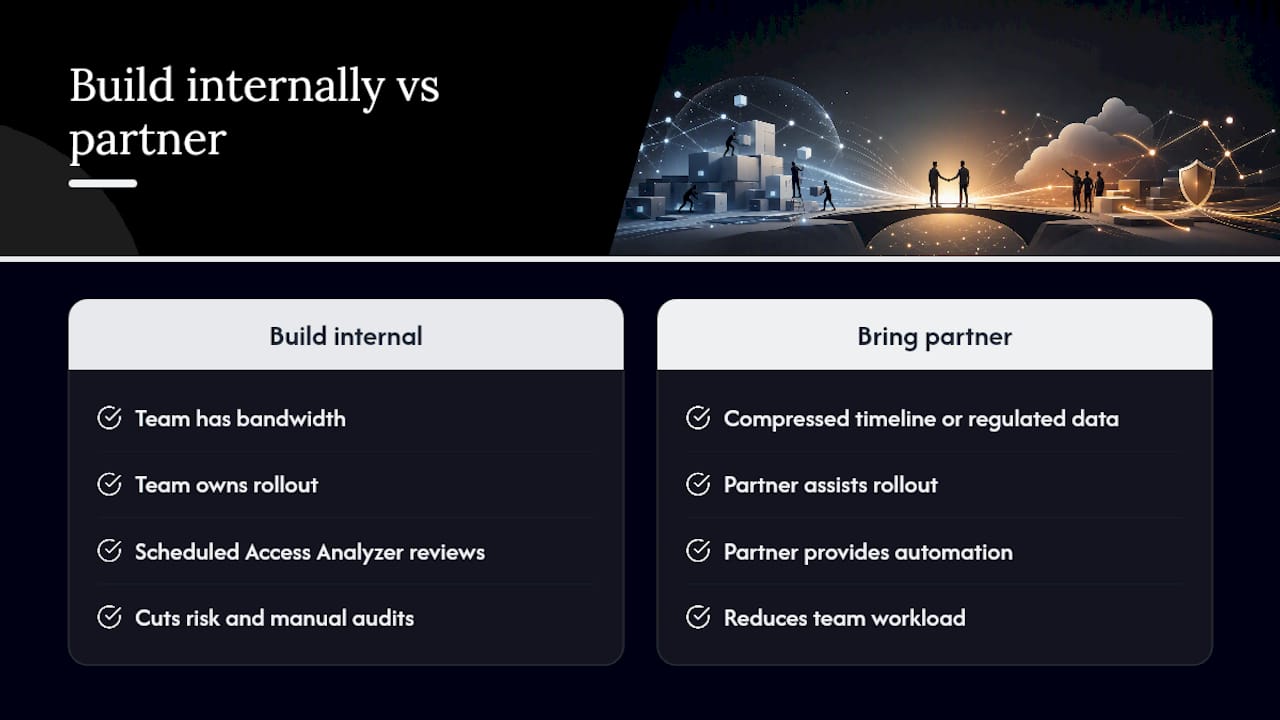
Policy bloat and missing automation are the same root problem: permissions management treated as a checkbox instead of a program. A disciplined rollout, one where Access Analyzer runs on a schedule and reviews happen whether or not anyone remembers, cuts both risk and the ongoing labor of manual audits.
Building this internally is entirely possible for a team with the bandwidth to own it. Bringing in a partner makes more sense when the migration timeline is compressed, the workload touches regulated data, or your team is already stretched managing the infrastructure side of the move.
— Oleksandr
Get Your AWS Identity Strategy Built Alongside Your Migration
Getting IAM right during a migration costs far less than retrofitting it after go-live, when every role change risks breaking something already in production. IT-Magic builds least-privilege IAM architecture, federation, SCPs, and permissions boundaries into every migration engagement rather than treating security as a separate phase bolted on afterward.

Our team runs the full lifecycle: infrastructure audit, migration strategy, hands-on execution, and post-migration optimization, with fixed-price engagements so the scope doesn’t creep along with the permissions. We handle this most often for eCommerce and fintech companies where a misconfigured policy or an exposed access key carries real financial consequences, not just theoretical risk.
For teams that need compliance automation layered on top of IAM controls, Sentrix’s GRC platform handles continuous policy enforcement for regulated workloads alongside the architecture we build.
Start with a free infrastructure audit through AWS Migration Services to see exactly where your current IAM setup stands before you commit to a migration timeline.
FAQ
What Is an IAM in AWS?
IAM, Identity and Access Management, is the AWS service that controls who or what can authenticate into your account and what actions they’re allowed to take once inside.
What Is an IAM Strategy?
An IAM strategy is the set of policies, tools, and processes an organization uses to govern identity and access consistently, rather than configuring permissions ad hoc as needs arise. For AWS specifically, that means prioritizing temporary credentials, least privilege, and account-level guardrails over standing access.
What Is the Difference Between IAM and SSO?
IAM manages the underlying permissions and policies that define what an identity can do inside AWS, while single sign-on (SSO) is the authentication layer that lets a user log in once and access multiple systems. AWS IAM Identity Center combines both, handling SSO authentication and centrally managing the permission sets IAM enforces.
What Does IAM Stand For?
IAM stands for Identity and Access Management, the umbrella term for controlling who can access a system and what they can do once they’re in.
How Often Should We Review IAM Permissions?
High-privilege roles warrant a monthly review, while lower-risk roles and users can typically move to a quarterly cadence, backed by automated Access Analyzer and CloudTrail checks rather than manual audits alone.