TL;DR:
- Post-migration optimization is essential to maximize cloud value and prevent cost overruns.
- Continuous monitoring, rightsizing, auto-scaling, and governance drive significant savings and operational efficiency.
- Most companies fail to own ongoing optimization, missing out on the full benefits of their AWS investments.
Getting to AWS is only half the battle. The uncomfortable reality most vendors won’t tell you upfront is that migration day isn’t the finish line—it’s the starting line. Only 10% of companies actually capture the full value cloud has to offer, and the gap between those that do and those that don’t comes down almost entirely to what happens after migration. This article breaks down the specific business drivers, proven strategies, and practical steps that separate companies who pay for the cloud from those who genuinely profit from it.
Table of Contents
- The case for optimizing your cloud infrastructure
- Key business drivers: Cost, scalability, and risk management
- Effective AWS cloud optimization strategies
- AWS optimization vs. dedicated servers: What you need to know
- Applying best practices for ongoing AWS optimization
- Why most cloud migrations miss the mark—and how to do better
- Next steps: Unlock the full value of AWS for your business
- Frequently asked questions
Key Takeaways
| Point | Details |
|---|---|
| Optimization delivers true value | The full benefits of cloud migration come from continuous AWS infrastructure optimization, not just moving workloads. |
| Major cost savings possible | Rightsizing, auto-scaling, and usage models like Spot and Savings Plans can yield 60% or more in cost reductions. |
| AWS fits dynamic businesses | eCommerce and fintech companies gain most from AWS when optimization supports scalability, compliance, and resilience. |
| Dedicated servers work for niches | On-premises options can be cheaper for predictable loads, but miss out on cloud’s elasticity and growth potential. |
| Ongoing review is essential | Regular AWS environment checks prevent waste, keep costs low, and align technology with changing business needs. |
The case for optimizing your cloud infrastructure
The most common mistake we see after a migration is what you might call the “set it and forget it” trap. A team spends months planning and executing a move to AWS, hits go-live, and then shifts attention to the next project. Bills start climbing. Resources sit idle. Teams wonder why costs look worse than they expected.
This is cloud sprawl in action. Optimizing AWS cloud infrastructure reduces costs by directly targeting idle resources, mismatched instance sizes, and configurations that made sense on day one but drifted out of alignment as workloads evolved. The fix isn’t complicated, but it does require discipline.
“Migration is an event. Optimization is a practice. Companies that treat them the same way are the ones who call us six months later wondering why their AWS bill doubled.”
Here’s what a typical post-migration environment looks like without optimization discipline:
- Orphaned volumes and snapshots accumulating storage charges with no active workload attached
- Oversized EC2 instances (Amazon’s virtual servers) running at 10-15% CPU utilization while billing at full rate
- Development environments running 24/7 when they’re only needed eight hours a day
- No Reserved Instance commitments, meaning the team pays on-demand prices for baseline workloads that never change
McKinsey research confirms that the majority of cloud value is locked in post-migration optimization, not the migration itself. Yet most organizations treat optimization as optional maintenance rather than a core business function. That framing shift alone is what separates the 10% that capture full value from everyone else. Understanding why this matters sets up the real question: what specific business outcomes does optimization actually drive?
Key business drivers: Cost, scalability, and risk management
For eCommerce and fintech companies specifically, three outcomes matter more than anything else: controlling spend, scaling without friction, and staying compliant under pressure.
Cost control is the most immediate driver. AWS gives you enormous flexibility in how you provision resources, but flexibility cuts both ways. Without active management, you pay for capacity you don’t use. With proper optimizing AWS costs practices in place, the savings are concrete and measurable. One fintech client we worked with dropped their monthly AWS spend from $8,100 to $3,300—a 60% reduction—without removing a single critical capability. That’s not an edge case. That’s what rightsizing, reserved capacity, and environment scheduling look like in practice.

Scalability is equally critical, especially for eCommerce teams dealing with seasonal spikes or fintech platforms seeing burst transaction volumes. Boosting cloud scalability through auto-scaling groups and elastic load balancing means you only pay for what traffic demands, not what you guessed it might demand three months ago.
Compliance and availability close out the triad. Fintech specifically operates under strict frameworks like PCI DSS (Payment Card Industry Data Security Standard), which governs how payment data is handled. High availability and compliance in AWS don’t require trading off DevOps speed or security—when architected correctly, they reinforce each other.
| Metric | Before optimization | After optimization |
|---|---|---|
| Monthly AWS spend | $8,100 | $3,300 |
| Idle instance count | 14 | 2 |
| Average CPU utilization | 12% | 58% |
| Compliance audit prep time | 3 weeks | 4 days |
Statistic callout: A properly optimized AWS environment typically shows CPU utilization above 40%, compared to the sub-20% averages common in unoptimized post-migration setups. That gap represents direct, recoverable cost.
Pro Tip: Use AWS Cost Explorer (the built-in spend analysis tool) to run a monthly savings opportunity report. Filter by service and instance type. You’ll almost always find low-hanging fruit in EC2, RDS (Amazon’s managed database service), and EBS (Elastic Block Store) volumes.
Driving digital transformation with AWS isn’t just about technology choices. It’s about aligning infrastructure spend with actual business outcomes—something that requires ongoing attention, not a one-time effort.
Effective AWS cloud optimization strategies
Once you’ve identified the business case, the next question is execution. What specific methods move the needle most? Here’s what the data and real-world experience point to.
Step 1: Audit for idle and underutilized resources. Start with EC2 instances showing average CPU below 20%. These are candidates for rightsizing or termination. Check EBS volumes not attached to any running instance. Review RDS snapshots older than 90 days.
Step 2: Rightsize instances based on actual workload data. An m5.xlarge running a workload that peaks at 2 vCPUs doesn’t need 4. Moving to the appropriate size cuts costs immediately with zero performance impact. AWS Compute Optimizer generates specific recommendations based on CloudWatch (AWS’s monitoring service) metrics.
Step 3: Implement auto-scaling for variable workloads. Auto-scaling groups adjust capacity in response to actual demand. For an eCommerce platform, this means you scale up for a flash sale and scale back down automatically when traffic normalizes. No manual intervention, no wasted spend.
Step 4: Match pricing models to workload patterns. The AWS Well-Architected framework identifies several pricing levers that dramatically reduce costs:
- Savings Plans and Reserved Instances: Up to 72% discount versus on-demand for predictable, steady-state workloads
- Spot Instances: Up to 90% savings for fault-tolerant, interruptible jobs like batch processing or data pipelines
- Graviton processors: AWS’s ARM-based instances deliver 20-40% better price-performance for compatible workloads
- S3 lifecycle policies: Automatically tier infrequently accessed data to cheaper storage classes
Step 5: Schedule non-production environments. Development and QA environments don’t need to run nights and weekends. Scheduling them to shut down during off hours delivers up to 65% savings on those environments alone.
| Strategy | Potential savings | Complexity | Best for |
|---|---|---|---|
| Rightsizing | 20-40% | Low | All workloads |
| Reserved Instances / Savings Plans | Up to 72% | Medium | Stable, predictable loads |
| Spot Instances | Up to 90% | Medium-High | Batch, CI/CD, data processing |
| Environment scheduling | Up to 65% | Low | Dev, QA, staging |
| Graviton migration | 20-40% | Medium | CPU-intensive applications |
Pro Tip: Don’t commit to Reserved Instances immediately after migration. Run on-demand for 60-90 days to establish real usage patterns, then commit. This prevents locking into the wrong instance types.
Pair these strategies with ongoing monitoring through cost optimization strategies built around AWS’s native tooling, and you have a self-reinforcing system that keeps improving over time.
AWS optimization vs. dedicated servers: What you need to know
This is where the conversation gets nuanced—and where oversimplification costs companies real money. AWS isn’t the right answer for every single workload, and honest counsel acknowledges that.
Dedicated servers can deliver meaningful cost advantages in specific scenarios. For workloads with stable, low traffic patterns under 50,000 daily users, dedicated infrastructure can theoretically generate up to 97% cost savings compared to AWS. That’s a striking number. But the tradeoffs are significant: you lose elasticity, you absorb hardware maintenance risk, and you give up the managed security and compliance tooling that AWS provides natively.
Here’s how the two approaches compare across the dimensions that matter most for eCommerce and fintech:
| Factor | AWS | Dedicated servers |
|---|---|---|
| Traffic spike handling | Elastic, automatic | Manual provisioning or over-provisioning |
| Cost for variable workloads | Pay-per-use | Fixed cost regardless of demand |
| Compliance tooling | Native (PCI DSS, SOC2, HIPAA) | DIY or expensive third-party |
| Disaster recovery | Built-in multi-AZ options | Custom setup required |
| Time to scale | Minutes | Days to weeks |
| Best for | Growth, variable demand, compliance-heavy | Stable, predictable, low-volume loads |
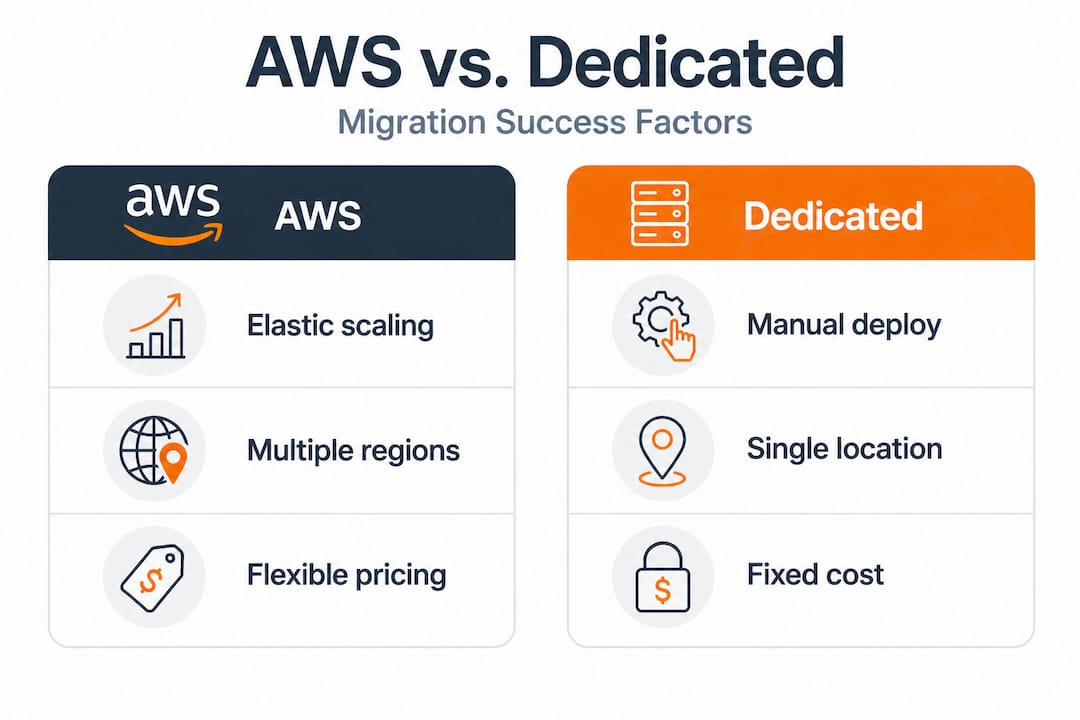
For most eCommerce platforms and fintech products, the workload profile doesn’t fit the dedicated server sweet spot. You’re dealing with unpredictable demand spikes, regulatory requirements that change, and a product that needs to scale with customer growth. AWS wins that context clearly.
That said, hybrid approaches make sense in some cases. A fintech company might run core transaction processing on dedicated infrastructure for pure performance, while keeping analytics, reporting, and auxiliary services on AWS where elasticity matters. The key is making this decision based on actual workload data, not assumptions.
Exploring the right business cloud strategies for your specific context is the starting point for this analysis. Don’t let a vendor tell you one approach fits everything.
Applying best practices for ongoing AWS optimization
Optimization isn’t a project with a completion date. It’s an operational discipline. Here’s the practical framework we recommend to clients for keeping their AWS environment healthy and cost-efficient over time.
1. Establish monthly cost and performance reviews. Review your AWS Cost Explorer report every month, without exception. Look for unexpected spend increases, new resource types appearing without clear ownership, and services drifting from their original purpose.
2. Tag everything from day one. Resource tagging (labeling cloud resources with metadata like team, project, and environment) is the foundation of cost attribution. Without it, you can’t answer “which product line is driving this cost?”
3. Automate environment scheduling. Use AWS Instance Scheduler or Lambda (AWS’s serverless compute service) functions to automatically stop and start non-production resources. This is a no-risk, immediate cost reduction.
4. Review rightsizing recommendations quarterly. Workloads change. An instance that was perfectly sized six months ago may now be over or under-provisioned. AWS Compute Optimizer refreshes recommendations continuously. Act on them.
5. Assign a cloud cost owner. This is the step most mid-sized companies skip. Without a named person or team responsible for cloud spend governance, no one acts on the recommendations. Cloud cost governance becomes real when someone’s KPIs include it.
6. Apply S3 and storage lifecycle policies. Data grows silently. Implement tiered storage policies that move infrequently accessed objects to S3 Infrequent Access or Glacier (Amazon’s archive storage service) automatically.
Pro Tip: Start an internal “cloud efficiency” working group that includes finance, engineering, and product. When engineering teams understand the cost impact of their architectural decisions, behavior changes fast—and savings follow.
Following proven AWS migration best practices ensures that the operational habits you build from day one don’t create expensive technical debt six months later.
Why most cloud migrations miss the mark—and how to do better
Here’s the uncomfortable truth after working on 700+ AWS projects: most migrations are executed well. The architecture is sound. The data moves cleanly. Go-live happens without drama. And then, six to twelve months later, the team is back asking why their AWS bill is 40% higher than projected and performance is degrading under load.
The pattern is almost always the same. Migration was treated as a destination rather than a departure point. The team that planned and executed the migration disbanded or moved on. No one owns the ongoing optimization work. The environment drifts.
McKinsey’s analysis puts the number of companies that capture full cloud value at just 10%. That’s not a technology failure. It’s a governance failure. The technology is there. The tools are excellent. The knowledge base is deep. What’s missing is the organizational commitment to treat cloud management as a living function, not a closed project.
The companies that genuinely land and expand with AWS do a few things differently. They build cost review into their sprint cycles. They create shared dashboards so product and engineering can see the cost impact of what they build. They treat cloud scalability lessons as inputs into architecture decisions, not afterthoughts. And they assign ownership, clearly and publicly, so accountability isn’t diffuse.
One client we worked with post-migration had achieved reasonable initial savings through rightsizing. When we ran a full optimization review three months later, we found they were still paying on-demand rates for five core production workloads that had been running identically for four months. Switching those to Savings Plans and adding environment scheduling for their staging environments doubled their total savings in under two weeks. The knowledge to do this existed. The discipline to act on it didn’t.
Make cloud governance a living process. Review it monthly. Improve it quarterly. The compounding effect of continuous optimization outpaces any single migration win.
Next steps: Unlock the full value of AWS for your business
The gap between a completed AWS migration and a truly optimized cloud environment is where your real ROI lives. If your team has successfully moved workloads to AWS but hasn’t yet implemented systematic optimization, you’re leaving measurable savings on the table every single month.
At awsmigrationservices.com, we specialize in exactly this work—working with eCommerce and fintech companies to move past the migration milestone and into continuous optimization. Whether you need a full infrastructure audit, a rightsizing and cost reduction engagement, or an end-to-end AWS migration services partnership, our team takes ownership of execution and outcomes. Explore our AWS cost optimization guide for actionable frameworks, or review our cloud scalability solutions to understand how elastic architecture drives sustainable growth. The next step is a conversation—not a pitch.
Frequently asked questions
What metrics indicate my AWS infrastructure needs optimization?
Low CPU utilization below 20%, rising monthly bills without corresponding traffic growth, and untagged or orphaned resources are clear signals your environment needs a structured review.
How much can I realistically save by optimizing my AWS workloads?
Savings Plans deliver up to 72% off on-demand rates, Spot Instances up to 90%, and a real-world fintech case shows 60% total spend reduction—combining multiple strategies compounds these gains significantly.
Is AWS always cheaper than on-premises or dedicated servers?
Not for every workload. Dedicated servers can outperform AWS on cost for stable, low-traffic environments, but they sacrifice the elasticity and resilience most growing eCommerce and fintech operations genuinely need.
How often should I review and update my AWS environment?
Monthly reviews of cost and performance metrics are the minimum; run a deeper architectural review immediately after any major product launch, traffic pattern shift, or significant change in your application stack.