TL;DR:
- Most cloud breaches result from customer misconfigurations, not failures in AWS security defaults, emphasizing the importance of proper access controls and monitoring. AWS provides a secure foundation, but organizations must actively manage security responsibilities within their environments to prevent vulnerabilities. Building governance, clear ownership, and automated security practices into migration projects ensures safer, more resilient cloud deployments.
Most organizations moving to AWS assume the cloud provider handles security. It’s a costly assumption. Most cloud breaches result from customer misconfigurations, not failures in AWS’s own security defaults. AWS delivers a rock-solid foundation, but the decisions your team makes about access controls, data handling, and monitoring determine whether that foundation holds. This guide cuts through the noise and gives IT decision-makers a practical, structured look at what cloud security actually means in an AWS migration context and what you need to do to get it right.
Table of Contents
- Cloud security explained: Beyond the buzzword
- Understanding AWS’s shared responsibility model
- Core AWS security methodologies: Making defense practical
- Common pitfalls: Where breaches really happen
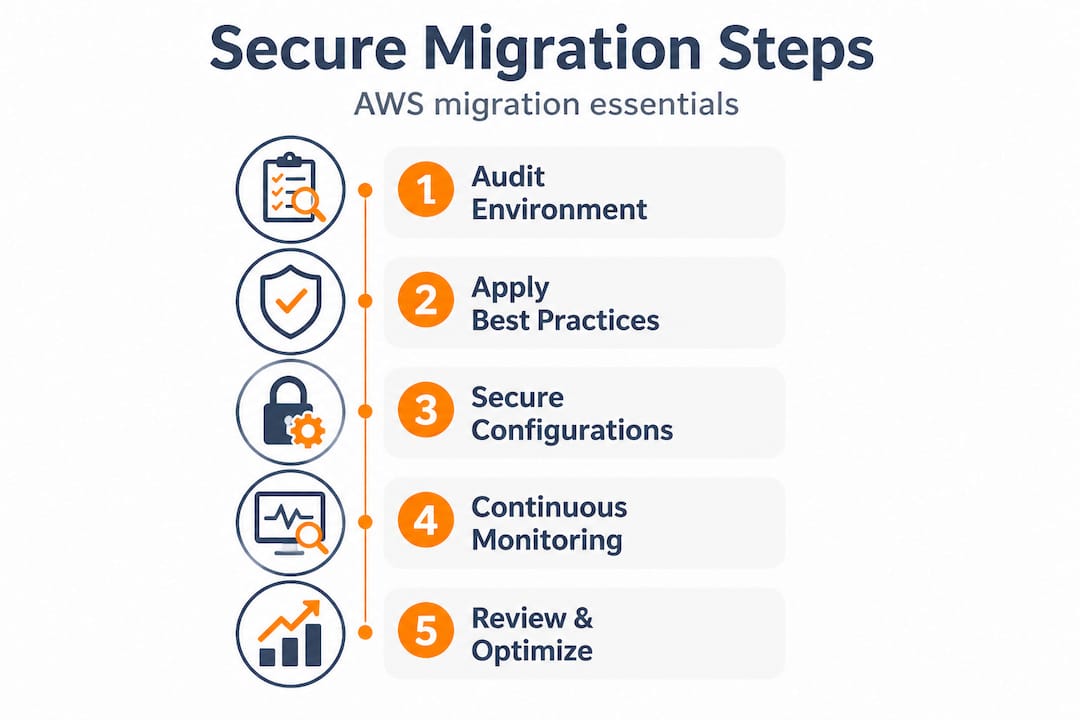
- Building your secure migration roadmap
- Why customer decisions drive AWS cloud security results
- Secure your AWS migration with proven expertise
- Frequently asked questions
Key Takeaways
| Point | Details |
|---|---|
| Shared responsibility model | AWS secures the infrastructure but you must secure your data, users, and configurations. |
| Misconfiguration risks | Most cloud breaches happen due to mistakes in customer settings, not AWS flaws. |
| Layered defense approach | Use multiple security controls like IAM, encryption, and monitoring for strong protection. |
| Automate for consistency | Automating security with AWS tools ensures repeatable, reliable protection during cloud migrations. |
| Continuous improvement | Review and refine your cloud security as services and threats evolve. |
Cloud security explained: Beyond the buzzword
Many leaders have heard about the risks of public cloud, but what does “cloud security” actually mean in today’s AWS landscape? The term gets thrown around constantly, often without a clear definition, which leads to vague strategies and real-world gaps.
Cloud security covers measures and controls designed to protect data, applications, and infrastructure in cloud environments. In plain terms, it’s everything you do to make sure the right people can access the right resources, and nothing else can. For AWS migration projects specifically, cloud security spans three core protection areas:
- Data protection: Ensuring sensitive information is encrypted, classified, and accessible only to authorized systems and users.
- Workload security: Protecting applications and services running in AWS from unauthorized access, exploits, and performance degradation from attacks.
- Infrastructure security: Hardening the network, compute, and storage layers that support your workloads.
If you overlook any of these areas during migration, the consequences are measurable. Exposed S3 buckets have leaked financial records for thousands of businesses. Misconfigured identity policies have handed attackers admin-level access with no alarm raised for weeks. Compliance failures tied to cloud misconfigurations have triggered regulatory fines in heavily governed sectors like fintech and healthcare.

Understanding the role of cloud in business strategy has evolved significantly over the past decade. Cloud is no longer just an infrastructure cost play. It’s a competitive advantage, and security is the foundation that makes that advantage sustainable.
Understanding AWS’s shared responsibility model
With the basics understood, the next critical step is to clarify who protects what in the AWS cloud. The shared responsibility model is the framework that defines this split, and misunderstanding it is one of the single most common causes of cloud security failures.
AWS secures the infrastructure, while customers secure everything within their cloud environment, including data, access controls, and configurations. Think of it this way: AWS builds and maintains a secure building. You’re responsible for everything inside your office on the 12th floor, who has keys, what you store there, and whether you left the window open.
Here’s how the split actually looks in practice:
| Responsibility area | AWS handles | Customer handles |
|---|---|---|
| Physical hardware | Data center security, servers, storage | Not applicable |
| Global network | Core network infrastructure, DDoS protection | VPC configuration, security groups |
| Hypervisor and virtualization | Patching the underlying platform | EC2 instance OS patching |
| Identity and access | IAM service availability | IAM policies, roles, and permissions |
| Data | Storage availability and durability | Encryption, classification, and access controls |
| Applications | Managed service security (e.g., RDS) | Application-level security and configurations |
| Monitoring | CloudTrail availability | Enabling and acting on monitoring alerts |
The most dangerous assumption in cloud migration is that AWS “takes care of security.” AWS takes care of its security. Yours is still your job.
This distinction matters enormously during migration. Teams moving workloads from on-premises environments often carry over old habits: assuming network perimeters protect everything, or that default settings are safe. In AWS, defaults are often permissive to enable flexibility. Your team must explicitly configure security controls at every layer.
Core AWS security methodologies: Making defense practical
Having a clear view of your responsibilities, how should your team approach actual security tasks in the AWS environment? The AWS Well-Architected Framework gives a useful starting point. Key AWS security practices include IAM with least privilege, defense in depth, encryption, monitoring, automation, and data protection. Here’s how to put each into practice during a migration.
-
Apply least privilege IAM from day one. Every user, role, and service should have only the permissions it needs to do its job, nothing more. This sounds simple, but in practice, teams often grant broad permissions early in a migration to “move fast” and never revisit them. That’s how overprivileged accounts become breach vectors.
-
Layer your defenses. Defense in depth means applying security controls at multiple levels: network (security groups, NACLs), compute (host-based firewalls, patch management), application (WAF, input validation), and data (encryption, access logging). No single layer is enough on its own.
-
Encrypt data at rest and in transit. AWS offers native encryption options across S3, RDS, EBS, and most managed services. Enable encryption by default. For data in transit, enforce TLS everywhere. If you’re unsure where to start with cloud scalability with AWS, encryption is a foundational requirement that feeds into both security and compliance posture.
-
Enable monitoring before you flip the switch. AWS CloudTrail, Amazon GuardDuty, and AWS Security Hub are powerful. But they only help you if they’re turned on and someone is acting on their findings. Set up alerting pipelines before migration begins, not after.
-
Automate wherever possible. Manual security checks don’t scale. Use AWS Config rules to enforce compliance continuously. Use AWS Systems Manager for patch automation. Automate remediation for common misconfigurations so your team isn’t chasing fires around the clock.
Pro Tip: Before migrating any workload, run a security baseline check against the AWS Foundational Security Best Practices standard in Security Hub. This gives you a scored, prioritized list of issues to fix before go-live, not after.
Following migration best practices means treating security as an input to the migration process, not an output. Security controls should be designed, tested, and validated before workloads move, not bolted on once they’re running in production.
Common pitfalls: Where breaches really happen
Now that you’re equipped with best practices, let’s spotlight the typical mistakes IT teams make and actionable ways to prevent them. The pattern is remarkably consistent across industries and company sizes.
Breaches are often due to disabled monitoring and governance gaps, not AWS platform flaws. Here’s a breakdown of the most common pitfalls and their real-world impact:
| Pitfall | Example scenario | Business impact |
|---|---|---|
| Open S3 buckets | Public read access left on an S3 bucket containing customer PII | Regulatory fines, customer trust loss |
| Overprivileged IAM roles | Developer role with admin rights used in production | Full account takeover if credentials are compromised |
| Disabled CloudTrail logging | No audit trail for a multi-account environment | Forensics impossible after a breach |
| Unpatched EC2 instances | OS patches skipped during migration crunch | Exploitable known vulnerabilities in production |
| Missing alerting | GuardDuty enabled but alerts routed to no one | Threats go undetected for weeks or months |
The pattern here is clear: these are all customer decisions, not AWS failures. Every one of these scenarios is preventable with proper configuration and governance.
- Audit permissions regularly. Use AWS IAM Access Analyzer to identify resources shared externally or with overly broad access.
- Block public access at the account level for S3. AWS now allows you to block all public S3 access with a single account-level setting. Enable it unless there’s an explicit, documented reason not to.
- Set up centralized logging. Use AWS Organizations with CloudTrail enabled across all accounts, routed to a dedicated, locked-down logging account.
- Automate patch cycles. Use AWS Systems Manager Patch Manager to apply OS patches on a defined schedule. Don’t rely on manual processes in a cloud environment.
Pro Tip: Run AWS Trusted Advisor weekly during and after migration. It flags open security groups, unrestricted access to key resources, and unused IAM credentials, all free to check with a Business or Enterprise support plan.
When you’re also trying to optimize AWS costs, it’s tempting to skip security tooling to cut spend. Resist that logic. The cost of one breach, in downtime, remediation, and reputational damage, far outweighs the monthly cost of GuardDuty and Security Hub combined.
Building your secure migration roadmap
With pitfalls in mind, here’s how to proactively embed security into your AWS migration journey. Security shouldn’t be a phase at the end of the migration project. It needs to be woven into each stage from planning through post-migration optimization.
Automation of security best practices is essential for efficient, repeatable cloud deployments. Here’s a stage-by-stage approach that works in practice:
-
Plan: Know what you’re moving and why it matters. Catalog all assets earmarked for migration. Classify data by sensitivity, PII, financial records, intellectual property. Identify compliance requirements (SOC 2, HIPAA, PCI DSS) that apply to each workload. This inventory becomes your security requirements checklist for every subsequent phase.
-
Design: Map security controls before you write a line of infrastructure code. For each workload, define the AWS services needed, the IAM roles required, the network segmentation model, and the encryption strategy. Use AWS reference architectures as a starting point. Define your monitoring and alerting requirements at this stage so they’re built in, not added later.
-
Execute: Use infrastructure as code to enforce security consistently. Tools like AWS CloudFormation or Terraform let you codify your security configurations and deploy them repeatably. This eliminates the “someone manually changed this setting” problem that causes so many breaches. Enable Security Hub, GuardDuty, and CloudTrail as part of your baseline account setup, before any workload migrations begin.
-
Optimize: Treat security as a continuous practice. Schedule regular penetration tests. Run quarterly IAM access reviews. Review Security Hub findings monthly and track remediation trends over time. Use AWS Well-Architected Reviews annually to identify gaps as your architecture evolves.
Embedding digital transformation with AWS into your roadmap means thinking beyond the lift-and-shift. Each migration phase is an opportunity to improve your security posture, not just replicate what you had on-premises. Teams that treat migration as a fresh start tend to end up with significantly stronger security outcomes than those that simply copy existing configurations to the cloud.
Why customer decisions drive AWS cloud security results
Here’s the uncomfortable truth that most cloud security conversations avoid: technology is rarely the actual gap. AWS provides some of the most sophisticated security tooling on the planet, all of it available from day one. And yet breaches keep happening. Why?
Breaches are almost always the result of customer misconfigurations, not failures in AWS cloud security or its defaults. After working through 700+ migration projects, the pattern we see isn’t “the technology failed.” It’s “nobody owned it.” A GuardDuty alert that routes to an email nobody checks. An IAM policy that was “temporary” eighteen months ago and is still in production. A CloudTrail log that was disabled because it was “generating too much noise.”
These aren’t technical failures. They’re governance failures. And governance is a people-and-process problem, not a product problem. The organizations that achieve consistently strong AWS security outcomes share three traits. They assign clear ownership, someone specific is accountable for each security control and its ongoing health. They build security reviews into their regular operating rhythm, not as a one-time audit but as a monthly checkpoint. And they invest in training so that every engineer who touches AWS understands the shared responsibility model and its implications for their daily work.
The contrarian point worth making here is this: buying more security tools without improving governance and team culture often makes things worse. More tools mean more alerts, and more alerts that nobody acts on mean more signal noise, which means real threats get buried. Start with the fundamentals and follow migration best practices to build the right habits before layering on additional tooling.
Security maturity in the cloud is built incrementally through consistent decisions made by accountable people. No product substitutes for that.
Secure your AWS migration with proven expertise
If the patterns in this article sound familiar, you’re not alone. Security gaps during AWS migrations are almost always the result of good intentions meeting real-world execution pressure. The good news is that they’re preventable with the right approach and the right partner.
At AWS Migration Services, we take full ownership of migration execution, from the initial infrastructure audit through post-migration security optimization. As an AWS Advanced Tier Partner with 700+ completed projects, we specialize in complex, high-load environments where a misconfiguration isn’t just a technical issue, it’s a revenue risk. Our team helps you implement migration best practices from day one, with security controls built into the architecture before any workload moves. Whether you need a full rehost, replatform, or refactor strategy, we design for cloud scalability with AWS and long-term resilience, not just a fast cutover. Let’s build something that holds.
Frequently asked questions
What does the AWS shared responsibility model mean for my company?
AWS secures its own infrastructure, but your company is responsible for protecting data, access controls, and configurations inside your cloud environment, per the AWS Well-Architected Security Pillar.
What’s the biggest cause of cloud security breaches?
The primary cause is customer misconfiguration, such as open access permissions or disabled monitoring tools, not AWS platform flaws, as consistent research on cloud misconfigurations confirms.
How can I automate cloud security during AWS migrations?
Use infrastructure as code tools like CloudFormation or Terraform, combined with AWS Config rules and Systems Manager, to enforce and maintain automated security practices across your environment with minimal manual effort.
Why do many organizations still get cloud security wrong despite good AWS tools?
A lack of governance, disabled monitoring, and no clear ownership of security controls create gaps even when excellent tooling is available, because misconfiguration and governance failures rather than tool limitations drive most real-world breaches.