
TL;DR:
- A migration assessment is a structured review that inventories assets, classifies their complexity, and estimates costs before cloud migration. It produces essential data, including a dependency map and a realistic timeline, to prevent costly guesswork. Skipping this assessment increases the risk of outages, delays, and budget overruns during migration projects.
A migration assessment is a structured technical audit performed before any cloud migration that inventories all assets, classifies their complexity, maps dependencies, and produces a verified cost and timeline estimate. The industry term for this process is a cloud readiness assessment, and the two phrases are used interchangeably across AWS, SAP, and Oracle documentation. Without this foundation, migration projects default to guesswork, and guesswork at enterprise scale is expensive. Tools like the AWS Migration Readiness Assessment (MRA) and SAP Integration Suite’s Migration Assessment exist precisely because decision-making without data produces timeline and budget failures at a predictable rate.
What is migration assessment and what does it actually produce?
A migration assessment is defined as a systematic evaluation of your IT environment that determines what exists, what is ready to move, and what requires redesign before cloud migration begins. The output is not a slide deck. It is a verified asset inventory, a complexity classification for each workload, a dependency map, and a cost and time estimate grounded in real data.

Cloud readiness assessment maps each asset to an appropriate cloud service model and deployment approach. That mapping is what separates a credible migration plan from a rough guess. A fintech company migrating 400 microservices to AWS needs to know which services can be rehosted directly, which need replatforming, and which require a full refactor before a single line of infrastructure code is written.
The four core outputs of any migration assessment are:
- Asset inventory: A complete catalog of servers, databases, applications, and integrations currently running in your environment.
- Complexity classification: Each asset is scored by migration difficulty, typically as “Ready to Migrate,” “Needs Modification,” or “Requires Redesign.”
- Dependency map: A visual or structured record of how systems connect, so that migrating one service does not silently break three others.
- Cost and timeline estimate: A projection built from the complexity data, not from vendor templates.
Pro Tip: Run your asset inventory before you engage any migration vendor. Vendors who quote a price without seeing your inventory are guessing, and you will absorb the cost of that guess.
What are the key components of a migration assessment?
The migration assessment process has five distinct components, and skipping any one of them creates a blind spot that surfaces as a production incident later.
Asset discovery is the starting point. Every server, virtual machine, container, database, and third-party integration must be enumerated. Incomplete enumeration is the most common cause of scope creep in cloud migrations. A team that discovers 200 undocumented integrations halfway through a migration to AWS is not dealing with a technical problem. It is dealing with an assessment failure.
Complexity classification determines how much engineering effort each asset requires. SAP Integration Suite’s Migration Assessment automatically classifies integration scenarios into readiness categories with quantified effort scores. That classification enables phased migration plans where the simplest workloads move first, generating early wins and reducing risk for the harder ones.
Dependency mapping is where most surface-level assessments fail. A database that appears standalone often feeds a reporting tool, a compliance archive, and a real-time dashboard. Missing those connections means migrating the database while leaving its consumers broken. Dependency mapping prevents that.
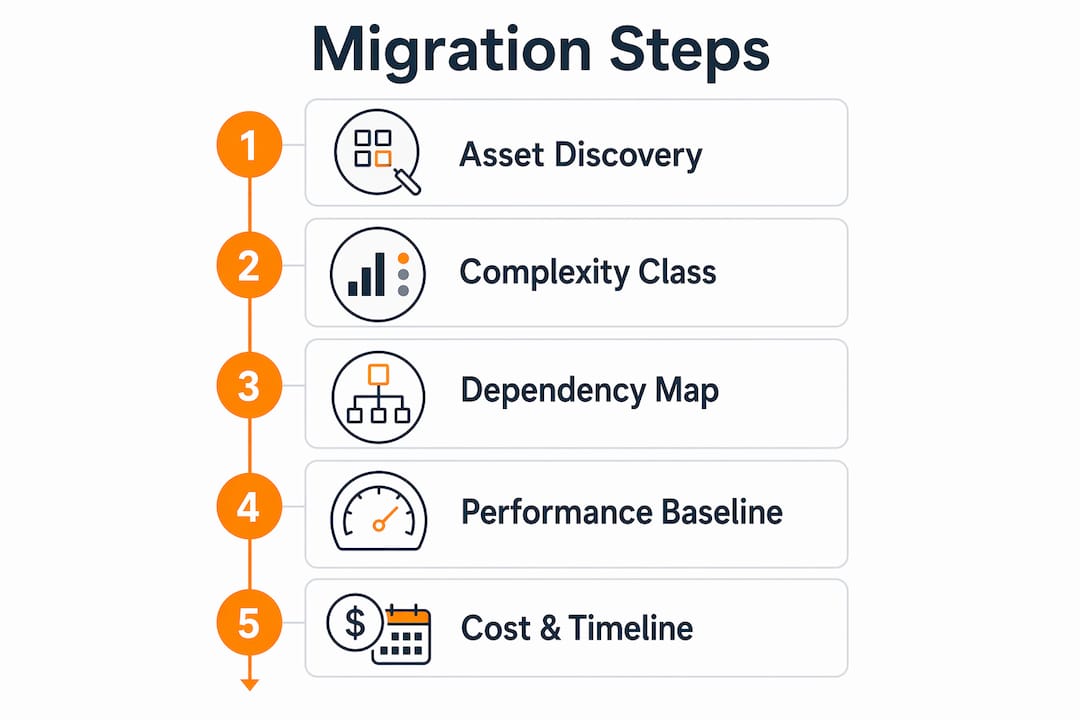
Performance and security baselining establishes what “normal” looks like before migration. Microsoft Azure’s workload assessment framework includes performance baselines and security inventory as required steps. Without a baseline, you cannot confirm that the migrated environment is performing correctly after cutover.
Cost and timeline modeling closes the loop. Every complexity classification and dependency finding feeds directly into the estimate. This is how a migration assessment converts technical data into a business case.
How do automated tools improve the migration assessment process?
Automated discovery tools are the only practical way to assess large IT estates accurately. A manual inventory of 2,000 servers takes weeks and introduces significant human error. Automated tools complete the same enumeration in hours.
SAP’s Migration Assessment tool enumerates thousands of objects in minutes, reducing manual effort and producing reports that classify each asset by migration readiness. Oracle Cloud Infrastructure’s Database Migration assessment checks for incompatibilities and misconfigurations automatically, flagging issues that would otherwise surface during cutover. AWS MRA uses structured discovery questionnaires and automated workload analysis to produce a readiness score across six dimensions: business drivers, platform, security, operations, reliability, and performance.
The benefits of automation in migration assessments include:
- Faster asset enumeration with fewer gaps
- Consistent classification criteria applied across every workload
- Automated detection of unsupported components and version conflicts
- Structured output that feeds directly into migration wave planning
Pro Tip: Use automated tools for discovery and classification, then assign a senior engineer to review every dependency the tool flags as “low risk.” Tools miss undocumented connections. Engineers catch them.
Automation does not replace human judgment. Automated discovery tools cannot uncover implicit dependencies or the “tribal knowledge” that exists only in the heads of the engineers who built the original system. A tool will map the documented API calls between two services. It will not know that a batch job runs every sunday night and writes directly to a database that the tool classified as standalone. Human validation is not optional.
What happens when migration assessments are skipped or underperformed?
A surface scan is not a migration assessment. Running a basic inventory tool and calling it done is the single most reliable predictor of six-figure migration failures. The pattern is consistent: a team underestimates complexity, commits to a timeline, discovers hidden dependencies mid-migration, and then spends more fixing the migration than the migration itself would have cost with a proper assessment.
“Shortcuts in migration assessment almost always result in overruns and complexity. Thorough assessments are what differentiate successful migrations from costly failures.” — Migration readiness practitioners
The most common failure modes from inadequate assessments are:
- Hidden dependencies that cause production outages when a migrated service loses a connection it was never documented as having.
- Budget overruns caused by discovering workloads that require refactoring after the project has already been scoped and priced as a rehost.
- Timeline failures caused by underestimating the number of assets or the effort required to migrate complex integrations.
- Security gaps caused by missing the compliance requirements attached to specific workloads, particularly in fintech and healthcare environments.
The cost of a thorough assessment is always lower than the cost of fixing a migration that was built on incomplete data. IT leaders who treat the assessment as overhead rather than as the foundation of the project are the ones who end up in emergency calls at 2 a.m. explaining why the payment system is down.
How to perform a migration assessment: practical steps for IT leaders
A migration assessment follows a defined sequence. Skipping steps or reordering them produces unreliable outputs.
- Define scope and business objectives. Identify which systems are in scope, what the migration must achieve (cost reduction, compliance, performance), and what constraints exist (downtime windows, regulatory requirements).
- Run automated discovery. Deploy an automated discovery tool across the in-scope environment. AWS MRA, SAP Migration Assessment, and Oracle Cloud Infrastructure’s assessment tool each cover their respective platforms. For mixed environments, use a platform-agnostic discovery tool first.
- Classify complexity. Apply a consistent classification framework to every discovered asset. The three-tier model (Ready to Migrate, Needs Modification, Requires Redesign) is the industry standard and maps directly to rehost, replatform, and refactor strategies.
- Map dependencies. Cross-reference automated dependency data with manual interviews. Ask the engineers who built each system what connects to it that is not in the documentation.
- Baseline performance and security. Record current performance metrics and run a security and compliance inventory for every workload. This data becomes your post-migration validation benchmark.
- Build migration waves. Group assets into migration waves based on readiness and dependency relationships. Start with “Ready to Migrate” workloads to build momentum and validate your process before tackling complex ones.
- Produce the cost and timeline estimate. Build the estimate from the complexity classifications and wave plan, not from industry averages. Every environment is different.
The table below shows how complexity classification maps to migration strategy and typical effort level:
| Complexity class | Migration strategy | Relative effort |
|---|---|---|
| Ready to Migrate | Rehost (lift and shift) | Low |
| Needs Modification | Replatform | Medium |
| Requires Redesign | Refactor | High |
Aligning business goals with technical findings at step one prevents the most common disconnect in migration projects: engineering teams optimizing for technical elegance while the business needs cost reduction by a specific date. A well-structured migration assessment checklist keeps both sides aligned throughout the process.
Key Takeaways
A migration assessment is the single most reliable factor in predicting whether a cloud migration finishes on time, within budget, and without production incidents.
| Point | Details |
|---|---|
| Define outputs first | A valid assessment produces an asset inventory, complexity classification, dependency map, and cost estimate. |
| Automate discovery | Tools like AWS MRA and SAP Migration Assessment enumerate assets faster and more consistently than manual methods. |
| Validate manually | Automated tools miss undocumented dependencies; human review of flagged assets is required. |
| Classify before scoping | Complexity classification must precede any cost or timeline commitment to avoid budget overruns. |
| Skipping costs more | Inadequate assessments are the leading cause of six-figure migration failures and production outages. |
Why the quality of your assessment decides everything
After working through hundreds of cloud migrations, the pattern is clear: the quality of the assessment predicts the quality of the migration. Not the size of the team, not the choice of cloud provider, not the migration methodology. The assessment.
The misconception I see most often is that IT leaders treat the assessment as a formality. They run an automated scan, generate a report, and move straight to planning. That report tells them what exists. It does not tell them what matters, what is fragile, or what will break under load in a new environment. Those answers come from the engineers who built the systems, and getting those answers requires structured interviews, not just tool output.
The second misconception is that a longer assessment means a slower migration. The opposite is true. A thorough assessment compresses the actual migration timeline because it eliminates surprises. Every hour spent in assessment saves multiple hours of incident response during cutover. The teams that move fastest through migrations are the ones who spent the most time on assessment upfront.
My practical advice: treat the dependency mapping phase as the most important part of the entire process. Asset inventories are easy to automate. Dependency maps require human judgment. The connections that are not in any documentation are exactly the ones that will cause a production outage at the worst possible moment. Find them before you migrate, not after.
— Oleksandr
AWS migration assessment support from IT-Magic
IT-Magic has completed 700+ AWS migrations as an AWS Advanced Tier Partner, and every engagement starts with a structured assessment phase before any infrastructure work begins.

The assessment covers full infrastructure discovery, complexity classification, dependency mapping, and a cost model built from your actual environment data. For eCommerce and fintech teams where downtime translates directly into lost revenue, that foundation is not optional. IT-Magic takes full ownership of execution from assessment through post-migration optimization, so your team does not absorb the operational burden of the transition. Review IT-Magic’s AWS migration services to see how the assessment phase fits into the full migration lifecycle, or check the migration best practices guide for a detailed breakdown of what a production-grade migration looks like from start to finish.
FAQ
What is migration assessment in cloud computing?
A migration assessment is a structured audit of your IT environment that inventories assets, classifies complexity, maps dependencies, and estimates cost and time before cloud migration begins. It produces the data required to build a credible migration plan.
What tools are used in a migration assessment?
AWS Migration Readiness Assessment, SAP Integration Suite’s Migration Assessment, Microsoft Azure’s workload assessment framework, and Oracle Cloud Infrastructure’s Database Migration assessment are the primary platform-specific tools. Mixed environments often use platform-agnostic discovery tools alongside these.
How long does a migration assessment take?
Duration depends on environment size and complexity. Automated discovery can complete asset enumeration in hours, but dependency mapping and manual validation for large environments typically extend the full assessment to several weeks.
What is the role of migration assessment in reducing risk?
A migration assessment identifies hidden dependencies, security gaps, and complexity mismatches before migration begins. Skipping it is the leading cause of budget overruns, timeline failures, and production outages during cloud migrations.
What should a migration assessment checklist include?
A migration assessment checklist should cover asset discovery, complexity classification, dependency mapping, performance baselining, security and compliance inventory, migration wave planning, and a cost and timeline estimate built from the collected data.