
Recovery Time Objective (RTO) is the maximum acceptable time between a service interruption and full restoration. Recovery Point Objective (RPO) is the maximum acceptable age of data at the moment of recovery. Both are business-defined targets, not technical defaults AWS sets for you.
Before you touch a single AWS service, two things need to happen:
- Stakeholders define the numbers. Finance, operations, and product owners quantify what an hour of downtime or an hour of lost transactions actually costs. The cloud team translates that into time targets.
- Business impact drives the tier. A payment processor and a weekly analytics report do not share an RTO. Tier your workloads by impact, then pick the architecture that meets each tier’s target at the lowest defensible cost.
Your immediate next steps: run a business-impact tiering worksheet with your stakeholders, assign preliminary RTO/RPO targets by tier, and kick off an AWS Resilience Hub assessment to see which components already breach those targets.
Key Takeaways
RTO and RPO are business commitments that must be set by stakeholders, tiered by impact, and validated through tested runbooks, not assumed from architecture diagrams.
| Point | Details |
|---|---|
| Define targets with stakeholders | RTO and RPO must reflect quantified business impact, not engineering preference or arbitrary SLA language. |
| Tier workloads by impact | AWS guidance provides example ranges: ~15-min RTO for Tier 1, ~4-hour RTO for Tier 2, 8–24-hour RTO for Tier 3. |
| Match services to targets | PITR (RDS, Aurora, DynamoDB) for low RPO; Aurora Global Database for near-zero; CloudFormation for fast environment rebuild. |
| Test every recovery path | Untested runbooks are hypotheses. Measure actual RTO and RPO during drills and close the gap with automation. |
| IT-Magic accelerates implementation | IT-Magic delivers Resilience Hub assessments, IaC recovery templates, and scheduled DR drills as part of its AWS migration service. |
Table of Contents
- What do RTO and RPO actually mean for AWS workloads?
- How do you set RTO and RPO targets that hold up under scrutiny?
- Which AWS services map to your RTO and RPO targets?
- What recovery architecture should you choose for each tier?
- How do you test and validate that your RTO and RPO targets are actually met?
- What are the most common mistakes teams make with RTO and RPO on AWS?
- Quick reference: RTO/RPO ranges and AWS approaches by tier
- A field-ready checklist and runbook template you can use today
- The real trade-offs you only learn after going live
- IT-Magic handles the architecture, automation, and validation so you don’t have to
- Sources
- FAQ
What do RTO and RPO actually mean for AWS workloads?
RTO answers: how long can this system be down? RPO answers: how much data can we afford to lose? Both are expressed in time, and both must be measurable enough to test against.
A few concrete examples make the difference clear:
- Public e-commerce site — customers abandon carts within minutes. A realistic RTO might be 15 minutes; RPO might be 5 minutes of transaction data.
- Transactional database (payments, orders) — financial reconciliation demands near-zero data loss. RPO is often measured in seconds; RTO in minutes.
- Internal analytics pipeline — a nightly batch job. An 8-hour RTO and a 24-hour RPO are probably fine. Rebuilding yesterday’s aggregations is annoying, not catastrophic.
The cost implication is direct: cutting RTO from 4 hours to 15 minutes can require moving from a warm standby to a multi-region active-active architecture, which multiplies both infrastructure spend and operational complexity. That trade-off belongs in a boardroom conversation before it lands in a CloudFormation template.
How do you set RTO and RPO targets that hold up under scrutiny?
The process that produces defensible targets has three stages: stakeholder interviews, financial quantification, and tier assignment.
Step 1: Interview the right stakeholders
Pull in finance, legal, operations, and product leadership. The AWS Cloud Operations Blog recommends asking specific questions:
- What is the financial impact per hour of downtime for this workload?
- What regulatory or contractual SLAs govern this system?
- How much data loss (in time) is recoverable through manual re-entry or reprocessing?
- What downstream systems depend on this one, and what are their RTO/RPO commitments?
- Has this system ever failed? What was the actual recovery time, and was it acceptable?
Step 2: Quantify and tier
Group workloads into tiers based on impact. AWS guidance provides example ranges that are useful starting points, not mandates:
| Tier | Description | Example RTO | Example RPO | Typical cost profile |
|---|---|---|---|---|
| Tier 0 | Mission-critical, revenue-generating | < 5 min | Near-zero | Very high (multi-region active-active) |
| Tier 1 | Business-critical, customer-facing | ~15 min | Near-zero | High (warm standby or multi-region) |
| Tier 2 | Important internal systems | ~4 hours | ~2 hours | Moderate (pilot light or warm standby) |
| Tier 3 | Standard / non-critical | 8–24 hours | ~4 hours | Low (backup and restore) |
Step 3: Validate against dependency chains
A Tier 1 application that depends on a Tier 3 database cannot actually meet a 15-minute RTO. Map upstream and downstream dependencies explicitly. If a shared authentication service has a 4-hour RTO, every application that calls it inherits that ceiling unless you add redundancy at the dependency layer. Align SLAs across the dependency graph before finalizing targets.
Which AWS services map to your RTO and RPO targets?
Once targets are set, the question becomes: which AWS tools actually deliver them? Here is the core toolkit:
- AWS Resilience Hub — define resiliency policies with your RTO/RPO targets, run assessments against live workloads, and receive remediation recommendations with estimated cost impacts. When a target is unattainable, Resilience Hub flags a “policy breached” state. Zero-RTO/zero-RPO settings are treated as near-zero in assessments and will almost always breach.
- AWS Backup — centralized backup management across EC2, RDS, DynamoDB, EFS, S3, and more. Supports backup plans, cross-region and cross-account copies, and automated restore testing. AWS Backup interacts with native service backups; for RDS, it can trigger continuous backups rather than just snapshots.
- Amazon RDS / Aurora (PITR) — continuous backups with point-in-time recovery provide sub-minute recovery granularity for supported retention windows. For low-RPO transactional databases, PITR is often mandatory. Snapshot schedules alone cannot meet sub-minute RPO goals.
- Amazon Aurora Global Database — synchronous or near-synchronous replication across regions with sub-second RPO and typically under a minute for managed failover. The right choice when a relational database is Tier 0 or Tier 1.
- Amazon S3 Replication / Versioning — Cross-Region Replication (CRR) and Same-Region Replication (SRR) copy objects automatically. Versioning protects against accidental deletion and overwrites. Together they support near-zero RPO for object storage.
- Amazon EBS Snapshots — point-in-time snapshots stored in S3; can be automated via AWS Backup or Data Lifecycle Manager. Restore time depends on volume size and instance type. Not suitable for sub-minute RPO on its own.
- Amazon DynamoDB Point-in-Time Recovery — continuous backups for DynamoDB tables with per-second granularity for the past 35 days. Restore creates a new table; factor the table-rebuild time into your RTO calculation.
- AWS CloudFormation / IaC — infrastructure-as-code templates are the fastest path to a clean recovery environment. Pre-validated CloudFormation stacks or CDK constructs let you rebuild an entire application tier in minutes rather than hours, directly cutting RTO.
- Amazon Route 53 — health checks and DNS failover policies (failover, latency-based, weighted) automate traffic rerouting during a regional event. DNS TTL settings directly affect how quickly clients reach the recovery region.
Pro Tip: AWS Backup’s restore testing feature lets you schedule automated restores to a sandbox account and validate them against a success criteria script. Run these weekly for Tier 1 and Tier 2 workloads so you catch backup corruption before a real incident does.
What recovery architecture should you choose for each tier?
AWS defines four DR strategies, each representing a different trade-off between recovery speed, cost, and operational overhead.

| Pattern | Typical RTO | Typical RPO | Cost profile | Operational complexity | When to use |
|---|---|---|---|---|---|
| Backup & Restore | 8–24 hours | Hours | Lowest | Low — restore from backup, redeploy via IaC | Tier 3; non-critical batch or dev workloads |
| Pilot Light | 1–4 hours | Minutes | Low–moderate | Moderate — scale up minimal running core | Tier 2; important systems with budget constraints |
| Warm Standby | 15 min–1 hour | Seconds–minutes | Moderate–high | High — maintain scaled-down live environment | Tier 1; customer-facing apps needing fast failover |
| Multi-Region Active-Active | Near-zero | Near-zero | Highest | Very high — active traffic in multiple regions | Tier 0; payment systems, global SaaS, regulated platforms |
Backup & Restore keeps costs minimal by storing backups in S3 and rebuilding the environment from IaC on demand. The trade-off is recovery time measured in hours. For a weekly analytics pipeline, that is entirely acceptable.
Pilot Light keeps a minimal core running in the recovery region: a database replica, a stopped EC2 AMI, a dormant Lambda. When disaster strikes, you scale up and reroute. Recovery time drops to the 1–4 hour range, and ongoing costs stay modest.
Warm Standby runs a scaled-down but fully functional copy of the production stack. Failover is fast because the environment is already running; you just scale it up and flip DNS. A documented AWS implementation shows how this pattern can deliver a 4-hour RTO with a 15-minute RPO, combining RDS continuous backups with pre-deployed infrastructure.
Multi-Region Active-Active routes live traffic to multiple regions simultaneously. Failover is effectively instantaneous because there is no “switch.” The cost and complexity are significant: you need global data synchronization, conflict resolution, and active traffic management across regions. Reserve this for workloads where even a 15-minute outage has direct, quantifiable financial or regulatory consequences.
For cross-account DR, use AWS Organizations with dedicated recovery accounts. This isolates blast radius and prevents a compromised primary account from affecting recovery resources.
How do you test and validate that your RTO and RPO targets are actually met?
Setting targets is easy. Proving you can hit them under real conditions is where most teams fall short. A validation program has four components.
Validation checklist
- Run a Resilience Hub assessment against every Tier 0 and Tier 1 workload. Review “policy breached” findings and prioritize remediation by estimated RTO/RPO impact.
- Schedule automated AWS Backup restore tests for all critical databases and file systems. Validate that restored resources pass application-level health checks, not just that the restore job completed.
- Conduct RDS/Aurora failover drills quarterly. Measure the time from initiating failover to the first successful application query against the new primary.
- Test Route 53 DNS cutover by simulating a regional health-check failure. Measure propagation time against your DNS TTL settings and confirm clients reconnect within your RTO window.
- Run a full tabletop exercise annually with stakeholders to walk through the runbook, assign roles, and identify gaps before an actual incident does.
Minimal runbook outline
A runbook that cannot be executed under pressure is not a runbook. Keep it short and timestamped:
- T+0:00 — Incident detected (CloudWatch alarm, PagerDuty alert, or manual report). Incident commander assigned.
- T+0:05 — Confirm scope: which services are affected, which region, which tier.
- T+0:10 — Declare DR event if scope meets threshold. Notify stakeholders.
- T+0:15 — Begin failover: trigger Route 53 health-check override or manual DNS update; initiate RDS failover or Aurora Global Database managed failover.
- T+0:30 — Validate recovery environment: run smoke tests, confirm database connectivity, verify application health checks pass.
- T+0:45 — Confirm RTO met or escalate if validation fails. Log measured elapsed time.
- RPO measurement — query the database for the timestamp of the last committed transaction before the incident. Subtract from incident detection time. That delta is your measured RPO.
Pro Tip: Integrate Resilience Hub assessments into your CI/CD pipeline so every infrastructure change triggers an automated policy check. A deployment that would breach your RTO target gets flagged before it reaches production, not after a 2 AM incident.
Compliance note: regulated industries (HIPAA, PCI-DSS, SOC 2) typically require documented, tested DR procedures with evidence of test results. Keep timestamped drill logs and Resilience Hub assessment reports as audit artifacts.
What are the most common mistakes teams make with RTO and RPO on AWS?
Getting the targets wrong is expensive in both directions. Here are the pitfalls that show up repeatedly:
- Zero-RTO / zero-RPO as a target. Resilience Hub treats zero as near-zero and will flag most workloads as “policy breached.” More importantly, true zero is physically unattainable. Set the lowest business-justified target, not the lowest theoretically possible one.
- Confusing high availability with disaster recovery. Multi-AZ RDS gives you automatic failover within a region in under two minutes. It does nothing for a regional outage, a data corruption event, or an account-level compromise. HA and DR solve different problems and require separate planning.
- Arbitrary target selection. “We need 99.99% uptime” is not an RTO. Targets set without a business-impact analysis tend to be either aspirationally tight (forcing expensive architectures) or dangerously loose (discovered only during an incident).
- Ignoring dependency alignment. An application with a 15-minute RTO that calls a shared service with a 4-hour RTO cannot meet its target. Map the full dependency graph before finalizing numbers.
- Untested recovery paths. A runbook that has never been executed is a hypothesis. Backup jobs that have never been restored may be corrupt. The only way to know your RTO is to measure it during a drill.
- Over-engineering Tier 3 workloads. Applying warm standby to a dev environment or an internal wiki wastes budget that could fund better protection for genuinely critical systems. Right-sizing recovery targets is as important as tightening them.
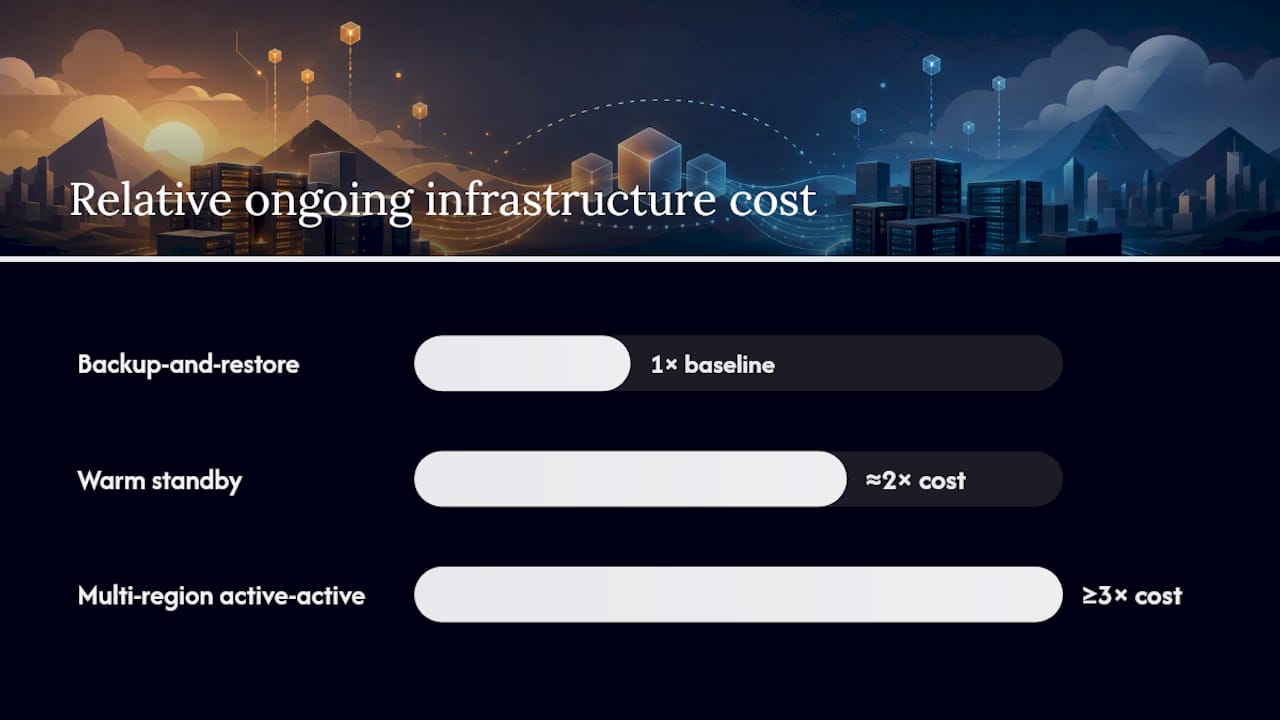
On cost: moving from backup-and-restore to warm standby roughly doubles ongoing infrastructure spend for a given workload. Moving to multi-region active-active can multiply it by three or more, plus adds significant operational staffing. Use a phased approach to AWS cost optimization — start with the pattern that meets the business target, measure actual recovery performance, then invest in tighter targets only when the business case is proven.
Physical infrastructure testing, including room integrity testing for on-premises components in hybrid DR setups, provides documented evidence that the full recovery chain holds, not just the AWS side.
Quick reference: RTO/RPO ranges and AWS approaches by tier
Escalate a workload to a higher tier when a dependency audit reveals it sits in a critical path, when a regulatory requirement mandates a specific RTO, or when a real incident reveals that the current tier’s recovery time caused measurable business harm.
A field-ready checklist and runbook template you can use today
Pre-deployment design checklist
- Confirm RTO and RPO targets are documented, stakeholder-approved, and tied to a specific business-impact figure.
- Assign each workload to a tier using the matrix above.
- Verify that all dependency RTOs are equal to or tighter than the dependent application’s RTO.
- Select a DR pattern for each tier and document the architecture decision.
- Pre-validate CloudFormation or CDK templates in a non-production account.
- Configure AWS Backup plans with cross-region copy for Tier 0–2 workloads.
- Enable PITR on all RDS, Aurora, and DynamoDB resources in Tier 0–2.
- Set Route 53 health checks and failover policies for all customer-facing endpoints.
- Create a Resilience Hub resiliency policy and run the initial assessment.
- Document the runbook and store it in a location accessible during a regional outage (not just in the primary region).
Operational checklist (ongoing)
- Run Resilience Hub assessments after every significant infrastructure change.
- Execute AWS Backup restore tests monthly for Tier 0–1, quarterly for Tier 2.
- Conduct RDS/Aurora failover drills quarterly; log measured failover time.
- Review and update the runbook after every drill or real incident.
- Revisit tier assignments annually or after major business changes.
Minimal runbook template
Workload: [Name]
Tier: [0/1/2/3]
RTO target: [X minutes/hours] | RPO target: [Y minutes/hours]
Incident commander: [Role]
Prerequisites: AWS CLI access to recovery account; CloudFormation template URL; database snapshot ID or PITR timestamp
Steps:
- Confirm incident scope and declare DR event (T+0 to T+10 min).
- Notify stakeholders per escalation matrix (T+10 min).
- Initiate DNS failover via Route 53 health-check override (T+15 min).
- Deploy CloudFormation stack in recovery region or scale up pilot light (T+15–30 min).
- Restore database from PITR or latest snapshot; update connection strings (T+20–45 min).
- Run smoke tests: HTTP health checks, database query, key transaction flow (T+45–60 min).
- Confirm service restored; log T+recovery timestamp.
- Compute measured RTO: T+recovery minus T+0. Compute measured RPO: last committed transaction timestamp minus T+0.
- Document gaps and open remediation tickets.
Rollback criteria: If smoke tests fail at step 6 after two attempts, revert DNS to primary region and escalate to engineering lead.
For optimizing the underlying cloud infrastructure that supports these recovery patterns, pre-migration architecture reviews catch dependency and configuration issues before they become DR liabilities.
The real trade-offs you only learn after going live
Most teams discover their actual RTO during their first real incident, not during planning. The number is almost always worse than the target, and the gap is almost always in the same three places: DNS propagation took longer than the TTL suggested, the CloudFormation stack had a parameter that needed manual input, or the database restore created a new endpoint that the application was not configured to find automatically.
The 4-hour RTO / 15-minute RPO combination documented in the AWS Builder example is achievable, but it requires that every step in the runbook has been executed at least once under realistic conditions. The architecture choices matter less than the operational readiness.
A pattern that comes up repeatedly in complex migrations: teams set Tier 1 targets during the initial design, then discover after go-live that seasonal traffic doubles the database size, which doubles the restore time, which silently breaks the RTO. Targets need to be re-validated after the first major traffic event and after any significant data growth.
The cost-versus-risk conversation also tends to shift after migration. Once a team sees the actual monthly cost of running a warm standby, they often find that a well-automated pilot light with a tested 2-hour RTO is a better business decision than a warm standby with a 30-minute RTO that costs three times as much. The cloud resilience framework that makes sense on day one should be reviewed at the 6-month mark with real cost and incident data in hand.
IT-Magic handles the architecture, automation, and validation so you don’t have to
Setting RTO and RPO targets is straightforward. Building the AWS architecture that reliably meets them, automating the runbooks, and proving it all works under pressure is where most teams need support.

IT-Magic is an AWS Advanced Tier Partner with 700+ completed migration projects. The team delivers end-to-end resilience implementation: infrastructure audits that surface dependency and configuration gaps, IaC templates pre-validated for your recovery tier, AWS Backup policy automation, Resilience Hub assessments with remediation roadmaps, and scheduled DR drills with documented results. For regulated environments in fintech, eCommerce, and healthcare, the team also handles compliance-ready DR documentation for SOC 2, HIPAA, and PCI-DSS audits.
The starting point is a free infrastructure audit that maps your current workloads to tiers, identifies the gap between your current recovery capability and your business targets, and produces a prioritized remediation plan. Request the free audit and get a concrete picture of where your DR posture stands today.
Sources
The following AWS documentation and posts are the primary references for implementing the guidance in this article:
- Disaster recovery (DR) objectives
- AWS Resilience Hub – Set RTO and RPO
- What is AWS Backup?
- Point-in-time recovery (AWS Backup)
- Achieving 4-Hour RTO and 15-Minute RPO
FAQ
What is RTO and RPO in AWS?
RTO (Recovery Time Objective) is the maximum acceptable time to restore a service after an interruption; RPO (Recovery Point Objective) is the maximum acceptable age of recovered data. Both are organization-defined targets that AWS services are configured to meet, not defaults the platform sets automatically.
What is a practical RTO and RPO example on AWS?
A payment processing service might target a 15-minute RTO and a near-zero RPO, implemented with Aurora Global Database and Route 53 failover. An internal reporting tool might accept a 24-hour RTO and a 4-hour RPO, covered by daily AWS Backup snapshots and a CloudFormation-driven restore.
Should RPO be lower than RTO?
Not necessarily, though it often is for transactional systems. RPO and RTO are independent targets. A system can have a 4-hour RTO (acceptable downtime) but a 15-minute RPO (very little data loss tolerated), as shown in the AWS Builder implementation example. Set each based on its own business-impact analysis.
What is RPO in cloud computing?
RPO is the maximum amount of time worth of data a business can afford to lose in a recovery scenario. In AWS, it is achieved through mechanisms like RDS/Aurora PITR, DynamoDB Point-in-Time Recovery, and S3 Cross-Region Replication, each offering different recovery granularity and cost profiles.
How does AWS Resilience Hub help with RTO and RPO?
Resilience Hub lets you define a resiliency policy with your RTO and RPO targets, then assesses your workload components against those targets. Components that cannot meet the policy are flagged as “policy breached,” and the tool provides remediation recommendations with estimated cost impacts, making it the fastest way to identify gaps across a complex application.