
AWS Lambda earns its keep on event-driven, stateless workloads: file processing, API backends, stream processing, scheduled automation, and durable multi-step workflows. The AWS Well-Architected Serverless Lens frames Lambda as compute glue that connects managed services like Amazon S3 and AWS Step Functions rather than a place to build monolithic logic. The decision rule is simple: choose Lambda when your workload is event-driven, stateless per invocation, and benefits from pay-per-use scaling. If you’re weighing an AWS migration or a fresh serverless build, these are the scenarios where Lambda pays off immediately:
- Processing files dropped into an S3 bucket (thumbnails, transcoding, virus scanning)
- Running an API backend that spikes unpredictably and needs to scale to zero
- Handling real-time stream processing from clickstreams, IoT sensors, or transaction logs
Key Takeaways
AWS Lambda delivers the most value on event-driven, stateless workloads paired with managed AWS services, while long-running or CPU-heavy tasks need a different compute layer.
| Point | Details |
|---|---|
| Match workload to compute | Pick Lambda for event-driven, stateless work; use Fargate or EC2 for sustained CPU-heavy or long-running jobs. |
| Pair, don’t duplicate | Use API Gateway, Kinesis, SQS, and EventBridge instead of rebuilding their logic inside a function. |
| Move state out of functions | Use Step Functions or Lambda Durable Functions for multi-step workflows instead of manual chaining. |
| Respect the 15-minute cap | Standard functions can’t exceed 15 minutes per invocation; plan long jobs on other compute. |
| Get expert migration support | IT-Magic designs and executes Lambda-ready AWS migrations with fixed-price, zero-downtime engagements. |
Table of Contents
- Where AWS Lambda Use Cases Deliver the Most Value
- Which Design Patterns Make Lambda Systems Production-Ready?
- When Should You Avoid Using AWS Lambda?
- Which AWS Services Pair With Lambda for Each Pattern?
- What Should Be On Your Lambda Launch Checklist?
- What Do Real Lambda Migrations Actually Deliver?
- What’s the Most Overlooked Mistake Teams Make With Lambda?
- How Can IT-Magic Help You Build on Lambda?
- Sources
- FAQ
Where AWS Lambda Use Cases Deliver the Most Value
Every strong Lambda deployment pairs the function with the right managed service instead of stuffing logic into the handler. Here’s the practical breakdown developers actually use in production, organized by the AWS services you’ll combine and why Lambda fits each pattern.
- File processing. Combine Amazon S3 + Lambda + DynamoDB or a destination S3 bucket. An S3 object-created event triggers a function that resizes an image, encrypts a PDF, or extracts metadata, then writes results downstream. AWS’s own file-processing tutorial walks through exactly this pattern using IAM execution roles and infrastructure-as-code deployment. It fits because the workload is short-lived, triggered by discrete events, and doesn’t need a server sitting idle between uploads.
- RESTful microservices and API backends. Amazon API Gateway + Lambda + DynamoDB or Cognito for auth. Each endpoint maps to a function, and Gateway handles routing, throttling, and request validation so you’re not writing that logic yourself. This is the classic serverless API pattern precisely because request volume is bursty and hard to forecast.
- Event-driven automation. Amazon EventBridge + Lambda + Step Functions for anything triggered by a schedule, a state change, or a third-party webhook. Think auto-tagging new cloud resources or kicking off a compliance check when a config value changes.
- Stream processing and real-time ETL. Amazon Kinesis + Lambda + DynamoDB or S3. Producers write records to a Kinesis stream, Lambda polls and processes batches, and results land in a data store. This pattern handles near-real-time processing without provisioning a single server.
- Scheduled tasks and cron jobs. EventBridge Scheduler + Lambda replaces a dedicated cron server for nightly reports, database cleanup, or health checks.
- Mobile and web backends. API Gateway + Lambda + DynamoDB, often behind a CDN. Good fit when traffic is spiky and you don’t want to manage backend capacity for a mobile app’s uneven usage curve.
- IoT and telemetry ingestion. IoT Core + Lambda + Kinesis or DynamoDB for device data that arrives in unpredictable bursts.
- ML preprocessing and inference. S3 or API Gateway + Lambda for lightweight inference or feature preparation before handing heavier work to a dedicated ML service.
- AI agent orchestration and durable workflows. Step Functions or Lambda Durable Functions for multi-step logic that needs to track state across calls.
- Background jobs. SQS + Lambda for decoupled task queues that shouldn’t block a user-facing request.
The common thread across every one of these: use managed integrations instead of building the same logic into your own function code. Let EventBridge handle routing, let Step Functions handle state, and keep the Lambda function doing one job well.
Which Design Patterns Make Lambda Systems Production-Ready?
Good Lambda architecture is mostly about restraint. The Well-Architected Serverless Lens flags eight areas worth deliberate design decisions: compute, data, messaging, identity, edge, monitoring, deployment, and version control. Skipping any one of them is usually where production incidents start.
- Event-driven design with single-responsibility functions. One function, one job. Resist the urge to branch a single Lambda into five different behaviors based on the event payload; split it into separate functions triggered by separate events.
- Idempotency. Retries happen. Design handlers so processing the same event twice doesn’t duplicate a database write. A DynamoDB table with a TTL-based dedupe key is a common, cheap fix.
- Orchestration. For multi-step, stateful business flows, move the logic into AWS Step Functions or Lambda Durable Functions instead of chaining functions manually with hand-rolled state tracking.
- Versioning and aliases. Publish versions and point aliases (like
prodorstaging) at specific version ARNs so you can roll back instantly without redeploying code. - Secrets and IAM. Encrypt environment variables, pull real secrets from Secrets Manager rather than plaintext env vars, and grant each function the narrowest IAM role that lets it do its job, nothing more.
- Observability. CloudWatch metrics and alarms, structured JSON logs, and X-Ray tracing for distributed calls. Set log retention deliberately; unlimited retention on a high-volume function gets expensive fast.
Pro Tip: Initialize SDK clients and database connections outside the handler function, not inside it. Lambda reuses the execution environment across invocations, so a client created at the top of your file persists between calls and skips the connection overhead on every request.
For deployment, AWS SAM and AWS CDK are the two standard infrastructure-as-code paths. Both let you define functions, permissions, and triggers as code instead of clicking through the console, which matters the moment you have more than one environment to manage.
When Should You Avoid Using AWS Lambda?
Lambda is not the right tool for every workload, and pretending otherwise is how teams end up fighting the platform instead of using it.
- Long-running processes. Standard functions cap out at 15 minutes per invocation. Batch jobs or video transcoding that runs longer belongs on a container platform (ECS or Fargate) or a dedicated EC2 instance.
- Sustained, CPU-heavy workloads. If a process needs steady high CPU for hours, a container running continuously is usually cheaper than paying per invocation.
- Heavy local state or long sessions. For interactive, multi-hour stateful sessions, Lambda MicroVMs can hold state for up to 8 hours, but beyond that, a dedicated compute layer fits better.
- Strict low-latency, cold-start-sensitive paths. Provisioned concurrency helps, but a persistent service may still win for sub-10ms latency requirements.
- Heavy VPC networking. Functions inside a VPC add ENI attachment overhead; keep VPC access limited to what’s truly required.
A hybrid approach often wins: run steady batch workloads on Fargate, keep event-driven spikes on Lambda.
Which AWS Services Pair With Lambda for Each Pattern?
Keep this list next to your architecture diagrams. Each line pairs a common pattern with the services teams reach for first.
- File processing → Amazon S3 trigger + Lambda + output to S3 or DynamoDB
- API backend → Amazon API Gateway + Lambda + DynamoDB or Cognito
- Stream processing → Amazon Kinesis + Lambda + DynamoDB or S3
- Automation and scheduling → Amazon EventBridge + Lambda
- Decoupled task queues → Amazon SQS + Lambda
- Fan-out notifications → Amazon SNS + Lambda
- Multi-step stateful workflows → AWS Step Functions + Lambda (or Lambda Durable Functions for code-native durability)
- Monitoring and alerting → Amazon CloudWatch metrics, logs, and alarms across every function
- Infrastructure deployment → AWS SAM or AWS CDK for repeatable, version-controlled stacks
What Should Be On Your Lambda Launch Checklist?
- Define IAM roles with least-privilege permissions, scoped to exactly what each function touches.
- Deploy through AWS SAM or AWS CDK so your infrastructure is version-controlled, not console-configured.
- Set up a deployment pipeline with function versions and aliases for safe rollback.
- Configure concurrency limits and check them against your account quotas before launch.
- Add CloudWatch alarms and X-Ray tracing for every production function.
- Attach a dead-letter queue (DLQ) or on-failure destination to catch failed async invocations.
- Store secrets in Secrets Manager and encrypt environment variables.
- Test locally with the SAM CLI and synthetic events before deploying.
- Tune memory allocation against CPU needs, and use SnapStart or provisioned concurrency where cold starts hurt latency.
What Do Real Lambda Migrations Actually Deliver?
Numbers matter more than promises here. Teams that move batch and API workloads to Lambda-based architectures typically see three consistent outcomes: lower idle infrastructure cost since nothing runs when there’s no traffic, faster recovery from failed deployments through version aliases, and simpler scaling during traffic spikes without manual capacity planning.
Migrations that pair Lambda with the right managed services tend to cut idle compute spend and reduce the operational surface area a team has to babysit after go-live.
IT-Magic documents these outcomes across eCommerce and fintech migrations on its case studies page, where cost and performance results are broken out project by project.
What’s the Most Overlooked Mistake Teams Make With Lambda?
I’ve seen more Lambda projects fail from over-engineering than from the platform’s actual limits. Teams build a single function that tries to validate, transform, notify, and log, then wonder why debugging takes all afternoon. Start with event-driven decoupling first, lean on managed services before writing custom code, and instrument logging and tracing from day one, not after the first production incident.
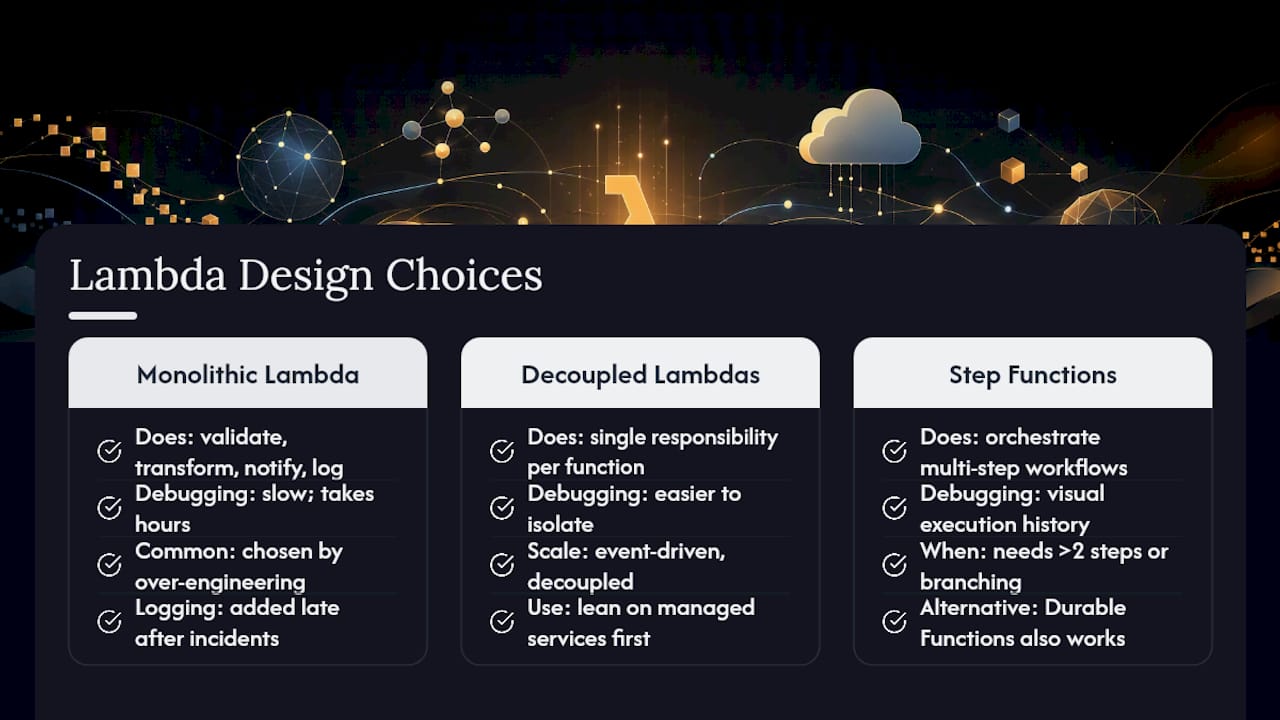
My one opinionated recommendation: the moment a workflow needs more than two sequential steps with any branching logic, move it into Step Functions instead of chaining Lambda invocations by hand. Durable Functions work too, but Step Functions gives you a visual execution history that saves hours during an incident.
How Can IT-Magic Help You Build on Lambda?
Designing the right Lambda architecture is one part of the equation; migrating existing workloads onto AWS without downtime is the harder part most teams underestimate. IT-Magic handles both, running infrastructure audits, migration strategy, and hands-on implementation for eCommerce, fintech, and SaaS companies that need serverless and containerized workloads running reliably from day one.

As an AWS Advanced Tier Partner with 700+ completed projects, IT-Magic takes ownership of execution, not just planning, applying rehost, replatform, or refactor strategies based on what actually fits your workload. If your team is weighing Lambda against a broader migration, our DevOps-as-a-Service offering covers ongoing monitoring, deployment pipelines, and cost optimization after the initial build. Start with a free infrastructure audit to see exactly where Lambda fits into your architecture and what a fixed-price migration would look like.
Sources
- Serverless Applications Lens – AWS Well-Architected Framework
- Welcome to AWS Lambda — documentation
- Designing Lambda applications — AWS Lambda developer guide
FAQ
What Are the Most Common AWS Lambda Use Cases?
File processing, API backends, event-driven automation, stream processing, scheduled tasks, and durable multi-step workflows are the most common production use cases for Lambda.

Can Lambda Handle Long-Running Processes?
No. Standard Lambda functions are capped at 15 minutes per invocation, so long-running batch jobs typically run better on Fargate or EC2.
What’s the Difference Between Step Functions and Lambda Durable Functions?
Both move state and retries out of function code for multi-step workflows; Step Functions offers visual execution tracking, while Durable Functions keeps orchestration logic closer to native code.
Do I Need a VPC for Lambda Functions?
Only if your function needs to reach resources inside a private network, like an RDS database; VPC access adds ENI overhead, so skip it when it’s not required.
How Can IT-Magic Support a Lambda-Based Migration?
IT-Magic runs infrastructure audits, designs the migration strategy, and implements the architecture end-to-end, then provides ongoing DevOps support for Lambda-based systems after launch.