
If you’re planning a production migration to AWS, engage a startup-focused migration partner that runs on fixed-price contracts with strong commitments on downtime, and get a migration assessment scheduled within 7 to 14 days. That single move sets everything else in motion: scope, budget, and a realistic cutover date, before you commit engineering hours you don’t have to spare.
A proper assessment isn’t a sales call. It delivers an infrastructure audit, a migration strategy mapped to your actual workloads, a phased runbook, and a fixed-price proposal you can take to your board. A structured stepwise approach that starts with assessment before touching infrastructure consistently outperforms teams that jump straight to lift-and-shift.
Before the call, pull together three things:
- A recent AWS or hosting billing export
- A current inventory of production workloads and dependencies
- Your existing SLAs and any compliance obligations (SOC 2, HIPAA, PCI DSS)
Pro Tip: Request a free introductory audit before signing anything. A partner unwilling to assess your environment before pricing the work is telling you something about how they’ll handle the unknowns later.
Key Takeaways
A production AWS migration succeeds when the assessment happens first, the pricing is fixed, and the partner commits to zero downtime in writing rather than in a sales call.
| Point | Details |
|---|---|
| Start with an assessment | A 7 to 14 day audit produces the strategy, runbook, and fixed-price proposal before any commitment. |
| Classify workloads early | Risk and complexity decisions made in the first two weeks determine whether the timeline holds. |
| Separate credits from migration cost | AWS credits offset ongoing cloud spend; they don’t cover a migration partner’s execution fee. |
| Vet on evidence, not credentials alone | Ask for documented case studies with measurable cost and performance results before signing. |
| IT-Magic delivers fixed-price, zero-downtime migrations | An AWS Advanced Tier Partner with 700+ completed projects and compliance-ready architectures for fintech and eCommerce. |
Table of Contents
- Why Startups Choose AWS Credit Startup Migration Strategies
- What Migration Risks Threaten Startup Production Workloads?
- How Do You Plan a Zero-Downtime AWS Migration?
- How Do You Evaluate an AWS Migration Partner?
- Overview of AWS Credit Programs and Eligibility for Startups
- How Do You Apply for AWS Credits and What Documentation Is Needed?
- What Is the Typical Timeline From Application to Migration?
- What Does an AWS Migration Cost, and How Do Credits Factor In?
- What Should You Look for in a Startup-Focused Migration Provider?
- Ready to Move Production to AWS Without the Guesswork?
- Sources
- FAQ
Why Startups Choose AWS Credit Startup Migration Strategies
The phrase “aws credit startup” gets searched by founders comparing options, but the real decision point is rarely about promotional credits. It’s about whether your infrastructure can survive a funding round, a traffic spike, or an enterprise customer’s security questionnaire. AWS wins that comparison for a specific set of reasons.
Scale is the obvious one. You provision for today’s load and expand without re-architecting when a launch goes better than expected. Less obvious is the depth of managed services: managed databases, container orchestration, and managed ML infrastructure remove entire categories of operational work your team would otherwise own. Managed services improve reliability and security precisely because the provider, not your two-person ops team, handles patching and failover.
The ecosystem matters too. Partner tooling, prebuilt integrations, and a marketplace of vetted vendors shorten the path from prototype to production. And there’s a business case underneath all of it: enterprise buyers increasingly require SOC 2 or ISO 27001 evidence before they’ll sign, and AWS’s compliance tooling gets you there faster than building controls from scratch.
- Elastic capacity that matches funding-stage volatility
- Managed databases, containers, and ML infrastructure that reduce headcount needs
- A partner and tooling ecosystem that accelerates integration work
- Compliance patterns that satisfy enterprise procurement requirements
Pro Tip: Default to managed services unless you have a specific reason not to, like needing deep customization or planning a multi-cloud exit. Rolling your own database cluster to save a few hundred dollars a month rarely survives contact with your first outage.
What Migration Risks Threaten Startup Production Workloads?
Every migration carries the same handful of risks, and they compound fast when a small team is stretched thin. Data migration tops the list: keeping a live database consistent during cutover, especially under limited bandwidth, is where most timelines slip. Get the replication and validation strategy wrong and you either eat downtime or ship corrupted data.

Vendor lock-in deserves more nuance than most advice gives it. You reduce it not by avoiding managed services, but by choosing architecture patterns (containerized workloads, standard APIs, portable data formats) that keep an exit possible without denying yourself the operational benefits today.
The shared responsibility model trips up more startups than any technical failure. AWS secures the infrastructure; your team secures what runs on it, identity management, application code, and data encryption. Partner guidance on shared responsibility is worth reading closely before you assume a compliance gap is AWS’s problem to fix.
Cost is its own risk category. Lift-and-shift migrations routinely land on oversized instances because nobody right-sized after the move, and license terms that made sense on-prem sometimes double in the cloud. Add limited internal expertise with stateful services, queues, and legacy integrations, and you have the four failure modes that derail most first-time migrations:
- Inconsistent data during cutover from rushed replication
- Runaway spend from unoptimized instance sizing post-migration
- Compliance gaps from misunderstanding shared responsibility
- Timeline slippage from underestimating stateful service complexity
How Do You Plan a Zero-Downtime AWS Migration?
A production migration succeeds or fails based on decisions made in the first two weeks, not the last two. Experience across more than 50 cloud migrations shows that rapid workload classification and a committed strategy up front beat improvising as you go. Here’s the sequence that works.
- Run the migration assessment. Inventory every workload, document SLAs, flag compliance constraints, and build an initial cost model before anyone touches infrastructure.
- Define success criteria. Set your RTO and RPO targets, performance benchmarks, and the compliance deliverables the migration must hit.
- Choose your approach per workload. Rehost for speed, replatform for moderate gains without a rewrite, or refactor when the architecture itself is the bottleneck. Not every workload gets the same treatment.
- Build the architecture and tooling plan. Infrastructure as code (Terraform is the common choice), CI/CD pipelines, and a blue/green or canary cutover pattern reduce the blast radius of anything that goes wrong.
- Design the data migration strategy. Phase it, replicate continuously, validate at each stage, and pick a cutover technique, often a brief read-only window, that limits downtime to minutes rather than hours.
- Lock down the security and compliance runbook. Access controls, encryption at rest and in transit, centralized logging, and audit trails need to exist before go-live, not after an auditor asks for them.
- Run dry runs and staged cutovers. Proof-of-concept tests, load tests under realistic traffic, and smoke tests after each stage, with a documented rollback plan you’ve actually rehearsed.
- Hand off post-migration optimization. Right-size instances, set up observability, document runbooks, and retain support for the weeks when unexpected costs and edge cases surface.
Your tools checklist should include a full inventory export, IaC templates, a written migration runbook, and telemetry with rollback triggers defined in advance. AWS’s own AI-assisted migration planning can generate service mapping, architecture diagrams, and Terraform templates in a fraction of the time manual planning takes, though the discipline to execute the runbook still comes from experienced hands. Our own AWS migration checklist walks through the pre-cutover tasks in more depth.
Pro Tip: Treat the first two weeks as a decision sprint. Classify every workload by risk and complexity before you write a line of Terraform. Teams that skip this step almost always end up renegotiating scope mid-migration.
How Do You Evaluate an AWS Migration Partner?
Credentials are the first filter, but not the only one. AWS Advanced Tier Partner status signals a baseline of certified engineers and validated methodology, but ask specifically how many production migrations they’ve completed and in what sectors. A partner who’s moved 700 workloads in fintech and eCommerce understands stateful checkout systems and PCI scope in a way a generalist doesn’t.
Pricing structure tells you a lot too. Fixed-price projects put the execution risk on the partner, not you, and force a real scoping conversation up front. Ask exactly how downtime guarantees are written into the contract, not just promised on a call.
Operational readiness matters after go-live as much as before it. Does the engagement include a documented runbook handover? Is there 24/7 support, or does coverage stop the day the migration ends?
On your first call, ask these directly:
- How many production migrations of comparable scale have you completed?
- What’s your rollback plan if the cutover fails midway?
- How is the downtime guarantee defined and enforced in the contract?
- Can you show a case study with measurable cost or performance results?
Red flags show up fast: vague answers about the cutover plan, no rollback strategy, or reluctance to share references and documented case studies showing real before-and-after numbers. If a partner can’t point to measurable outcomes from past work, that’s your answer.
Overview of AWS Credit Programs and Eligibility for Startups
Cost is where most startup CTOs start asking about AWS credit programs, and it’s worth being direct: credit programs exist to offset early cloud bills, but they don’t replace the planning work a migration requires. Eligibility for most programs depends on funding stage, incorporation status, and sometimes participation in an accelerator or venture network, and terms shift often enough that founders should confirm current criteria directly with AWS rather than relying on secondhand summaries.
What matters more for a CTO planning a production move is what happens to your architecture regardless of whether credits are in play. A migration partner should design your infrastructure to be cost-efficient on its own merits, not dependent on a subsidy that runs out in twelve or twenty-four months. That’s the difference between a startup that scales cleanly into its next funding round and one that hits a cost cliff the moment promotional credits expire.
If credits are part of your funding structure, factor the expiration date into your migration timeline. A migration that finishes while credits still cover a meaningful chunk of spend gives your team room to validate architecture choices before the full bill lands. One that finishes after credits run out means you’re optimizing costs under pressure, which is a worse position to negotiate from with any vendor, including your cloud migration partner.
How Do You Apply for AWS Credits and What Documentation Is Needed?
Applying for AWS credit programs typically runs through AWS’s own startup channels or an accelerator, incubator, or venture capital partner with an existing relationship to AWS. Documentation requirements generally include proof of incorporation, evidence of funding stage, and sometimes a brief description of your product and cloud usage plans.
Confirm current requirements directly on AWS’s startup resources, since terms and required paperwork change and this article does not stand in for that primary source. What’s more useful for your planning is preparing the same documentation your migration partner will eventually need anyway: a billing history, a workload inventory, and your compliance posture. That overlap means the groundwork isn’t wasted even if a specific credit program’s eligibility window closes before you’re ready to migrate.
A common mistake is treating the credit application and the migration plan as sequential when they can run in parallel. While an application processes, your migration partner can already be running the infrastructure audit and building the phased runbook. Waiting for credit approval before starting technical planning just adds weeks to a timeline that’s already competing against your burn rate.
What Is the Typical Timeline From Application to Migration?
Credit application review timelines vary by program and are best confirmed with AWS directly rather than assumed from general industry chatter. What’s more predictable, and more directly in your control, is the migration timeline itself once you engage a partner.
A migration assessment typically takes 7 to 14 days and produces the infrastructure audit, strategy document, and fixed-price proposal you need to move forward. From there, the Migration Acceleration Program framework structures execution into three phases: Assess, Mobilize, and Migrate & Modernize, each with its own deliverables and checkpoints.
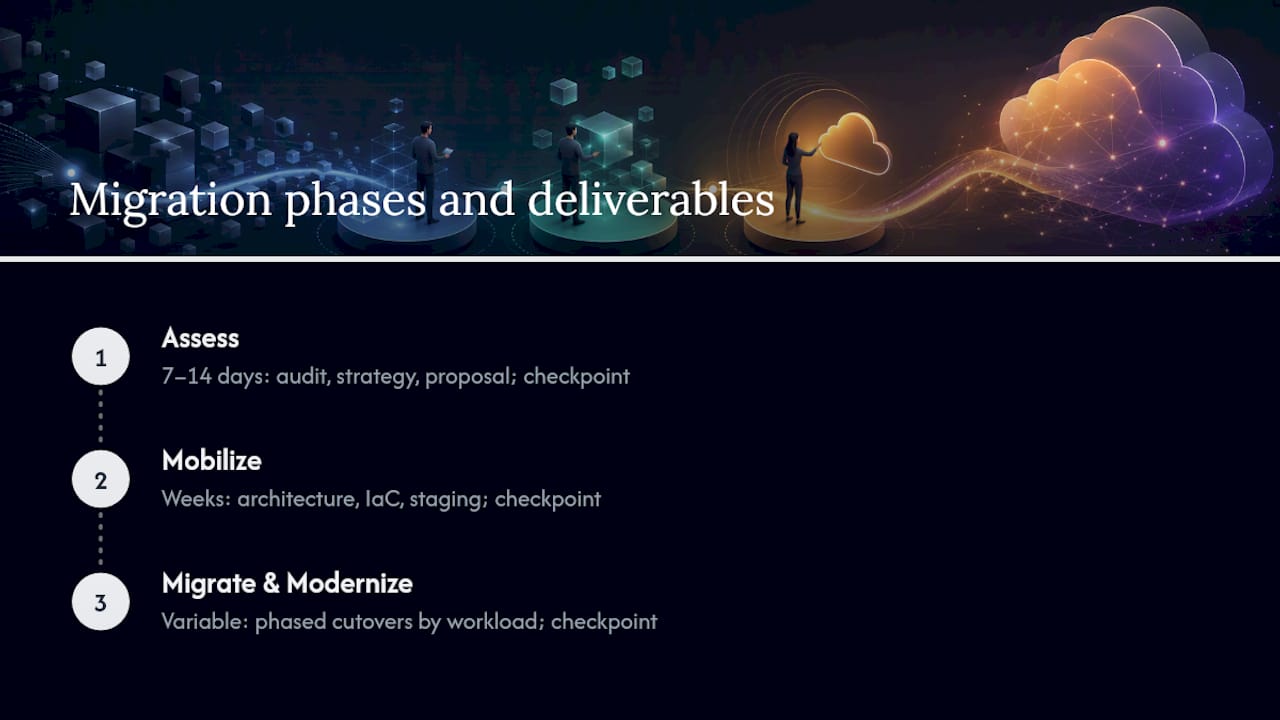
Mobilize is where the architecture plan, IaC templates, and staging environment come together, usually a few weeks depending on workload complexity. Migrate & Modernize is the execution phase, where phased cutovers happen workload by workload rather than in one risky weekend event. A straightforward SaaS application with a handful of services might move in a matter of weeks; a fintech platform with dozens of interdependent, stateful services and strict compliance requirements takes longer, and any partner who promises otherwise without having seen your environment is guessing.
The honest answer for total timeline is: it depends on workload count, data volume, and compliance scope, which is exactly why the assessment comes first. Skipping it to save two weeks upfront routinely costs a month or more in mid-migration rework.
What Does an AWS Migration Cost, and How Do Credits Factor In?
Migration costs break down into three buckets: the assessment, the execution, and the post-migration period where real AWS spend starts accruing. A fixed-price engagement model means the second bucket is a known number before you sign, which matters enormously for a startup managing runway.
The assessment phase is often offered as a free introductory audit by migration partners competing for the engagement, since it doubles as their own scoping exercise. Execution pricing depends on workload count, complexity, and whether you’re rehosting, replatforming, or refactoring, refactoring costs more upfront but tends to produce lower ongoing AWS spend.
Where AWS credits factor in is purely on the operating cost side, not the migration service fee. Credits, when applicable to your funding stage and program eligibility, offset your AWS bill during the months after cutover, not the partner’s fee for doing the migration work itself. That distinction gets lost in a lot of marketing copy, so it’s worth stating plainly: a credit program reduces your cloud bill; it doesn’t reduce what you pay a migration partner for planning and executing the move.
The bigger cost lever, regardless of credits, is right-sizing after migration. Workloads that get optimized in the weeks after cutover often see meaningful reductions in monthly AWS spend compared to their initial lift-and-shift configuration, which is why post-migration optimization deserves its own line item in any proposal you evaluate. Our guide on reducing IT costs without losing performance covers the specific levers worth pulling first.
What Should You Look for in a Startup-Focused Migration Provider?
Not every AWS migration provider is built for startup speed and constraints. The right partner for a startup or scale-up looks different from an enterprise systems integrator built for six-month engagements and layered approval chains.
Look for a provider with AWS Advanced Tier Partner status backed by a real volume of completed projects, not just a logo on a website. A provider that’s completed hundreds of migration projects has almost certainly seen your specific edge case before, whether that’s a legacy monolith with hidden dependencies or a compliance requirement that surfaced mid-project.
Sector experience narrows the field further. eCommerce and fintech workloads carry specific demands, checkout systems that can’t tolerate downtime, payment data that triggers PCI scope, transaction logs that need airtight audit trails, and a provider without that specific experience will learn on your production environment, which is not where you want the learning curve to happen.
Fixed-price contracts, explicit zero-downtime commitments, and documented case studies with real before-and-after numbers separate providers who’ve done this repeatedly from those pitching a process they haven’t fully tested. Ask any provider on your shortlist for measurable case study results before you sign, and treat a partner unable to produce one as a serious flag regardless of how confident the pitch sounds.
A short note from the migration team
We recommend the assessment-first approach because we’ve watched teams skip it and pay for that decision in mid-migration rework. Startups we’ve worked with have seen real reductions in AWS spend and measurably more resilient architecture once post-migration optimization actually happened, not just once, but as an ongoing practice.
Ready to Move Production to AWS Without the Guesswork?
IT-Magic runs AWS migrations as fixed-price engagements with a minimal-downtime commitment, not an open-ended hourly contract that grows the longer things take. As an AWS Advanced Tier Partner with more than 700 completed migration projects, we’ve built compliance-ready architectures for fintech and eCommerce teams where a checkout outage or an audit gap costs real revenue, not just reputation.

Every engagement starts with the infrastructure audit and migration strategy described throughout this article, delivered in 7 to 14 days once you share your billing export, workload inventory, and compliance requirements. Case studies on our site document specific outcomes: reduced AWS spend and improved application performance after migration, the kind of results a proposal should be able to point to rather than promise.
Post-migration, our DevOps-as-a-Service model keeps optimizing cost and performance instead of handing you a finished environment and disappearing. Visit the AWS migration services page to request your free introductory audit, or ask for a technical briefing if you’d rather start with a statement of work before committing to the full engagement.
Sources
FAQ
What does “AWS credit startup” actually mean for my migration?
In the context of a production migration, it refers to planning your AWS move so operating costs stay controlled with or without promotional credits, not to the credit program itself. Confirm credit eligibility directly with AWS while your migration partner handles the technical planning in parallel.
How long does an AWS migration assessment take?
A thorough infrastructure audit and migration strategy typically takes 7 to 14 days, producing a fixed-price proposal and phased runbook you can act on immediately.
Should I choose rehost, replatform, or refactor?
Rehost suits workloads where speed matters most, replatform offers moderate gains without a full rewrite, and refactor fits workloads where the current architecture itself limits scale or reliability.
What makes IT-Magic different from a generalist migration provider?
IT-Magic is an AWS Advanced Tier Partner with 700+ completed migration projects, fixed-price contracts, and a zero-downtime commitment, with specific depth in high-load fintech and eCommerce environments.
Do AWS credits cover the cost of hiring a migration partner?
No. Credits offset your ongoing AWS infrastructure bill; they don’t apply to a migration partner’s fee for planning and executing the move itself.