
Yes. You can run HIPAA-compliant workloads on AWS, but only after you accept the AWS Business Associate Addendum, scope electronic protected health information (ePHI) to HIPAA-eligible services, and implement the technical and operational controls HIPAA actually requires. AWS does not hand you compliance out of the box, no matter what a sales deck implies.
Three things need to happen before you touch production data:
- Sign and internally document your BAA acceptance with AWS.
- Isolate ePHI workloads into dedicated accounts running only eligible services.
- Turn on baseline controls immediately: encryption at rest and in transit, multi-factor authentication (MFA) for privileged users, and centralized logging.
Pro Tip: If you skip the scoping step and let a convenient but non-eligible service touch patient data “just for testing,” you’ve created a compliance gap that an auditor will find before you do.
If you leave default configurations in place or let ePHI drift into a service that isn’t on the eligible list, the violation is yours, not AWS’s. That single fact trips up more healthcare IT teams than any other part of this framework.
Key Takeaways
HIPAA compliance on AWS requires a signed BAA, strict scoping to eligible services, and customer-configured technical safeguards; AWS never certifies compliance on your behalf.
| Point | Details |
|---|---|
| BAA is the entry requirement | Sign and document AWS BAA acceptance before any ePHI touches your AWS environment. |
| Scope ePHI to eligible services | Restrict patient data to services on the HIPAA Eligible Services Reference and review it periodically. |
| Shared responsibility never disappears | AWS secures the cloud infrastructure; you secure your configuration, IAM, and data. |
| Automate evidence and guardrails | Use AWS Config, Conformance Packs, and SCPs to enforce and document controls continuously. |
| Get execution help when it matters | IT-Magic builds HIPAA-ready architecture, guardrails, and evidence delivery directly into AWS migration projects. |
This article is general information, not a substitute for advice from a qualified lawyer. Consult a qualified legal professional about your own circumstances before acting on anything here.
Table of Contents
- What AWS Provides for HIPAA Compliance on AWS, and What It Doesn’t
- How Do You Scope Which AWS Services Can Touch ePHI?
- Mapping Shared Responsibility and Designing a Defensible Architecture
- Which Technical Safeguards Does HIPAA Compliance on AWS Actually Require?
- How Do You Operationalize These Controls at Scale?
- What Belongs in a HIPAA Risk Analysis and Audit File?
- What Happens When an AWS-Hosted ePHI Incident Occurs?
- How Should You Maintain Compliance as AWS and HIPAA Rules Change?
- How Does IT-Magic Approach HIPAA-Ready AWS Migrations?
- Editorial Take: What the Compliance Checklists Get Wrong
- Get a HIPAA-Ready AWS Migration Without the Guesswork
- Sources
- FAQ
What AWS Provides for HIPAA Compliance on AWS, and What It Doesn’t
There is no such thing as a “HIPAA-certified” cloud platform. No accreditation body issues one, and AWS won’t claim otherwise. What AWS does offer is a signed BAA and a defined list of services it will support for ePHI workloads under that agreement.
Two documents matter more than anything else here:
- The Business Associate Addendum (BAA), which legally establishes AWS as a business associate for the services you use to handle ePHI.
- The HIPAA Eligible Services Reference, the living list of services AWS has approved for use with ePHI under the BAA. Anything not on this list is off-limits for patient data, full stop.
AWS frames its side of this as “security of the cloud.” That covers physical data centers, host infrastructure, and the virtualization layer. Your side is “security in the cloud”: how you configure IAM, encrypt data, restrict network access, and log activity. AWS states plainly that signing the BAA and using eligible services does not automatically make your workload compliant — you still have to build and operate the safeguards yourself.
For the legal baseline underneath all of this, HHS and the Office for Civil Rights (OCR) set the actual regulatory requirements. AWS guidance tells you how to implement controls; HHS/OCR tells you what the law demands and how enforcement works. Treat AWS documentation as an implementation guide, not a legal opinion.
How Do You Scope Which AWS Services Can Touch ePHI?
Every AWS account handling patient data needs a hard boundary around it, and that boundary starts with a service allow-list pulled directly from the HIPAA Eligible Services Reference. AWS updates that list periodically, which means your allow-list isn’t a document you write once and forget. Review it on a schedule, because a service that wasn’t eligible last year might be now, and vice versa.
- Build the allow-list first. Cross-reference every service your architecture touches against the current eligible-services list before any ePHI flows through it.
- Separate ePHI into its own accounts. A multi-account structure, with dedicated production accounts for ePHI, isolated non-production environments, and clear boundaries around any third-party SaaS integration, keeps the blast radius small if something goes wrong.
- Automate the guardrail, not just the policy. Manual review catches drift eventually. Service Control Policies and tagging-based detection catch it before a developer spins up an ineligible resource with real patient records in it.
Independent practitioner guidance on AWS HIPAA deployments consistently points to the same pattern: multi-account separation and allow-listing eligible services beats trying to police a single sprawling account after the fact. If your organization is still running ePHI and non-ePHI workloads side by side in one account, that’s the first architectural problem to fix, and AWS’s healthcare-focused guidance walks through what a properly scoped environment looks like in practice.
Mapping Shared Responsibility and Designing a Defensible Architecture
The HIPAA Security Rule, codified at 45 CFR §164.312, doesn’t care that your infrastructure lives in someone else’s data center. AWS’s own guidance recommends treating the cloud the same way you’d treat an on-premises data center for compliance planning purposes. That reframing matters: the Security Rule’s access control, audit control, integrity, and transmission security specifications still apply. AWS secures the physical and virtualization layers; you own everything from the guest operating system up, including every configuration choice inside it.
A defensible architecture typically includes:
- VPC segmentation that isolates ePHI subnets from general application traffic, with explicit routing rules rather than flat network design.
- Private endpoints (AWS PrivateLink) so traffic to services like S3 or KMS never traverses the public internet.
- Tokenization or pseudonymization wherever patient identifiers can be substituted without breaking application logic, shrinking your actual ePHI footprint.
- Least-privilege IAM policies scoped to specific roles and resources, not broad administrative access granted for convenience.
Narrowing consistent controls to a well-defined boundary, rather than trying to apply uniform security everywhere, reduces your audit surface and simplifies evidence collection considerably.
Pro Tip: Draw the data-flow diagram before you build anything. Auditors ask for it, and teams that build first and diagram later almost always find a gap between what they documented and what’s actually running.

Which Technical Safeguards Does HIPAA Compliance on AWS Actually Require?
This is where most of your engineering hours go, and where most audit findings come from. AWS’s technical safeguards guidance maps each HIPAA Security Rule specification to a concrete implementation pattern, and the mapping breaks down into five buckets.
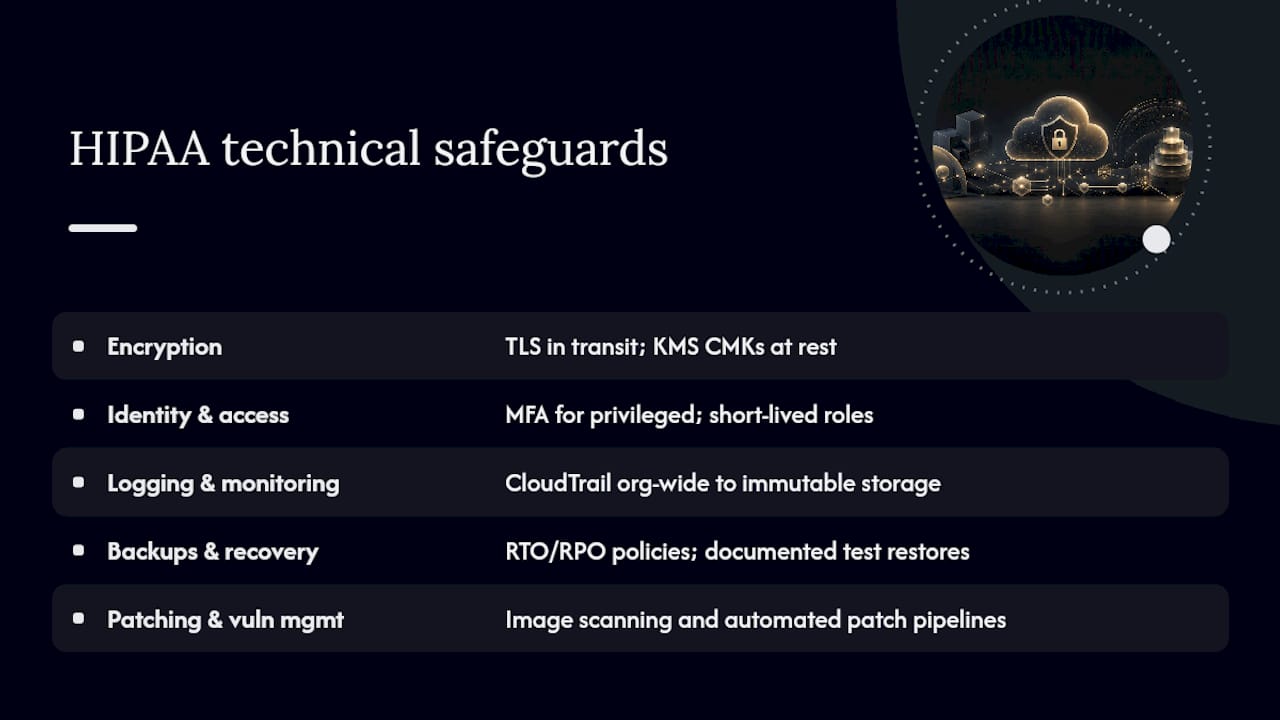
Encryption. Enforce TLS for every connection carrying ePHI in transit, no exceptions for “internal” traffic. At rest, use server-side encryption with AWS KMS and customer-managed keys (CMKs) rather than AWS-managed defaults, because CMKs give you control over rotation policy and access logging. Client-side encryption adds a layer AWS itself can’t decrypt, which some healthcare organizations require for their most sensitive data stores. Separate KMS keys by workload or data classification instead of using one key for everything; a single compromised key should never expose your entire ePHI footprint.
Identity and access. MFA is mandatory for every privileged account, not optional for busy admins. Use short-lived credentials through IAM roles instead of long-lived access keys, set permission boundaries so no role can escalate beyond its intended scope, and log every key-access event so you can reconstruct who touched what and when.
Logging and monitoring. Enable AWS CloudTrail organization-wide, not per-account, and route logs to immutable storage where they can’t be altered after the fact. Centralize everything into CloudWatch or a SIEM so a security engineer can correlate events across accounts in one place. Set retention policies that match your organization’s audit and legal requirements, typically well beyond the default 90-day window.
Backups and recovery. AWS Backup lets you define recovery time objectives (RTO) and recovery point objectives (RPO) as policy rather than tribal knowledge, and you need documented test results proving the restore process actually works, not just that backups exist.
Patching and vulnerability management. Image scanning at build time, automated patch pipelines, and a documented patch cadence all serve double duty: they reduce your attack surface and they generate the evidence trail an auditor will ask for.
Common root causes of cloud-hosted HIPAA breaches aren’t exotic. Public S3 buckets, overly permissive IAM policies, unprotected KMS keys, and missing CloudTrail coverage across accounts show up again and again. Automated detection and prevention, not periodic manual review, is what actually closes those gaps.
How Do You Operationalize These Controls at Scale?
Manually checking every account against every control doesn’t survive contact with a healthcare organization running dozens of accounts. AWS Config, paired with validated Conformance Pack templates for HIPAA, gives you a starting map between specific resource configurations and HIPAA control requirements. These are templates, not a finished compliance program. You still need to assess and customize them against your own risk analysis, since Conformance Packs and Config rules provide repeatable, auditable evidence only when validated against your organizational policies first.
Layer three types of controls on top of that mapping:
- Preventive controls. Service Control Policies (SCPs) at the organization level block ineligible services or risky configurations before they’re ever deployed.
- Detective controls. Config rules and CloudWatch alarms flag drift the moment a resource falls out of compliance, rather than waiting for a quarterly review to catch it.
- Corrective controls. Automated remediation, wired through SOAR-style playbooks, fixes common violations, like an unencrypted volume or an open security group, without waiting on a human ticket queue.
Pro Tip: Don’t let Config rules run in “detect only” mode indefinitely. Auto-remediation for well-understood violations, like re-enabling encryption on a volume, closes the gap between finding and fixing, which is usually where compliance programs quietly fail.
What Belongs in a HIPAA Risk Analysis and Audit File?
A risk analysis that satisfies HIPAA and survives an OCR audit needs more than a checklist someone filled out once. It has to identify where ePHI lives, what threats and vulnerabilities apply to each location, and what you’re doing to reduce that risk to a reasonable level, then track remediation to completion, not just to a documented plan.
- Inventory every ePHI location and flow. This includes storage, transit paths, and any third-party integration point where patient data crosses a boundary.
- Map each control to a specific HIPAA Security Rule specification. A control mapping template that ties encryption, access control, and audit control requirements to the actual AWS resource enforcing them makes an audit conversation move fast instead of dragging for weeks.
- Attach evidence artifacts to each control. CloudTrail logs, Config snapshots, and key inventories should be pulled and packaged, not promised as “available on request.”
- Retain evidence in tamper-evident storage. Exporting Config snapshots, CloudTrail logs, and change-control records into time-stamped, tamper-evident storage, such as an isolated evidence account with S3 Object Lock, protects you if an auditor questions whether records were altered after the fact.
What Happens When an AWS-Hosted ePHI Incident Occurs?
Cloud incidents move fast, and the instinct to fix things immediately can destroy the forensic evidence you need to determine what actually happened. Contain first, investigate second.
- Preserve before you touch anything. Snapshot affected resources and export the relevant CloudTrail logs before making any changes, so you have a forensic record of the environment as it existed at detection time.
- Isolate the blast radius. Pull affected instances out of load balancers, apply restrictive security groups, and cut network paths that could let an attacker move laterally.
- Revoke and rotate. Kill compromised credentials immediately, rotate any KMS keys that may have been exposed, and issue fresh access tokens for affected services.
- Determine notification obligations. HIPAA’s breach notification rule sets specific timelines once you’ve confirmed unsecured ePHI was accessed or disclosed improperly, and HHS/OCR guidance governs exactly when the clock starts and who must be told.
Pro Tip: Draft your breach notification communication templates before you ever need them. Writing a patient notification letter under regulatory deadline pressure, with legal reviewing every word, is not the time to start from a blank page.
How Should You Maintain Compliance as AWS and HIPAA Rules Change?
Compliance on AWS isn’t a project with an end date. Service eligibility changes, your architecture grows, and the regulatory floor itself is shifting.
- Run quarterly Config scans against your Conformance Pack baseline to catch drift before it accumulates into a bigger problem.
- Conduct an annual risk analysis review at minimum, more often if you’ve added significant new workloads or acquired another organization’s infrastructure.
- Check service eligibility before every new deployment, since a service that wasn’t HIPAA-eligible last quarter might be now, and assumptions get stale fast.
- During mergers or reorganizations, re-verify BAA coverage and account structure explicitly. Acquired infrastructure rarely arrives with the same compliance posture you’ve built internally.
The January 2025 Notice of Proposed Rulemaking (NPRM) signals where HIPAA enforcement is heading: stronger requirements around encryption, MFA, and asset inventory. AWS guidance recommends treating those proposed items as required for new workloads now, since building to the anticipated final rule costs far less than retrofitting after it takes effect.
How Does IT-Magic Approach HIPAA-Ready AWS Migrations?
A HIPAA-focused migration engagement typically starts with a readiness audit against the eligible-services list, followed by architecture changes to enforce the ePHI boundary, guardrail automation through Config and SCPs, and a documented evidence package handed to your compliance team, not left buried in a console somewhere.
- AWS Advanced Tier Partner status with over 700 completed migration projects.
- Deep experience in high-load, regulated environments, including fintech and healthcare workloads where downtime or a compliance gap has real financial consequences.
- A full lifecycle approach: audit, strategy, hands-on implementation, and post-migration optimization.
Pro Tip: When vetting any migration partner, ask three questions directly: What’s covered under their BAA scope? What evidence do they hand off at project close? And what does ongoing support look like after go-live? A partner that can’t answer all three specifically isn’t ready for regulated workloads.
Editorial Take: What the Compliance Checklists Get Wrong
Most HIPAA-on-AWS content treats the eligible-services list as the finish line. Sign the BAA, pick services off the approved list, check the box, done. That’s backwards. The list is the entry ticket, not the compliance program. The actual work, encryption key separation, IAM discipline, organization-wide logging, is where most healthcare IT teams underinvest, because it’s less visible than the paperwork and doesn’t feel like “doing compliance.”
The overrated piece of conventional advice is treating Conformance Packs as a compliance program you install rather than a baseline you customize. AWS says as much itself: these are templates, and skipping the validation step against your own risk analysis is how organizations end up compliant on paper and exposed in practice.
If I had to prioritize one thing for a team starting today, it’s the ePHI boundary. Get the multi-account structure and allow-list right before you optimize anything else. Every other control, encryption, logging, backup testing, gets easier to apply consistently once you know exactly where the boundary sits. Teams that skip this step end up retrofitting segmentation onto a sprawling account structure months later, which is slower and more expensive than doing it first. For organizations without deep in-house AWS security expertise, that’s precisely the phase where a migration partner with regulated-industry experience earns its cost back.
— Oleksandr
Get a HIPAA-Ready AWS Migration Without the Guesswork
Reading through everything above, one pattern stands out: the technical requirements for HIPAA compliance on AWS are well documented, but executing them correctly, across dozens of accounts, services, and a growing regulatory checklist, is where healthcare IT teams lose months. IT-Migration Services builds compliance-ready architecture directly into the migration itself, instead of treating it as a separate project bolted on afterward.

As an AWS Advanced Tier Partner with over 700 completed projects, IT-Magic runs the full lifecycle: infrastructure audit, migration strategy, hands-on implementation, and post-migration optimization, with fixed-price engagements and zero-downtime execution built for high-load, regulated environments. That matters most for healthcare and fintech workloads, where a misconfigured account or an unscoped service isn’t just a technical error; it’s a reportable incident.
If your organization is planning an AWS migration and needs the ePHI boundary, guardrails, and evidence collection built correctly from day one, start with a migration assessment to see what a compliance-ready architecture looks like for your specific workload.
Sources
- HIPAA Compliance – Amazon Web Services (AWS)
- Operational best practices for HIPAA security – AWS Config
- HIPAA — U.S. Department of Health & Human Services (HHS)
FAQ
Is Amazon AWS HIPAA Compliant?
AWS itself isn’t “HIPAA compliant” as a blanket status. AWS signs a Business Associate Addendum and offers HIPAA-eligible services, but you’re responsible for configuring those services to meet actual HIPAA requirements.
What AWS Services Are HIPAA Compliant?
Only services listed in the current HIPAA Eligible Services Reference can be used for ePHI under the BAA. That list changes periodically, so recheck it before deploying new workloads.
What Are the New HIPAA Compliance Requirements for 2026?
No final rule has taken effect yet, but the January 2025 NPRM proposes stronger requirements around encryption, MFA, and asset inventory. Treating those as required now for new workloads avoids costly rework later.
Which Cloud Services Are HIPAA Compliant?
Compliance depends on the provider signing a BAA and the customer using only eligible services with proper safeguards configured. On AWS, that means scoping ePHI strictly to services on the eligible-services list and implementing encryption, access control, and logging correctly.
Does Using AWS Automatically Make My Organization HIPAA Compliant?
No. Signing the BAA and using eligible services is necessary but not sufficient. You still need to configure encryption, IAM, logging, backups, and monitoring yourself, or work with a partner like IT-Magic to build that architecture correctly from the start.