
TL;DR:
- Moving workloads to AWS without a security plan risks compliance failures and expensive breaches. Organizations must understand shared responsibility, map security tools, implement strict identity controls, and establish a multi-account landing zone for effective protection. Post-migration, continuous monitoring and operational security practices are vital to maintain compliance and prevent vulnerabilities.
Moving workloads to AWS without a clear security plan is not a calculated risk — it’s a guaranteed path to compliance failures and costly breaches. This guide to AWS cloud security walks enterprise IT and security teams through the exact steps needed to protect data, identities, and infrastructure before, during, and after migration. Misconfigurations remain the top cause of cloud security breaches, with credential abuse responsible for nearly one in five incidents in AWS environments. If your organization is planning a migration, what follows is the operational playbook you need.
Table of Contents
- Understand the AWS shared responsibility model and migration security challenges
- Prepare for migration: map security tools and establish compliance framework
- Implement identity and access management with least privilege and strong authentication
- Build a secure, multi-account landing zone and network architecture
- Automate continuous security monitoring and compliance verification post-migration
- Why many enterprises underestimate post-migration security and how to avoid costly pitfalls
- Secure your AWS migration with expert services and proven best practices
- Frequently asked questions
Key Takeaways
| Point | Details |
|---|---|
| Security shared responsibility | AWS secures infrastructure, but you must secure identities, data, and configurations. |
| Plan compliance early | Map tools and frameworks using AWS Artifact before migrating workloads. |
| Centralize identity access | Use federated identity providers and enforce least privilege with IAM roles. |
| Build landing zone first | Pre-configure security and governance controls to simplify migration waves. |
| Automate monitoring | Use AWS Config and Security Hub for continuous compliance and threat detection. |
Understand the AWS shared responsibility model and migration security challenges
Before your first workload moves, every person on your team needs to internalize one core principle: AWS secures the cloud, you secure everything in it. AWS manages physical infrastructure, hardware, and the hypervisor layer. Your organization owns data classification, identity management, application configurations, and network controls. Confusing these boundaries is where enterprises get into trouble.
“Misconfigurations remain the top cause of cloud security breaches, with credential abuse accounting for 18% of incidents in AWS environments.”
The practical consequences of misunderstanding this split are severe. A misconfigured S3 bucket can expose millions of customer records. An over-permissioned IAM role can give an attacker full account access in minutes. And the window between breach and detection in cloud environments is often wide. Incident costs in multi-cloud environments average $5.05 million per breach, a figure that reflects both the damage and the remediation complexity.
Before migration begins, audit these categories for gaps:
- Data classification: Know what data is sensitive, where it lives, and who can access it
- Identity inventory: Document all existing user roles, service accounts, and API keys
- Network exposure: Map all inbound and outbound access paths from your current infrastructure
- Logging posture: Confirm whether audit logs are complete, centralized, and tamper-resistant
A solid secure cloud migration checklist forces this kind of pre-migration clarity. Skipping it means carrying your existing vulnerabilities directly into AWS, where the attack surface is larger and more complex. Note that security decisions also affect your bill — a misconfigured architecture that needs rework post-migration drives up AWS cloud cost optimization complexity significantly.
Prepare for migration: map security tools and establish compliance framework
Understanding risk is step one. Preparing to eliminate it is step two. The AWS Secure Migrations Framework mandates a “mobilize” phase focused specifically on mapping on-premises security tools to AWS services and defining compliance frameworks before migrating any workloads. Most enterprise teams skip this phase or treat it as a formality. That’s a mistake that shows up later as audit failures and remediation sprints.
Here is the preparation sequence that works in practice:
- Inventory existing security tools. List every firewall, identity provider, vulnerability scanner, and SIEM in your current environment.
- Map to AWS equivalents. Identify which AWS-native services replace or complement each tool.
- Define your compliance framework. Whether you’re bound by HIPAA, PCI-DSS, GDPR, or SOX, document the specific control requirements relevant to each workload you are migrating.
- Classify data before it moves. Assign sensitivity tiers to all datasets so you can apply the right controls at migration time, not after.
- Access AWS Artifact. This portal gives you compliance documentation for over 100 AWS services, including audit reports, certifications, and agreements that your own auditors will require.
| On-premises tool | AWS equivalent | Key difference |
|---|---|---|
| Hardware firewall | AWS Network Firewall | Managed, scalable, inline inspection |
| Active Directory | AWS IAM Identity Center | Federated, cloud-native identity |
| Vulnerability scanner | Amazon Inspector | Continuous, automated workload scanning |
| SIEM | Amazon Security Lake + Security Hub | Unified log aggregation and normalization |
| Config management DB | AWS Config | Real-time resource configuration tracking |
Pro Tip: Treat compliance as a workstream with its own owner, timeline, and acceptance criteria, not a checkbox at the end of the migration project. Assign a compliance lead who maps each control requirement to a specific AWS configuration decision before migration planning is complete. Detailed cloud security migration preparation guidance can help structure that workstream effectively. For CIO-level oversight, explore secure AWS migration management frameworks that align security with governance.
Implement identity and access management with least privilege and strong authentication
Identity is the new perimeter. This is not a platitude — it reflects how attacks on AWS environments actually work. Attackers rarely break through network defenses. They compromise credentials, exploit over-permissioned roles, or abuse misconfigured trust policies. According to the AWS Well-Architected Framework, security professionals must move from perimeter-based thinking to a strong identity foundation with centralized identity management and temporary, role-based access.
The specific configurations that matter most:
- Eliminate root account usage. Lock the AWS root user behind hardware MFA keys and use it only for billing tasks. Root access is never needed for operational work.
- Federate with your existing identity provider. Connect Active Directory or Okta to AWS IAM Identity Center so users authenticate through your corporate IdP, not separate AWS credentials.
- Use IAM roles, not long-lived access keys. EC2 instances, Lambda functions, and ECS tasks should assume roles with temporary credentials. Rotate any remaining access keys every 90 days or less.
- Enforce least privilege at every layer. Every IAM policy should grant only the permissions explicitly required by the task it supports. Start with deny-all and add only what is needed.
- Run AWS Access Analyzer regularly. This tool detects external access paths and overly broad policies automatically, making privilege creep visible before it becomes a breach vector.
Pro Tip: When you create IAM policies during migration, use the IAM Access Advisor to see which permissions are actually being used. After 30 to 60 days, delete the unused ones. Newly migrated workloads often start with broader permissions for testing, and those never get tightened unless someone explicitly schedules the cleanup. Your AWS identity and access management configuration is the single highest-leverage security decision you will make. Review best practices for AWS migration security to ensure identity architecture is woven into your migration plan from day one.
Build a secure, multi-account landing zone and network architecture
Think of a landing zone as the foundation you pour before you build. Building a landing zone with pre-configured security and governance controls before workloads move reduces risk and complexity substantially for large migrations. Skipping this step and migrating directly into a single AWS account is one of the most common and costly structural mistakes in enterprise cloud migrations.

The account structure shapes everything that follows:
| Account type | Purpose | Example SCP guardrails |
|---|---|---|
| Production | Live customer workloads | Block public S3 buckets, restrict region usage |
| Development | Engineering and testing | Prevent production data access, limit EC2 types |
| Sandbox | Experimentation | Deny all outbound internet, strict cost limits |
| Security | Centralized logs and monitoring | Read-only from all accounts, tamper-resistant |
| Shared services | DNS, networking, CI/CD | Controlled access from prod and dev accounts |
Service Control Policies (SCPs), which are account-level permission guardrails enforced through AWS Organizations, prevent specific risky actions regardless of what IAM policies allow. An SCP blocking public S3 bucket creation cannot be overridden by any IAM administrator in that account. That’s the point.
For network design, follow zero-trust principles:
- Place all application workloads in private VPC subnets with no direct internet access
- Use VPC endpoints to reach AWS services like S3 and DynamoDB without traversing the public internet
- Configure security groups to allow only the specific ports and protocols each service requires
- Enable VPC Flow Logs and route them to your security account for analysis
- Turn on Amazon GuardDuty across all accounts from day one for threat detection
A well-structured secure multi-account migration isolates blast radius when something goes wrong. When a workload in dev is compromised, production stays clean. That isolation is architectural, not procedural, which means it holds even when people make mistakes. Your multi-account landing zone best practices checklist should be completed and validated before the first production workload moves.
Automate continuous security monitoring and compliance verification post-migration
Migration day is not the finish line for security work. Compliance is a continuous process; AWS Config and Security Hub enable ongoing resource monitoring against compliance rules rather than one-time audits. The enterprises that maintain clean compliance postures treat security as an ongoing operational function, not a project deliverable.
Set up monitoring in this order:
- Enable AWS Config on day one. Config records every configuration change to every AWS resource. Without it, you have no historical record when an auditor asks what changed and when.
- Activate AWS Security Hub with your relevant standards. For healthcare workloads, enable the HIPAA standard. For payment systems, enable PCI-DSS. Security Hub aggregates findings from GuardDuty, Inspector, Macie, and Config into a single prioritized dashboard.
- Configure automated remediation. Use AWS Lambda functions triggered by EventBridge rules to auto-remediate common violations, such as reverting a publicly exposed security group or re-enabling CloudTrail logging if someone disables it.
- Implement patch management through AWS Systems Manager. Systems Manager Patch Manager enforces patching schedules across your entire fleet and provides compliance reports that satisfy auditor requirements.
- Schedule quarterly compliance reviews. Automated monitoring catches drift in real time, but a human review cycle catches policy gaps that tools miss.
Pro Tip: Configure a Security Hub custom action that routes critical findings directly to your incident response ticket system. The default Security Hub interface is useful for security engineers, but your on-call team needs findings in the same place they handle everything else. Continuous security monitoring integrated into your operations workflow catches threats before they escalate. Pair this with a clear post-migration compliance review cadence to maintain audit readiness year-round.
Why many enterprises underestimate post-migration security and how to avoid costly pitfalls
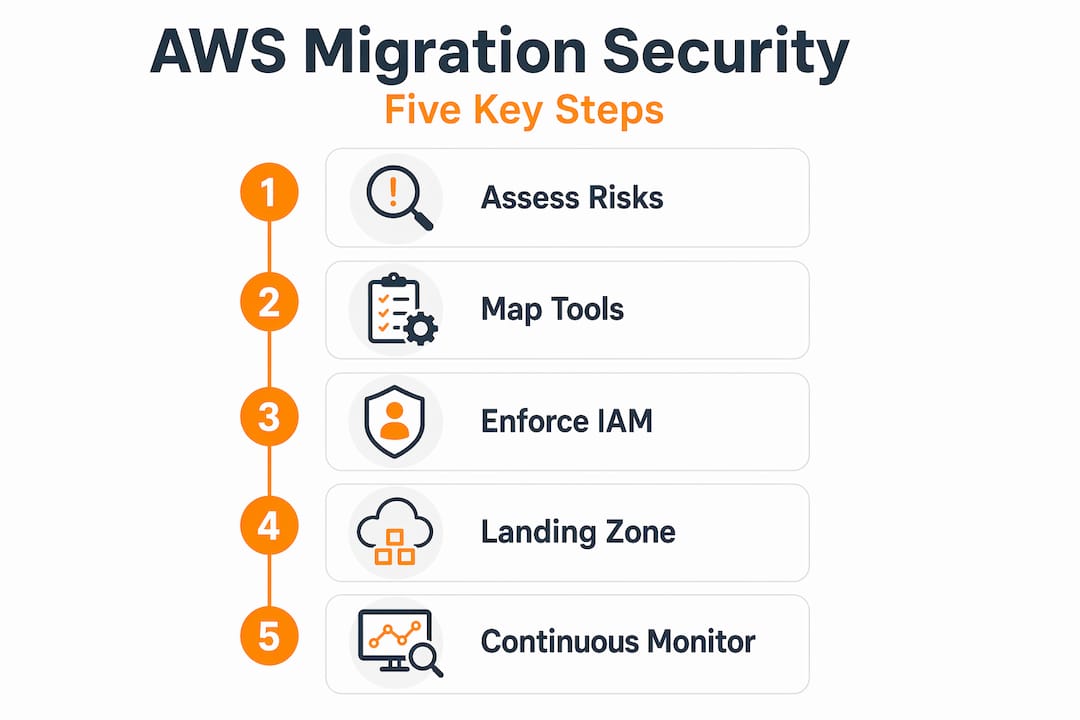
Here is the uncomfortable pattern we see repeatedly: enterprises invest heavily in migration security planning, execute a clean migration, declare success, and then quietly let security posture erode over the following six months. The migration project ends. The security program does not.
The specific failure mode is predictable. After cutover, teams are exhausted. The on-call engineers shift focus to new feature development. The temporary IAM roles created for migration tooling never get deleted. The test VPCs that bypassed production network controls remain active. The S3 buckets used for data staging during migration sit there, unmonitored, with overly broad bucket policies still in place. Post-migration cleanup is a vital security practice, as leaving unused resources active increases both attack surface and costs.
The deeper problem is organizational, not technical. Security during migration gets framed as a project. Security after migration is an operational function. Most enterprise teams have not made the transition explicit, so it falls into a gap between the migration team handing off and the operations team taking over.
Our experience across 700+ completed migrations confirms that the organizations with the cleanest compliance records post-migration share one characteristic: they treat the go-live date as the start of a security operations program, not the end of a security planning exercise. That means a named owner, a recurring review cadence, and automated alerting that someone actually responds to. Post-migration security operations coverage is the gap most enterprises discover too late, and closing it proactively is far cheaper than a breach remediation.
Secure your AWS migration with expert services and proven best practices
Knowing the right security controls is only half the equation. Implementing them correctly under the pressure of a live migration, across complex multi-account architectures, with compliance requirements in play, requires execution experience that most internal teams build slowly and expensively.

At IT-Magic, our AWS migration services team has completed 700+ migrations, including high-stakes environments in fintech and eCommerce where a compliance gap or security misconfiguration translates directly into regulatory penalties and lost revenue. We take ownership of the full security lifecycle: landing zone design, IAM architecture, compliance framework alignment, and post-migration monitoring setup. Explore our migration best practices to see how these principles apply in practice, or learn how to unlock cloud scalability without sacrificing the security controls your auditors require.
Frequently asked questions
What is the AWS shared responsibility model in cloud security?
AWS secures the underlying cloud infrastructure, while you are responsible for securing your data, identities, configurations, and applications running within AWS. This split is clearly defined and non-negotiable — misunderstanding it is the root cause of most enterprise cloud breaches.
How can I establish compliance before migrating to AWS?
Map your existing security tools to AWS equivalents, define your compliance framework such as HIPAA or PCI-DSS, and use AWS Artifact to access compliance reports and documentation for over 100 services before any workloads move.
What are best practices for identity management in AWS?
Use centralized identity providers federated with AWS IAM Identity Center, eliminate root user access except for billing with hardware MFA, implement least privilege via IAM roles, and rotate all credentials on a 90-day or shorter cycle.
Why is building a landing zone important for large migrations?
A landing zone pre-configures security guardrails, account structure, and governance controls so that migration waves move faster and with less risk, rather than inheriting security debt from ad-hoc account setups.
How can I maintain compliance after migrating workloads to AWS?
Enable AWS Config for continuous resource tracking, activate Security Hub with your industry’s compliance standards, automate patch management through Systems Manager, and configure event-driven alerts that trigger remediation automatically when drift is detected.