
TL;DR:
- Planning a structured AWS migration ensures cost control, security, and minimal downtime during cloud transition.
- Using frameworks like the AWS Cloud Adoption Framework and tools such as Migration Hub optimizes readiness and dependency mapping.
- An iterative, wave-based approach combined with automation and thorough post-migration validation maximizes cloud benefits.
Moving to AWS without a plan is how organizations end up with cost overruns, security gaps, and weeks of unplanned downtime. A well-structured aws cloud migration guide addresses the full picture: technical execution, business alignment, governance, and the right tools for each workload. This guide gives IT decision-makers and technical teams a clear path from pre-migration assessment through post-migration optimization, drawing on AWS Prescriptive Guidance, real-world migration strategies, and the tools that actually get the job done.
Table of Contents
- Key takeaways
- Assessing readiness for your AWS cloud migration
- Choosing the right migration strategy and tools
- Step-by-step execution of your AWS migration
- Verifying success and optimizing post-migration
- Common challenges and mistakes in AWS migrations
- What I have learned from real AWS migration projects
- How Awsmigrationservices can take migration off your plate
- FAQ
Key takeaways
| Point | Details |
|---|---|
| Start with structured assessment | Use the AWS Cloud Adoption Framework across all six perspectives before touching a single workload. |
| Match strategy to workload | Apply the 7 Rs framework per application, not across the board, to balance speed and cost. |
| Migrate in waves, not big-bang | Small iterative waves reduce risk and let teams learn and adjust before scaling. |
| Configure launch templates carefully | Default EC2 launch templates almost always need customization to avoid post-migration connectivity failures. |
| Verify and optimize post-cutover | Testing, autoscaling, and cost tuning after migration are where you capture the actual cloud benefits. |
Assessing readiness for your AWS cloud migration
Most migration failures are not execution failures. They are planning failures. Specifically, they come from teams that skip a structured readiness assessment and discover mid-migration that their inventory is wrong, their dependencies are undocumented, and their staff has no idea what governance means in a cloud context.
AWS addresses this directly through the AWS Cloud Adoption Framework, which structures readiness across six perspectives: Business, People, Governance, Platform, Security, and Operations. The first three focus on organizational alignment. The latter three cover technical foundations. You need both. A technically perfect migration that lands in an organization without cloud governance will create problems within months.
For infrastructure discovery, AWS Application Discovery Service and AWS Migration Hub are the tools that actually belong in your pre-migration workflow:
- Application Discovery Service scans your on-premises environment and collects server specs, performance data, and network connections automatically.
- Migration Hub aggregates that data and gives you a single view of discovered servers, letting you group them into applications and migration waves.
- Wave planning is where teams most commonly cut corners. Grouping dependent servers into the same migration wave is not optional. Migrating an application server without its database in the same wave is a reliable way to cause outages.
Pro Tip: Run your discovery tooling for at least two weeks before finalizing wave assignments. Short observation windows miss off-peak traffic patterns and batch jobs that only run weekly or monthly.
The output of this phase is a migration backlog: a prioritized list of application groups, their dependencies, their complexity rating, and their target strategy. Without this, you are guessing.
Choosing the right migration strategy and tools
The 7 Rs framework is the foundation of any honest cloud migration strategy guide. But most teams know the names and misapply the concepts. Here is what each strategy actually means in practice.
| Strategy | Use case | Pro | Con |
|---|---|---|---|
| Rehost (lift-and-shift) | Legacy apps, tight timelines | Fastest to execute | No optimization; same costs, different environment |
| Replatform | Apps that can use managed services with minimal code changes | Moderate speed gain | Requires light engineering effort |
| Refactor | Apps where performance or cost savings require architectural changes | Best long-term ROI | High upfront investment and time |
| Repurchase | Apps with viable SaaS replacements | Eliminates maintenance burden | Vendor dependency, data migration complexity |
| Retire | Unused or redundant workloads | Immediate cost reduction | Requires business sign-off to decommission |
The 7 Rs framework makes this tradeoff explicit: lift-and-shift is the fastest path, but refactoring yields the best cost and performance outcomes over time. The practical answer for most organizations is a mix. Start by rehosting the bulk of workloads to get off-premises fast, retire anything nobody is actually using, and queue the refactoring candidates for a second phase.
For tooling, the match is relatively straightforward:
- AWS Application Migration Service (MGN) handles lift-and-shift. It uses continuous block-level replication to replicate servers in near-real-time, converting them to run natively on AWS with minimal downtime.
- AWS Database Migration Service (DMS) covers database workloads, including heterogeneous migrations like Oracle to PostgreSQL, with ongoing replication until cutover.
- Migration Hub coordinates progress across both tools and gives stakeholders visibility into migration status without diving into individual service consoles.
Pro Tip: Do not let the refactor conversation stall your migration. Identify your top three refactoring candidates, scope them separately, and execute the rest as rehost or replatform. Waiting to refactor everything is how migrations get canceled.
Aligning strategy to workload requires honest conversations about business criticality, tolerance for risk, and available engineering bandwidth. The migration roadmaps guide from Awsmigrationservices covers how to structure that conversation with stakeholders across technical and business teams.
Step-by-step execution of your AWS migration
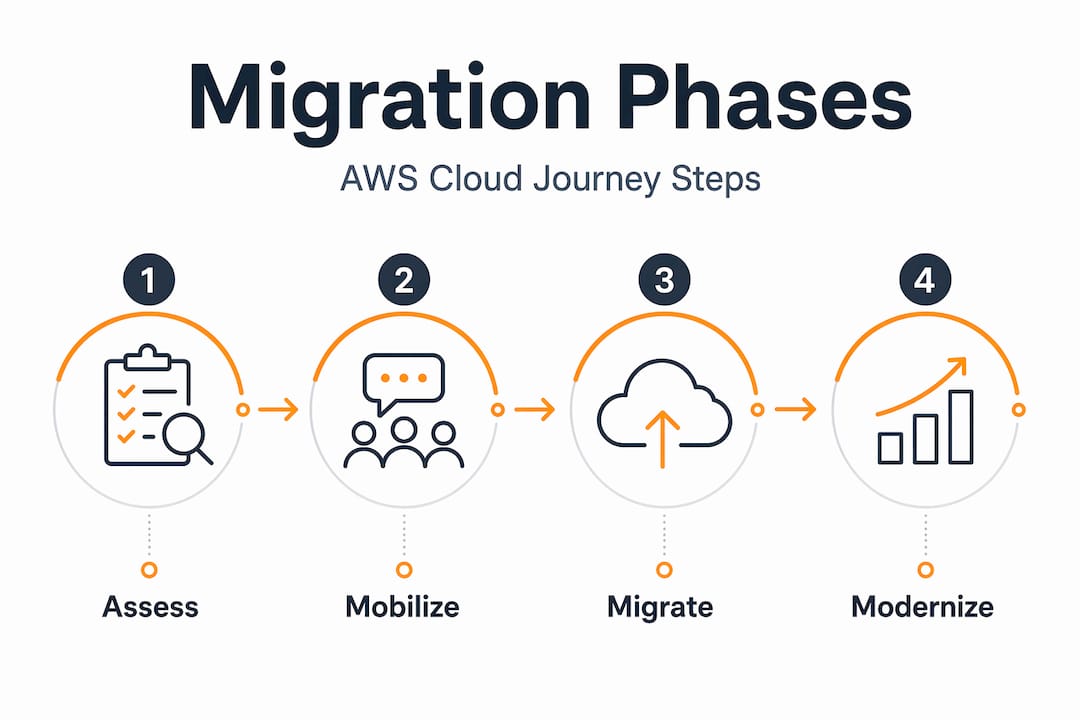
The AWS three-phase approach (Assess, Mobilize, Migrate and Modernize) gives structure to what can otherwise feel like an uncontrollable sequence of events. Here is how execution actually flows in practice.
- Complete your AWS environment setup. Configure landing zone networking (VPC, subnets, security groups), IAM roles, and logging before any workload touches AWS. Getting this wrong means fixing it under pressure during the migration.
- Set up AWS Application Migration Service. Create a replication template that defines default instance settings. Install the AWS replication agent on source servers. At this point, continuous replication begins.
- Customize EC2 launch templates per workload. Default templates almost always need editing. Misconfigured launch templates are the most common cause of post-migration connectivity and performance failures. Set the correct instance type, security groups, subnets, and storage per application.
- Launch test instances and validate. Before any cutover, launch a test instance and run functional tests against it. This catches configuration errors without touching production.
- Execute cutover per wave. Finalize replication, trigger the cutover, and redirect traffic. For critical applications, use a blue-green deployment pattern at the load balancer level.
- Shift traffic progressively. Blue-green deployment lets you route a percentage of traffic to the new environment and roll back instantly via Application Load Balancer rule weight changes if anything breaks.
- Confirm and decommission source servers. Only after a validation window (typically 48 to 72 hours) should you finalize and decommission the source.
| Migration phase | Key activities | Primary AWS tools |
|---|---|---|
| Assess | Discovery, dependency mapping, wave planning | Application Discovery Service, Migration Hub |
| Mobilize | Landing zone setup, team training, pilot migration | AWS Control Tower, CloudFormation |
| Migrate and Modernize | Replication, cutover, optimization | MGN, DMS, Auto Scaling, Cost Explorer |
For large data volumes, distributed architectures make scale feasible. Real-world examples show 2.7 PB transferred in two weeks for approximately $2,000 using automated tooling. The economics of cloud data transfer are workable at scale when you plan the architecture correctly.

Pro Tip: Automate your cutover runbook. Every manual step in a cutover is a step that gets skipped or done out of order at 2 AM. Use AWS Systems Manager Automation documents to execute and log each step.
Verifying success and optimizing post-migration
Cutover is not the finish line. It is the start of the verification phase, and skipping it is how teams discover problems weeks later when the blast radius is much larger.
Your post-migration verification process should cover:
- Application functionality testing: Run the same test cases you used during test instance validation against production. Pay attention to authentication flows, external integrations, and any application that reads from a local configuration file (these often have hardcoded IPs that break post-migration).
- Network configuration review: Update "/etc/hosts` entries, internal DNS records, and any configuration that references old on-premises IP addresses. This is a common miss that causes subtle, hard-to-diagnose failures.
- Performance benchmarking: Compare response times and throughput against your pre-migration baseline. If performance is worse, you likely need right-sizing, not more instances.
- Cost optimization: Enable AWS Cost Explorer and review your spend by service in the first two weeks. Enable autoscaling on compute and database layers. Consider post-migration cost tuning as a distinct workstream, not an afterthought.
“The organizations that capture the most value from AWS are not the ones that migrated fastest. They are the ones that spent 30 days after cutover systematically tuning what they moved.” This reflects what the data consistently shows in post-migration reviews across complex environments.
Security and compliance setup also belongs here. Apply AWS security best practices: enable AWS Config rules, review IAM policies for least-privilege violations, and validate that encryption is active on all data stores. Following an aws cloud security checklist at this stage catches the gaps that crept in during the execution rush.
Common challenges and mistakes in AWS migrations
Most migration problems are predictable. They happen for the same reasons across different organizations and different technology stacks.
- Treating migration as purely technical. Cloud migration requires business outcome alignment, staff training, and governance changes alongside the technical work. Projects that ignore this stall when leadership cannot explain why workloads are moving or when teams do not know how to operate what they just migrated.
- Skipping staff training. Your team needs to understand the target architecture before cutover, not after. Bringing in an IT partner for skill development or running AWS training pre-migration is not a luxury. It is risk mitigation.
- Over-committing to refactoring upfront. Refactoring every application before migrating is a common reason migrations never complete. Rehost first, refactor later.
- Ignoring the retire strategy. Retiring unused workloads reduces scope and cost before you spend a dollar migrating them. Run a formal audit and decommission aggressively.
- Underestimating rollback planning. Every wave needs a documented rollback procedure tested before cutover. Blue-green deployments give you the mechanism. You still need to test it.
Pro Tip: Set a formal “go/no-go” checkpoint 24 hours before each cutover. Review replication lag, test instance results, team readiness, and rollback procedures. If anything is yellow, delay. The cost of one missed launch date is far less than an unplanned production incident.
What I have learned from real AWS migration projects
After working on migrations across eCommerce and fintech environments, I have developed some views that run counter to what most planning documents suggest. Here is my honest take.
I have seen teams spend months designing the perfect cloud architecture and never migrate a single server. The organizations that successfully move to AWS are the ones that start with a small, non-critical wave, learn from it, and apply those lessons to the next wave. The iterative, agile approach is not just an AWS recommendation. It is what I have observed actually working in practice.
I also think the rehost-then-optimize model is underrated. Most teams feel pressure to refactor immediately to justify the migration. But starting with rehosting gets you onto AWS fast, lets you see real cloud costs and performance data, and gives you concrete evidence to prioritize which workloads actually deserve refactoring investment.
One more thing: team coordination and automation tooling decide more migrations than technology choices do. I have watched technically sound migrations fail because communication between teams broke down at cutover. Runbook automation, Slack channels with defined escalation paths, and pre-assigned decision-makers for go/no-go calls are not overhead. They are the infrastructure for your migration.
Finally, not every workload belongs in AWS. Hybrid approaches are legitimate. Forcing everything into a public cloud model because the strategy says “cloud-first” creates cost and complexity without proportionate benefit. Be willing to say a workload is better on-premises, in a colocation facility, or on a different platform entirely.
— Oleksandr
How Awsmigrationservices can take migration off your plate
Planning a migration is one challenge. Executing it without disrupting your business is another. Awsmigrationservices, the AWS migration practice by IT-Magic, handles the full lifecycle: infrastructure audit, wave planning, hands-on execution, and post-migration optimization. As an AWS Advanced Tier Partner with 700+ completed projects, the team specializes in complex environments where downtime and compliance gaps have direct revenue consequences.

If your organization is planning a move to AWS and wants a predictable, secure outcome without adding workload to your internal team, explore what professional AWS migration services can deliver. For organizations that need specifics on planning, the AWS migration checklist covers security, cost efficiency, and sequencing in one structured reference. Whether you are working through your first migration wave or managing a multi-region enterprise cutover, Awsmigrationservices brings execution depth that in-house teams rarely have available.
FAQ
What is the AWS Cloud Adoption Framework?
The AWS Cloud Adoption Framework structures migration readiness across six perspectives: Business, People, Governance, Platform, Security, and Operations. It helps organizations identify gaps in both technical and organizational readiness before migration begins.
What are the 7 Rs of cloud migration strategy?
The 7 Rs are: Rehost, Replatform, Refactor, Repurchase, Retire, Retain, and Relocate. Most migrations use a combination, with rehosting for speed and refactoring reserved for workloads where cost or performance gains justify the investment.
How do I minimize downtime during an AWS migration?
Use AWS Application Migration Service for continuous block-level replication and apply blue-green deployment at the load balancer level. This lets you shift traffic in increments and roll back instantly if problems appear after cutover.
What should an AWS cloud migration checklist include?
A solid aws cloud migration checklist covers infrastructure discovery, dependency mapping, wave planning, landing zone setup, launch template configuration, test instance validation, cutover runbooks, rollback procedures, and post-migration security review.
How long does a typical AWS migration take?
Timeline depends heavily on environment complexity and wave size. Small environments with 20 to 50 servers can complete in 6 to 10 weeks. Large enterprise migrations with hundreds of interdependent systems typically run 6 to 18 months when executed in structured waves.