TL;DR:
- Understanding and managing cloud workloads is essential to optimize costs, performance, and security in cloud environments. Proper workload assessment, classification, and continuous optimization prevent overspending, outages, and security vulnerabilities, especially during migrations. Effective workload discipline relies on thorough dependency mapping, workload-specific strategies, and ongoing rightsizing to ensure predictable and efficient cloud operations.
A cloud workload is defined as any discrete software unit, such as a virtual machine, container, or serverless function, that consumes cloud compute, memory, storage, and networking to execute specific business or technical functions. Understanding cloud workloads is the foundation of every effective cloud strategy, whether you’re running production systems on AWS, Microsoft Azure, or Google Cloud. Organizations that lack a clear picture of their workloads consistently overspend, underperform, and expose themselves to preventable security gaps. This guide gives IT professionals and business leaders the precise framework to identify, manage, and optimize every workload in their cloud environment.
What is a cloud workload, and why does it matter?
A cloud workload is any discrete software unit like VMs, containers, microservices, or databases that consumes cloud resources to perform a defined function. The word “workload” is the recognized industry term. It maps directly to what most engineers informally call an “app” or “service,” but the formal definition carries more weight: it includes the full resource footprint, the dependencies, and the operational behavior of that unit.

Why does the definition matter? Because every cost, performance, and security decision in the cloud traces back to individual workloads. If you can’t identify and categorize your workloads, you can’t right-size them, secure them, or migrate them without risk. Platforms like AWS, Azure, and Google Cloud all organize billing, scaling policies, and security controls at the workload level.
The practical implication is direct. A company running 200 workloads without a formal inventory is making infrastructure decisions blind. Netdata, Komodor, and Microsoft Azure each publish workload management frameworks precisely because unmanaged workloads are the leading cause of cloud cost overruns and outages.
What are the main types of cloud workloads?
Cloud workload types differ in how they consume resources, how they scale, and how much operational control they require. Knowing the differences helps you choose the right deployment model for each application.
Virtual Machines (VMs) are the most familiar type. A VM runs a full operating system and behaves like a physical server. VMs offer maximum control but require the most management overhead. They suit legacy applications that can’t be containerized without significant refactoring.
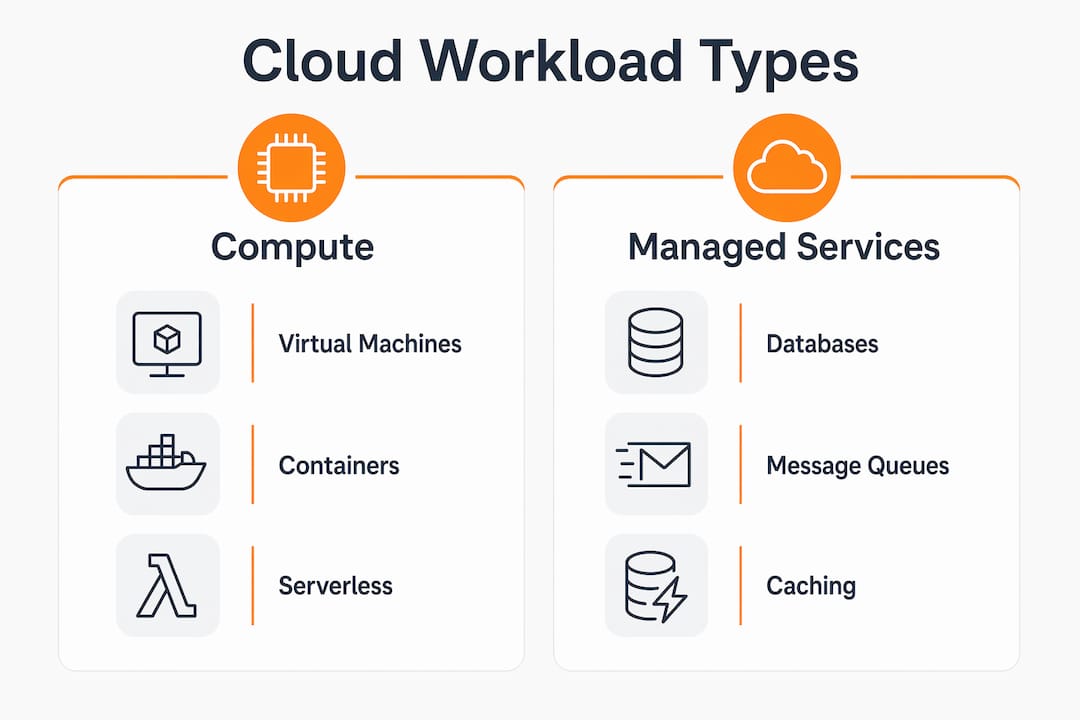
Containers package application code and its dependencies into a portable unit. Docker and Kubernetes are the dominant tools here. Containers share the host OS kernel, making them lighter and faster to start than VMs. They’re the standard choice for microservices architectures.
Serverless functions abstract away the server entirely. AWS Lambda and Azure Functions execute code in response to events and scale to zero when idle. They’re cost-efficient for event-driven tasks but introduce cold-start latency and vendor lock-in considerations.
Managed services include databases like Amazon RDS, message queues like Amazon SQS, and caching layers like Amazon ElastiCache. The cloud provider handles patching, scaling, and availability. Your team focuses on configuration and data, not infrastructure.
| Workload Type | Resource Control | Scalability | Management Overhead | Best Fit |
|---|---|---|---|---|
| Virtual Machine | High | Manual or scripted | High | Legacy apps, full OS control |
| Container | Medium | Automated via orchestration | Medium | Microservices, CI/CD pipelines |
| Serverless Function | Low | Automatic | Low | Event-driven, short-lived tasks |
| Managed Service | Low | Provider-managed | Very Low | Databases, queues, caching |
Pro Tip: When migrating to AWS, don’t default every workload to VMs. Map each application’s traffic pattern first. Bursty, event-driven workloads almost always cost less as Lambda functions or containers than as always-on EC2 instances.
How does cloud workload management influence cost, performance, and security?
Cloud workload management focuses on scheduling, prioritization, scaling, and uptime of applications. This is distinct from resource management, which focuses on provisioning and capacity. The difference matters because you can have perfectly provisioned infrastructure and still suffer outages if workload scheduling and prioritization are mismanaged.
Effective cloud workload management produces three measurable outcomes:
- Cost reduction: Automated rightsizing tools like Komodor can reduce Kubernetes compute costs up to 70% through real-time CPU and memory adjustments. That number reflects what happens when manual overprovisioning is replaced with data-driven allocation.
- Performance reliability: Workload management defines how applications behave under load. Without it, a traffic spike in one workload can starve adjacent services of compute, causing cascading failures.
- Security posture: Cloud workloads require a shift from perimeter-based security to Zero Trust and microsegmentation. Workloads are distributed, dynamic, and share infrastructure, which makes traditional firewall rules insufficient.
The security point deserves emphasis. A Zero Trust model treats every workload as untrusted by default, verifying identity and intent before allowing communication. Microsegmentation limits the blast radius if one workload is compromised. Both practices are now standard in regulated industries like fintech and healthcare.
Pro Tip: Before enforcing Zero Trust policies, run two to four weeks of baseline traffic observability. Strict enforcement without prior monitoring breaks service communication in ways that are hard to diagnose under production pressure.
Why is workload assessment critical before cloud migration?
Workload assessment before migration is the step most teams underestimate. The Azure Cloud Adoption Framework defines formal assessment as four sequential activities:
- Asset discovery: Catalog every server, database, application, and network component in scope. Use automated discovery tools to avoid manual gaps. AWS Application Discovery Service and Azure Migrate both automate this step.
- Dependency mapping: Document every internal and external connection each workload relies on. This step is often more time-consuming than the migration itself. Missing a single dependency causes post-migration downtime, which is the most expensive outcome of a poorly planned move.
- Business value prioritization: Rank workloads by revenue impact, compliance requirements, and user criticality. This ranking determines migration sequence. High-value, low-complexity workloads migrate first to build team confidence and deliver early wins.
- Cloud readiness estimation: Classify each workload as rehost, replatform, or refactor. A legacy monolith running on Windows Server 2012 has a different readiness profile than a containerized Node.js API. Mixing these without classification leads to scope creep and budget overruns.
The dependency mapping step is where most migrations fail. Internal network links are straightforward. External dependencies, including third-party APIs, licensing servers, and on-premises data feeds, are frequently undocumented. A thorough workload inventory process surfaces these before they become production incidents.
What are the best strategies for continuous workload optimization?
Post-migration optimization is not a one-time activity. Continuous rightsizing is necessary because static provisioning leads to resource waste or bottlenecks. High-performing engineering teams treat resource limits as living configurations, adjusting them based on traffic patterns and application metrics on a regular cycle.
The most effective approach combines three practices:
Rightsizing as a feedback loop. Set resource limits based on observed peak usage, not theoretical maximums. Review CPU and memory utilization weekly for high-traffic workloads and monthly for stable ones. Tools like AWS Compute Optimizer and CloudZero automate this analysis and surface recommendations without requiring manual metric review.
Workload-aware efficiency strategies. Workload-aware cloud efficiency uses autoscaling, spot instances, and workload-specific configurations instead of generic black-box approaches. An e-commerce checkout service has a different scaling profile than a nightly batch job. Treating them identically wastes money and creates unnecessary risk.
Zero-downtime operational practices. Kubernetes environments support live migration and rolling updates, which allow workload changes without service interruption. This capability is not automatic. It requires proper readiness and liveness probes, pod disruption budgets, and tested rollback procedures.
| Optimization Strategy | Tool or Method | Primary Benefit |
|---|---|---|
| Continuous rightsizing | AWS Compute Optimizer, Komodor | Eliminates overprovisioning waste |
| Autoscaling policies | AWS Auto Scaling, Kubernetes HPA | Matches capacity to real demand |
| Spot instance usage | AWS Spot Instances | Reduces compute costs for fault-tolerant workloads |
| Observability-first security | Prometheus, Grafana, service mesh | Enables safe Zero Trust enforcement |
Pro Tip: For cloud performance optimization on AWS, start with Compute Optimizer recommendations before touching any instance types manually. The tool analyzes 14 days of CloudWatch metrics and identifies right-sizing opportunities you’d miss in a manual review.
Key takeaways
Effective cloud workload management requires continuous assessment, workload-specific optimization strategies, and security models built for distributed, dynamic environments.
| Point | Details |
|---|---|
| Define workloads precisely | A cloud workload is a discrete software unit consuming cloud resources, not just an “app.” |
| Know your workload types | VMs, containers, serverless functions, and managed services each have distinct cost and management profiles. |
| Assess before you migrate | Dependency mapping is more complex than migration itself; skipped dependencies cause downtime. |
| Manage continuously | Rightsizing is a recurring process, not a one-time configuration after deployment. |
| Secure with Zero Trust | Microsegmentation and Zero Trust are required for distributed workloads sharing cloud infrastructure. |
The discipline most teams still treat as optional
After working through hundreds of cloud migrations, the pattern I see most often is this: teams invest heavily in the migration itself and almost nothing in the discipline of ongoing workload management. They migrate, they celebrate, and then six months later they’re paying 40% more than projected with no clear explanation.
The uncomfortable truth is that cloud workloads are not static. Traffic changes, applications evolve, and the resource profile that made sense at launch rarely matches what production actually needs. Teams that treat workload management as a continuous discipline, reviewing rightsizing recommendations monthly and updating security policies as workloads change, consistently outperform teams that set and forget.
The other mistake I see regularly is conflating workload management with resource management. Provisioning the right instance type is necessary but not sufficient. You also need scheduling logic, prioritization rules, and autoscaling policies that reflect how each workload actually behaves. Without that layer, you’re managing infrastructure, not workloads.
My strongest recommendation: before any migration, spend at least two weeks on dependency mapping. Not one day, not a weekend sprint. Two weeks of systematic discovery using tools like AWS Application Discovery Service or Azure Migrate. The migration checklist matters less than the dependency map. Every post-migration outage I’ve seen traces back to a dependency that wasn’t documented before cutover.
The teams that get this right treat their workload inventory as a living document, not a pre-migration artifact. That shift in mindset is what separates predictable cloud operations from constant firefighting.
— Oleksandr
Ready to move your workloads to AWS without the risk?
Understanding your workloads is step one. Migrating them without downtime, security gaps, or cost overruns is where execution depth matters. IT-Magic has completed 700+ AWS migrations as an AWS Advanced Tier Partner, covering the full lifecycle from workload discovery and dependency mapping through post-migration optimization.
Whether you’re running a complex e-commerce platform or a fintech environment where compliance gaps translate directly into lost revenue, IT-Magic takes full ownership of outcomes, not just planning. The AWS migration services IT-Magic provides are built around your specific workload profile, applying rehost, replatform, or refactor strategies where each fits best. See the proven migration results from environments like yours before you commit to a path.
FAQ
What is a cloud workload in simple terms?
A cloud workload is any software unit, such as a virtual machine, container, or serverless function, that runs on cloud infrastructure and consumes compute, memory, storage, or networking resources to perform a specific task.
What are the main cloud workload types?
The four primary types are virtual machines, containers, serverless functions, and managed services. Each differs in resource control, scalability, and management overhead, making workload type selection a key architectural decision.
What is cloud workload analysis?
Cloud workload analysis is the process of inventorying, classifying, and evaluating workloads to understand their resource consumption, dependencies, and cloud readiness. The Azure Cloud Adoption Framework defines this as asset discovery, dependency mapping, business value prioritization, and readiness estimation.
How does cloud workload management reduce costs?
Automated rightsizing and workload-aware scaling strategies eliminate overprovisioning. Tools like Komodor report up to 70% reduction in Kubernetes compute costs through real-time CPU and memory adjustments based on actual usage data.
Why is dependency mapping so critical before migration?
Missing a single dependency causes post-migration downtime. Dependency mapping is often more time-consuming than the migration itself because external connections, including third-party APIs and on-premises data feeds, are frequently undocumented in legacy environments.