
TL;DR:
- Rehost migration moves applications to the cloud without changing code or architecture, completing in days to weeks. It is suitable for stable, low-change workloads planned for at least two years and helps build cloud skills quickly. However, neglecting post-migration modernization can lead to ongoing performance issues and higher costs.
Rehost migration is defined as moving an application, its data, and its configuration to cloud infrastructure without changing the underlying code or architecture. Known in the industry as lift-and-shift migration, it is the fastest path to the cloud for stable workloads. The Microsoft Cloud Adoption Framework classifies rehosting as a migration tactic, not modernization, a distinction that shapes every decision around when and how to use it. IT teams choose this approach to meet hard datacenter exit deadlines, reduce physical infrastructure costs, and build foundational cloud skills before tackling more complex changes.
What is the rehost migration process?
Rehost migration moves virtual machines, workloads, and their associated data to an infrastructure-as-a-service (IaaS) environment with minimal adjustments. The workload arrives in the cloud running the same operating system, the same application stack, and the same configuration it had on-premises. Nothing about the application logic changes.
The process follows a predictable sequence:
- Discovery and inventory. Map every workload, dependency, and data source targeted for migration. Identify network configurations, storage volumes, and access controls.
- Assessment. Confirm each workload meets the stability criteria for rehosting. Flag any workloads with existing performance or reliability issues for remediation before migration.
- Environment provisioning. Build the target IaaS environment on the cloud provider, matching compute, memory, and storage specifications to the source environment.
- Data and workload replication. Use automated migration tools to replicate virtual machines and data to the cloud environment. Automation reduces manual error and accelerates the timeline significantly.
- Cutover and validation. Switch production traffic to the cloud environment, validate application behavior, and confirm data integrity.
- Post-migration monitoring. Track performance, cost, and security posture in the first weeks after cutover to catch unexpected issues early.
The deployment timeline for rehosting is typically days to weeks, compared to months or years for refactoring efforts. That speed advantage is the primary reason organizations choose this path when time pressure is high.
Pro Tip: Automate as much of the replication and validation steps as possible. Manual VM migrations introduce configuration drift that is difficult to detect until production traffic exposes it.

When and why should organizations choose rehost migration?
Rehost migration fits a specific workload profile. The Microsoft Cloud Adoption Framework recommends rehosting only when a workload will remain stable and unchanged for at least two years. That two-year threshold exists because migrating a workload twice, once to rehost and again to modernize shortly after, doubles the cost and disruption without proportional benefit.
The clearest use cases for rehosting include:
- Datacenter exit deadlines. A lease expiration or hardware end-of-life forces migration on a fixed timeline. Rehosting is the only approach fast enough to meet it.
- Legacy applications planned for retirement. Workloads with a defined sunset date do not justify the investment of refactoring. Rehosting for short-term use accelerates datacenter exit without wasting engineering resources.
- Low-change, non-strategic systems. Internal tools, batch processing jobs, and back-office applications that rarely change are strong rehost candidates.
- Teams new to cloud operations. Rehosting gives IT teams hands-on experience with cloud governance, cost management, and security tooling before they take on complex architectural changes.
Rehosting is the wrong choice for workloads with existing performance problems. Migrating a broken workload to the cloud does not fix it. The same failures appear in the new environment, often at higher cost because cloud compute pricing differs from on-premises fixed costs. A migration strategy guide can help teams match each workload to the right approach before committing to rehost.
Pro Tip: Run a workload stability check before adding anything to the rehost list. If the application has open performance tickets or reliability incidents in the past six months, resolve them first or route it to replatform.
What are the benefits and limitations of rehost migration?
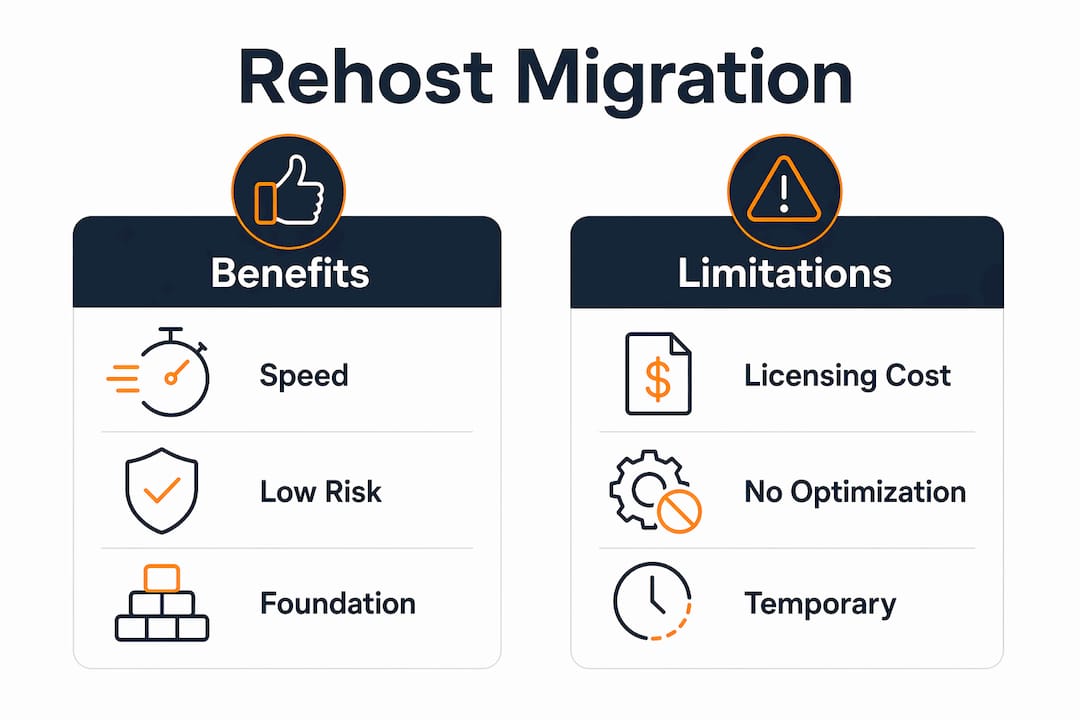
Rehost migration delivers real advantages, but those advantages come with conditions. Understanding both sides prevents the most common planning mistakes.
Core benefits
Speed is the defining advantage. Because no code changes are required, migration teams can move dozens of workloads in parallel. Organizations gain immediate access to cloud capabilities like on-demand scaling, geographic redundancy, and managed backup services without waiting for a full modernization cycle. Rehosting also frees physical datacenter space quickly, reducing colocation or owned-facility costs from the moment of cutover.
Rehosting also serves as a foundation for cloud governance skills. Teams learn to manage cloud cost dashboards, configure identity and access management, and operate cloud monitoring tools on workloads that carry low modernization risk. That experience is valuable before they take on refactoring projects where architectural mistakes are more expensive.
Limitations and risks
The most serious limitation is technical debt. Rehosting carries existing problems forward into the cloud environment. An application with inefficient database queries, memory leaks, or poor connection handling will behave the same way on cloud infrastructure. Cloud pricing models, which charge for compute by the hour, can make those inefficiencies more expensive than they were on fixed on-premises hardware.
“The most significant criticism of rehosting is post-migration neglect, where technical debt remains unaddressed and cloud costs become higher than on-premises.” This outcome is avoidable, but only if teams plan explicitly for follow-up modernization before the migration begins.
Licensing is another hidden cost. Software licensed per physical server or per core may not transfer cleanly to cloud virtual machines. Teams that carry forward fixed-capacity licensing models often pay for capacity they no longer need or violate license terms without realizing it.
| Factor | Rehost migration | Refactoring |
|---|---|---|
| Time to migrate | Days to weeks | Months to years |
| Code changes required | None | Significant |
| Technical debt | Carried forward | Addressed |
| Upfront cost | Low | High |
| Long-term cloud cost | Potentially higher | Lower after optimization |
| Cloud-native features | Limited access | Full access |
How does rehost migration compare to replatforming and refactoring?
Cloud migration strategies generally fall into three categories: rehost, replatform, and refactor. Each targets a different workload profile and delivers a different outcome.
Rehosting moves the workload as-is. No code changes, no architectural redesign. The goal is speed and minimal disruption.
Replatforming makes targeted adjustments without changing the core architecture. A team might swap a self-managed database for a managed cloud database service, reducing operational overhead while keeping the application logic intact. The effort is moderate, and the timeline is weeks to a few months.
Refactoring (also called rearchitecting) redesigns the application to take full advantage of cloud-native services. This includes breaking monolithic applications into microservices, adopting serverless compute, or rebuilding data pipelines using managed streaming services. The effort is high, the timeline is long, and the long-term payoff in performance and cost efficiency is significant. A detailed breakdown of this approach is available in the refactoring in cloud migration guide.
Most organizations do not choose a single strategy for their entire portfolio. Portfolio analysis consistently shows workloads splitting across all three approaches, with different applications requiring different levels of change. Rehosting handles the stable, low-risk workloads. Replatforming addresses moderate-complexity systems. Refactoring targets the applications where cloud-native architecture delivers measurable business value.
The right sequencing matters. Rehosting first, then modernizing in phases, lets teams exit datacenters quickly while building the skills and cloud familiarity needed for more complex work. Attempting to refactor everything simultaneously stalls migrations and exhausts engineering capacity.
What are best practices for executing a rehost migration?
Execution quality determines whether a rehost migration delivers its promised speed and cost benefits or creates new problems. These practices separate successful migrations from ones that require rework.
- Validate workload stability before committing. Confirm the application has no open performance or reliability issues. Confirm the two-year non-modernization horizon applies. If either condition fails, route the workload to a different strategy.
- Audit licensing before migration. Identify every software license attached to the workload. Confirm cloud deployment is permitted under current license terms. Renegotiate or replace licenses that do not transfer cleanly.
- Use automation for replication. Manual VM migrations introduce configuration drift. Automated tools replicate configurations consistently and reduce the window of risk during cutover.
- Build cloud governance in from day one. Configure cost alerts, tagging policies, and access controls before the workload goes live. Retrofitting governance after migration is slower and more error-prone. The role of cloud governance in post-migration operations is often underestimated.
- Plan for people and process costs. Budget overruns in rehost migrations most often come from underestimating the time teams spend on coordination, testing, and stakeholder communication, not from technical tasks. Build those costs into the plan explicitly.
- Set a modernization date before cutover. Treat rehosting as a temporary state, not a destination. Agree on a timeline for the next phase of work before the workload goes live in the cloud.
- Monitor closely in the first 30 days. Performance baselines shift in cloud environments. Track CPU, memory, network throughput, and cost daily in the first month to catch unexpected behavior before it becomes expensive.
Pro Tip: Treat every rehosted workload as having a built-in expiration date. Document the planned modernization timeline in your migration records so it does not get deprioritized when the next project cycle starts.
An AWS migration checklist covers the technical and governance steps in detail for teams running rehost migrations on AWS infrastructure.
Key takeaways
Rehost migration is the fastest path to the cloud, but its value depends entirely on selecting the right workloads and planning explicitly for post-migration modernization.
| Point | Details |
|---|---|
| Rehost means lift-and-shift | Move workloads to IaaS with no code or architecture changes, completing migration in days to weeks. |
| Two-year stability rule | Only rehost workloads that will remain unchanged for at least two years to avoid duplicate migration costs. |
| Technical debt travels with the workload | Existing performance problems do not disappear in the cloud and can increase operational costs if left unaddressed. |
| Plan modernization before cutover | Set a follow-up modernization date before the workload goes live to prevent lift-and-shift from becoming permanent. |
| Governance starts on day one | Configure cost alerts, tagging, and access controls before migration, not after. |
Rehost migration as a foundation, not a finish line
Rehost migration gets misread in two directions. Some teams treat it as the lazy option, a shortcut that avoids real cloud work. Others treat it as the finish line, declaring cloud migration complete the moment workloads are running on IaaS. Both readings are wrong, and I have seen both cause real damage to cloud programs.
The teams I have worked with that got the most value from rehosting treated it as a deliberate, time-bounded move. They used the migration window to get their operations teams comfortable with cloud tooling, cost dashboards, and incident response in a cloud environment. By the time they started refactoring their more complex applications, their teams were not learning cloud basics at the same time they were redesigning architecture. That sequencing matters more than most planning documents acknowledge.
The risk I see most often is not choosing rehost when refactoring was needed. It is choosing rehost correctly and then never following up. Post-migration neglect is where the real cost accumulates. A workload that was cheap to run on aging on-premises hardware can become expensive in the cloud if its inefficiencies are never addressed. The cloud does not hide waste. It bills you for it.
My advice: before any workload goes on the rehost list, write down the date by which it will either be modernized or retired. If you cannot write that date down, the workload is not ready to rehost.
— Oleksandr
AWS migration services built for teams that need results
IT-Magic has completed 700+ AWS migrations as an AWS Advanced Tier Partner, working across eCommerce and fintech environments where downtime and cost overruns are not acceptable outcomes. The team takes full ownership of execution, from infrastructure audit through post-migration optimization, applying rehost, replatform, or refactor strategies based on what each workload actually needs.

For organizations facing datacenter exit deadlines or looking to reduce infrastructure costs without a lengthy modernization program, IT-Magic’s AWS migration services deliver production-grade results on a predictable timeline. The approach covers licensing audits, governance setup, and post-migration monitoring so your team does not carry the operational burden alone. Review the AWS migration best practices guide to see how IT-Magic structures each phase of execution.
FAQ
What is rehost migration in simple terms?
Rehost migration means moving an application to the cloud exactly as it exists today, with no changes to code or architecture. It is also called lift-and-shift migration.
How long does a rehost migration take?
Rehost migrations typically complete in days to weeks because no code changes are required. Refactoring projects, by contrast, take months to years.
What workloads are best suited for rehosting?
Stable, low-change workloads that will not require modernization for at least two years are the best candidates. Legacy applications planned for retirement are also strong fits.
What is the biggest risk of rehost migration?
The biggest risk is post-migration neglect. Workloads with existing performance or reliability problems carry those problems into the cloud, where they can increase operational costs compared to on-premises environments.
How is rehosting different from refactoring?
Rehosting moves a workload to the cloud without changes. Refactoring redesigns the application to use cloud-native services, requiring significant engineering effort but delivering better long-term performance and cost efficiency.