
TL;DR:
- Many organizations mistakenly believe that cloud providers handle all security measures, which leads to costly misconfigurations and credential abuse.
- Effective cloud security requires organizations to own identity, network controls, monitoring, and compliance, going beyond simple firewall deployment.
Most organizations assume that moving to the cloud means the provider handles security. That assumption is expensive. Misconfigurations remain the top breach cause, and credential abuse accounts for 18% of cloud incidents. IBM data shows multi-cloud breaches average $5.05 million and take 276 days to detect. The cloud security best practices that actually protect your organization go far beyond enabling a firewall. They require you to own identity, network controls, monitoring, and compliance readiness as if your infrastructure depends on it. Because it does.
Table of Contents
- Key takeaways
- Cloud security best practices start with shared responsibility
- Identity and access management: closing the biggest gap
- Network and data protection with zero-trust architecture
- Continuous monitoring and automated incident response
- Compliance and operationalizing security during migration
- My take: security is infrastructure, not a checklist
- How Awsmigrationservices secures your AWS migration
- FAQ
Key takeaways
| Point | Details |
|---|---|
| Shared responsibility is yours too | Cloud providers secure the platform; you own identity, data, and configuration controls. |
| IAM is your biggest attack surface | Eliminating static credentials and enforcing phishing-resistant MFA cuts the most common attack paths. |
| Zero trust reduces lateral movement | Scoped network rules and encrypted traffic prevent attackers from moving freely after initial access. |
| Automate detection, not just alerting | Event-driven remediation with tools like AWS Lambda stops threats faster than manual response. |
| Compliance needs evidence, not just policy | Auditors want screenshots, diagrams, and log retention proof. Policies alone fail audits. |
Cloud security best practices start with shared responsibility
The shared responsibility model is widely cited and widely misunderstood. AWS secures the physical infrastructure, the hypervisor, and the managed service control planes. You secure everything on top: your operating systems, network configurations, IAM policies, data classification, and application code.
The gap between those two boundaries is where most breaches happen. Security teams assume a managed service like Amazon RDS or S3 is “handled by AWS,” so they skip encryption settings, leave buckets with public access enabled, or grant database access to overly broad IAM roles. Common organizational oversight like this is what attackers exploit, not sophisticated zero-days.
The model also shifts based on the service type. With IaaS, you manage the OS and runtime. With PaaS, AWS handles more of the stack, but you still own application-level access controls and data handling. With SaaS, your responsibility narrows to user management and data governance. Most enterprises run all three simultaneously, which means your responsibility matrix is more complex than any single diagram suggests.
Practical steps to take ownership of this model:
- Build a documented responsibility matrix for every service in your environment, separated by IaaS, PaaS, and SaaS categories.
- Review it quarterly and update it when new services are adopted.
- Assign a named owner for each control domain: identity, network, data, logging, and patching.
- Include shared responsibility scope in vendor onboarding and third-party risk reviews.
Pro Tip: Run an AWS Trusted Advisor check alongside your responsibility matrix. Where Trusted Advisor flags a gap, that gap almost always sits in the customer responsibility column.
Identity and access management: closing the biggest gap
IAM is where attackers spend most of their time once they are inside your environment. Attackers use tools like CloudFox and Prowler to map IAM misconfigurations within minutes of gaining initial access. Static credentials, overprivileged roles, and forgotten service accounts give them everything they need to move laterally and escalate privileges.
Strong IAM hygiene follows a specific sequence:
- Delete all root access keys. The AWS root account should have no programmatic access keys at all. Use the root account only for billing and initial account setup, then lock it down with a hardware MFA device.
- Replace static credentials with IAM roles. Any application or service using long-lived access keys is a liability. Migrate to instance profiles, task roles, or identity federation so credentials rotate automatically.
- Enforce phishing-resistant MFA. FIDO2 tokens are recommended for all privileged accounts. SMS-based MFA does not meet the bar for accounts with production access.
- Scope every permission to the minimum required. Use IAM Access Analyzer to identify unused permissions and remove them. Set permission boundaries on roles that developers create.
- Govern non-human identities. CI/CD pipelines, Lambda functions, and cross-account integrations each carry their own identity. Audit these with the same rigor you apply to human users.
- Implement just-in-time access. For sensitive operations, grant temporary elevated permissions through a request-and-approve workflow rather than persistent admin roles.
The Zero Trust principle of “never trust, always verify” applies directly here. No identity, human or machine, gets standing access by default. Every access decision is explicit, time-bounded, and logged.
Pro Tip: Set an IAM password policy with a 90-day rotation requirement, but also configure CloudWatch alarms on any use of the root account. Root account activity outside a scheduled maintenance window should trigger an immediate incident.

Network and data protection with zero-trust architecture
Perimeter-based security does not work in cloud environments. The network boundary is fluid, services communicate across accounts and regions, and developers spin up resources faster than any manual review process can track. Your cloud security strategy needs controls that work at the resource level, not just at the edge.
Designing a zero-trust VPC
Start with the assumption that any resource inside your VPC can be compromised. Security groups and Network Access Control Lists (NACLs) should reflect that assumption. Every security group rule should specify exact source IP ranges or security group IDs. The rule "0.0.0.0/0` on any inbound port other than 443 is a finding, not a configuration choice.
Segment your VPC into tiers: public subnets for load balancers only, private subnets for application servers, and isolated subnets for databases. Use VPC endpoints for AWS service communication so traffic never traverses the public internet.
| Control | What it does | What to avoid |
|---|---|---|
| Security groups (stateful) | Allow specific inbound/outbound traffic per resource | Overly broad CIDR ranges, unused rules |
| NACLs (stateless) | Subnet-level deny rules as a second layer | Relying on NACLs alone without security groups |
| VPC Flow Logs | Record all accepted and rejected traffic | Disabling or sampling only a subset of traffic |
| AWS Network Firewall | Deep packet inspection at the VPC perimeter | Leaving internet-facing services unfiltered |
Encrypting data the right way
Encrypt everything at rest using customer-managed KMS keys, not AWS-managed defaults. Customer-managed keys give you rotation control, key policy auditing, and the ability to revoke access instantly. For data in transit, enforce TLS 1.3 and reject older protocol versions at your load balancer configuration level.
Use Amazon Macie for sensitive data discovery across S3 buckets. Security teams are often surprised by what Macie finds in buckets that developers created months ago and forgot about.
Pro Tip: Enable S3 Block Public Access at the AWS Organizations level, not just per account. One new account created without that setting can expose data before anyone notices.
Continuous monitoring and automated incident response
Logging and detection are not optional add-ons. They are the mechanism by which you know your other controls are working. AWS advocates Security Hub CSPM with automated controls across all four control types: preventative, proactive, detective, and responsive. Each layer catches what the previous one misses.
Here is how to build that detection stack in practice:
- Enable AWS CloudTrail across all regions and all accounts. Single-region CloudTrail is a gap. Attackers know which regions get less scrutiny.
- Turn on VPC Flow Logs for every VPC. Flow logs catch port scans, unusual outbound connections, and east-west traffic anomalies that other tools miss.
- Use Amazon GuardDuty as your primary threat detection layer. GuardDuty analyzes CloudTrail, DNS, and flow log data to surface findings like credential exfiltration, crypto-mining, and reconnaissance activity.
- Aggregate findings in AWS Security Hub. Security Hub normalizes findings from GuardDuty, Inspector, Macie, and third-party tools into a single view aligned to CIS benchmarks.
- Automate remediation for high-severity findings. Use EventBridge rules to trigger Lambda functions that isolate a compromised EC2 instance, revoke a suspicious IAM session, or block a malicious IP at the security group level.
- Run quarterly breach simulations. Tabletop exercises and controlled purple team exercises validate that your detection and response playbooks work before a real incident forces you to find out.
Continuous drift detection using CIS-aligned posture rules catches configuration changes between audit cycles. A quarterly manual review misses the misconfiguration that was introduced and exploited in week two.
Compliance and operationalizing security during migration
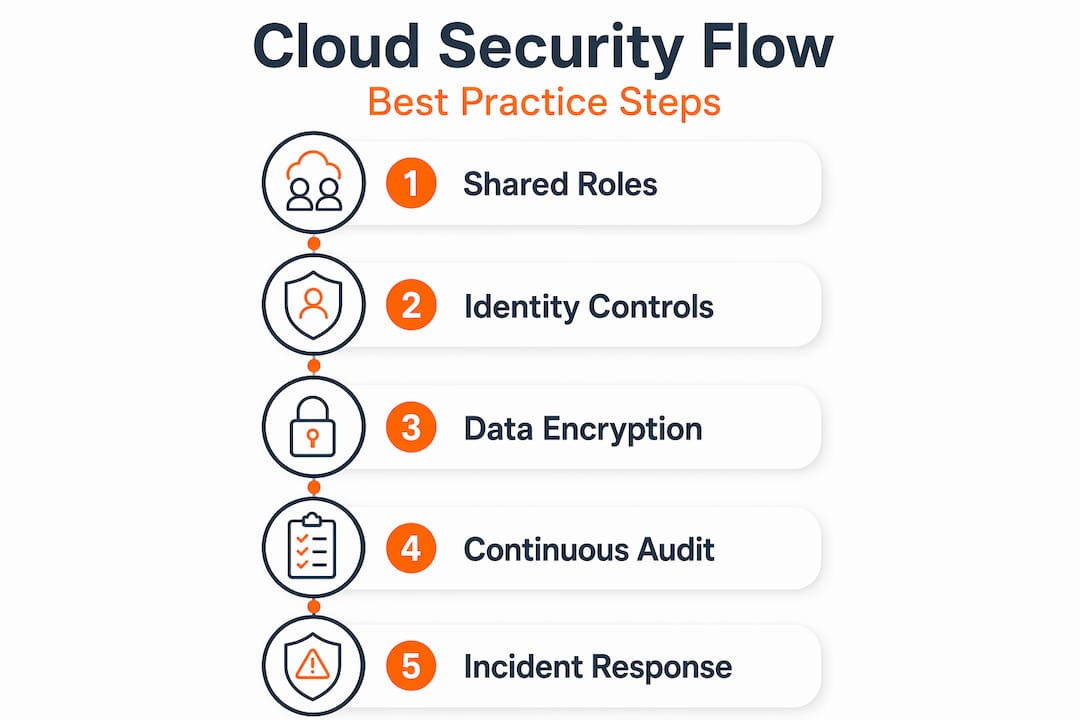
Security and compliance are not finish lines. They are ongoing operational states that require the right architecture from day one. This is especially true during a cloud migration, when new resources are created rapidly and old security habits from on-premises environments do not translate directly.
Follow this sequence to build compliance into your operations rather than bolting it on later:
- Embed security validation into your CI/CD pipeline. Use policy-as-code tools to scan every infrastructure-as-code template before deployment. Policy-as-code with tools like Checkov catches misconfigurations before they reach production, which is far cheaper than remediating them after.
- Apply Service Control Policies (SCPs) at the AWS Organizations level. SCPs are guardrails that prevent any account in your organization from taking actions that violate your security baseline. For example, deny the ability to disable CloudTrail or create unencrypted S3 buckets.
- Structure your environment with multi-account separation. Separate production, staging, development, and security tooling into distinct AWS accounts. This limits blast radius and simplifies IAM scope.
- Document evidence continuously, not just before audits. Auditors require concrete evidence including user permission reviews, network diagrams, and log retention proof, not just written policies. Automate evidence collection using AWS Config rules and export reports on a scheduled basis.
- Align with AWS security white papers and AWS security white papers from the Well-Architected Framework. The Security Pillar of the Well-Architected Framework maps directly to the controls auditors expect for SOC 2, PCI DSS, and HIPAA.
| Activity | Frequency | Tool |
|---|---|---|
| IAM permission review | Quarterly | IAM Access Analyzer |
| Configuration drift check | Continuous | AWS Config |
| Penetration testing | Annually | Third-party assessor |
| Compliance evidence export | Monthly | AWS Security Hub |
| SCP and guardrail review | Biannually | AWS Organizations |
Understanding how security affects migration outcomes is critical before you move a single workload. Getting the architecture right at the start costs far less than remediating a compliance gap after go-live.
My take: security is infrastructure, not a checklist
I have worked through enough cloud migrations to say this plainly: the organizations that get breached are not the ones that skipped security entirely. They are the ones that treated it as a phase. Security review at the end of a sprint, a quarterly audit, a one-time penetration test. That model does not hold up in cloud environments where infrastructure changes happen continuously.
What I have found actually works is treating security monitoring and automation the same way you treat compute or database infrastructure. It is not a tool you turn on and walk away from. It is something you architect, version control, test, and iterate on. When a team checks policy-as-code into the same repository as their Terraform modules, security becomes part of the deployment workflow, not an external review gate.
The other shift I advocate for is cultural, not technical. Zero trust as a culture means every engineer on the team understands why least privilege matters, why they cannot use root credentials in their pipeline, and why that S3 bucket cannot be public even for “just a test.” That understanding comes from security teams who teach rather than gate-keep, and from organizations that measure security posture the same way they measure uptime.
The teams I have seen fail at cloud security are the ones who assumed the cloud provider would catch the things they missed. That assumption is the breach enabler. Own every layer of the shared responsibility model, automate the controls you cannot afford to manually review, and build the evidence pipeline before an auditor asks for it.
— Oleksandr
How Awsmigrationservices secures your AWS migration
Security gaps during migration are not hypothetical. They are the most common cause of post-migration incidents, and they are almost always preventable with the right architecture from the start.

Awsmigrationservices brings 700+ completed AWS migrations and an Advanced Tier Partner credential to every engagement. The team builds security baselines, identity controls, VPC architecture, and logging pipelines as part of the migration itself, not as a follow-up project. If you are planning a migration or auditing an existing AWS environment, explore the secure migration approach to see how security and compliance get built in from day one. For teams that want to go deeper on execution, the AWS migration best practices guide covers the full lifecycle in detail.
FAQ
What are the most critical cloud security best practices?
The highest-impact practices are eliminating static IAM credentials, enforcing phishing-resistant MFA, enabling CloudTrail and GuardDuty across all regions, and embedding policy-as-code into your CI/CD pipeline to catch misconfigurations before deployment.
Who is responsible for security in the cloud?
Security is shared. The cloud provider secures the physical infrastructure and managed service control planes. You are responsible for identity, data, network configurations, and application-level controls. Misunderstanding this boundary is the leading cause of cloud breaches.
How do you secure cloud data at rest and in transit?
Use customer-managed AWS KMS keys for data at rest, and enforce TLS 1.3 at load balancers for data in transit. Enable Amazon Macie to discover sensitive data in S3 buckets that may have been misconfigured or forgotten.
What is the role of AWS Security Hub in cloud security?
AWS Security Hub aggregates findings from GuardDuty, Inspector, Macie, and third-party tools into a unified view. It maps findings to CIS benchmarks and compliance frameworks, giving security teams a single place to prioritize and track remediation.
How do you prepare for a cloud security audit?
Automate evidence collection using AWS Config rules and Security Hub reports. Auditors need more than policies. They require permission review records, network architecture diagrams, and proof of log retention. Quarterly automated exports make audit preparation a process, not a fire drill.