
TL;DR:
- Moving workloads to AWS does not transfer your security responsibilities to Amazon, and neglecting this can lead to costly breaches and audit failures. Cloud security must be an ongoing, integrated process involving active management of identity, data, network, and monitoring controls, especially during migration phases that expose systems to increased risks. Implementing risk-based prioritization, automation, centralized governance, and clear shared responsibility ensures a secure, compliant, and efficient cloud migration.
Moving workloads to AWS does not transfer your security obligations to Amazon. That assumption is one of the most expensive mistakes enterprises make during cloud adoption, and it shows up in audit failures, breach incidents, and costly remediation efforts after go-live. Many security failures during cloud adoption stem from customer-side configuration and identity mistakes rather than provider infrastructure flaws. If you are responsible for an AWS migration at a mid-sized or large enterprise, this article gives you a practical, honest framework for building security into the process from day one, not as an afterthought.
Table of Contents
- Cloud security is an ongoing practice, not a one-time checklist
- Why migration makes security a top priority
- How risk-based prioritization transforms real-world cloud security
- Automated and centralized cloud governance: What most miss
- The enterprise’s role: Shared responsibility and audit readiness
- What most migration guides overlook about cloud security
- How we help you achieve secure and compliant AWS migration
- Frequently asked questions
Key Takeaways
| Point | Details |
|---|---|
| Ongoing security needed | Cloud security is not a one-time task but a continual enterprise commitment. |
| Migration increases risk | AWS migrations expose vulnerabilities that require special security focus. |
| Prioritize real risks | Risk-based alerts and management reduce actual threats, not just alert volume. |
| Automate for compliance | Centralized automation streamlines governance and cuts costs during migration. |
| Shared responsibility matters | Compliance during AWS migration hinges on understanding your security obligations. |
Cloud security is an ongoing practice, not a one-time checklist
The instinct to treat security as a setup task is understandable. You configure your VPC, set up IAM roles, enable encryption, and check the boxes. Done, right? Not even close.
Cloud security is a living discipline that spans every layer of your environment, from how data moves between services to how permissions are granted and revoked over time. According to AWS Security Essentials, cloud security is an ongoing practice spanning identity, data protection, infrastructure controls, applications, and monitoring. That means you are not securing a static target. You are securing a system that changes every time a developer deploys a new function, spins up a container, or connects a new data pipeline.
Here is what that looks like across the core security layers you need to actively manage:
- Identity and access management: Who can do what, and are those permissions reviewed regularly?
- Data at rest: Are your S3 buckets, RDS databases, and EBS volumes encrypted with properly managed keys?
- Data in transit: Are all API calls and service-to-service communications using TLS?
- Network controls: Are security groups and NACLs scoped tightly, with no overly permissive inbound rules?
- Application security: Are your workloads patched, and are third-party dependencies scanned for vulnerabilities?
- Monitoring and logging: Are CloudTrail, GuardDuty, and CloudWatch configured to catch anomalies and alert your team in real time?
“Security is not a product but a process. In the cloud, that process must be designed into operations, not bolted on after deployment.” This is the mindset shift most enterprises need before they migrate a single workload.
Continuous monitoring and automated log analysis are not optional extras for compliance-heavy industries. They are the baseline for any organization that cannot afford a production incident or a failed audit.
Why migration makes security a top priority
Understanding why security is an ongoing obligation, let’s focus on why migration phases amplify every risk. When you are moving workloads from on-premises infrastructure or another cloud to AWS, you are operating in a state of controlled chaos. Systems are temporarily exposed, configurations are in flux, and teams are moving fast.
The AWS Well-Architected Security Pillar outlines that your security posture depends on how workloads are designed and operated on AWS, including identity, defense-in-depth, automation, encryption, and incident preparation. These are not vague principles. They are specific controls that must be designed into your migration architecture, not added after the fact.
The business impact of getting this wrong is immediate and measurable.
| Security gap | Business consequence | Compliance impact |
|---|---|---|
| Overly permissive IAM roles | Unauthorized access to production data | GDPR, HIPAA violation |
| Unencrypted data in transit | Interception risk during cutover | PCI-DSS failure |
| Missing audit logs | No forensic trail for incidents | SOC 2 audit failure |
| Public S3 buckets | Data exposure, reputational damage | Multiple regulatory breaches |
| No incident response plan | Extended downtime, uncontrolled breach | SLA violations |
Notice that every technical gap maps directly to a business or compliance consequence. That is not coincidence. Security failures during migration are rarely technical mysteries. They are the result of skipping deliberate steps under deadline pressure.
The AWS migration best practices framework addresses this by organizing security controls around five core pillars: least privilege access, defense in depth, automation of security tasks, encryption everywhere, and preparation for security events. Applying all five before your first workload moves is the difference between a clean migration and one that generates incidents.
Pro Tip: Map each compliance requirement (HIPAA, PCI-DSS, SOC 2) to specific AWS controls before the migration kickoff. This turns abstract requirements into a concrete implementation checklist your team can verify at each phase gate.
The cloud infrastructure decisions you make during migration, such as how you segment VPCs, how you configure logging, and how you manage secrets, will define your security posture for years. Retrofitting these decisions later costs significantly more in engineering time and operational disruption.
How risk-based prioritization transforms real-world cloud security
Once the critical reasons for prioritizing security are clear, the next question is: how do you decide what to fix first? Most organizations default to severity-based triage. A critical vulnerability gets fixed before a medium one. Simple, right? The problem is that raw severity scores do not reflect your specific operational context.
AWS Security Hub changes this by providing risk-contextualized findings, where cloud security programs prioritize findings based on actual operational risk rather than raw severity to improve remediation focus. That distinction matters enormously during migration when you have a hundred findings and a team that cannot address all of them simultaneously.
Here is how risk-based and severity-based approaches differ in practice:
| Approach | What it measures | Migration usefulness |
|---|---|---|
| Severity-based | CVSS score of the vulnerability | Low: ignores your actual exposure |
| Risk-based | Likelihood of exploitation given your environment | High: focuses effort on real threats |
| Risk-contextualized | Severity plus asset criticality plus exposure | Highest: tailored to your workload risk |
Risk-based prioritization asks different questions. Not just “how bad is this vulnerability?” but “how likely is it to be exploited in our environment, and what is the business impact if it is?” During a migration, this translates directly into better decisions about sequencing remediation work.
Practical benefits of adopting this approach during your migration include:
- Faster remediation cycles because teams know exactly what to tackle first
- Reduced alert fatigue from findings that are technically severe but contextually low-risk
- Better alignment between security teams and business stakeholders on what actually matters
- More defensible audit documentation because decisions are grounded in risk context, not just scores
When you use secure AWS services like Security Hub alongside services like Amazon Inspector and GuardDuty, you get a layered detection capability that surfaces the highest-priority issues across your entire migration footprint. This is not theoretical. It is the operational foundation that high-maturity enterprises build before they flip the production switch.
Automated and centralized cloud governance: What most miss
Armed with risk management strategies, successful cloud security also demands automation and centralized oversight. This is the area where even well-funded enterprises consistently fall short, not because they lack tools, but because they underestimate the operational complexity of managing security manually at cloud scale.

Think about what happens during a large migration. You might be provisioning hundreds of EC2 instances, dozens of RDS clusters, Lambda functions, and S3 buckets across multiple accounts. A manual governance process cannot keep up. By the time a human reviews a configuration change, the environment has moved on.
The evidence for automation’s impact is striking. Security enhancements can cut costs by up to 95% with minimal productivity impact when security monitoring and governance are automated and centralized to reduce friction and avoid disruptions. That figure comes from the athenahealth case study, where centralized, automated security governance transformed both cost efficiency and operational continuity.
Here is a practical sequence for building automated governance into your migration:
- Centralize logging first: Set up AWS CloudTrail organization-wide before any workloads move. Every API call, configuration change, and access event needs a permanent, tamper-proof record.
- Automate compliance checks: Use AWS Config rules to continuously evaluate whether your resources conform to your security baselines. Non-compliant resources trigger alerts automatically.
- Deploy GuardDuty across all accounts: Threat detection should not depend on someone remembering to check a dashboard. GuardDuty monitors continuously and surfaces threats in real time.
- Integrate Security Hub as the aggregation layer: Pull findings from GuardDuty, Inspector, Macie, and third-party tools into a single prioritized view.
- Build automated remediation for common violations: Lambda functions can automatically remediate specific violations, such as disabling public S3 bucket access, without human intervention.
Pro Tip: Start your centralized logging setup at least two weeks before the first workload migration. You want baseline data in place so that anomalies during migration stand out clearly against normal operational patterns.
The cost reduction benefits of automated security governance are a useful selling point when presenting to leadership. Security and cost efficiency are not competing priorities. Automation serves both simultaneously.
The enterprise’s role: Shared responsibility and audit readiness
With the technical foundations set, it is vital to understand the compliance and audit implications that are specific to migration scenarios. Shared responsibility is a concept most IT leaders have heard of, but fewer have applied rigorously during an active migration.
Here is the short version: AWS secures the underlying infrastructure, the hardware, the global network, and the physical facilities. You are responsible for everything that runs on top of it. That includes your operating systems, your application configurations, your IAM policies, and critically, your data.
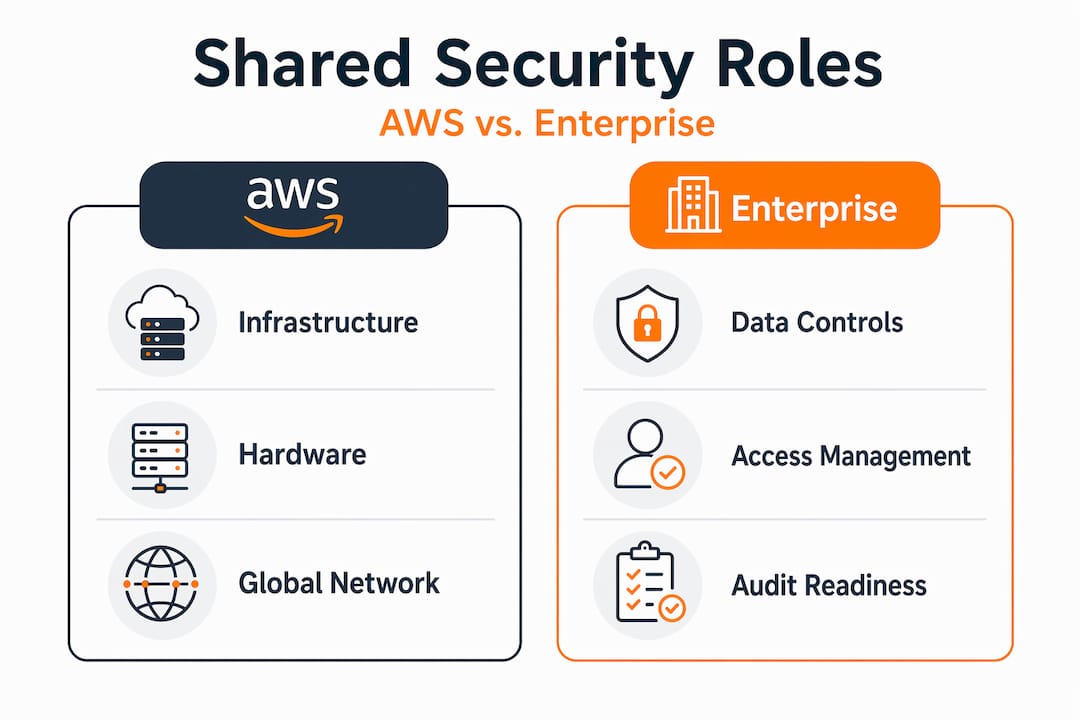
For enterprises in regulated industries, shared responsibility during AWS migrations means enterprises must secure data and identities that auditors will examine. Your auditors do not care about AWS’s compliance certifications in isolation. They care about how you configured, monitored, and protected your specific workloads and data.
What falls under your responsibility during migration:
- Data classification and encryption: You decide how data is labeled, encrypted, and access-controlled
- IAM configuration: Role boundaries, permission policies, and MFA enforcement are entirely in your hands
- Network security: VPC design, security group rules, and routing decisions are customer-managed
- Application security: Patching, dependency management, and code-level security are your team’s job
- Audit logging: Enabling, retaining, and protecting audit logs is a customer obligation
“Assuming AWS handles compliance because it handles infrastructure is the fastest path to a failed audit. Your data, your identities, your controls. Own them.”
For managed cloud security, the goal is to have a clear documented mapping of every control, who owns it, and how it is verified. Auditors want to see evidence of control operation, not just existence. If a control is configured but never tested or reviewed, it may as well not exist from an audit perspective.
What most migration guides overlook about cloud security
Here is the honest take, grounded in 700+ migrations across eCommerce and fintech environments: most cloud security failures are not exotic. They are embarrassingly predictable, and they keep happening because guides focus on tools while ignoring the human and organizational gaps underneath them.
Identity misconfiguration is still the root cause of a disproportionate number of cloud breaches. Not because organizations do not have IAM tools. They do. The problem is that permissions get granted quickly, under pressure, and then never reviewed. Over time, roles accumulate access they no longer need. One compromised credential in an over-permissioned role becomes a catastrophic breach instead of a contained incident.
The second gap is incident response. Most enterprises migrating to AWS have not built or tested a cloud-specific incident response playbook. When something goes wrong during or after migration, the team improvises. Improvised incident response in a cloud environment, where resources can be spun up or destroyed in seconds, is genuinely dangerous. Evidence disappears. Containment decisions get made without context.
Security tools are valuable, but they create a false sense of security when they are deployed without clear ownership. Who reviews GuardDuty findings? Who has authority to isolate a compromised instance at 2 AM? If you cannot answer those questions before go-live, you have a gap that no tool can fill.
Our practical recommendation: treat your AWS migration as the forcing function to codify your security and incident response processes. Document who owns each control, build runbooks for the five most likely incident scenarios, and run a tabletop exercise before your first production workload moves. Migration pressure is uncomfortable, but it is also the best organizational lever you have to build security discipline that lasts.
Revisit security during AWS migration periodically as your environment evolves. What you document at migration kickoff will need updating as workloads scale and architectures change.
How we help you achieve secure and compliant AWS migration
Security during AWS migration is not something you figure out as you go. It requires deliberate planning, the right architecture decisions, and ongoing oversight from people who have done this before.

At AWS Migration Services, we start every engagement with a tailored risk assessment and compliance mapping exercise. Before a single workload moves, you have a clear picture of your current security posture, your regulatory obligations, and the specific controls that need to be in place at go-live. We automate governance, deploy centralized monitoring, and manage the migration security lifecycle so your internal team is not stretched thin. Explore our AWS migration best practices guide for a detailed look at how we structure secure migrations, and see how we help enterprises optimize AWS costs securely without sacrificing the compliance controls that protect your business.
Frequently asked questions
Which AWS security controls are most critical during migration?
Identity and access management, encryption, and automated monitoring are essential for reducing migration risk. Your security posture depends on how workloads are designed and operated on AWS, including identity, defense-in-depth, automation, encryption, and preparation for events.
How does shared responsibility impact compliance in AWS migrations?
You must implement and manage controls over your data and identities to meet audit and compliance standards. Customers own their data and identities and are responsible for protecting them and complying with governance requirements.
Can cloud security automation save both time and cost?
Yes, centralizing and automating security monitoring can significantly reduce operational costs and minimize disruptions. Security enhancements can be achieved with minimal impact and significant reductions in operational cost.
What is a risk-contextualized alert in cloud security?
It is an alert ranked by how much operational risk it poses in your specific environment, not just its generic severity score. This approach helps teams prioritize critical issues with correlation, contextualization, and visualization at scale.