
TL;DR:
- AWS migration downtime typically lasts 2 to 10 minutes due to continuous replication and controlled traffic shifts. Proper planning, including DNS TTL reduction and thorough testing, minimizes split traffic and data divergence during cutover. Maintaining the old environment for a fallback period ensures safety, helping teams achieve smooth, low-impact cloud transitions.
AWS migration downtime is defined as the period when applications or databases are unavailable during the cutover from on-premises infrastructure to AWS. The good news for IT leaders: with AWS Application Migration Service (MGN) and AWS Database Migration Service (DMS), that window shrinks to minutes, not hours. Write downtime with continuous replication typically runs 2–10 minutes. The challenge is not eliminating downtime entirely. It is controlling exactly when it happens, how long it lasts, and what your team does if something goes wrong.
What causes AWS migration downtime?
Downtime during an AWS migration does not come from a single source. It accumulates from several overlapping technical factors, each adding seconds or minutes to the total outage window.
The main contributors are:
- Data synchronization lag. During the final delta transfer, writes to the source database must pause briefly so the target can catch up. This write pause is the most common source of measurable downtime.
- DNS propagation delays. After you update DNS records to point to AWS, some resolvers cache old IPs for up to 10 minutes, ignoring your TTL settings. Users hitting the old IP during this window see stale or broken responses.
- Application and service restarts. Services on the AWS side need time to start, pass health checks, and register with load balancers. A poorly sequenced startup order can add several minutes to perceived downtime.
- Session persistence and state divergence. During the split-traffic window caused by DNS lag, some users hit the old server while others hit AWS. If sessions are stored locally rather than in a shared layer like ElastiCache or Redis, those users lose their state.
- Dependency chain failures. Undocumented integrations, hardcoded IP addresses, and third-party API callbacks pointing to on-premises endpoints all surface during cutover and extend the outage.
Pro Tip: Reduce DNS TTL to 60 seconds at least 48 hours before cutover. Most resolvers will honor the lower TTL, which means traffic switches within one minute of your DNS update rather than ten.
The practical implication is that most downtime is not caused by the migration tool itself. It comes from gaps in preparation: undiscovered dependencies, high DNS TTLs, and untested startup sequences.

How do continuous replication and traffic shifting minimize downtime?
The technical foundation of a low-downtime AWS migration rests on three methods: continuous block-level replication, Change Data Capture (CDC), and controlled traffic shifting.
-
Continuous block-level replication with AWS MGN. AWS Application Migration Service replicates your source servers to AWS in real time, running entirely in the background before cutover. AWS MGN reduces cutover downtime to the delta time between stopping source writes and switching traffic. Because replication is continuous, the delta is tiny. Test cutovers validate that the AWS instance boots correctly and passes health checks before you touch production.
-
Change Data Capture with AWS DMS. For databases, AWS Database Migration Service uses CDC to stream every insert, update, and delete from the source to the target in near real time. The target database stays within seconds of the source throughout the replication period. When you trigger cutover, the write pause needed to drain the final transaction queue is brief.
-
Weighted DNS routing with Route 53. Rather than flipping all traffic at once, Route 53 weighted routing lets you shift 5%, then 25%, then 100% of traffic to AWS over a controlled window. This approach limits the blast radius of any issue discovered post-cutover.
-
AWS Global Accelerator for instant traffic switching. Unlike DNS, Global Accelerator switches traffic in seconds using anycast IPs. There is no propagation delay because the IP address does not change. Only the routing target behind it does. For latency-sensitive applications in eCommerce or fintech, this is the preferred cutover mechanism.
-
Scheduling the write pause. The brief mandatory write pause during database cutover typically lasts 2–10 minutes. Scheduling it at 3 AM on a Tuesday converts a potential business incident into a routine maintenance event.
Pro Tip: Run at least two full test cutovers before production. The first reveals unknown dependencies. The second confirms your fixes. By production day, the team executes from muscle memory.
The combination of continuous replication and phased traffic shifting means your users experience a brief degradation window, not a hard outage. That distinction matters enormously for SLA compliance and customer trust.
How to plan and execute a minimal-downtime AWS migration
Technical tools only work when the planning behind them is solid. The most common cause of extended downtime is not a tool failure. It is a planning gap that surfaces at the worst possible moment.
Discovery before everything else
Thorough infrastructure discovery is the single highest-leverage activity in any AWS migration strategy. Document every application dependency, every hardcoded IP, every database connection string, and every third-party integration before writing a migration runbook. Teams that skip this step discover missing dependencies during the cutover window, when fixing them is expensive and stressful.
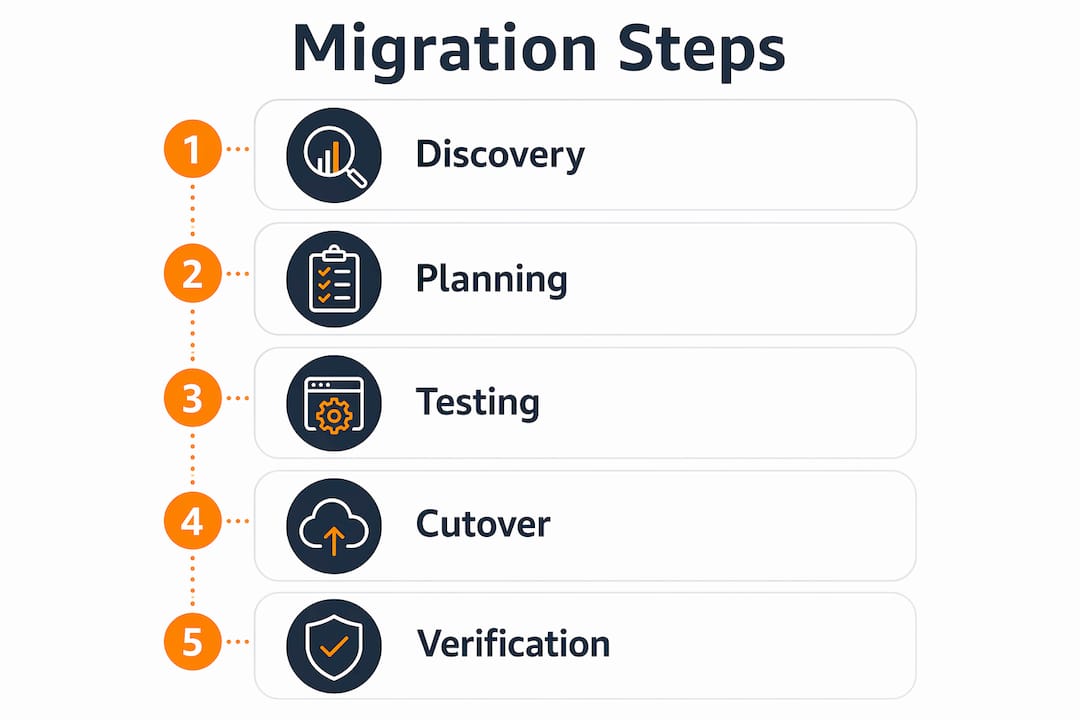
AWS recommends a migrate-first, modernize-later approach for large enterprises. Rehosting or replatforming first, then refactoring after the workload is stable on AWS, reduces the number of variables in play during cutover. Fewer variables mean fewer surprises.
The pre-cutover checklist
Before scheduling a production cutover, confirm each of the following:
- DNS TTL is set to 60 seconds or below, at least 48 hours in advance
- At least two successful test cutovers have been completed and documented
- Rollback procedures are written, rehearsed, and assigned to named team members
- The old environment stays live for 48–72 hours post-migration as a fallback
- Application health checks pass on the AWS side before traffic shifts
- Database replication lag is below one second at the time of cutover
Skipping any item on this list is how a 5-minute write pause becomes a 2-hour incident. The AWS migration checklist for enterprise environments covers dependency mapping and rollback sequencing in detail.
Migration timelines and cost context
Migration scope affects how much time you have to prepare and test. Small migrations take 4–8 weeks and cost $15,000–$30,000. Medium migrations run 8–16 weeks at $30,000–$60,000. Large migrations span 16–26 weeks at $60,000–$120,000. Enterprise migrations can run 26–52 weeks and exceed $250,000. More time means more opportunity to run test cutovers and validate the environment. Teams that compress timelines to save money often spend that savings on incident response.
For enterprises managing complex, high-load environments, the role of cloud migration planning in reducing risk is well documented. Phased approaches, starting with low-criticality workloads and progressing to core systems, give teams real-world cutover experience before the stakes are highest.
How do you measure and verify downtime after cutover?
Measuring downtime accurately requires more than checking whether the site loads. You need a set of metrics that capture user impact, data integrity, and system health across the first 30 minutes post-cutover.
Track these metrics from the moment you initiate the traffic switch:
- Total user-visible downtime. Measure from the first failed request to the first successful response at scale. Synthetic monitoring tools and real-user monitoring both contribute here.
- Replication lag at cutover. The gap between the last committed transaction on the source and the first committed transaction on the target defines your maximum data loss window.
- Error rate spike duration. A brief error rate spike is normal during cutover. A spike that persists beyond five minutes signals an unresolved dependency or a misconfigured health check.
- Application log validation. Check for connection refused errors, authentication failures, and timeout patterns in the first 10 minutes. These are the fingerprints of undiscovered dependencies.
- Integration endpoint health. Confirm that every third-party callback, webhook, and API integration is reaching the AWS environment, not the old on-premises endpoint.
AWS CloudWatch provides the monitoring layer for all of these metrics. Set alarms with thresholds calibrated to your normal baseline before cutover day, so the team is not manually interpreting raw numbers under pressure. The first 30 minutes post-cutover are the highest-risk window. Automated alerting converts that window from a guessing game into a structured response protocol.
Key Takeaways
Minimizing AWS migration downtime requires continuous replication, phased traffic shifting, and rehearsed rollback procedures executed before production cutover day.
| Point | Details |
|---|---|
| Write pause is unavoidable but brief | Database cutover requires a 2–10 minute write pause; schedule it during off-peak hours. |
| DNS propagation adds hidden downtime | Lower DNS TTL to 60 seconds 48 hours before cutover to limit propagation lag to under one minute. |
| Test cutovers are non-negotiable | Run at least two full test cutovers before production to surface dependencies and validate rollback. |
| Keep the old environment live | Maintain the on-premises environment for 48–72 hours post-migration as a tested fallback option. |
| Measure the right metrics | Track error rate spikes, replication lag, and integration endpoint health in the first 30 minutes. |
The uncomfortable truth about “zero downtime” migrations
Zero downtime is a marketing phrase, not a technical reality. Every migration I have been involved in includes at least a brief write pause. The real goal is to make that pause invisible to users by scheduling it at 3 AM, keeping it under five minutes, and having a rollback plan that the team has actually rehearsed.
The teams that handle cutovers well share one trait: they treat production cutover as a routine, well-rehearsed event, not a crisis. That mindset comes from doing two or three test cutovers where things go wrong in a safe environment. By the time production day arrives, the team is bored. That boredom is the goal.
The other thing I see teams underestimate is the DNS lag window. Even with a 60-second TTL, some resolvers ignore it. During that window, you have split traffic: some users hitting AWS, some hitting the old server. If your database sync is not running continuously during that window, you get data divergence. That is the scenario that turns a 5-minute cutover into a 3-hour incident. Blue-green deployments and AWS Global Accelerator both solve this cleanly, but only if they are in the architecture before cutover day, not added as an afterthought.
My honest recommendation: do not compress your migration timeline to save money on preparation. The cost of a failed cutover in an eCommerce or fintech environment far exceeds the cost of an extra two weeks of testing.
— Oleksandr
AWS migration services built for minimal downtime
Planned correctly, an AWS migration is a controlled, predictable event. The difference between a 5-minute write pause and a multi-hour outage comes down to preparation, tooling, and execution depth.

IT-Magic has completed 700+ AWS migrations as an AWS Advanced Tier Partner, specializing in high-load eCommerce and fintech environments where downtime translates directly into lost revenue. The team covers the full lifecycle: infrastructure audit, continuous replication setup, test cutovers, and post-migration monitoring. Every engagement includes a documented rollback plan and a validated AWS migration strategy tailored to your environment. For teams that need full ownership of execution and outcomes, IT-Magic’s managed migration services are built for exactly that.
FAQ
How long does AWS migration downtime typically last?
With continuous replication via AWS MGN and AWS DMS, write downtime during cutover typically lasts 2–10 minutes. DNS propagation can add up to 10 minutes of split-traffic behavior, which is mitigated by lowering TTL in advance or using AWS Global Accelerator.
Can you roll back an AWS migration if something goes wrong?
Yes. AWS MGN supports rollback without data loss by keeping the source environment live until you confirm the AWS environment is stable. Maintaining the old environment for 48–72 hours post-cutover gives your team a tested fallback option.
What is the best time to schedule an AWS migration cutover?
Schedule the write pause during the lowest-traffic window for your application, typically between 2 AM and 4 AM on a weekday. This limits user-visible impact and gives the team daylight hours to monitor and respond if issues arise.
How does DNS propagation affect migration downtime?
DNS propagation causes a split-traffic window where some users hit the old server and others hit AWS. Reducing TTL to 60 seconds at least 48 hours before cutover minimizes this window. AWS Global Accelerator eliminates it entirely by switching traffic in seconds without a DNS change.
What is the safest AWS migration strategy for large enterprises?
Large enterprises benefit most from a rehost-first approach: migrate workloads to AWS without refactoring, stabilize the environment, then modernize. This limits the number of variables during cutover and reduces the risk of extended downtime from application-level changes.