
TL;DR:
- The EC2 Instance Scheduler automates start and stop routines for AWS resources to optimize costs across multiple accounts and regions. It relies on tagging policies, CloudFormation deployment, and scheduled Lambda functions to manage resources effectively and ensure compliance. Implementing it can reduce non-production workloads’ costs by up to 70 percent while maintaining an auditable, governable environment.
The EC2 Instance Scheduler is an AWS Solutions implementation that automates start/stop scheduling for EC2, RDS, and related resources. For enterprise teams, adopt it as a first-line Well-Architected Cost Optimization control, deployed with tagging governance and production-grade monitoring from day one.
AWS-cited savings reach up to 70% when business-hours-only workloads drop from 168 to roughly 50 weekly hours. The solution handles multi-account and multi-region fleets natively, making it suitable for regulated enterprise environments.
Before you proceed, align on three decisions:
- Pilot scope: Which account and region will you test first?
- Tagging policy: Who owns the tag taxonomy, and how will it be enforced via IaC?
- Operational ownership: Which team holds the runbook and SLA for failed starts?
Table of Contents
- What is the AWS EC2 Instance Scheduler and how does it work?
- Enterprise governance, compliance, and multi-account operations
- How the scheduler runs: deployment flow and runtime logic
- Which scheduling approach fits your environment?
- Implementation checklist: from pilot to enterprise rollout
- Monitoring and resilience for production workloads
- How to estimate savings and calculate ROI
- Real-world results and credentials
- How to scope the work and evaluate vendors
- Key Takeaways
- What the field actually looks like
- IT-Magic handles the full EC2 Instance Scheduler rollout for you
- Useful sources
- FAQ
What is the AWS EC2 Instance Scheduler and how does it work?
The AWS Instance Scheduler is an official AWS Solutions implementation, not a third-party tool. You deploy it entirely through CloudFormation, which provisions every component: an orchestration Lambda, parallel per-target scheduler Lambdas, EventBridge rules, and two DynamoDB tables (one for schedule definitions, one for runtime state).
Architecture at a glance:
- CloudFormation hub stack deployed in the primary account
- Remote stacks (
aws-instance-scheduler-remote) in each secondary account - EventBridge rule triggers the orchestrator Lambda on a configurable frequency (default: 5 minutes)
- DynamoDB config table stores schedule periods and definitions
- DynamoDB state table tracks which resources are currently managed
- Tag-based registration — resources opt in by carrying the configured tag key/value
Supported resource types span EC2, Auto Scaling groups, RDS, Aurora, DocumentDB, and Neptune. Cross-account and cross-region coverage is built into the reference architecture.
Reference architecture note: The hub-and-spoke model keeps scheduling logic centralized while remote stacks handle IAM role delegation in each secondary account. This separation is what makes the solution auditable and governable at enterprise scale.
Enterprise governance, compliance, and multi-account operations
Tags are the enforcement point. Every resource the scheduler manages must carry the configured tag key. If your tagging discipline is inconsistent, resources silently fall outside the schedule. In regulated environments, enforcing standardized tags via IaC or Service Catalog is the only reliable way to prevent drift.

Cross-account deployment requires deploying the remote CloudFormation stack in each secondary account and supplying CrossAccountRole ARNs back to the primary hub stack. Manage this through AWS Organizations and Service Control Policies to prevent manual role changes that break the trust relationship.
Compliance teams care about two things: who changed what, and when. CloudWatch logs from the Lambda functions and DynamoDB state-change records together provide that audit trail. Assign a dedicated IAM execution role to the scheduler with least-privilege permissions, and document role ownership in your CMDB.
Pro Tip: Use AWS Config rules to flag any EC2 or RDS instance missing the required scheduler tag. Catching untagged resources at provisioning time costs far less than discovering them during a cost audit.
How the scheduler runs: deployment flow and runtime logic
Deployment steps
- Deploy the hub CloudFormation stack in your primary account, setting
TagName(the tag key the scheduler watches) and scheduling frequency. - Deploy
aws-instance-scheduler-remotein each secondary account via CloudFormation. - Supply the CrossAccountRole ARNs from remote stacks back to the hub stack parameters.
- Define periods and schedules in DynamoDB directly or via the scheduler CLI.
- Tag target resources with the configured key/value pair to register them.
Runtime flow
The EventBridge rule fires at the configured interval. The orchestrator Lambda reads schedule definitions from DynamoDB, determines which resources need a state change, and dispatches parallel scheduler Lambdas per target. Each Lambda executes the start or stop action and writes the result back to the DynamoDB state table.
Testing and failure modes
Before production rollout, test with a predefined running schedule that keeps instances up, then verify DynamoDB registration and CloudWatch Lambda error metrics. Two failure modes deserve explicit attention:
- EBS volumes encrypted with KMS: The scheduler’s execution role must be added to the KMS key policy. Missing this permission blocks instance restarts silently.
- Shutdown behavior: Confirm every target instance is set to Stop, not Terminate. A misconfigured instance will be permanently deleted on the next scheduled stop.
Which scheduling approach fits your environment?
| Dimension | AWS Instance Scheduler | Systems Manager Resource Scheduler | Custom Lambda/cron |
|---|---|---|---|
| Best for | Multi-account, multi-region enterprise fleets | Single-account, UI-driven teams | Simple, single-account use cases |
| Operational overhead | Moderate (CloudFormation, DynamoDB config) | Low (Quick Setup wizard) | High (build, maintain, debug yourself) |
| Built-in error handling | Yes (retry logic, fallback resizing) | Limited | None by default |
| Deployment method | CloudFormation templates | Quick Setup console | Manual or custom IaC |
| Governance and tagging | Tag-based, IaC-enforceable | Basic | None built in |
| Multi-region support | Yes (hub-and-spoke) | Limited | Manual per region |
| Cost impact | Up to 70% cost savings for workloads reduced from 168 to 50 hours per week, as cited by AWS | Similar potential, less control | Variable |
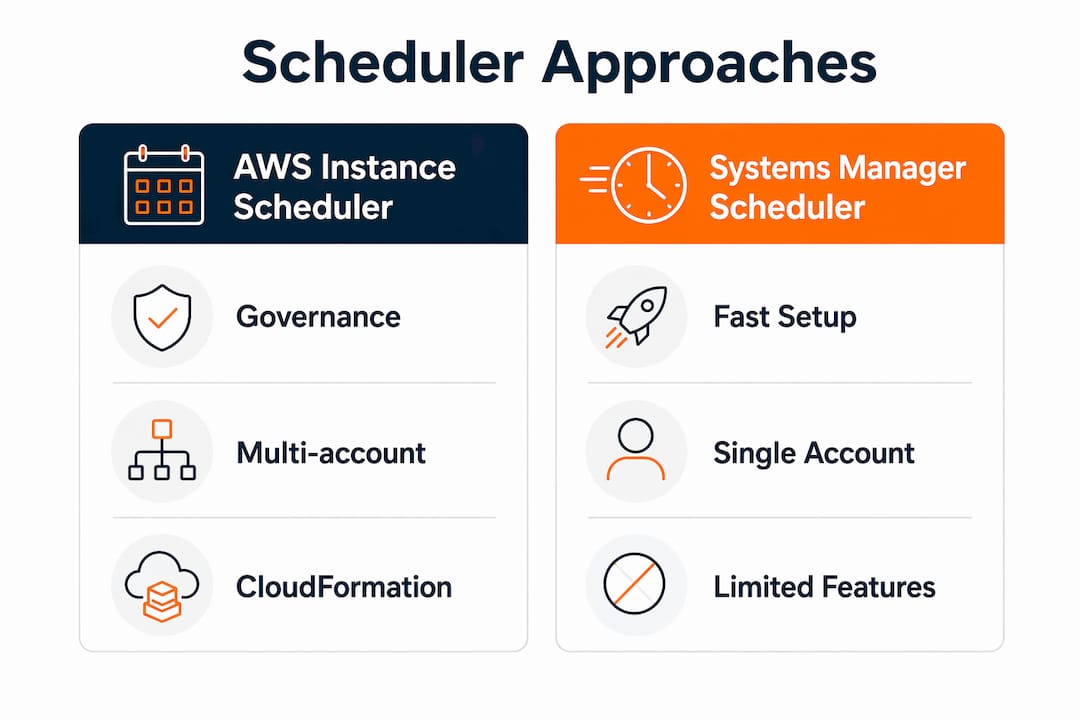
AWS Systems Manager Quick Setup suits teams that need a fast start in a single account without maintaining CloudFormation stacks. Custom Lambda scripts work for narrow, well-understood use cases, but lack built-in retry logic, multi-region orchestration, and operational telemetry that regulated environments require. For anything spanning multiple accounts or requiring an audit trail, the official Instance Scheduler is the right foundation.
Implementation checklist: from pilot to enterprise rollout
- Inventory candidate instances. Identify non-production workloads (dev, staging, QA) that run 24/7 but are only used during business hours.
- Define your tagging taxonomy. Agree on tag key names, allowed values, and ownership before touching CloudFormation. Document in a runbook.
- Flag always-on exceptions. Production databases, monitoring agents, and compliance-required services must be explicitly excluded. Use a dedicated tag value (e.g.,
schedule=always-on). - Verify shutdown behavior. Audit every candidate instance to confirm
InstanceInitiatedShutdownBehavioris set tostop, notterminate. - Deploy the hub stack in your pilot account via CloudFormation. Set
TagNameand frequency parameters. - Deploy remote stacks in secondary accounts and register CrossAccountRole ARNs with the hub.
- Configure periods and schedules in DynamoDB or via the scheduler CLI. Start with a simple weekday business-hours schedule.
- Tag pilot resources and confirm registration in the DynamoDB state table.
- Run test cycles. Use the predefined
runningschedule to validate start behavior before enabling stop schedules. - Monitor for 72 hours. Watch CloudWatch Lambda error metrics, EventBridge invocation counts, and DynamoDB state changes before expanding scope.
- Enforce tags via IaC. Add tag policies to your Service Catalog or CloudFormation templates so new resources are automatically enrolled.
- Document rollback criteria. Define what triggers a rollback (e.g., more than two consecutive failed starts) and who executes it.
For a broader migration context, the AWS migration checklist covers complementary governance steps that pair well with scheduler rollout.
Monitoring and resilience for production workloads
Production use requires more than deploying the stack and walking away.
Key principle: The scheduler must be treated as a production-grade control, not a background job. A missed start on a critical batch workload at 6 AM is an incident, not a configuration note.
Metrics to track in CloudWatch:
- Lambda error rate and throttle count per invocation cycle
- EventBridge rule invocation count (gaps indicate trigger failures)
- DynamoDB state-change write errors
- Count of start/stop failures per schedule period
Set alarms on Lambda error rate and configure SNS notifications to your SRE team. For large fleets, configure scheduler frequency and Lambda concurrency carefully to avoid throttling. The parallel Lambda architecture handles concurrency well, but you need to verify your account’s Lambda concurrency limits before scaling to hundreds of instances.
For failed starts due to capacity constraints, the scheduler supports configurable fallback to alternate instance types. Define a fallback type in your runbook and test it during the pilot. Never leave a capacity-fallback scenario undocumented.
How to estimate savings and calculate ROI
The AWS-cited benchmark: reducing weekly utilization from 168 hours to roughly 50 hours yields up to 70% cost savings on affected instances.
Savings benchmark: A workload running 168 hours/week (always-on) costs roughly 3.4x more than the same workload scheduled for 50 hours/week.
| Variable | Example value |
|---|---|
| Baseline weekly hours | full weekly usage |
| Scheduled weekly hours | reduced business-hours usage |
| Monthly savings | up to 70% cost savings when reducing weekly utilization from 168 to approximately 50 hours |
| Annualized savings | up to 70% cost savings on scheduled workloads |
ROI formula: (Annual savings − Annual platform costs) ÷ Implementation cost × 100
Platform costs (Lambda invocations, EventBridge rules, DynamoDB reads/writes) are typically small relative to instance-hour savings but should be explicit in your procurement model. For a broader view of AWS cost optimization levers, scheduling is one of the fastest-payback controls available.
Real-world results and credentials
Enterprise teams that deploy the Instance Scheduler as part of a structured cost-optimization program consistently see material savings on non-production fleets. Typical engagement patterns look like this:
- Pilot phase: 1 account, 1 region, 20–50 instances, 4–6 weeks to validate schedules and runbooks
- Cross-account rollout: Hub-and-spoke deployment across 5–20 accounts, tagging policy enforcement via Service Catalog
- Managed handover: SRE team takes ownership of monitoring, runbook updates, and quarterly schedule reviews
IT-Magic is an AWS Advanced Tier Partner with 700+ completed projects, specializing in high-load and regulated environments including eCommerce and fintech. Our case studies show measurable reductions in AWS spend alongside improved operational reliability.
How to scope the work and evaluate vendors
RFX scope template
- Discovery: inventory of candidate instances, current utilization data, always-on exception list
- Tagging policy design: taxonomy, enforcement mechanism (IaC, SCP, Config rules)
- CloudFormation deployment: hub stack plus remote stacks across N accounts and regions
- Schedule configuration: period definitions, timezone handling, exception schedules
- Runbook and monitoring: CloudWatch alarms, SNS notifications, escalation paths, capacity-fallback procedures
- SLA definition: target start/stop success rate, incident response time for failed starts
Vendor questions to ask
- How have you handled cross-account deployments in AWS Organizations at scale?
- What is your approach to EBS volumes encrypted with customer-managed KMS keys?
- How do you test and validate schedules before enabling stop operations in production-adjacent accounts?
- What are your rollback criteria and timeline commitments?
- Do you offer ongoing SRE support post-deployment, and on what commercial model?
Expect pricing to follow one of two models: a fixed-price pilot covering discovery through initial deployment, followed by a per-account rollout fee, or a monthly managed retainer for ongoing SRE support and schedule governance.
Key Takeaways
The AWS EC2 Instance Scheduler, deployed with tagging governance and production-grade monitoring, can reduce non-production instance costs by up to 70% while remaining auditable and scalable across multi-account AWS Organizations.
| Point | Details |
|---|---|
| Adopt as a Well-Architected control | Treat the scheduler as a governed cost control, not an ad-hoc script, to reduce technical debt. |
| Up to 70% savings potential | Reducing weekly hours from 168 to 50 delivers up to 70% cost savings, as cited by AWS, on business-hours workloads. |
| Tagging is the enforcement point | Standardize tag policies via IaC or Service Catalog before deployment to prevent unmanaged drift. |
| Monitor like a production system | Track Lambda errors, EventBridge invocations, and DynamoDB state changes with CloudWatch alarms. |
| IT-Magic for managed rollout | IT-Magic handles discovery through cross-account deployment and SRE handover as an AWS Advanced Tier Partner. |
What the field actually looks like
The most common mistake teams make is treating the Instance Scheduler as a set-and-forget tool. They deploy the hub stack, tag a few instances, and move on. Six months later, half the fleet has drifted outside the schedule because new instances were provisioned without the required tag, and nobody noticed until the cost report landed.
The second most common issue is the KMS permissions gap. Teams encrypt EBS volumes with customer-managed keys, deploy the scheduler, and then discover at 7 AM on a Monday that a batch of instances failed to start. The fix is straightforward: add the scheduler execution role to the KMS key policy. But finding it at 7 AM is not the time you want to be reading documentation.
Testing windows matter more than most teams budget for. Run a full stop-and-start cycle in your pilot account during business hours, with engineers watching CloudWatch in real time. That one hour of testing catches 80% of the issues you would otherwise find in production.
IT-Magic handles the full EC2 Instance Scheduler rollout for you
Deploying the EC2 Instance Scheduler correctly across a multi-account AWS Organization takes more than running a CloudFormation template. IT-Magic covers the complete engagement: infrastructure discovery, tagging taxonomy design, hub-and-spoke CloudFormation deployment, schedule configuration, CloudWatch monitoring setup, runbook documentation, and SRE handover.

As an AWS Advanced Tier Partner with 700+ completed projects, IT-Magic has deployed scheduling solutions in regulated eCommerce and fintech environments where a missed start is a revenue event, not a minor inconvenience. Engagements start with a free infrastructure audit that identifies your highest-value scheduling candidates and estimates annualized savings before any contract is signed.
Ready to cut non-production AWS spend without adding operational burden? Request your free audit and get a scoped pilot proposal within five business days.
Useful sources
- Instance Scheduler on AWS — Official solution overview: Primary reference for architecture, supported services, and deployment mechanics.
- Instance Scheduler on AWS — Implementation Guide (PDF): Source for the up-to-70% savings benchmark and platform cost guidance.
- AWS re:Post: How do I use Instance Scheduler with CloudFormation?: Covers cross-account deployment steps, KMS key policy requirements, and common operational pitfalls.
- aws-solutions/instance-scheduler-on-aws on GitHub: Open-source repository for the solution; useful for reviewing Lambda logic and contributing fixes.
- AWS Systems Manager Automation: Background on Systems Manager as an alternative orchestration layer for EC2 lifecycle management.
FAQ
What does the AWS EC2 Instance Scheduler actually do?
It automates start and stop operations for EC2, RDS, Aurora, and other supported resources on defined schedules, using tags to identify targets and DynamoDB to store schedule definitions.
How much can the EC2 Instance Scheduler save?
AWS cites up to 70% savings for workloads reduced from 168 to roughly 50 weekly hours, typical for business-hours-only non-production environments.
Does it support multiple AWS accounts and regions?
Yes. Deploy the hub CloudFormation stack in your primary account and remote stacks in secondary accounts, then supply CrossAccountRole ARNs to the hub for cross-account orchestration.
What is the difference between the Instance Scheduler and Systems Manager Resource Scheduler?
The Instance Scheduler offers deeper governance, tagging enforcement, and multi-account support via CloudFormation; Systems Manager Quick Setup’s Resource Scheduler is simpler but better suited to single-account, UI-driven teams.
Can IT-Magic deploy and manage the scheduler for us?
Yes. IT-Magic provides end-to-end managed implementation covering discovery, CloudFormation deployment, schedule configuration, monitoring setup, and ongoing SRE support as an AWS Advanced Tier Partner.