
TL;DR:
- Replatforming on AWS involves moving workloads with targeted optimizations, avoiding full application rewrites. Key tools include AWS MGN for VM migration, DMS for databases, App2Container for containerization, and Migration Hub for tracking progress. Managed partners like IT-Magic reduce risk by providing full lifecycle execution and zero-downtime migrations.
The shortest defensible shortlist of top replatforming tools for AWS: AWS Application Migration Service (MGN) for VM lift-and-tinker, AWS Database Migration Service (DMS) for low-downtime database moves, AWS Application Discovery Service for pre-migration inventory, AWS App2Container for containerizing Java and .NET workloads, CloudEndure Migration for continuous replication with fast cutover, AWS Migration Evaluator for cost modeling, AWS Migration Hub for centralized orchestration, and Ispirer SQLWays for complex cross-engine database conversions.
Replatforming, which AWS Prescriptive Guidance calls “lift, tinker, and shift,” sits between a pure rehost and a full refactor. You move the workload to AWS and make targeted optimizations, such as swapping a self-managed SQL Server for Amazon RDS or containerizing a monolith with App2Container, without rewriting application logic. It is the right call when you want cloud economics quickly but cannot justify the cost or timeline of a ground-up rewrite.
- AWS MGN — automated VM replication; the standard entry point for server migrations
- AWS DMS — homogeneous and heterogeneous database migration with continuous replication
- AWS Application Discovery Service — agentless and agent-based inventory of on-prem assets and dependencies
- AWS App2Container — converts running Java and .NET apps into container images for ECS or EKS
- CloudEndure Migration — block-level continuous replication with sub-second RPO and fast cutover
- AWS Migration Evaluator — on-prem utilization analysis and AWS cost forecasting
- AWS Migration Hub — single pane of glass for tracking progress across all migration tools
- Ispirer SQLWays — automated schema and code conversion for cross-engine database migrations
Table of Contents
- What does replatforming mean in AWS, and when should you pick it?
- What are the top replatforming tools for AWS and what does each one do?
- How do these tools compare across the dimensions that matter?
- How do you choose the right replatforming tool for your AWS project?
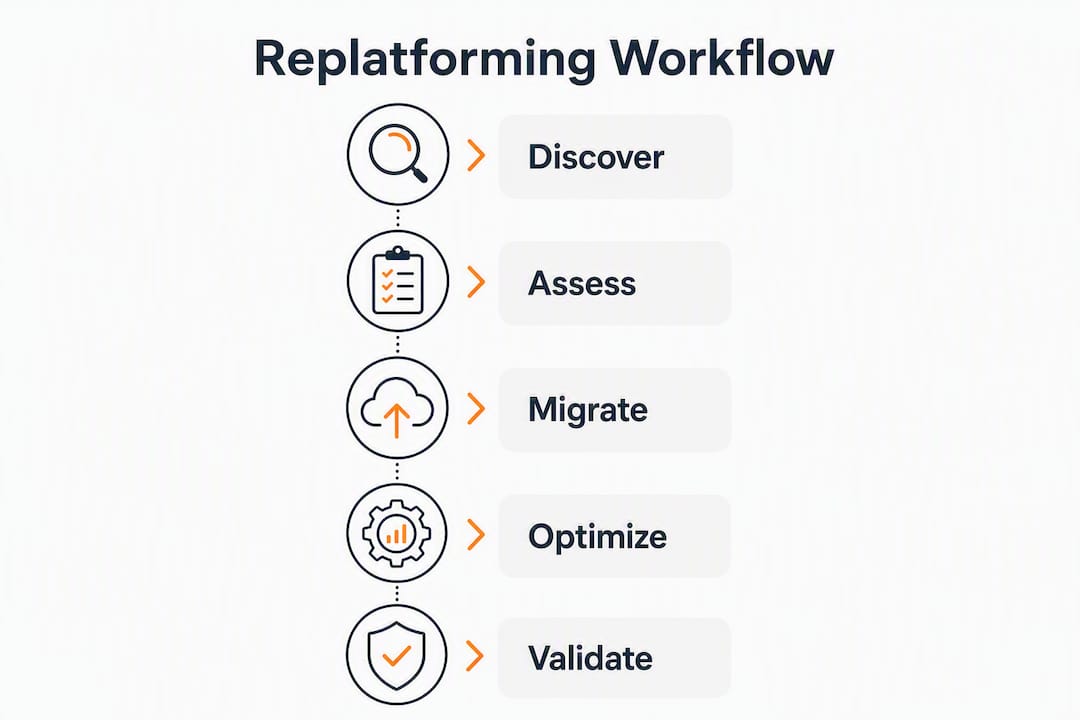
- What does a typical replatforming workflow on AWS look like?
- How an AWS Advanced Tier partner executes a replatforming migration
- Which tool should you use for common enterprise replatforming scenarios?
- Key Takeaways
- When should you replatform in-house versus hire a partner?
- IT-Magic handles the full replatforming lifecycle for you
- Useful sources and official documentation
- FAQ
What does replatforming mean in AWS, and when should you pick it?
AWS Prescriptive Guidance defines replatforming as moving an application to the cloud with targeted optimizations that take advantage of cloud capabilities, without requiring major code rewrites. The classic examples are migrating SQL Server to Amazon RDS, containerizing a VM-based workload with App2Container, or replacing a self-managed message broker with Amazon SQS. You get managed patching, auto-scaling, and reduced licensing overhead without touching the application’s core logic.
The practical difference between replatforming and rehosting is often underestimated. Rehosting (lift-and-shift) moves a server image as-is. Replatforming changes the underlying platform, which means OS upgrades, database engine migrations, or containerization steps can introduce configuration drift. That difference demands a more thorough regression and performance testing cycle than a straight lift-and-shift, and teams that skip it tend to discover the gap in production.
When replatforming is the right strategy:
- On-premises components are at or near end-of-support (EOS), and you want to offload lifecycle management to AWS managed services rather than pay for extended support
- You need to reduce licensing costs (for example, moving from commercial Oracle to Amazon Aurora PostgreSQL) without a full application rewrite
- The workload runs on Java or .NET and can be containerized with minimal changes, enabling ECS or EKS deployment
- You want cloud-native resilience and auto-scaling but cannot allocate the engineering time a refactor requires
- The application is a COTS product where you control configuration but not source code
When to choose rehosting instead: the workload is stable, the team needs speed above all, and no platform-level optimization is required. Move it as-is, then evaluate replatforming in a second phase.
When to choose refactoring instead: the application architecture is fundamentally incompatible with cloud-native patterns, or the business case for microservices, serverless, or a new data model justifies the engineering investment. Replatforming delivers a middle ground that reduces operational costs and improves security while avoiding the cost and timing of full rewrites.
What are the top replatforming tools for AWS and what does each one do?
No single tool covers the full replatforming lifecycle. The right approach combines AWS-native services with specialized third-party tooling, matching each tool to the phase where it adds the most value.

AWS Application Migration Service (MGN)
MGN automates server replication and is the standard AWS-recommended tool for moving VMs into AWS as the first step in a replatform project. It installs a lightweight replication agent on source servers, continuously replicates block-level data to a staging area in your target AWS account, and lets you launch test instances before the actual cutover. Once you cut over, the source server is decommissioned and the AWS instance takes over.
- Primary function: Automated VM replication and lift-and-tinker migration
- Supported sources: VMware, Hyper-V, physical servers, other clouds (Azure, GCP)
- Downtime impact: Cutover window typically measured in minutes
- Automation level: High; agent-based continuous replication with launch templates
- AWS integrations: EC2, EBS, VPC; feeds into App2Container post-migration
- Pricing: No additional charge beyond standard AWS infrastructure costs
- Best for: Teams migrating large VM fleets who need a repeatable, low-risk cutover process
AWS Database Migration Service (DMS)
DMS is purpose-built for migrating both homogeneous databases (Oracle to Oracle) and heterogeneous databases (SQL Server to Amazon Aurora) into AWS managed engines. It supports continuous data replication, which means you can keep the source database live during migration and minimize the cutover window to the time it takes to flip the connection string. For heterogeneous migrations, the AWS Schema Conversion Tool (SCT) handles schema translation before DMS moves the data.
- Primary function: Database migration with continuous replication
- Supported sources: Oracle, SQL Server, MySQL, PostgreSQL, MongoDB, and others
- Downtime impact: Near-zero for cutover when using continuous replication mode
- Automation level: High for homogeneous; moderate for heterogeneous (SCT required)
- AWS integrations: Amazon RDS, Aurora, Redshift, DynamoDB
- Pricing: Pay-per-use based on replication instance hours and data transferred
- Best for: Moving databases to Amazon RDS or Aurora with minimal downtime
AWS Application Discovery Service
Before you migrate anything, you need to know what you have. Application Discovery Service catalogs on-premises servers, their configurations, performance data, and network dependencies. It operates in two modes: agentless (using a VMware vCenter connector) and agent-based (for physical servers and non-VMware environments). The dependency data it produces is what lets you group servers into migration waves and sequence cutovers without breaking application tiers.
- Primary function: Asset discovery and dependency mapping
- Supported sources: VMware vCenter, physical servers, other hypervisors (agent mode)
- Downtime impact: None; read-only discovery
- Automation level: Moderate; outputs feed into Migration Hub for planning
- AWS integrations: AWS Migration Hub, Athena (for querying discovery data)
- Pricing: No charge for the service itself; storage costs apply for collected data
- Best for: The planning phase of any migration, especially when the on-prem inventory is poorly documented
Pro Tip: Run Application Discovery Service for at least two weeks before finalizing your migration waves. A single week of data often misses batch jobs and end-of-month processing spikes that will break your sizing assumptions.
AWS App2Container
App2Container targets teams running Java and .NET applications on VMs who want to move to containers without rewriting code. It analyzes a running application, identifies its dependencies, and generates a container image along with the Kubernetes or ECS deployment manifests. The result is a containerized workload ready for ECS or EKS, with no changes to application logic required.
- Primary function: Automated containerization of Java and .NET applications
- Supported sources: Windows and Linux VMs running Java or .NET apps
- Downtime impact: Low; containerization happens on a running instance
- Automation level: High; generates Dockerfile, task definitions, and Kubernetes manifests
- AWS integrations: Amazon ECS, Amazon EKS, ECR, CodePipeline
- Pricing: No charge for the tool; ECS/EKS infrastructure costs apply
- Best for: Modernizing monolithic Java or .NET applications to containers without a rewrite
CloudEndure Migration
CloudEndure Migration (now largely superseded by MGN for new projects, but still in active use) provides continuous block-level replication with a sub-second recovery point objective. Its strength is speed of cutover: because replication is continuous, the delta at cutover is tiny. AWS acquired CloudEndure in 2019, and its technology underpins much of MGN’s replication engine. For teams already invested in CloudEndure workflows, it remains a supported path.
- Primary function: Continuous block-level replication for fast cutover
- Supported sources: Physical servers, VMware, Hyper-V, other clouds
- Downtime impact: Minimal; sub-second RPO enables near-instant cutover
- Automation level: High; automated machine conversion for AWS
- AWS integrations: EC2, EBS
- Pricing: Free for migrations to AWS; disaster recovery use cases are paid
- Best for: Scenarios where cutover speed is the primary constraint, or teams with existing CloudEndure deployments
AWS Migration Evaluator
Migration Evaluator (formerly TSO Logic) answers the question every CIO asks first: what will this cost? It collects on-premises utilization data, models right-sized AWS instance recommendations, and produces a business case with projected AWS spend. That output directly informs tool selection and migration phasing, because it tells you which workloads are over-provisioned on-prem and which will need larger AWS instances than their current specs suggest.
- Primary function: Cost modeling and right-sizing analysis
- Supported sources: On-prem VMware, Hyper-V, physical (via data collector)
- Downtime impact: None; assessment only
- Automation level: Moderate; automated data collection with analyst-reviewed output
- AWS integrations: Feeds into Migration Hub; outputs inform EC2 and RDS sizing
- Pricing: No charge for the assessment
- Best for: Building the business case and avoiding over-provisioning before committing to a migration plan
AWS Migration Hub
Migration Hub is the control plane, not a migration engine. It aggregates status from MGN, DMS, CloudEndure, and third-party tools into a single dashboard so program managers can track which servers have been discovered, which are in replication, and which have cut over. For large migrations involving dozens or hundreds of servers, the visibility it provides is what keeps the program on schedule.
- Primary function: Centralized migration tracking and orchestration
- Supported sources: Aggregates from all connected migration tools
- Downtime impact: None; monitoring only
- Automation level: Low for execution; high for visibility and reporting
- AWS integrations: MGN, DMS, Application Discovery Service, CloudEndure, third-party tools
- Pricing: No charge
- Best for: Enterprise migrations with multiple workstreams running in parallel
Ispirer SQLWays
Ispirer SQLWays is a third-party tool for complex database migrations where automated schema and code conversion is required to move between database engines. It handles stored procedures, triggers, views, and application SQL that AWS SCT cannot fully convert automatically. Teams migrating from Oracle, Sybase, or IBM DB2 to PostgreSQL-compatible engines on AWS often reach for SQLWays when SCT leaves conversion gaps. Because Ispirer is a commercial product, pricing and feature specifics should be confirmed directly with the vendor.
- Primary function: Automated schema and code conversion for cross-engine DB migrations
- Supported sources: Oracle, SQL Server, Sybase, IBM DB2, Informix, and others
- Downtime impact: Conversion happens offline; DMS handles live data replication
- Automation level: High for schema/code conversion; pairs with DMS for data movement
- AWS integrations: Works upstream of DMS and RDS/Aurora
- Pricing: Commercial license; contact vendor for current pricing
- Best for: Heterogeneous database migrations with complex stored procedures or proprietary SQL dialects
How do these tools compare across the dimensions that matter?
| Tool | Primary function | Supported sources | Downtime impact | Automation level | AWS managed-service integration | Pricing model | Complexity / enterprise scale |
|---|---|---|---|---|---|---|---|
| AWS MGN | VM replication and migration | VMware, Hyper-V, physical, other clouds | Minutes (cutover window) | High | EC2, EBS, feeds App2Container | Included (infra costs only) | Low to moderate / high scale |
| AWS DMS | Database migration | Oracle, SQL Server, MySQL, PostgreSQL, MongoDB, others | Near-zero (continuous replication) | High (homogeneous) / Moderate (heterogeneous) | RDS, Aurora, Redshift, DynamoDB | Pay-per-use | Moderate / high scale |
| Application Discovery Service | Asset inventory and dependency mapping | VMware (agentless), physical (agent) | None | Moderate | Migration Hub, Athena | Free (storage costs apply) | Low / any scale |
| AWS App2Container | Containerization of Java/.NET apps | Windows/Linux VMs | Low | High | ECS, EKS, ECR, CodePipeline | Free (infra costs apply) | Moderate / medium to high scale |
| CloudEndure Migration | Continuous block-level replication | Physical, VMware, Hyper-V, other clouds | Minimal (sub-second RPO) | High | EC2, EBS | Free for AWS migrations | Low to moderate / high scale |
| AWS Migration Evaluator | Cost modeling and right-sizing | VMware, Hyper-V, physical | None | Moderate | Feeds Migration Hub | Free assessment | Low / any scale |
| AWS Migration Hub | Migration tracking and orchestration | All connected tools | None | Low (execution) / High (visibility) | MGN, DMS, CloudEndure, Discovery | Free | Low / enterprise scale |
| Ispirer SQLWays | Schema and code conversion | Oracle, SQL Server, Sybase, DB2, Informix | Offline conversion | High (schema/code) | Upstream of DMS, RDS, Aurora | Commercial license | Moderate to high / enterprise scale |
Primary function and best-for. The tools divide cleanly into four categories: discovery (Application Discovery Service, Migration Evaluator), VM migration (MGN, CloudEndure), database migration (DMS, Ispirer SQLWays), and containerization (App2Container). Migration Hub sits across all of them as the tracking layer. Matching tool to phase is more important than picking a single “best” tool.
Downtime and cutover impact. DMS with continuous replication and CloudEndure both minimize cutover windows to the point where a planned maintenance window of under an hour is realistic for most workloads. MGN’s cutover window depends on the final replication delta, typically minutes for servers with low write activity. App2Container and Ispirer SQLWays operate offline and do not directly affect production downtime.
Automation level. MGN, App2Container, and CloudEndure are the most automated end-to-end. DMS is highly automated for homogeneous migrations but requires SCT and manual validation for heterogeneous ones. Migration Evaluator automates data collection but produces a report that requires human interpretation.
Enterprise scale suitability. MGN and Migration Hub are designed for fleet-scale migrations. DMS handles high-throughput database workloads. Ispirer SQLWays is typically used for a smaller number of complex databases where automation coverage is the constraint, not volume.
How do you choose the right replatforming tool for your AWS project?
The selection decision starts before you talk to any vendor. Get clear on your constraints first.
Selection checklist:
- What is the current state of your on-prem inventory? (If you cannot answer this, Application Discovery Service is your first tool, not your last.)
- Are any components at or near end-of-support? EOS status is one of the strongest justifications for replatforming over rehosting.
- What is your acceptable cutover window? Sub-hour cutover requirements push you toward DMS continuous replication or CloudEndure.
- What is your compliance posture? HIPAA, PCI-DSS, and SOC 2 requirements affect which AWS managed services you can use and what testing evidence you need to produce.
- Do you have the internal skills to manage ECS or EKS post-migration? App2Container creates the container image, but someone has to operate the cluster.
- What is your rollback plan if the cutover fails? Tools that support test launches (MGN) or parallel-run modes (DMS) make rollback tractable; tools that do not require a separate strategy.
Vendor questions worth asking:
- Which OS versions and database engine versions does the tool support as sources?
- How does the tool handle test cutovers, and can you run multiple test launches without affecting the production source?
- What is the rollback process if a cutover fails mid-window?
- How does the tool integrate with Amazon RDS, EKS, and ECS specifically?
- What is the licensing model, and are there data transfer or replication-volume charges beyond the base fee?
- What monitoring and alerting does the tool provide during active replication?
Typical cost drivers that teams underestimate: data transfer fees during the replication period, the cost of running parallel environments (source and target) during testing, regression testing cycles that extend the project timeline, and schema conversion work for heterogeneous database migrations. A cost modeling exercise using Migration Evaluator before committing to a tool set can prevent budget surprises.
Red flags that should pause your strategy:
- A tool requires significant application code changes to function. That is refactoring, not replatforming.
- Pricing is opaque or volume-based in ways the vendor cannot clearly quantify for your workload size.
- The tool has no test-launch or dry-run capability. You cannot validate a migration you cannot test.
- The vendor cannot demonstrate integration with your target AWS managed services (RDS, EKS, ECS).
- The tool’s supported OS or database version list does not include your source environment.
What does a typical replatforming workflow on AWS look like?
A well-run replatform project follows a consistent sequence. The tools map to specific phases, and skipping phases is where projects fail.
-
Prepare and discover. Run Application Discovery Service to catalog servers, map dependencies, and identify migration groups. Run Migration Evaluator in parallel to model costs and right-size target instances. Output: a prioritized migration wave plan and a validated AWS business case. See the AWS migration checklist for a phase-by-phase planning template.
-
Replicate. Install MGN agents on Wave 1 servers. For databases, configure DMS replication instances and start continuous replication to the target RDS or Aurora instance. For complex heterogeneous databases, run Ispirer SQLWays schema conversion first, then hand off to DMS for data movement. CloudEndure is an alternative to MGN for teams already using it.
-
Optimize and reshape. While replication runs, apply targeted optimizations: containerize eligible Java and .NET workloads with App2Container, configure RDS parameter groups, set up Auto Scaling policies, and update connection strings in application configuration. This is the “tinker” step that separates replatforming from a straight lift-and-shift.
-
Test cutover. Launch test instances from MGN without stopping source replication. Run regression tests, performance benchmarks, and integration tests against the AWS environment. DMS continuous replication keeps the target database current during this phase. Document test results as evidence for compliance sign-off.
-
Cutover. Schedule the production cutover window. Finalize MGN replication, launch production instances, flip DNS or load balancer targets, and confirm DMS replication is complete. The cutover window for a well-prepared Wave 1 is typically short for a moderate group of servers.
-
Validate and stabilize. Monitor CloudWatch metrics, application logs, and database performance for 48–72 hours post-cutover. Confirm that backup jobs, monitoring agents, and security controls are functioning. Decommission source servers only after a defined stabilization period.
Tool-to-phase mapping:
- Discovery → Application Discovery Service, Migration Evaluator
- VM replication → MGN, CloudEndure
- Database migration → DMS (data), Ispirer SQLWays (schema conversion)
- Containerization → App2Container
- Orchestration and tracking → Migration Hub (all phases)
For a medium-complexity enterprise migration of multiple servers and databases, a realistic timeline from discovery kickoff to final wave cutover spans several months, depending on regression testing depth and the number of heterogeneous database conversions required. Scalable infrastructure migration steps covers sequencing in more detail for larger fleets.
Multi-tool orchestration tip: connect every active tool (MGN, DMS, CloudEndure) to Migration Hub from day one. The unified view prevents the common failure mode where VM migrations and database migrations run on separate timelines and the cutover window arrives before the database replication is ready.
How an AWS Advanced Tier partner executes a replatforming migration
The gap between a replatforming plan and a successful cutover is almost always execution depth, not tool selection. Here is how a representative project plays out in practice.
A mid-size eCommerce company running a Windows-based .NET application on VMware vSphere, with SQL Server as the primary database, needed to move to AWS before its SQL Server license reached end-of-support. The business constraint: zero planned downtime during peak trading hours, and a compliance requirement to maintain audit logs throughout the migration.
Approach and tools used:
- Application Discovery Service ran for a few weeks to map all servers and identify undocumented batch-processing dependencies that would have broken the cutover sequencing
- Migration Evaluator identified many servers were over-provisioned on-prem, reducing the projected AWS bill significantly compared to a like-for-like lift-and-shift
- MGN handled VM replication for all servers across multiple migration waves
- DMS with continuous replication moved the SQL Server databases to Amazon RDS for SQL Server, preserving the existing engine to avoid schema conversion risk
- App2Container containerized three internal .NET microservices that were already loosely coupled, moving them to Amazon ECS
- Migration Hub tracked all three workstreams in a single dashboard, which the program manager used for weekly stakeholder reporting
The most expensive mistake in replatforming is treating the database migration and the VM migration as independent tracks. When the VM cutover completes before the database replication catches up, you either extend the downtime window or roll back. Sequencing DMS replication to reach near-zero lag before the MGN cutover window opens is the single most important coordination step in the entire project.
Outcomes: The migration completed within the planned timeline. Post-migration, infrastructure costs dropped compared to the on-prem baseline, application response times improved on RDS versus the self-managed SQL Server instance, and the compliance team received complete audit trail documentation from CloudTrail and DMS task logs.
Tactical lessons from execution:
- Run at least two full test cutovers before the production window. The first one always reveals a missed dependency or a firewall rule.
- Build rollback into the cutover runbook as a first-class step, not an afterthought. MGN’s ability to revert to source replication after a test launch is one of its most underused features.
- Performance-test the RDS instance under production-equivalent load before the cutover window. Managed services behave differently from self-managed databases under high concurrency, and parameter group tuning after cutover adds unplanned hours.
- Post-migration cloud performance optimization is a separate workstream, not a day-one task.
IT-Magic has completed 700+ AWS migration projects as an AWS Advanced Tier Partner. Case studies covering eCommerce and fintech migrations are available on the website.
Which tool should you use for common enterprise replatforming scenarios?
- Legacy Windows SQL Server near EOS: Use DMS with continuous replication to Amazon RDS for SQL Server or Aurora. Pair with MGN for the application tier. Ispirer SQLWays is worth evaluating if stored procedure complexity is high and you want to move to Aurora PostgreSQL rather than stay on SQL Server.
- Monolith to containers without a code rewrite: App2Container is the direct answer for Java and .NET. Run it on a cloned instance first to validate the generated manifests before touching production.
- Heavy-data heterogeneous database migration (Oracle to Aurora PostgreSQL): Start with AWS SCT for schema conversion, escalate to Ispirer SQLWays for stored procedures SCT cannot handle, then use DMS for data movement. Budget for two to three regression cycles.
- Low-downtime eCommerce cutover: CloudEndure or MGN for the application tier (both support sub-hour cutover windows), DMS continuous replication for the database, and a blue/green DNS switch for the final flip. For high-traffic retail environments, AWS for eCommerce architectures are worth reviewing before finalizing the target design.
- Multi-cloud exit (Azure or GCP to AWS): MGN supports Azure and GCP as source environments. Application Discovery Service agent mode handles non-VMware inventories. DMS covers database migration regardless of source cloud.
- When to bring in a managed partner: If your team lacks experience with DMS continuous replication, MGN cutover orchestration, or App2Container in production, or if the migration involves regulated data (PCI, HIPAA, SOC 2), a managed partner reduces execution risk more than any tool selection decision will.
Key Takeaways
The most effective AWS replatforming projects combine Application Discovery Service for planning, MGN or CloudEndure for VM migration, DMS for databases, and App2Container for containerization, all tracked through Migration Hub.
| Point | Details |
|---|---|
| Start with discovery | Run Application Discovery Service for at least two weeks before finalizing migration waves to catch undocumented dependencies. |
| Match tool to phase | No single tool covers the full lifecycle; use MGN for VMs, DMS for databases, App2Container for containers, and Migration Hub to track all workstreams. |
| Replatforming requires more testing | Unlike a pure lift-and-shift, replatforming changes the underlying platform, so regression and performance testing cycles are mandatory, not optional. |
| Model costs before committing | Migration Evaluator identifies over-provisioned on-prem workloads and prevents budget surprises from data transfer and parallel-run costs. |
| IT-Magic for partner-led execution | IT-Magic is an AWS Advanced Tier Partner with 700+ completed projects, offering fixed-price replatforming engagements with zero-downtime guarantees for eCommerce and fintech environments. |
When should you replatform in-house versus hire a partner?
The honest answer is that tool selection is the easy part. The hard part is execution: sequencing cutovers correctly, managing regression testing under time pressure, and handling the surprises that every migration surfaces after the discovery phase ends.
My view: teams with strong AWS skills and a migration footprint under 30 servers can run a replatform in-house using the native AWS toolset described here. The tools are well-documented, the pricing is favorable, and AWS Prescriptive Guidance covers most standard patterns. The risk is manageable when the workload is not regulated and the business can tolerate a longer stabilization period.
The calculus changes when three conditions are present simultaneously: the migration involves regulated data (PCI, HIPAA, SOC 2), the business cannot absorb more than a one-hour cutover window, and the team has not run a DMS continuous replication cutover before. Any one of those conditions alone is manageable. All three together is where in-house projects tend to extend timelines and accumulate unplanned costs.
Fixed-price engagements from a managed partner matter most in that scenario, not because the tools are different, but because the execution experience is. A team that has run 50 DMS cutovers knows which parameter group settings cause replication lag under high write load. That knowledge does not come from documentation.
Pro Tip: Whatever path you choose, preserve your rollback option until 48 hours post-cutover. Keep source servers running, keep DMS replication active, and do not decommission anything until monitoring confirms stable performance. The cost of running parallel environments for two extra days is trivial compared to an emergency rollback from a decommissioned source.
The IT modernization strategies guide covers the rehost-replatform-refactor decision in more depth if you are still working through which strategy fits your workload.
IT-Magic handles the full replatforming lifecycle for you
Selecting the right tools is one decision. Running the migration without downtime, cost overruns, or compliance gaps is another. IT-Magic is an AWS Advanced Tier Partner that takes full ownership of both.

For organizations that need a partner-led approach, IT-Magic covers the entire replatforming lifecycle: infrastructure audit, migration strategy, hands-on execution, and post-migration optimization. The service scope includes:
- Fixed-price migration projects with defined scope and no surprise billing
- Zero-downtime cutover planning for eCommerce, fintech, and regulated environments
- Compliance-ready architectures (HIPAA, PCI-DSS, SOC 2) with full audit trail documentation
- Post-migration DevOps-as-a-Service retainer for ongoing optimization and support
- Free introductory infrastructure audit to scope the project before any commitment
With 700+ completed AWS migrations, the team brings execution depth that reduces risk at every phase, from discovery through stabilization. Start with a free audit to get a clear picture of your migration scope, timeline, and cost before you commit to a tool set or a plan.
Useful sources and official documentation
- AWS Prescriptive Guidance: Migration Strategies — the authoritative AWS definition of replatforming (lift, tinker, and shift) with use-case examples including RDS migration and App2Container.
- Replatforming COTS and in-house applications on AWS — detailed guidance on replatforming commercial and in-house applications, including EOS-driven decisions and managed service adoption.
- AWS Prescriptive Guidance: Replatform pattern list — a catalog of specific replatforming patterns covering DMS, RDS, and containerization scenarios.
- Migration Lens: Definitions (AWS Well-Architected) — defines the 7 Rs of migration including replatforming, and covers Application Discovery Service and Migration Evaluator in the context of the Well-Architected Framework.
- AWS Prescriptive Guidance: Database Migration Planning — covers the planning phase for database migrations, including strategy selection across the 7 Rs.
- TechTarget: What is Replatforming? — a vendor-neutral primer on replatforming that explains the middle-ground position between rehosting and refactoring.
FAQ
What is replatforming in AWS?
Replatforming in AWS, also called “lift, tinker, and shift,” means moving an application to AWS with targeted optimizations such as migrating to Amazon RDS or containerizing with App2Container, without rewriting application logic. AWS Prescriptive Guidance defines it as the middle path between a pure lift-and-shift and a full refactor.
What are the top cloud migration tools for AWS replatforming?
The core set is AWS MGN for VM migration, AWS DMS for database migration, AWS Application Discovery Service for inventory, AWS App2Container for containerization, AWS Migration Evaluator for cost modeling, AWS Migration Hub for tracking, CloudEndure Migration for continuous replication, and Ispirer SQLWays for complex cross-engine database conversions.
What is the difference between replatforming and rehosting on AWS?
Rehosting moves a server image to AWS as-is with no platform changes. Replatforming changes the underlying platform, for example swapping a self-managed SQL Server for Amazon RDS or containerizing a VM-based workload, which requires additional regression and performance testing cycles that a straight lift-and-shift does not.
Why do teams choose replatforming over a full refactor?
Replatforming delivers cloud economics, managed patching, and reduced licensing costs without the engineering cost and timeline of a ground-up rewrite. It is the practical choice when components are near end-of-support or when the team needs cloud benefits quickly but cannot justify a full architectural overhaul.
When should you bring in an AWS partner for replatforming?
Bringing in a managed partner makes the most sense when the migration involves regulated data (PCI, HIPAA, SOC 2), the business requires a cutover window under one hour, or the internal team has not previously run DMS continuous replication or MGN cutover orchestration at scale. IT-Magic offers fixed-price replatforming engagements with zero-downtime guarantees for exactly these scenarios.