TL;DR:
- Refactoring for AWS involves reorganizing an application’s code and infrastructure to leverage native AWS services without disrupting existing production systems. The AWS CDK refactor command enables safe, resource-preserving updates through logical ID mapping, avoiding resource replacement. The strangler fig pattern facilitates incremental migration by routing traffic gradually from legacy systems to new microservices.
Refactoring for AWS is the process of restructuring your application’s code and infrastructure to take full advantage of AWS-native services, without replacing or disrupting what’s already running in production. The industry term for this migration strategy is re-architect, and it sits at the most transformative end of the 6 Rs of cloud migration. Knowing how to refactor for AWS correctly means using tools like AWS CDK, AWS Migration Hub Refactor Spaces, and patterns like the strangler fig to move incrementally, safely, and with full rollback capability at every step.
How does the AWS CDK refactor command work?
AWS CDK refactoring is the most precise tool available for infrastructure-as-code reorganization on AWS. The cdk refactor command preserves deployed resources by computing mappings between old and new logical IDs using CloudFormation’s stack refactoring API, then applying those mappings without triggering resource replacement. That distinction matters enormously. Before this command existed, renaming a construct or moving it between stacks would cause CloudFormation to delete and recreate the resource, which meant downtime and data loss risk.

What the command actually does
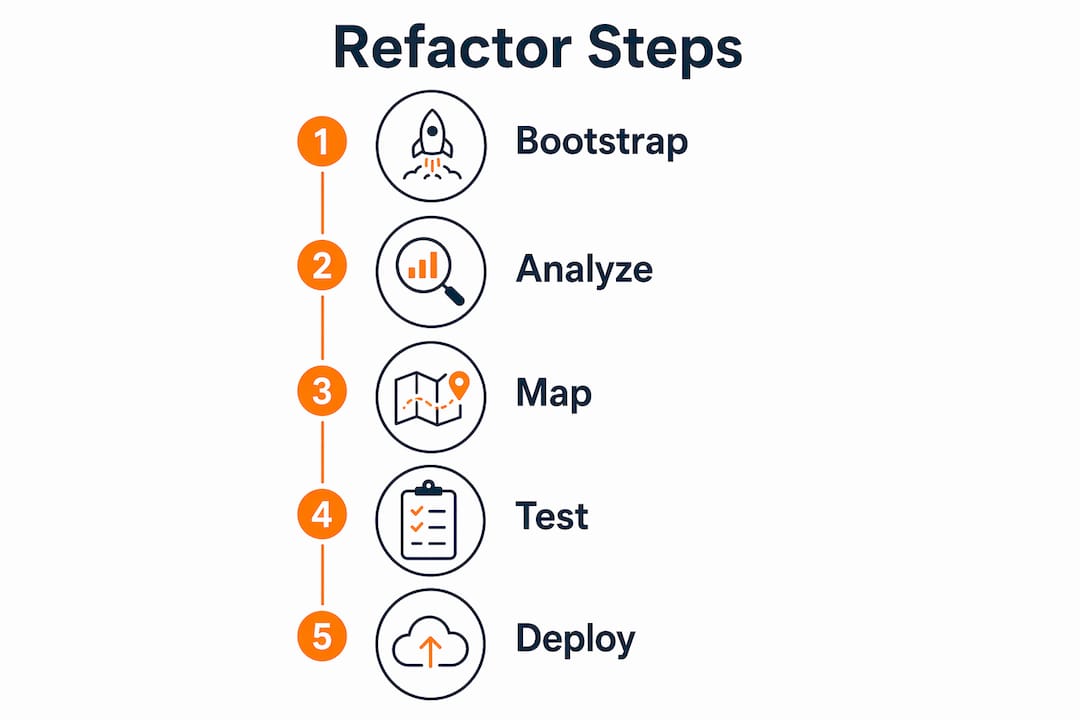
The cdk refactor command requires the experimental flag --unstable=refactor because it is currently in preview and subject to change. Without that flag, the command will not execute. The workflow looks like this:
- You modify your CDK construct tree (rename a construct, move a resource to a different stack, reorganize nested constructs).
- You run
cdk refactor --unstable=refactoragainst your target stacks. - The CDK CLI compares the local construct tree against the deployed CloudFormation state.
- It computes the logical ID mappings and calls the CloudFormation refactor API.
- CloudFormation updates the logical IDs in place, preserving the physical resource and its state.
One strict constraint governs the entire operation: no additions or deletions are permitted during a refactor run. The local and deployed resource sets must match exactly, except for location changes. This means you cannot bundle a new resource creation with a rename in the same cdk refactor call. Separate those operations into distinct commits and deployments.
When the CDK CLI cannot determine the correct mapping automatically (for example, when two resources of the same type swap positions), you can provide an override file that specifies the exact source-to-destination mapping. This prevents the CLI from guessing wrong and applying an incorrect logical ID update.
Pro Tip: Bootstrap your AWS environment with the latest CDK bootstrap template before running cdk refactor. Older bootstrap stacks may lack the IAM permissions required for the CloudFormation refactor API calls, and the command will fail silently on permission errors.
Common refactor scenarios
| Scenario | What Changes | What Stays the Same |
|---|---|---|
| Rename a construct | Logical ID in CloudFormation | Physical resource, ARN, data |
| Move resource between stacks | Stack ownership, logical ID | Physical resource, configuration |
| Reorganize nested constructs | Construct tree path | Deployed infrastructure state |
| Split a large stack | Stack boundaries | All resource identities |
Traditional infrastructure-as-code refactors caused resource replacement by changing logical IDs without the mapping step. CDK refactor eliminates that risk by automating the complex mapping computation that developers previously had to handle manually through CloudFormation drift detection and manual state surgery.
How to apply the strangler fig pattern for incremental refactoring
The strangler fig pattern is the standard AWS best practice for replacing a monolith with microservices without a big-bang rewrite. The routing approach works by placing a centralized traffic layer, typically Amazon API Gateway or AWS Migration Hub Refactor Spaces, in front of both the legacy system and the new microservices. Traffic flows to the legacy system by default, and you redirect specific routes to new services as they become production-ready.
The pattern runs through three phases:
- Transform. Extract a bounded module from the monolith and rebuild it as a standalone AWS service (Lambda function, ECS container, or standalone API). Do not touch the legacy system yet.
- Coexist. Deploy the new service alongside the legacy system. Configure the routing layer to send a small percentage of traffic, or specific request types, to the new service. Both systems run simultaneously.
- Eliminate. Once the new service handles 100% of its traffic type with verified correctness, remove the corresponding code from the legacy monolith.
Data migration during coexistence
Data consistency is the hardest part of the coexistence phase. A controlled data migration strategy is critical to avoid behavior and data inconsistencies when both systems are live. Two approaches work well depending on your data volume and latency tolerance.
The bulk migration approach copies all existing data to the new service’s data store before switching traffic. This works for datasets where a maintenance window is acceptable. The read-through approach lets the new service query the legacy data store for records it hasn’t migrated yet, then writes them locally on first access. This works for large datasets where a full copy is impractical.
During coexistence, run parallel logging on both systems and compare response payloads for the same requests. Any divergence signals a bug in the new service before it affects real users.
Pro Tip: Use AWS AppConfig feature flags to control which users or request segments route to the new service. This gives you a kill switch to revert traffic instantly if monitoring shows unexpected errors, without redeploying your routing configuration.
What is AWS migration hub refactor spaces?
AWS Migration Hub Refactor Spaces is a managed service that handles the networking, routing, and service discovery infrastructure required for incremental application refactoring. Instead of building your own API Gateway routing logic and Transit Gateway configuration from scratch, Refactor Spaces provides managed environments that wire these components together automatically.
The service organizes everything into four concepts:
- Environment: The top-level container that provisions a Transit Gateway to connect VPCs across accounts.
- Application: Represents your application within the environment. Refactor Spaces creates an API Gateway here to serve as the routing layer.
- Services: Individual components, either the legacy monolith or new microservices, registered within the application.
- Routes: Rules that map URL paths or HTTP methods to specific services.
Default routing and gradual traffic shift
When you first configure Refactor Spaces, the default route points all traffic to the legacy service. You add new routes incrementally as microservices become ready. A new route for /orders sends all order-related traffic to your new Orders microservice, while everything else continues hitting the monolith. This is the coexist phase of the strangler fig pattern, managed through a UI and API rather than hand-rolled infrastructure.
| Refactor Spaces Component | AWS Service Behind It | Your Responsibility |
|---|---|---|
| Environment | Transit Gateway | Define VPC CIDR ranges |
| Application | API Gateway | None (auto-provisioned) |
| Service (legacy) | EC2, ECS, or on-prem | Register endpoint URL |
| Service (new) | Lambda, ECS, or API | Deploy and register |
| Route | API Gateway route | Define path and method |
The managed networking removes a significant operational burden. Building this yourself requires configuring Transit Gateway attachments, VPC route tables, API Gateway integrations, and security groups across multiple accounts. Refactor Spaces collapses that work into a few API calls, letting your team focus on the actual service code rather than the plumbing.
What are the practical steps to refactor applications for AWS?
A disciplined execution sequence separates successful AWS refactoring projects from ones that create more problems than they solve. Follow this order to keep risk contained at every stage.
- Baseline your deployed state. Before touching any code, run
cdk synthandcdk diffto capture the exact current state of your CloudFormation stacks. Store this output. It is your rollback reference. - Separate refactor commits from feature commits. A refactor-only pull request contains zero functional changes. This makes it auditable and keeps the CDK CLI from rejecting the operation due to unexpected additions.
- Run
cdk refactor --unstable=refactoragainst a staging environment first. Verify that the CloudFormation change set shows only logical ID updates, with no resource replacements or deletions in the planned changes. - Handle cross-stack references explicitly. Cross-stack references during CDK refactor require explicit CloudFormation export/import configurations. Implicit references break when a resource moves stacks. Refactor the export/import pattern before moving the resource.
- Apply to production with a maintenance window. Even though CDK refactor avoids replacements, CloudFormation stack updates lock the stack briefly. Schedule the production run during low-traffic periods.
- Verify with integration tests immediately after. Run your full integration test suite against the production environment within 15 minutes of the refactor completing. Any behavioral change indicates a mapping error.
Cross-stack dependency failures are the most common error in CDK refactor operations. Always audit your stack outputs and imports before running the command in any environment.
Pro Tip: After a successful refactor, review your AWS migration best practices checklist to confirm that IAM roles, security groups, and resource tags transferred correctly to the new stack context. Tags and policies do not always follow logical ID updates automatically.
For applications using the strangler fig pattern, add a verification step between the coexist and eliminate phases. Compare CloudWatch metrics for error rates, latency, and throughput between the legacy and new service over a minimum of 72 hours before decommissioning any legacy code. Rushing the eliminate phase is the most common cause of production incidents in incremental refactoring projects.
Key takeaways
Successful AWS refactoring combines CDK tooling for infrastructure safety with incremental application patterns for architectural change, and skipping either layer increases production risk significantly.
| Point | Details |
|---|---|
| CDK refactor preserves resources | Use cdk refactor --unstable=refactor to move resources without triggering CloudFormation replacements. |
| Separate refactor from feature work | Never mix resource additions or deletions with a refactor operation in the same CDK deployment. |
| Strangler fig reduces rewrite risk | Route traffic incrementally through API Gateway or Refactor Spaces to replace modules without downtime. |
| Cross-stack refs need explicit exports | Use CloudFormation Fn::ImportValue patterns before moving resources across stacks to avoid broken dependencies. |
| Verify before eliminating legacy code | Monitor error rates and latency for at least 72 hours in the coexist phase before decommissioning legacy modules. |
What i’ve learned running 700+ AWS refactoring projects
Most teams underestimate how much of their refactoring risk lives in the data layer, not the application code. The CDK refactor command handles infrastructure identity beautifully. Refactor Spaces handles traffic routing cleanly. But neither tool tells you whether your new Orders service is writing data in a format that your legacy Reporting service can still read.
The teams I’ve seen struggle most are the ones that treat the coexist phase as a formality. They route 5% of traffic to the new service, see no errors in the first hour, and declare victory. Then they eliminate the legacy code and discover that a monthly batch job was still reading from the old database schema. The monitoring window needs to cover at least one full business cycle, which for most eCommerce and fintech systems means a minimum of 7 days, not 72 hours.
The other pattern I’d caution against is treating CDK refactor and the strangler fig as separate workstreams. They work best together. Use CDK refactor to reorganize your infrastructure stacks in parallel with the strangler fig’s transform phase. By the time your new microservice is ready for the coexist phase, your infrastructure is already cleanly organized to support it. That coordination is what separates a smooth refactor from a six-month fire drill.
The cloud performance optimization guide from IT-Magic covers the post-refactor tuning steps that most teams skip, and those steps are where a significant portion of the cost savings actually come from.
— Oleksandr
Ready to refactor without the risk?
IT-Magic has completed 700+ AWS migration and refactoring projects across eCommerce and fintech environments where downtime translates directly into lost revenue. As an AWS Advanced Tier Partner, IT-Magic takes full ownership of execution, from infrastructure audit through post-refactor optimization, so your team keeps shipping features instead of managing migration risk.
If you are planning a refactor and want a second set of eyes on your architecture before you start, IT-Magic’s team can review your current stack and map out a safe execution sequence. Visit awsmigrationservices.com to start the conversation, or explore the AWS cost optimization audit to see where your current infrastructure is leaving money on the table.
FAQ
What does cdk refactor actually do to my resources?
The cdk refactor command updates CloudFormation logical IDs to match your new construct tree without replacing the physical resources. Your S3 buckets, RDS instances, and other stateful resources keep their ARNs, data, and configuration intact.
How is refactoring different from rehosting when migrating to AWS?
Rehosting (lift and shift) moves your application to AWS without changing its architecture. Refactoring restructures the application to use AWS-native services like Lambda, ECS, or managed databases, which delivers better performance and lower long-term cost but requires more planning.
When should i use refactor spaces instead of building my own routing?
Use AWS Migration Hub Refactor Spaces when you need to route traffic across multiple AWS accounts or VPCs during incremental refactoring. It automates Transit Gateway setup, API Gateway configuration, and service registration, which would otherwise require significant manual networking work.
Can i refactor and add new resources in the same CDK deployment?
No. The CDK refactor command rejects operations that include additions, deletions, or updates alongside location changes. Separate your refactor commits from feature commits and deploy them in distinct operations.
What is the strangler fig pattern in AWS application modernization?
The strangler fig pattern is an incremental modernization approach where you replace a monolith module by module using a routing layer like API Gateway. Traffic shifts gradually from legacy to new services, with full rollback capability at every step.