
TL;DR:
- Lift and shift to AWS rehosts applications without changes, enabling fast cloud migration and cost savings. It forms the foundation of a three-stage strategy that includes optimization and modernization for long-term efficiency. Proper planning, discovery, and post-migration governance are essential to avoid cost overruns and security issues.
Lift and shift to AWS is defined as migrating applications and infrastructure to the AWS cloud with no changes to the underlying architecture. Known formally as rehosting, this approach moves workloads from on-premises servers directly to AWS EC2 instances, RDS databases, and equivalent services without refactoring code or redesigning systems. For IT leaders facing data center lease expirations, hardware refresh cycles, or urgent cost pressure, rehosting delivers the fastest path to cloud adoption. The real value, however, comes from treating it as the first phase of a three-stage strategy: Migrate, Optimize, Modernize.
What are the main benefits and use cases for lift and shift to AWS?
Rehosting to AWS delivers measurable results quickly, which is why it remains the most common first move for large-scale migrations. The core benefits fall into three categories: speed, cost reduction, and risk management.

Speed to cloud is the defining advantage. Because you move applications as-is, your teams skip the months of refactoring work that replatforming or refactoring require. A data center with 200 servers can be migrated in weeks rather than quarters. That speed matters most when a lease is expiring or a hardware vendor is ending support.
Infrastructure cost savings arrive immediately after cutover. Post-migration optimization through rightsizing and Reserved Instances delivers a 20–35% reduction in ongoing cloud costs. That figure assumes you act on the data AWS provides after migration, not before.
Risk reduction comes from keeping applications unchanged. You eliminate the risk of introducing new bugs through code changes. The application behaves exactly as it did on-premises, which simplifies testing and sign-off.
The strongest use cases for rehosting include:
- Data center exits with fixed deadlines where refactoring is not feasible in the available window
- Legacy systems with complex, undocumented dependencies that make code changes dangerous
- Compliance-sensitive workloads where any architectural change triggers a full re-certification cycle
- Large application portfolios where migrating everything at once would be unmanageable without a phased approach
One counterintuitive finding: organizations that perform only rehosting see about 40% lower ROI compared to those that invest in refactoring or replatforming after the initial migration. That gap closes when you treat rehosting as a foundation, not a finish line.
How to plan and execute a successful lift and shift migration
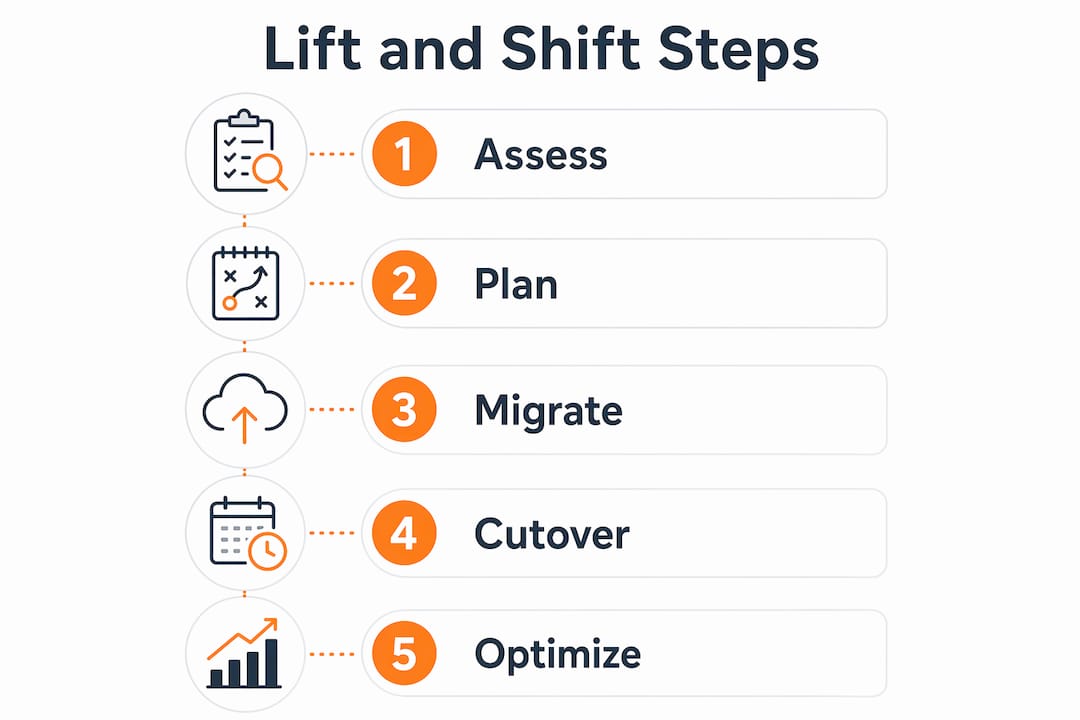
A rehosting project fails or succeeds in the planning phase, not the execution phase. The steps below reflect cloud migration best practices for IT leaders managing complex environments.
-
Discovery and dependency mapping. Audit every application, server, and service before touching a single workload. 70% of audited environments contain undocumented dependencies that cause post-migration failures. Use automated discovery tools to map service relationships, network flows, and storage dependencies. This phase also typically retires 10–25% of the application portfolio, which reduces migration scope and cost.
-
Target architecture design using infrastructure as code (IaC). Define your AWS environment in Terraform or AWS CloudFormation before migration begins. IaC ensures your target state is repeatable, auditable, and consistent across all migration waves. It also makes rollback straightforward if a wave encounters problems.
-
Phased migration waves. Group applications by dependency cluster and business criticality. Migrate low-risk, standalone applications in the first wave to validate your tooling and process. Reserve complex, high-traffic workloads for later waves when your team has built confidence and resolved process gaps.
-
Zero-downtime cutover techniques. Use DNS weighting to shift traffic gradually from on-premises to AWS. Blue-green deployments let you run both environments in parallel and cut over instantly if the AWS environment validates correctly. These techniques are non-negotiable for production workloads in eCommerce or fintech where every minute of downtime has a direct revenue cost.
-
Post-migration validation and reconciliation. Post-migration discovery must compare actual AWS resources against your pre-migration plan to detect drift, missed configurations, and shadow resources before production cutover. Build this step into every wave, not just the final one.
Pro Tip: Before each migration wave, run a tabletop exercise with your application owners. Walk through the cutover sequence, rollback triggers, and communication plan. Teams that practice the cutover catch 80% of procedural gaps before they become production incidents.
A solid AWS migration checklist covering these five steps reduces the risk of the most common migration failures before your first wave begins.
What challenges and limitations does lift and shift have?
Rehosting inherits every inefficiency from your on-premises environment. That is its greatest strength and its most significant limitation.
Architectural debt travels with you. An application that was over-provisioned on-premises will be over-provisioned on AWS. A monolithic application with poor separation of concerns will remain monolithic. You gain cloud infrastructure, but you do not gain cloud-native efficiency automatically.
Cost overruns are common without post-migration governance. Migration without adequate discovery leads to over-provisioned and inefficient cloud environments. Teams that skip rightsizing after migration often pay more on AWS than they did on-premises, which destroys the business case. The fix is a structured optimization sprint within 90 days of each migration wave.
Security posture requires active attention. Moving to AWS does not automatically improve your security configuration. Network ACLs, IAM policies, and encryption settings must be explicitly configured for the AWS environment. Many teams assume the cloud provider handles security by default, which is incorrect under the AWS Shared Responsibility Model.
Treating migration as an infrastructure event rather than an operating model shift causes most migration failures. Aligning migration activities with business outcomes like cost reduction and scalability is what separates successful projects from expensive ones.
The path through these limitations is structured post-migration optimization. Rightsizing instances, purchasing Reserved Instances for stable workloads, and automating start-stop schedules for non-production environments are the three highest-impact actions. Targeted optimization using these techniques saves 30–40% on AWS spend compared to a naive rehosting with no follow-up. That saving funds the modernization work that follows.
For a detailed look at avoiding the most common pitfalls, the migration pitfalls guide covers the failure patterns IT leaders encounter most frequently.
How does lift and shift fit into a broader AWS migration strategy?
AWS recommends a three-stage migration approach for large portfolios: Migrate (Rehost), Optimize, then Modernize. Each stage builds on the previous one, and skipping stages increases risk without proportional benefit.
| Stage | Primary Activity | Key Outcome |
|---|---|---|
| Migrate | Rehost workloads to AWS as-is | Fast data center exit, reduced hardware costs |
| Optimize | Rightsize, reserve instances, automate | 20–35% reduction in ongoing cloud spend |
| Modernize | Refactor or replatform selected workloads | Cloud-native performance, developer velocity |
The migrate-first approach works because it gives your team real operational data before making architectural decisions. You learn which applications consume the most resources, which have unpredictable traffic patterns, and which are candidates for containerization or serverless refactoring. Making those decisions before migration means guessing. Making them after migration means acting on evidence.
Selective refactoring typically follows 12–24 months after migration, informed by actual usage data from AWS Cost Explorer and CloudWatch. That timeline is not arbitrary. It takes roughly one full business cycle to understand seasonal load patterns, peak traffic behavior, and real cost drivers. Refactoring immediately during migration extends timelines and costs without the data to justify specific architectural choices.
The IT modernization strategies that deliver the best results treat rehosting as the foundation that makes modernization possible, not a compromise that delays it.
Pro Tip: Align your migration waves with business quarters. Migrating before a peak season creates unnecessary risk. Migrating after a peak gives your team a stable window for cutover and a full quarter of AWS operational data before the next high-traffic period.
Scaling your cloud infrastructure after migration requires a clear plan. The guide on scaling cloud infrastructure for business growth covers the architectural patterns that support sustained growth after the initial rehosting is complete.
Key Takeaways
A lift and shift to AWS succeeds when rehosting is treated as the first phase of a structured three-stage strategy, not a one-time infrastructure event.
| Point | Details |
|---|---|
| Rehosting is a starting point | Migrate first to exit data centers fast, then optimize and modernize based on real usage data. |
| Discovery prevents failures | 70% of environments have undocumented dependencies; map them before migrating a single workload. |
| Post-migration optimization is required | Rightsizing and Reserved Instances cut ongoing AWS spend by 20–35% after migration. |
| Architectural debt transfers | Over-provisioned on-premises workloads stay over-provisioned on AWS without active governance. |
| Business alignment drives ROI | Teams that align migration activities with cost and scalability goals see significantly higher project success rates. |
What I’ve learned from 700+ AWS migrations
After working through hundreds of AWS migration projects at IT-Magic, the pattern I see most often is this: teams rush discovery to hit a deadline, then spend the next six months fixing problems that a thorough audit would have caught in week two. The pressure is real. Lease deadlines, budget cycles, and executive timelines are not flexible. But cutting discovery short is not a time-saving measure. It is a cost-deferral strategy with a high interest rate.
The second mistake I see consistently is treating the migration cutover as the finish line. The moment an application is running on AWS, the real optimization work begins. AWS gives you tools that on-premises environments never could: granular cost visibility, auto-scaling, and managed services that replace expensive custom infrastructure. Teams that ignore those tools for the first year after migration are paying for cloud infrastructure at on-premises efficiency levels.
The third thing I have learned is that the lift and shift vs. re-architecture debate is mostly a false choice. The question is not which approach to use. The question is which approach to use first. Rehosting gets you to AWS quickly. Real usage data then tells you which workloads justify the investment of refactoring. That sequence reduces risk and produces better architectural decisions than refactoring based on assumptions made before migration.
View rehosting as the foundation that makes everything else possible. It is not a compromise. It is the right first move for almost every large-scale migration.
— Oleksandr
IT-Magic’s approach to AWS migration projects
IT-Magic has completed 700+ AWS migration projects as an AWS Advanced Tier Partner, specializing in complex, high-load environments in eCommerce and fintech where downtime translates directly into lost revenue.

Every engagement starts with a full infrastructure audit and dependency mapping before a single workload moves. IT-Magic owns the entire lifecycle: discovery, architecture design, phased execution, and post-migration optimization. The result is a predictable, cost-efficient migration that does not add operational burden to your team. For organizations ready to exit their data center or reduce infrastructure costs, the AWS migration services page details the full scope of what IT-Magic delivers. You can also review real migration outcomes from completed projects across industries.
FAQ
What is lift and shift to AWS?
Lift and shift to AWS is the process of migrating applications and infrastructure to AWS with no changes to the underlying architecture, also called rehosting. It is the fastest way to exit a data center and begin cloud adoption.
How long does a lift and shift migration take?
Timeline depends on portfolio size and complexity, but most organizations complete initial migration waves in weeks rather than months. Thorough discovery and phased execution are the primary factors that determine speed.
What are the main risks of a lift and shift approach?
The primary risks are undocumented dependencies causing post-migration failures, over-provisioned environments that increase AWS costs, and security misconfigurations inherited from on-premises setups. Proactive discovery and a 90-day optimization sprint after each wave address all three.
When should you refactor instead of rehost?
Refactor workloads that show high resource costs, poor performance, or scalability limits after 12–24 months of AWS operational data. Refactoring before migration means making architectural decisions without real usage evidence.
How much can you save with post-migration optimization?
Rightsizing, Reserved Instances, and automation save 30–40% on AWS spend compared to rehosting with no follow-up optimization. That saving typically funds the modernization work in the third stage of the migration strategy.